Cortex Code in Snowflake: How to Use It Without Burning Credits

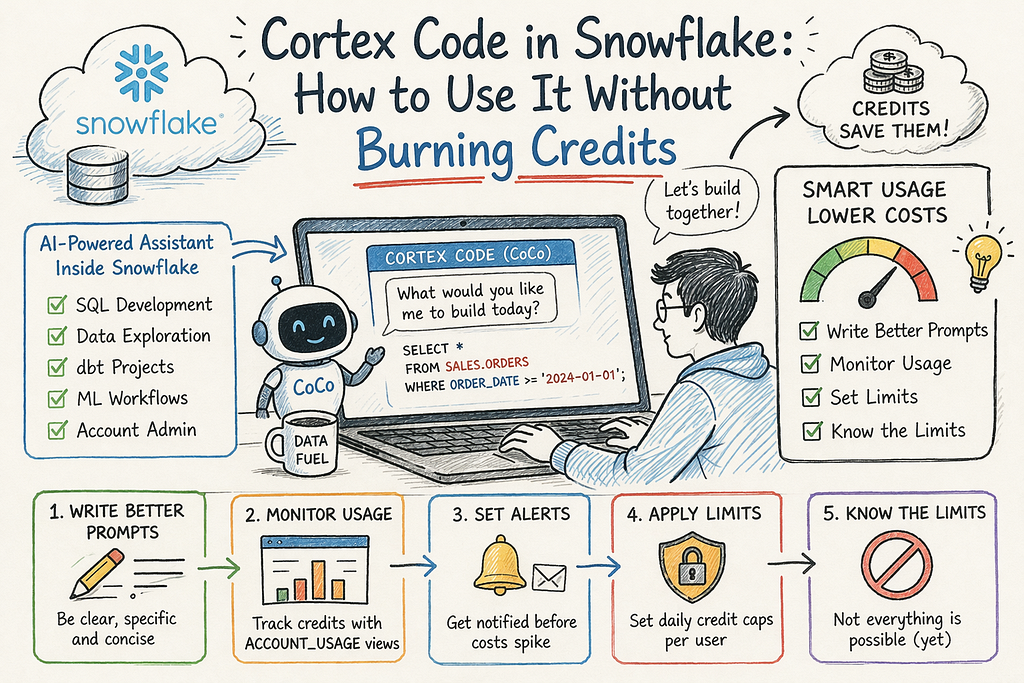
Snowflake Cortex Code (CoCo) is like an AI assistant inside Snowsight (and CLI also). You can ask it to write SQL, create dbt models, explore data, help in ML work, and even do some admin tasks.
But one thing people don’t realise early — this tool is powerful, but also costly if used wrongly.
Bad prompts → more tokens → more credits → surprise bill.
Prompt Engineering (this directly impacts cost)
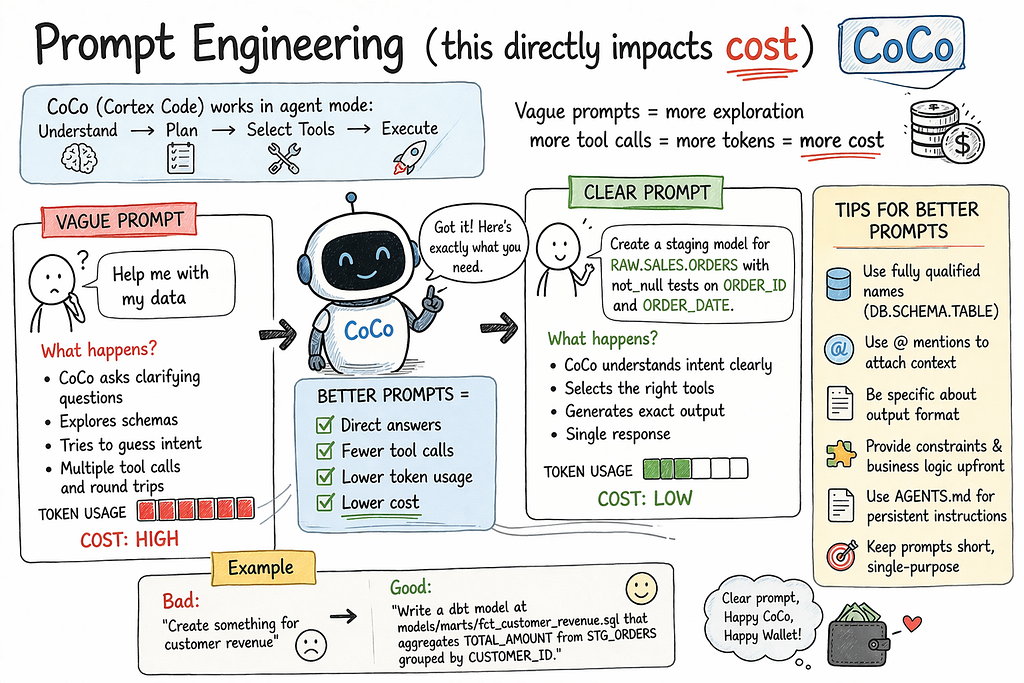
CoCo works on token consumption.
- what you type → counted
2. what it replies → counted
If your prompt is vague → more tool calls → more cost.
Example:
Bad: Help me with my data
Good: Create staging model for RAW.SALES.ORDERS with not_null on ORDER_ID
Best Practices:
- Use full table names
2. Be clear about output
3. Keep prompts small
4. Provide business logic upfront
5. Use AGENTS.md for consistency
Monitoring CoCo usage & Notification
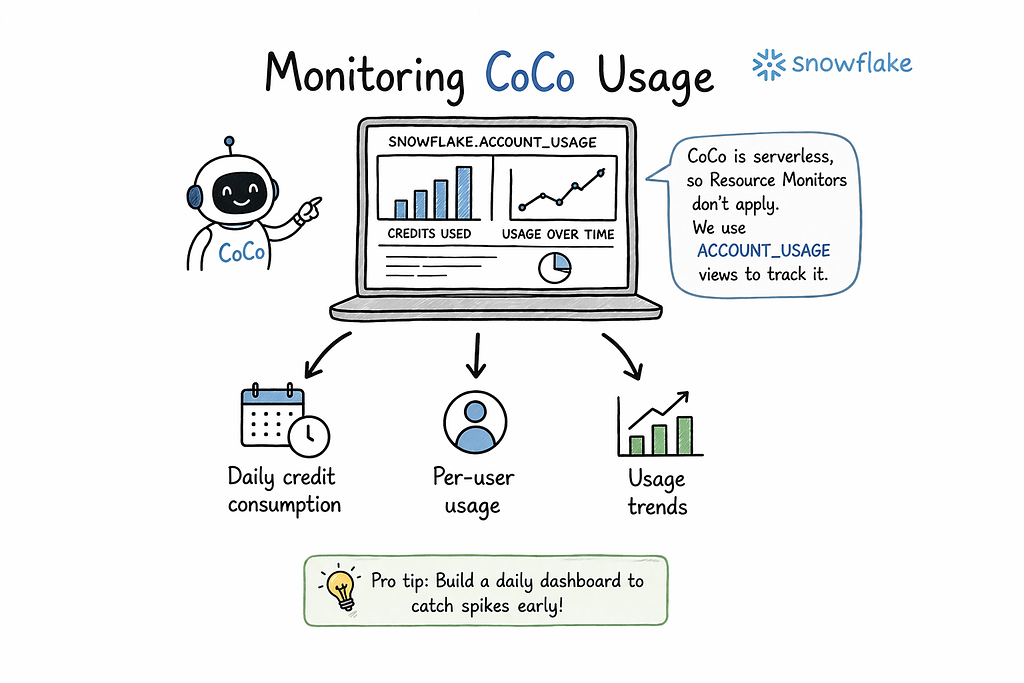
CoCo is serverless → no warehouse used.
Use:
SNOWFLAKE.ACCOUNT_USAGE.CORTEX_CODE_SNOWSIGHT_USAGE_HISTORY
SNOWFLAKE.ACCOUNT_USAGE.CORTEX_CODE_CLI_USAGE_HISTORY
Track:
- daily credits
2. per user usage
Note: Data delay of 45 mins to 2 hours.
-- ============================================================
-- CoCo Monitoring: Daily credit usage by user (last 30 days)
-- ============================================================
SELECT
    DATE(u.USAGE_TIME) AS usage_date,
    us.NAME AS user_name,
    ROUND(SUM(u.TOKEN_CREDITS), 4) AS daily_credits,
    SUM(u.TOKENS) AS total_tokens,
    COUNT(*) AS request_count
FROM SNOWFLAKE.ACCOUNT_USAGE.CORTEX_CODE_SNOWSIGHT_USAGE_HISTORY u
LEFT JOIN SNOWFLAKE.ACCOUNT_USAGE.USERS us ON u.USER_ID = us.USER_ID
WHERE u.USAGE_TIME >= DATEADD('day', -30, CURRENT_TIMESTAMP())
GROUP BY DATE(u.USAGE_TIME), us.NAME
ORDER BY usage_date DESC, daily_credits DESC;
Notification
- Account Budget → only alerts
Account Budget Email Notifications
-- Activate the account budget
CALL SNOWFLAKE.LOCAL.ACCOUNT_ROOT_BUDGET!ACTIVATE();

-- Set a monthly spending limit (in credits)
CALL SNOWFLAKE.LOCAL.ACCOUNT_ROOT_BUDGET!SET_SPENDING_LIMIT(7);

-- Set email notifications (emails must be verified)
CALL SNOWFLAKE.LOCAL.ACCOUNT_ROOT_BUDGET!SET_EMAIL_NOTIFICATIONS(
    'admin@company.com, manager@company.com'
);
2. Snowflake Alerts → custom monitoring
-- Create email notification integration
CREATE OR REPLACE NOTIFICATION INTEGRATION coco_cost_alerts
    TYPE = EMAIL
    ENABLED = TRUE
    ALLOWED_RECIPIENTS = ('admin@company.com');

-- Create alert: fires when CoCo exceeds 2 credits in 24 hours
CREATE OR REPLACE ALERT coco_daily_spend_alert
    WAREHOUSE = COMPUTE_WH
    SCHEDULE = 'USING CRON 0 * * * * UTC'
    IF (EXISTS (
        SELECT 1
        FROM SNOWFLAKE.ACCOUNT_USAGE.CORTEX_CODE_SNOWSIGHT_USAGE_HISTORY
        WHERE USAGE_TIME >= DATEADD('hour', -24, CURRENT_TIMESTAMP())
        HAVING SUM(TOKEN_CREDITS) > 2
    ))
    THEN
        CALL SYSTEM$SEND_EMAIL(
            'coco_cost_alerts',
            'admin@company.com',
            'CoCo Daily Spend Alert',
            'Cortex Code Snowsight usage exceeded 2 credits in the last 24 hours.'
        );

-- Resume the alert to activate it
ALTER ALERT coco_daily_spend_alert RESUME;
Reference : https://docs.snowflake.com/en/user-guide/cortex-code/credit-usage-limit
3. No hard stop via budget
Setting Limits
Snowflake provides two parameters to set daily credit limits on CoCo per user:
CORTEX_CODE_SNOWSIGHT_DAILY_EST_CREDIT_LIMIT_PER_USER CORTEX_CODE_CLI_DAILY_EST_CREDIT_LIMIT_PER_USER
How it works: Tracks a rolling 24-hour window. When a user’s estimated credits hit the limit, access is blocked until usage drops below.
Account Level All Users
ALTER ACCOUNT SET CORTEX_CODE_SNOWSIGHT_DAILY_EST_CREDIT_LIMIT_PER_USER = 5;
ALTER ACCOUNT SET CORTEX_CODE_CLI_DAILY_EST_CREDIT_LIMIT_PER_USER = 10;

Per User Override
ALTER USER power_user SET CORTEX_CODE_SNOWSIGHT_DAILY_EST_CREDIT_LIMIT_PER_USER = 20;
ALTER USER intern_user SET CORTEX_CODE_SNOWSIGHT_DAILY_EST_CREDIT_LIMIT_PER_USER = 0

Remove the Limits
ALTER ACCOUNT UNSET CORTEX_CODE_SNOWSIGHT_DAILY_EST_CREDIT_LIMIT_PER_USER;
ALTER USER jsmith UNSET CORTEX_CODE_SNOWSIGHT_DAILY_EST_CREDIT_LIMIT_PER_USER;
Reference: https://docs.snowflake.com/en/user-guide/cortex-code/credit-usage-limit
Limitations of CoCo

Not supported:
1. file upload in chat
2. external API calls
3. background jobs
4. multi-session memory
5. large context handling fully
6. free tier
Workarounds:
- use stage for files
2. use external functions for APIs
3. use AGENTS.md for memory
Final Summary
1.Prompt clearly
2. Monitor usage
3. Set limits early
4. Understand boundaries
Closing Thought
CoCo is powerful but needs proper usage. Otherwise it becomes expensive and confusing.
Cortex Code in Snowflake: How to Use It Without Burning Credits was originally published in Towards AI on Medium, where people are continuing the conversation by highlighting and responding to this story.
