ClawBot’s Architecture Explained: How a Lobster Conquered 100K GitHub Stars

The technical design decisions that turned a personal hobby project into 2026’s most-discussed AI agent
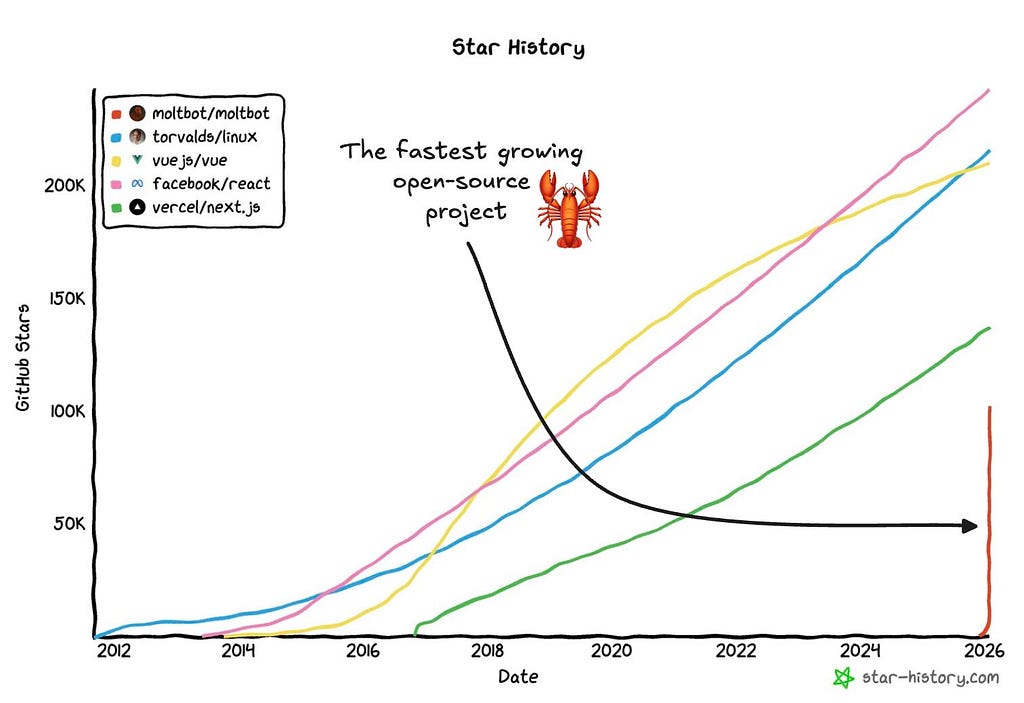
An open-source AI agent hit 100,000 GitHub stars in under two months. That’s not hype, that’s a signal.
OpenClaw (née Clawdbot, briefly Moltbot) isn’t just another chatbot wrapper. It’s a locally-deployed autonomous agent that lives in your messaging apps and executes tasks on your machine. And beneath the viral TikTok demos and space lobster memes lies an architecture worth studying.
Let’s dissect it.
The Problem OpenClaw Actually Solves
Most AI assistants are sandboxed. They answer questions. They summarize documents. They exist in browser tabs, isolated from your actual digital life.
OpenClaw takes a fundamentally different approach: it bridges high-level LLM reasoning with low-level system operations. Your Telegram/WhatsApp becomes a command interface. Your terminal becomes the execution layer. The AI doesn’t just talk about helping it actually runs shell commands, manipulates files, and orchestrates workflows.
Quick snapshot of ClawBot’s Trajectory:
- Supported platforms: 12+ messaging channels
- GitHub trajectory: 0 → 100K stars in ~60 days
- Community size: 8,900+ Discord members, 50+ contributors
- Security incidents: Multiple (more on this later)
Peter Steinberger, the Austrian developer behind PSPDFKit’s successful exit, built this for himself. He wanted a “24/7 Jarvis” that could proactively message him, remember context across conversations, and execute tasks autonomously.
The developer community apparently wanted the same thing. 📈
The Architecture: A Technical Deep Dive
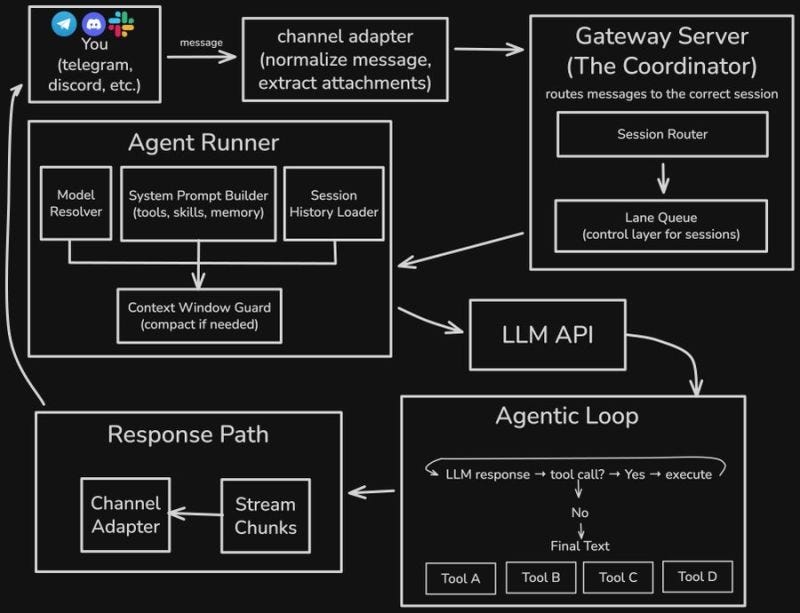
OpenClaw’s design follows a gateway-centric pattern that cleanly separates concerns. Five layers, each with a specific job.
Here’s the unfiltered breakdown:
Layer 1: Channel Adapters (The Universal Inbox) 📥
The entry point is deceptively simple. Messages arrive from Telegram, Discord, WhatsApp, Slack, Signal, iMessage twelve platforms and counting. Each channel adapter performs two critical functions:
Message normalization: Different platforms have wildly different message formats. Telegram sends stickers with file IDs. Discord has embeds. WhatsApp has reactions. The adapter transforms everything into a unified envelope.
Attachment extraction: Media, documents, voice messages all get pulled into a consistent format the downstream components can process.
This isn’t glamorous work, but it’s essential. The adapter layer is why you can switch from texting on WhatsApp to continuing the same conversation on Slack without the agent losing context.
Key insight: Abstraction layers aren’t sexy. They’re necessary.
Layer 2: Gateway Server (The Coordinator) 🎛️
The Gateway Server is OpenClaw’s control plane. Think of it as air traffic control for your AI assistant.
Two components handle the routing:
Session Router: Determines which session should handle an incoming message. DMs might share the agent’s main session. Group chats get isolated sessions. Work accounts route separately from personal accounts.
Lane Queue: A concurrency control layer that prevents sessions from stepping on each other. When you’re chatting in three Telegram groups simultaneously, the Lane Queue ensures each conversation maintains its own state without race conditions.
The Gateway runs as a daemon (typically on port 18789) and exposes a WebSocket interface. This is where the CLI, companion apps, and web UI all connect.
One control plane. Multiple clients. Clean separation.
Layer 3: Agent Runner (The Brain Assembly Line) 🧠
Here’s where it gets interesting. The Agent Runner doesn’t just call an LLM it prepares the call with surgical precision.
Four subcomponents working in concert:
- Model Resolver selects which LLM to use (Claude Opus, Sonnet, GPT) per-agent or per-session.
- System Prompt Builder dynamically assembles prompts based on enabled skills, tools, and memory.
- Session History Loader pulls persistent conversation context from local storage.
- Context Window Guard compacts history when approaching token limits the unsung hero.
The prompt builder deserves special attention. OpenClaw’s “skills” architecture lives here capability modules for browser automation, file system access, cron scheduling, Discord actions. Skills load dynamically, so you don’t pay context window costs for capabilities you’re not using.
Pro tip: Dynamic prompt assembly is the difference between a demo and a product.
Layer 4: The Agentic Loop (Where Autonomy Happens) 🔄
This is the architectural decision that separates OpenClaw from conventional chatbots.
After the LLM generates a response, the system asks one question: Is this a tool call?
LLM Response → Tool Call? → Yes → Execute → Loop Back
                         → No  → Final Text → Stream to User
If yes, execute the tool and loop back. The LLM sees the tool’s output and decides what to do next. Maybe it needs another tool. Maybe it chains three tools together. Maybe it’s done.
This loop enables genuine autonomy. When you ask OpenClaw to “find all PDFs modified this week and email me a summary,” it doesn’t ask clarifying questions it executes find, reads the files, generates the summary, and triggers the email action.
Multiple iterations. One request. Zero hand-holding.
The tool registry supports:
- Shell execution
- File system operations
- Browser automation (CDP)
- Calendar management
- 100+ third-party services via MCP (Model Context Protocol)
The power here is real. So is the attack surface. 🎯
Layer 5: Response Path (Streaming Done Right) 📤
The final layer handles output delivery.
Stream Chunks: LLM responses stream incrementally. Users see the response forming in real-time rather than waiting for complete generation. Perceived latency drops dramatically.
Channel Adapter (outbound): Transforms the unified response format back into platform-specific messages. Long responses get split for Telegram’s character limits. Markdown renders appropriately for Discord. Same response, adapted per surface.
Deterministic routing principle: Responses always return to the originating channel. The model never “chooses” where to send messages. This prevents a class of bugs where multi-channel agents get confused about context.
🔍 Why This Architecture Matters
Three design principles emerge:
1. Deterministic Routing: No ambiguity about where responses go. Architecturally enforced.
2. Session Isolation: Group chats, DMs, and different accounts maintain separate state. Cross-contamination is impossible by design.
3. Modular Tool Loading: Skills load on-demand. Context window usage scales to actual needs, not theoretical capabilities.
These aren’t accidental choices. They’re the result of Steinberger building something he uses daily. Rough edges got sanded through real usage.
How Clawd Remembers
Without a proper memory system, an ai assistant is just as good as a goldfish. Clawd handles this through two systems:
- Session transcripts in JSONL as mentioned.
- Memory files as markdowns in `MEMORY[.]md` or the `memory/` folder.
For searching, it uses a hybrid of vector search and keyword matches. This captures the best of both worlds.
So searching for “authentication bug” finds both documents mentioning “auth issues” (semantic) and exact phrase (keyword match).
for the vector search SQLite is used and for keyword search FTS5 which is also a SQLite extention. the embedding provider is configurable.
It also benefits from Smart Synching which triggers when file watcher triggers on file changes.
this markdown is generated by the agent itself using a standard ‘write’ file tool. There’s no special memory-write API. the agent simply writes to `memory/*.md`.
once a new conversation starts a hok grabs the previous conversation, and writes a summary in markdown.
Clawd’s memory system is surprisingly simple and very similar to workflow memories. No merging of memories, no monthly/weekly memory compressions.
This simplicity can be an advantage or a pitfall depending on your perspective, but I’m always in favor of explainable simplicity rather than complex spaghetti.
The memory persists forever and old memories have basically equal weight, so we can say there’s no forgetting curve.
Clawd’s Claws: How it uses your Computer
This is one of the MOAT’s of Clawd: you give it a computer and let it use. So how does it use the computer? It’s basically similar to what you think.
Clawd gives the agent significant computer access at your own risks. it uses an exec tool to run shell commands on:
- sandbox: the default, wher commands run in a Docker container
- directly on host machine
- on remote devices
Aside from that Clawd also has Filesystem tools (read, write, edit),
Browser tool, which is Playwrite-based with semantic snapshots,
and Process management (process tool) for background long-term commands, kill processes, etc.
The Safety (or a lack of none?)
Similar to Claude Code there is an allowlist for commands the user would like to approve (allow once, always, deny prompts to the user).
// ~/.clawdbot/exec-approvals.json
{
  "agents": {
    "main": {
      "allowlist": [
        { "pattern": "/usr/bin/npm", "lastUsedAt": 1706644800 },
        { "pattern": "/opt/homebrew/bin/git", "lastUsedAt": 1706644900 }
      ]
    }
  }
}
safe commands (such as jq, grep, cut, sort, uniq, head, tail, tr, wc) are pre-approved already.
dangerous shell constructs are blocked by default.
# these get rejected before execution:
npm install $(cat /etc/passwd)     # command substitution
cat file > /etc/hosts              # redirection
rm -rf / || echo "failed"          # chained with ||
(sudo rm -rf /)                    # subshell
the safety is very similar to what Claude Code has installed.
the idea is to have as much autonomy as the user allows.
Browser: Semantic Snapshots
The browser tool does not primirily use screenshots, but uses semantic snapshots instead, which is a text-based representation of the page’s accessibility tree (ARIA).
so an agent would see:
- button "Sign In" [ref=1]
- textbox "Email" [ref=2]
- textbox "Password" [ref=3]
- link "Forgot password?" [ref=4]
- heading "Welcome back"
- list
  - listitem "Dashboard"
  - listitem "Settings"
This gives away four significant advantages. As you may have guessed, the act of browsing websites is not necessarily a visual task.
while a screenshot would have 5 MB of size, a semantic snapshot would have less than 50 KB, and the fraction of the token cost of an image.
What Developers Should Take Away 💡
If you’re evaluating OpenClaw for personal use or considering contributing:
The Good:
- Clean architectural separation
- Genuinely useful multi-channel support
- Active development, responsive maintainer
- Gateway pattern worth studying regardless
The Challenging:
- Security requires constant vigilance
- Codebase moves fast breaking changes happen
- Resource consumption significant with multiple channels
The Reality: This is a young project (less than three months old at peak hype) built to inspire experimentation, not to serve as enterprise infrastructure. Steinberger has been explicit about this.
Remember: Not every AI agent needs to control your entire system. Sometimes a sandboxed chatbot is exactly right. Choose wisely.
The Bigger Picture 🌐
OpenClaw’s viral success signals something important about where AI agents are heading.
IBM researchers noted it “challenges the hypothesis that autonomous AI agents must be vertically integrated” with providers controlling models, memory, tools, and security in a tightly-coupled stack.
The counter-argument emerging: Modular, user-controlled agents running on personal hardware, connecting to whichever LLM APIs you choose, with community-developed capabilities.
Both approaches will likely coexist:
- Vertically integrated: Enterprise deployments, compliance-heavy environments
- Open and composable: Power users who want control
OpenClaw planted a flag in the latter camp. Whether that flag survives depends on how well the project balances capability expansion with security hardening.
For now, the space lobster keeps molting. 🦞
🌐 Connect
For more insights on AI, and LLM systems follow me on:
ClawBot’s Architecture Explained: How a Lobster Conquered 100K GitHub Stars 🦞 was originally published in Towards AI on Medium, where people are continuing the conversation by highlighting and responding to this story.
