
Building stateful AI Agents with Google ADK’s InMemorySessionService

“The difference between a good AI assistant and a great one? Memory.”
Why state matters in modern AI applications
Picture this: You’re chatting with an AI assistant about planning a trip. You tell it you love warm climates and spicy food. Five minutes later, you ask for restaurant recommendations, and it suggests Italian places with mild flavors. Frustrating? Absolutely.
This is the state problem — the bane of modern AI development. Without proper session management, every interaction is a clean slate, forcing users to repeat themselves and preventing truly personalized experiences.
But here’s the thing: Google ADK’s InMemorySessionService doesn’t just solve this problem,it transforms how you think about building conversational AI. In this deep dive, we’re going to build a stateful personal assistant that actually remembers who you are, what you like, and how you interact. By the end, you’ll understand not just how to use session state, but why it’s the secret sauce behind memorable AI experiences.
What You’ll Learn:
- How to set up and configure InMemorySessionService from scratch
- Building custom tools that access session state programmatically
- Creating agents that remember user context across conversations
- Real-world patterns for stateful AI application development
- Production considerations and best practices
Let’s build something that your users will actually remember talking to.
What is InMemorySessionService? (and why it matters)
At its core, InMemorySessionService is Google ADK’s answer to one of the most fundamental challenges in conversational AI: persistence without complexity.
Think of it as a digital notepad that your agent carries between conversations. Unlike traditional stateless architectures where each request is isolated, InMemorySessionService gives your agent a working memory that persists throughout a session.
What It Enables:
🔹 Persistent Data Storage: Remember user information, preferences, and conversation history across multiple interactions
🔹 Context Preservation: Maintain conversation flow without losing track of what was discussed
🔹 Personalization Engine: Build responses based on stored user profiles and behavior
🔹 State Management: Track complex application state (shopping carts, form data, user journeys) seamlessly
The “InMemory” Trade-off:
The name tells you everything you need to know: this service stores data in RAM, which means:
- ✅ Zero setup time — No database configuration needed
- ✅ Lightning fast — Direct memory access, no I/O overhead
- ✅ Perfect for development — Instant iteration, no infrastructure concerns
- ⚠️ Data loss on restart — Session data disappears when your server restarts
- ⚠️ Single-server only — Not designed for distributed deployments
For production applications with thousands of concurrent users, you’ll want database-backed persistence. But for development, prototyping, and learning? InMemorySessionService is your best friend.
A real-world example: building a personal assistant that actually knows you
Let’s move beyond theory and build something tangible. We’re going to create a personal assistant that doesn’t just answer questions — it remembers who you are, what you care about, and how you like to interact.
This isn’t just a tutorial; it’s a blueprint for building production-ready, stateful AI applications. We’ll start from absolute zero and build up to a working system that demonstrates real-world session management patterns.
Prerequisites: setting up your development environment
Time to get your hands dirty. Before we write a single line of agent code, let’s ensure your environment is bulletproof. I’ll walk you through every step — no assumptions, no shortcuts. By the end of this section, you’ll have a production-ready development setup that’s identical to what we’re using in this guide.
1. Create a virtual environment
First, create and activate a virtual environment to keep your dependencies isolated:
# Create a virtual environment
python3 -m venv .venv

# Activate it (on macOS/Linux)
source .venv/bin/activate

# Or on Windows
# .venvScriptsactivate
2. Install required packages
Create a requirements.txt file with the following dependencies:
google-adk[database]==0.3.0
yfinance==0.2.56
psutil==5.9.5
litellm==1.66.3
google-generativeai==0.8.5
python-dotenv==1.1.0
Then install them:
pip install -r requirements.txt
3. Set up your Google API key (the gateway to AI)
Here’s where the magic starts. Google ADK requires a Generative AI API key to access Google’s language models. Don’t worry — getting one is free and takes less than two minutes.
Getting Your API Key:
- Visit Google AI Studio
- Sign in with your Google account (the same one you use for other Google services)
- Click “Create API Key” in the API keys section
- Copy your newly generated key immediately (you might not see it again!)
Pro Tip: Create separate keys for development and production. This way, if one gets compromised, you can rotate it without affecting the other environment.
Securing Your Key:
Create a .env file in your project root (this is where secrets belong, not in your code):
# .env
GOOGLE_GENAI_API_KEY=your_api_key_here
🔒 Security First: I cannot stress this enough ,never commit your .env file to version control. This is one of those mistakes that can cost you thousands in API charges if your key leaks. Add it to your .gitignore immediately:
.env
.venv/
__pycache__/
*.pyc
4. Install additional dependencies (if needed)
If you encounter any missing dependencies, install the deprecated package:
pip install deprecatedpip install deprecated
5. Project Structure
After setting up your environment, your project should have the following structure:
session-state-runner/
├── .venv/                    # Virtual environment (created)
├── .env                      # Environment variables (create this)
├── requirements.txt          # Python dependencies
├── basic_stateful_session.py # Main execution script
├── article.md                # This article
├── README.md                 # Project documentation
└── question_answer_agent/    # Agent module
    ├── __init__.py          # Makes it a Python package
    └── agent.py             # Agent definition with tools
File Purposes:
- basic_stateful_session.py: The main script that creates the session, configures the Runner, and executes the agent
- question_answer_agent/agent.py: Contains the agent definition and the get_session_state tool
- question_answer_agent/__init__.py: Makes the directory a Python package so it can be imported
- .env: Stores your Google API key securely (not committed to git)
- requirements.txt: Lists all Python package dependencies
Understanding the imports: your toolkit explained
Before we write production code, let’s demystify every import you’ll encounter. I’ve seen too many developers copy-paste imports without understanding their purpose — let’s change that. Each library here solves a specific problem, and understanding why will make you a better developer.
Our project uses imports across two files, each serving a distinct purpose:
File: basic_stateful_session.py
Core Python Standard Library:
- os: Accesses and modifies environment variables. We use it to set GOOGLE_API_KEY from the .env file
- json: Serializes Python objects (like dictionaries) to JSON strings. Used for formatting session state output
- uuid: Generates universally unique identifiers (UUIDs). Creates unique session IDs so each user has their own isolated session
Google ADK Framework:
- google.adk.sessions.InMemorySessionService: The session management service. Stores session state in RAM – perfect for development, but data is lost when the server restarts
- google.adk.runners.Runner: The execution engine that connects agents to session services. Manages the flow of messages and maintains session context during agent execution
- google.genai.types: Type definitions for structured data. types.Content represents a message, and types.Part represents parts of that message (text, function calls, etc.)
Utility Libraries:
- dotenv.load_dotenv: Reads the .env file and loads key-value pairs into os.environ, making them accessible via os.getenv()
Custom Module:
- question_answer_agent.agent: Imports our custom agent module. The agent object contains root_agent (the Agent instance) and set_session_context function
File: question_answer_agent/agent.py
Core Python Standard Library:
- os: Same as above – for environment variable access
- json: Same as above – for JSON serialization of session state
- typing.Optional: Type hint indicating a parameter can be None or a specific type. Used in get_session_state(key: Optional[str] = None)
Google ADK Framework:
- google.adk.agents.Agent: The base class for creating AI agents. We instantiate this to create our root_agent with tools and model configuration
Utility Libraries:
- dotenv.load_dotenv: Same as above – loads environment variables
- pydantic.BaseModel (included in imports but not shown in simplified code): Used for defining structured output schemas. In our full code, we define QuestionAnswer schema for structured responses
Why Each Import Matters:
- os and dotenv: Enable secure API key management without hardcoding secrets
- InMemorySessionService: Provides stateful memory for user data across conversations
- Agent: The building block for creating intelligent, tool-enabled AI assistants
- Runner: Orchestrates the interaction between agents, sessions, and user messages
- types: Ensures type safety and proper message formatting
- uuid: Ensures session isolation and uniqueness
- json: Enables readable formatting of complex session state data
The Big Picture: Every single import here solves a real problem. os and dotenv handle secrets securely. InMemorySessionService gives us state. Agent and Runner orchestrate the AI magic. Understanding this architecture makes debugging easier and helps you build better systems.
Now that we understand our tools, let’s put them to work.
Setting up the session service: creating your agent’s memory
This is where the rubber meets the road. We’re about to create the foundation of our stateful agent , the session service that will remember everything we tell it. Think of this as giving your agent a brain instead of just a mouth.
# File: basic_stateful_session.py

import os
# os: Access environment variables and set system environment variables

from dotenv import load_dotenv
# load_dotenv: Loads environment variables from .env file

from google.adk.sessions import InMemorySessionService
# InMemorySessionService: Stores session state in memory for development/testing

import uuid
# uuid: Generates unique session identifiers

import json
# json: Serialize session state to JSON format

from google.genai import types
# types: Type definitions for Content, Part, and other message types

# Load environment variables from .env file
load_dotenv()

# Set the API key for Google ADK
os.environ["GOOGLE_API_KEY"] = os.getenv("GOOGLE_GENAI_API_KEY")

# Create the session service
session_service_stateful = InMemorySessionService()

# Define initial user state
initial_state = {
    "user_name": "John Doe",
    "user_email": "john.doe@example.com",
    "user_phone": "1234567890",
    "user_address": "123 Main St, Anytown, USA",
    "user_city": "Anytown",
    "user_state": "CA",
    "user_zip": "75001",
    "user_country": "USA",
    "user_recent_searches": [
        "stock market",
        "weather",
        "news",
        "sports",
        "entertainment",
        "technology",
        "politics",
        "economy",
        "health",
    ],
    "user_preferences": """i like to travel to places with a warm climate and a lot of history
i like to eat food that is spicy and has a lot of flavor
i like to watch movies that are action-packed and have a lot of suspense
i like to listen to music that is upbeat and has a lot of energy
i like to read books that are about history and have a lot of suspense
i like to watch tv shows that are about history and have a lot of suspense"""
}

# Create a session with initial state
APP_NAME = "Personal Assistant"
USER_ID = "glenn_personl_assistant"
SESSION_ID = str(uuid.uuid4())

session = session_service_stateful.create_session(
    app_name=APP_NAME,
    user_id=USER_ID,
    session_id=SESSION_ID,
    state=initial_state
)
Creating an agent that accesses session state: the tool that makes it real
Here’s where most tutorials stop, but this is where it gets interesting. We’re not just creating an agent — we’re creating a tool-enabled agent that can programmatically access session state. This is the pattern that separates amateur implementations from professional ones.
The key insight? Your agent doesn’t receive session state in messages ,it retrieves it on demand through tools. This separation of concerns is what makes Google ADK’s architecture so powerful.
# File: question_answer_agent/agent.py

import os
# os: Access environment variables

import json
# json: Format session state data as JSON strings

from typing import Optional
# Optional: Type hint for function parameters that can be None

from dotenv import load_dotenv
# load_dotenv: Load environment variables from .env file

from google.adk.agents import Agent
# Agent: Base class for creating AI agents with tools and capabilities

# Load environment variables
load_dotenv()

# Set the API key as an environment variable for the Google ADK
os.environ["GOOGLE_API_KEY"] = os.getenv("GOOGLE_GENAI_API_KEY")

# Store session service reference
_session_service = None
_session_context = None

def set_session_context(session_service, app_name, user_id, session_id):
    """Set the session context for accessing session state."""
    global _session_service, _session_context
    _session_service = session_service
    _session_context = {
        'app_name': app_name,
        'user_id': user_id,
        'session_id': session_id
    }

def get_session_state(key: Optional[str] = None) -> str:
    """
    Retrieve session state information from the current session.

    This tool demonstrates that the agent can access session state through the Runner.
    The Runner automatically provides access to the session state for the current session.

    Available keys in session state:
    - user_name, user_email, user_phone
    - user_address, user_city, user_state, user_zip, user_country
    - user_recent_searches: List of recent searches
    - user_preferences: User preferences and interests

    Args:
        key: Optional specific key to retrieve (e.g., 'user_name', 'user_recent_searches').
             If None, returns all session state as JSON string.

    Returns:
        The session state value(s) as a formatted string. Lists are formatted as comma-separated values.
    """
    if not _session_service or not _session_context:
        return "Session context not available"

    try:
        session = _session_service.get_session(
            app_name=_session_context['app_name'],
            user_id=_session_context['user_id'],
            session_id=_session_context['session_id']
        )

        if key:
            if key not in session.state:
                return f"Key '{key}' not found. Available keys: {', '.join(session.state.keys())}"

            value = session.state.get(key)
            # Format lists nicely
            if isinstance(value, list):
                return ', '.join(str(v) for v in value)
            return str(value)
        else:
            return json.dumps(session.state, indent=2)
    except Exception as e:
        return f"Error accessing session state: {str(e)}"

# Create the agent with the session state tool
root_agent = Agent(
    name="question_answer_agent",
    model="gemini-2.0-flash",
    description="""A question-answer agent that accesses session state information through tools.

    IMPORTANT: When answering ANY questions about user information, you MUST use the get_session_state tool
    to retrieve the actual values from the session state. Do not guess or make up information.

    Examples:
    - For user name: call get_session_state(key='user_name')
    - For recent searches: call get_session_state(key='user_recent_searches')
    - For preferences: call get_session_state(key='user_preferences')
    - To see all available data: call get_session_state() without a key

    After retrieving the data, use it to answer the question accurately.""",
    tools=[get_session_state],
)
Connecting everything with the Runner: orchestrating the magic
The Runner is the conductor of this orchestra. It doesn’t just execute your agent,it manages session context, routes messages, handles tool execution, and maintains state throughout the conversation lifecycle. Think of it as the infrastructure layer that makes stateful conversations possible.
# File: basic_stateful_session.py (continued)

from google.adk.runners import Runner
# Runner: Connects agents to session services and manages execution flow

from question_answer_agent import agent
# agent: Import our custom agent module with the root_agent

# Create a runner with session service
runner_stateful = Runner(
    app_name=APP_NAME,
    agent=agent.root_agent,
    session_service=session_service_stateful,
)

# Set session context so tools can access it
agent.set_session_context(session_service_stateful, APP_NAME, USER_ID, session.id)

# Ask a question
new_message = types.Content(
    role="user",
    parts=[
        types.Part(
            text="what are john doe like to do for fun?"
        )
    ]
)

# Run the agent and watch it use session state
events = []
for event in runner_stateful.run(
    user_id=USER_ID,
    session_id=session.id,
    new_message=new_message
):
    events.append(event)
    # The agent will call get_session_state(key='user_preferences')
    # and use that data to answer the question!
How it works: the architecture of memory
When you run this code, something beautiful happens behind the scenes. Let me walk you through the execution flow — understanding this will help you debug issues and extend the system:
The system architecture: visualizing the flow
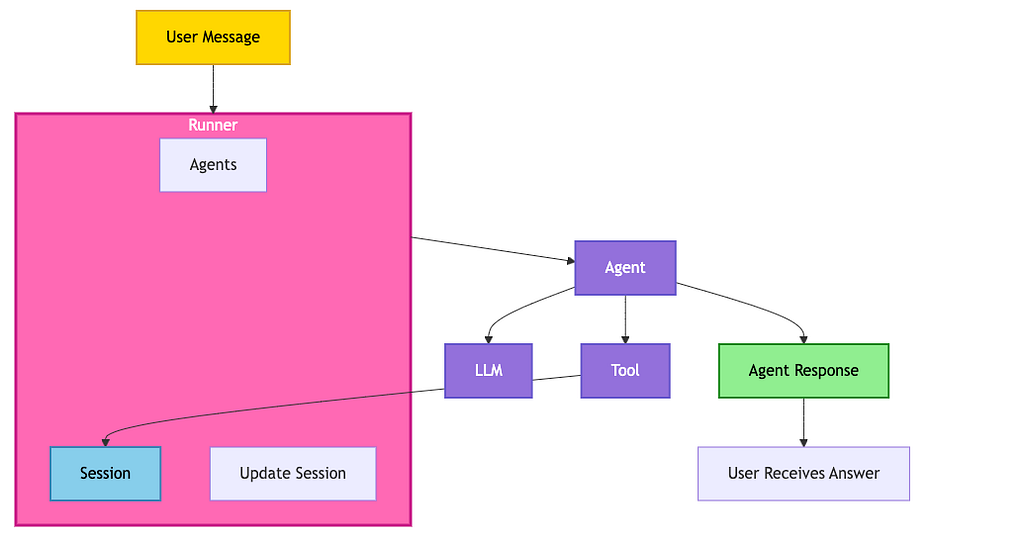
Before we dive into the step-by-step process, let’s visualize how all the components interact. This diagram shows the complete workflow from user message to agent response:
Understanding the Components:
- Runner (Pink border): The central orchestration container that manages the entire conversation lifecycle. It coordinates agents, sessions, and message routing. Inside the Runner, you’ll find:
- Agents (Step 3): The available agents that can handle different types of requests
- Session (Step 2): Stores persistent state data (user preferences, history, context) throughout the conversation
- Update Session (Step 6): Captures and persists any changes to the session state
- Agent (Purple, Step 4): The intelligent component that receives messages from the Runner. It makes decisions, reasons about user input, and determines when to call tools or use the LLM.
- LLM (Step 5): The language model that the Agent can use to generate natural language responses based on context and tool results.
- Tool (Step 5): Custom functions (like get_session_state) that the Agent can call to access external data or perform actions. Tools can access the Session state within the Runner.
The execution flow
Step 1: Session Creation
A session object is created in memory with our initial state dictionary. This becomes the agent’s “memory” for this conversation.
Step 2: Runner Configuration
The Runner receives both the agent and session service, establishing the connection that enables state access.
Step 3: Tool Context Injection
When we call set_session_context(), we’re giving the get_session_state tool the keys it needs to access the session service. This happens at runtime, not compile time.
Step 4: Agent Reasoning
The agent analyzes the user’s question and realizes it needs user preferences. This is LLM decision-making in action — the model determines what information it needs.
Step 5: Tool Invocation
The agent calls get_session_state(key=’user_preferences’) through Google ADK’s function calling mechanism. This is transparent—you can see it in the event stream.
Step 6: State Retrieval
The tool function executes, queries the session service, and returns the actual preference data. No guessing, no hallucination — real data.
Step 7: Response Synthesis
Armed with actual user preferences, the agent generates a natural-language response that’s both accurate and personalized.
Why this architecture is good
The critical insight here is separation of concerns. The agent doesn’t receive session state in the message payload — it actively retrieves it through tools. This means:
- ✅ Session state stays separate from conversation logic
- ✅ You have fine-grained control over what data is accessed
- ✅ Tool execution is traceable and debuggable
- ✅ The pattern scales to complex, multi-key queries
Seeing it in action: real execution output
When you run the code with the question “what are john doe like to do for fun?”, here’s the actual output you’ll see:
=== Running agent with session state ===

Warning: there are non-text parts in the response: ['function_call'], returning concatenated text result from text parts. Check the full candidates.content.parts accessor to get the full model response.
Function call part 0: get_session_state with args: {'key': 'user_preferences'}
--------------------------------------------------
Function response part 0: {'result': 'i like to travel to places with a warm climate and a lot of historyni like to eat food that is spicy and has a lot of flavorni like to watch movies that are action-packed and have a lot of suspenseni like to listen to music that is upbeat and has a lot of energyni like to read books that are about history and have a lot of suspenseni like to watch tv shows that are about history and have a lot of suspense'}
--------------------------------------------------
Text part 0: OK. John Doe likes to travel to places with a warm climate and a lot of history, eat food that is spicy and has a lot of flavor, watch movies that are action-packed and have a lot of suspense, listen to music that is upbeat and has a lot of energy, read books that are about history and have a lot of suspense, and watch TV shows that are about history and have a lot of suspense.

--------------------------------------------------

=== Final Response ===
Final answer: OK. John Doe likes to travel to places with a warm climate and a lot of history, eat food that is spicy and has a lot of flavor, watch movies that are action-packed and have a lot of suspense, listen to music that is upbeat and has a lot of energy, read books that are about history and have a lot of suspense, and watch TV shows that are about history and have a lot of suspense.
Real-world use cases: where state management shines
Let’s get practical. Here are real applications where InMemorySessionService (and its production counterparts) are making a difference:
🤖 Personal assistants
The Challenge: Users want help that feels personal, not robotic.
The Solution: Remember preferences, contact information, and interaction history to provide contextually relevant assistance.
Example: “Based on your previous bookings, I know you prefer window seats and morning flights.”
🛒 Shopping assistants
The Challenge: E-commerce conversions drop when users have to re-enter information.
The Solution: Track browsing history, cart persistence, and purchase patterns across sessions.
Example: “You left these items in your cart. Still interested?” (with full cart state preserved)
📚 Learning platforms
The Challenge: Students lose progress when sessions reset.
The Solution: Maintain learning progress, quiz results, and preferences throughout the learning journey.
Example: “Last time you struggled with calculus. Let’s review those concepts.”
💬 Customer support
The Challenge: Support agents waste time gathering the same information repeatedly.
The Solution: Keep conversation context, ticket history, and customer details throughout the interaction.
Example: “I see you contacted us last week about billing. Let’s resolve this together.”
The Pattern: In every case, stateful agents provide better experiences because they remember. That’s the competitive advantage.
Questions? Insights? Building something cool?
I’d love to hear about your experiences with Google ADK and session management. The best way to learn is by building,so go build something amazing.
Happy coding, and may your agents never forget! 🚀
Building stateful AI Agents with Google ADK’s InMemorySessionService was originally published in Towards AI on Medium, where people are continuing the conversation by highlighting and responding to this story.
