Building a Self-Healing Web Tester with AI Agents and Combinatorial Logic

54% of software defects in production are caused by human error during testing.
If you are a QA Engineer or a Full Stack Developer, you know the pain of Web UI Testing. You spend days writing Selenium or Playwright scripts, targeting specific div IDs and XPath selectors. Then, a frontend developer changes a CSS class, and your entire test suite turns red.
Traditional RPA (Robotic Process Automation) is brittle. It breaks when the UI changes. It’s strictly rule-based.
In this engineering guide, based on research from Fujitsu’s Social Infrastructure Division, we are going to build a “Next-Gen” Testing Pipeline. We will move away from brittle scripts and move toward Autonomous AI Agents.
We will combine Combinatorial Parameter Generation (to ensure we test every edge case) with AI Agents (using tools like browser-use) that “see” the website like a human, making your tests immune to UI changes.
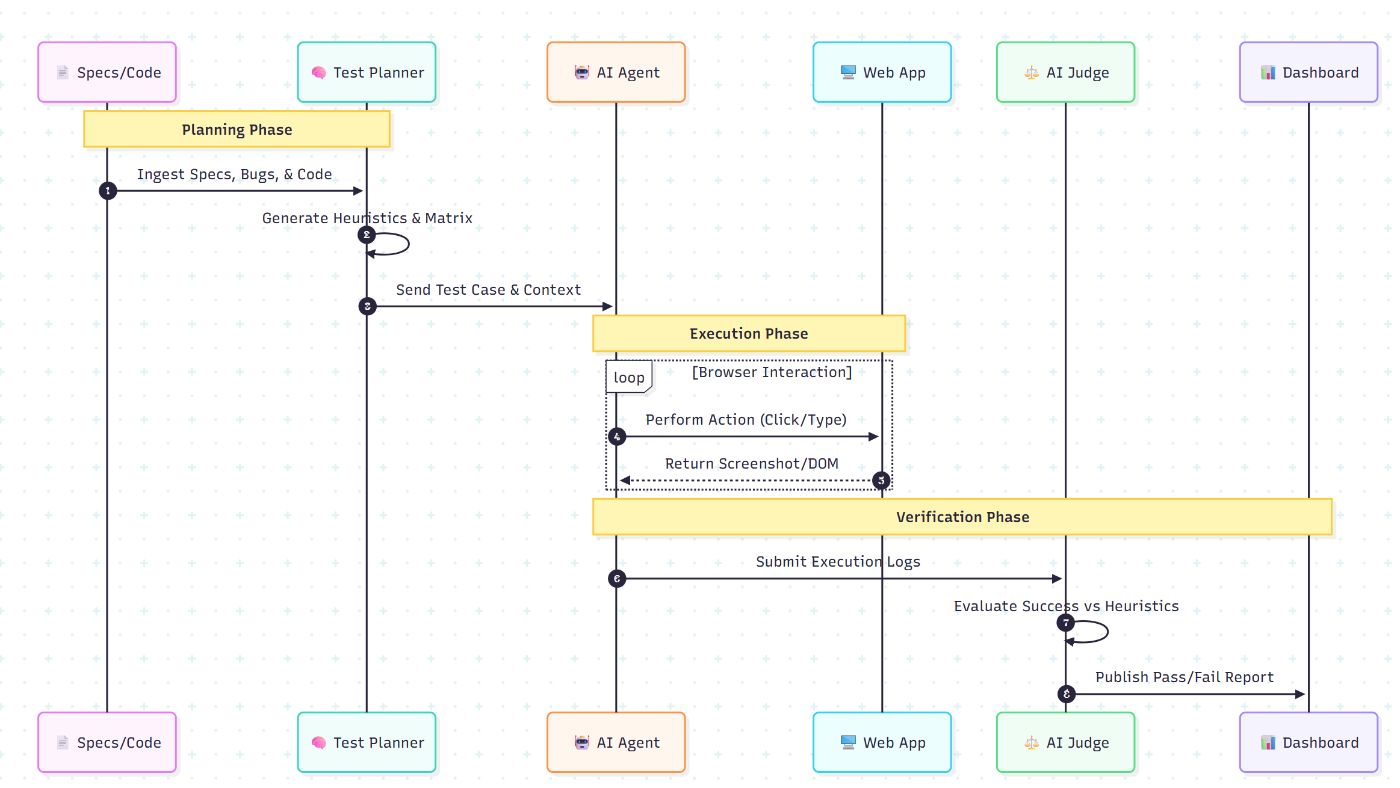
The Architecture: The Agentic Test Loop
We are building a system that doesn’t just “click coordinates”; it understands intent.
The Pipeline:
-
Source Analysis: Extract parameters from the code/specifications.
-
Combinatorial Engine: Generate the minimum set of test cases to cover all logic paths.
-
The Agent: An LLM-driven browser controller that executes the test.
-
The Judge: An AI validator that checks if the output matches the expectation.
Phase 1: The Combinatorial Engine (Smart Pattern Generation)
A common mistake in testing is testing everything (too slow) or testing randomly (misses bugs). The research suggests analyzing source code to generate an Exhaustive Parameter Table.
We need to cover the “All-Pairs” (pairwise) combinations of settings to catch interaction bugs.
**The Logic:
If you have 3 settings:
- Theme: [Dark, Light]
- Notifications: [Email, SMS, Push]
- Role: [Admin, User]
Testing every combination = 2×3×2=122×3×2=12 tests. n Pairwise testing can reduce this to ~6 tests while catching 90%+ of defects.
**Python Implementation:
We can use the allpairspy library to generate this matrix automatically.
from allpairspy import AllPairs

# Parameters extracted from the Web UI Source Code
parameters = [
    ["Dark", "Light"],
    ["Email", "SMS", "Push"],
    ["Admin", "User"]
]

print("PAIRWISE TEST CASES:")
for i, pairs in enumerate(AllPairs(parameters)):
    print(f"Case {i}: Theme={pairs[0]}, Notify={pairs[1]}, Role={pairs[2]}")

# Output:
# Case 0: Theme=Dark, Notify=Email, Role=Admin
# Case 1: Theme=Light, Notify=SMS, Role=Admin
# ... (Optimized list)
Phase 2: The AI Agent (Without Selenium)
This is the game-changer. Instead of writing driver.find_element(By.ID, “submit-btn”).click(), we give an AI agent a high-level instruction.
The research highlights the use of “Browser Use,” an emerging class of AI agents that control headless browsers.
Why this works:
- If the “Submit” button changes from
