
Building a Lean Claude Code–Style Agent in Python


LLM coding agents may look complex, but fundamentally they’re just a loop, some tools, and an LLM doing the real work.
Agentic coding assistants are now widespread (e.g., Aider, Claude Code, OpenCode). After spending some time with Claude Code and OpenCode, I wanted something I could run locally, inspect end-to-end, and modify and extend without wading through a large framework.
That curiosity led to developing an open-source, Python-based, agentic coding assistant called PatchPal.
PatchPal is a lean Claude Code–inspired AI coding agent implemented purely in Python intended to help with things like:
- Building, debugging, and modifying software
- Data analysis and visualization, including data curation through web scraping and API interactions
- Researching issues and reporting synthesized findings (e.g., web search, log file analysis)
- Automating tasks and solving problems with skills, tools, and on-the-fly code generation/execution
The permission-based, interaction model is aligned with that used by Claude Code, providing a familiar workflow.
Unlike many larger coding agents, PatchPal is intentionally small and transparent:
$ ls patchpal
__init__.py  agent.py  cli.py  context.py  permissions.py
skills.py    system_prompt.md  tool_schema.py tools.py
How to Install
PatchPal is distributed via PyPI:
pip install patchpal
Supported on Linux, macOS, and Windows.
Quick Start
PatchPal supports both cloud models and local models via LiteLLM.
Option 1: Cloud models (fastest to try)
Set an API key and run the patchpal command:
# Use Anthropic (default model is currently Claude Sonnet 4.5)
export ANTHROPIC_API_KEY=your_key_here
patchpal

# Use Anthropic's Claude Opus 4.5 instead of default model
patchpal --model anthropic/claude-opus-4-5

# Use OpenAI models
export OPENAI_API_KEY=your_key_here
patchpal --model openai/gpt-5.2 # or gpt-5-mini, gpt-4o, etc.

# Use any provider supported by the LiteLLM package
# e.g., bedrock/anthropic.claude-sonnet-4-5-20250929-v1:0 on AWS
patchpal --model <enter litellm model path here>
PatchPal is compatible with every LLM provider supported by the LiteLLM package. The default model is currently Anthropic’s Claude Sonnet 4.5 — same as Claude Code.
Option 2: Local models with Ollama
Ollama also works well, with one important requirement: you must increase the context window to at least 32K tokens.
# Required: increase context size
export OLLAMA_CONTEXT_LENGTH=32768

# Start Ollama
ollama serve

# Run PatchPal with Ollama
patchpal --model ollama_chat/gpt-oss:20b
Without the larger context window, agent workflows will fail in subtle ways — this is the most common Ollama pitfall. Moreover, not all Ollama models will work well in tool-calling agentic workflows. Some models that Ollama recommends are gpt-oss and qwen3-coder.
Option 3: Local models with vLLM
If you have larger GPU, you can also run models locally using vLLM in a more performant fashion.
vllm serve openai/gpt-oss-20b
  --api-key token-abc123
  --tool-call-parser openai
  --enable-auto-tool-choice
Then, in another terminal:
export HOSTED_VLLM_API_BASE=http://localhost:8000
export HOSTED_VLLM_API_KEY=token-abc123
patchpal --model hosted_vllm/openai/gpt-oss-20b
Example Tasks
Once running, PatchPal supports conversational interaction similar to Claude Code.
Building Apps or New Features
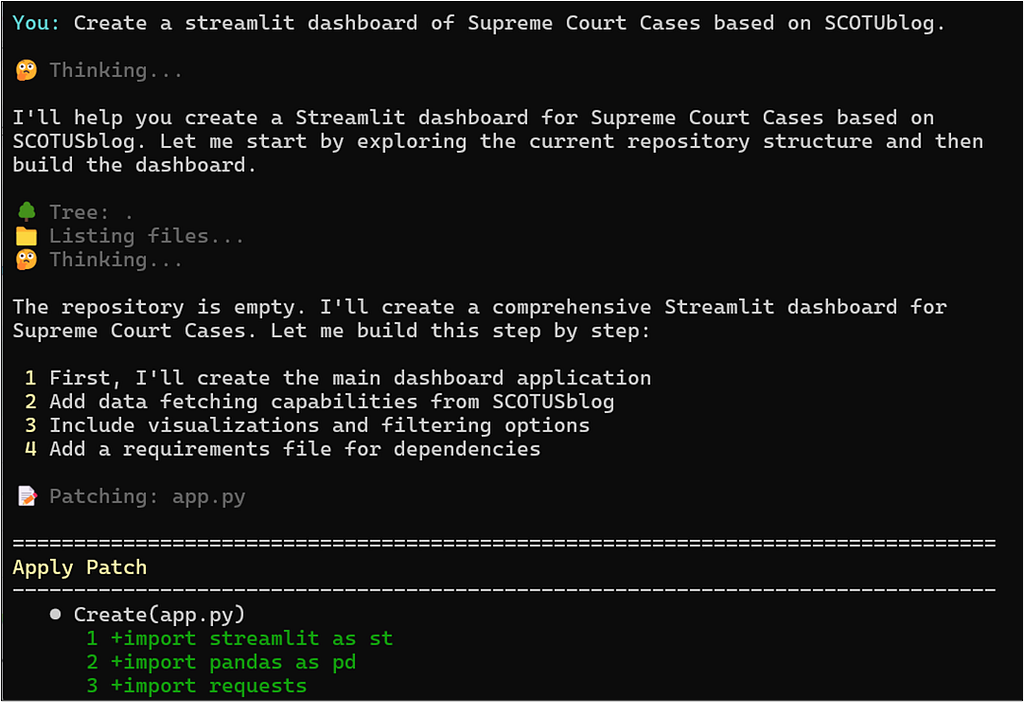
In the example below, we build a Streamlit dashboard of Supreme Court cases using web-scraped data from SCOTUSblog. The final app includes both the dashboard and a web-scraping script to collect and curate the data.
Fixing Bugs
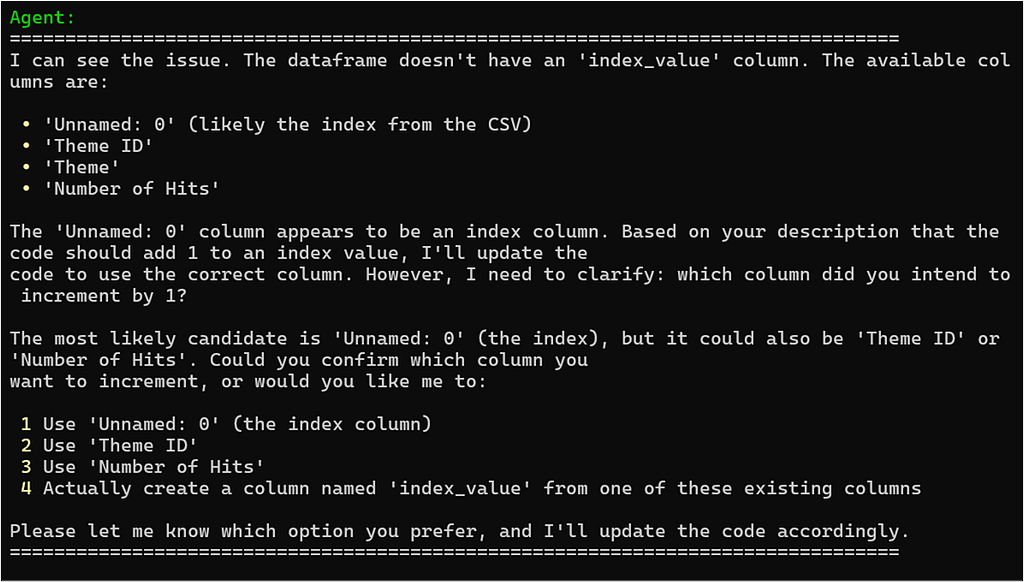
IEEE Spectrum recently published an article titled, AI Coding Assistants are Getting Worse. However, we find that the experiments in the article do not support the central claim of the author. The example below demonstrates a solution to the following code issue that the author claims is not reliably solvable by current LLMs:
# broken code
df = pd.read_csv(‘data.csv’)
df['new_column'] = df['index_value'] + 1 #there is no column ‘index_value’
Data Analysis and Visualization
Beyond code editing, agentic coding assistants are useful for data analysis and visualization in addition to data curation and web scraping.
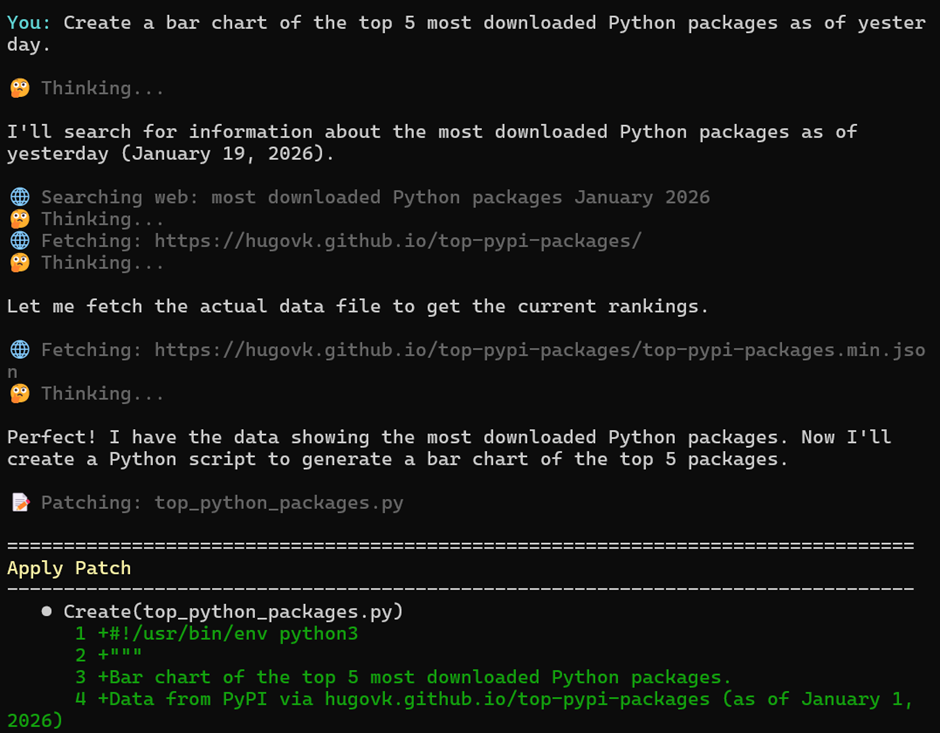
When generating a bar chart of the top 5 downloaded Python packages, the agent will follow a transparent, permission-based workflow by default:
- Source Identification: The agent initiates an autonomous web search to identify authoritative data sources for Python package download statistics. It first requests user permission to proceed with the proposed search queries.
- Data Acquisition: Upon locating a suitable data source, the agent prompts the user for permission to access (download and parse) the web content required for analysis.
- Code Generation and Execution: The agent then generates the necessary Python code to process the data, create the bar chart, and display the visualization. It requests final user authorization before executing this code.
Skills: Reusable Agent Workflows
PatchPal also supports agent skills, an open format for reusable, named workflows written in Markdown.
You can create new skills for your agent using the skills-creator skill and then simply drop them to the ~/.patchpal/skills folder for PatchPal to use them. (Anthropic also maintains a public repository of more agent skills, all of which are compatible with PatchPal.)

Creating Your Own Tools
While skills provide the agent with instructions and templates to follow, custom tools extend the agent’s capabilities with executable Python
functions that run on demand.
Drop a .py file in ~/.patchpal/tools/, and PatchPal automatically discovers and integrates your functions at startup. The agent can then call
them just like any built-in tool.
The implementation is straightforward: write a function with type hints and a docstring, and PatchPal generates the LLM tool schema
automatically. Want the agent to query your database? Parse your custom file format? Call your company’s API? Just write the function, and the
agent knows how to use it.
In the example below, we implement a simple calculator tool, calculator.py, that the agent can use.
"""Filename: calculator.py

Example custom tools for PatchPal.

This file demonstrates how to create custom tools that extend PatchPal's
capabilities. Tools are automatically discovered from ~/.patchpal/tools/

Requirements for tool functions:
- Type hints for all parameters
- Docstring with description and Args section
- Module-level functions (not nested)
- Return type should typically be str (for LLM consumption)
"""


def add(x: int, y: int) -> str:
    """Add two numbers together.

    Args:
        x: First number
        y: Second number

    Returns:
        The sum as a string
    """
    result = x + y
    return f"{x} + {y} = {result}"


def subtract(x: int, y: int) -> str:
    """Subtract two numbers.

    Args:
        x: First number
        y: Second number (subtracted from x)

    Returns:
        The difference as a string
    """
    result = x - y
    return f"{x} - {y} = {result}"


def multiply(x: float, y: float) -> str:
    """Multiply two numbers.

    Args:
        x: First number
        y: Second number

    Returns:
        The product as a string
    """
    result = x * y
    return f"{x} × {y} = {result}"


def divide(x: float, y: float) -> str:
    """Divide two numbers.

    Args:
        x: Numerator
        y: Denominator

    Returns:
        The quotient as a string
    """
    if y == 0:
        return "Error: Cannot divide by zero"
    result = x / y
    return f"{x} ÷ {y} = {result}"
Tools are automatically used by the agent when necessary:
You: What is 12345*654?

🤔 Thinking...
🔧 multiply({'x': 12345, 'y': 654})
🤔 Thinking...

===================================
Agent
===================================
12345 × 654 = 8,073,630
===================================
Custom tools move beyond file operations and shell commands into domain-specific tasks — analyzing business data, checking system health,
processing custom file formats, or integrating with internal APIs. The agent gets direct access to your vetted functions without having to generate and execute code on the fly via a shell command.
Custom tools work in both the terminal CLI (auto-discovered) and Python API (passed as parameters), which is discussed next.
Accessing PatchPal via Python
PatchPal can also be used programmatically from Python scripts or a REPL, giving you full agent capabilities with a simple API.
In the Python API, custom tools can be supplied directly to create_agent. In the example below, we provide the agent with a custom tool for searching GitHub repositories.
from patchpal.agent import create_agent

# custom tool for searching GitHub Repos
from typing import Optional
import requests
def search_github_repos(query: str, language: Optional[str] = None, max_results: int = 5) -> str:
    """Search GitHub repositories by keyword.

    Args:
        query: Search query (e.g., "machine learning", "web framework")
        language: Optional programming language filter (e.g., "Python", "JavaScript")
        max_results: Maximum number of results to return (default: 5)

    Returns:
        Formatted list of repositories with stars, descriptions, and URLs
    """
    if requests is None:
        return "Error: 'requests' library not installed. Install with: pip install requests"

    try:
        search_query = query
        if language:
            search_query += f" language:{language}"

        url = "https://api.github.com/search/repositories"
        params = {"q": search_query, "sort": "stars", "order": "desc", "per_page": max_results}

        response = requests.get(url, params=params, timeout=10)

        if response.status_code != 200:
            return f"Error: GitHub API request failed (HTTP {response.status_code})"

        data = response.json()
        repos = data.get("items", [])

        if not repos:
            return f"No repositories found for '{query}'"

        result = [f"Found {len(repos)} repositories for '{query}'"]
        if language:
            result[0] += f" (language: {language})"
        result.append("")

        for i, repo in enumerate(repos, 1):
            stars = repo["stargazers_count"]
            forks = repo["forks_count"]
            language_name = repo["language"] or "N/A"

            result.append(f"{i}. {repo['full_name']} ⭐ {stars:,} 🍴 {forks:,}")
            result.append(f"   Language: {language_name}")

            description = repo["description"] or "No description"
            if len(description) > 100:
                description = description[:97] + "..."
            result.append(f"   {description}")
            result.append(f"   {repo['html_url']}")
            result.append("")

        return "n".join(result)

    except requests.exceptions.Timeout:
        return "Error: Request timed out while searching GitHub"
    except requests.exceptions.ConnectionError:
        return "Error: Could not connect to GitHub API. Check your internet connection."
    except KeyError as e:
        return f"Error: Unexpected response format from GitHub API: missing {e}"
    except Exception as e:
        return f"Error searching GitHub: {str(e)}"

# Create agent with custom tools
agent = create_agent(
    model_id="anthropic/claude-sonnet-4-5",
    custom_tools=[search_github_repos]
)

# Use the agent - it will call your custom tools when appropriate
response = agent.run("Show me some ML GitHub repos")
print(response)

# All built-in tools still available (e.g., web_search, run_shell, etc.)
response = agent.run("Do a web search for data sources for court cases")
print(response)
Configuration, Safety, and Guardrails
PatchPal includes safety controls, context management, and execution limits, allowing you to adapt the agent to different environments and risk tolerances.
By default, a Claude Code–inspired safety model is employed, including:
- Permission prompts for shell commands and file modifications
- Blocking of privilege escalation and dangerous commands (e.g., sudo, rm -rf)
- Audit logging and optional automatic file backups
- A read-only mode for safe exploration and analysis
This reduces the risk of unintended changes in typical, realistic scenarios.
Scope and Fit
PatchPal is a good fit if you:
- Like Claude Code’s interaction model
- Want something you can run with local models
- Prefer Python-based tools you can easily extend and configure
- Desire a small footprint
A key goal of this work is to cover the same fundamentals as larger agent frameworks — model support, tool use, codebase navigation, agent skills, and multi-step tasks — while prioritizing simplicity, configurability, and end-to-end clarity.
Finally, with support for agent skills and custom tools, and guarded by an explicit permissions system, the agent can be used for general problem-solving tasks beyond code editing.
Documentation and Source Code
The documentation and source code for PatchPal is available on GitHub: https://github.com/amaiya/patchpal.
Building a Lean Claude Code–Style Agent in Python was originally published in Towards AI on Medium, where people are continuing the conversation by highlighting and responding to this story.
