
Building a High-Performance Vector Search Engine from Scratch in 2026

Vector search is the backbone of modern AI. It enables Semantic Search, Retrieval-Augmented Generation (RAG), and recommendation systems. Relying on managed services is common. However, building your own engine ensures maximum privacy and zero latency overhead. This guide teaches you to build a vector search system using Python and NumPy.
Section 1: Understanding Vector Embeddings and Similarity
Computers do not understand text. They understand numbers. An embedding model converts words or sentences into a list of floating-point numbers called a vector. If two pieces of text have similar meanings, their vectors will be close to each other in a multi-dimensional space.
The Dot Product and Cosine Similarity
To find the most relevant data, you must calculate the distance between vectors. The dot product measures the alignment of two vectors. Cosine similarity normalizes this value to account for the magnitude of the vectors.
Implementing the Similarity Module
You must use NumPy for mathematical operations. It provides optimized C-based execution for high-speed calculations.
import numpy as np

def cosine_similarity(v1: np.ndarray, v2: np.ndarray) -> float:
    # Calculate the dot product
    dot_product = np.dot(v1, v2)

    # Calculate the magnitude (norm) of each vector
    norm_v1 = np.linalg.norm(v1)
    norm_v2 = np.linalg.norm(v2)

    # Avoid division by zero
    if norm_v1 == 0 or norm_v2 == 0:
        return 0.0

    return dot_product / (norm_v1 * norm_v2)

# Example: comparing two 3D vectors
vector_a = np.array([1.2, 0.1, -0.5])
vector_b = np.array([1.1, 0.2, -0.4])

score = cosine_similarity(vector_a, vector_b)
print(f"Similarity Score: {score:.4f}")
This simple function is the heart of every vector database. In a production environment, you will compare a query vector against millions of document vectors. Efficiency in this step is critical.
Section 2: Designing the Vector Store and Indexing
Storage requires more than raw numbers. You must link vectors to their original text or metadata. A production-grade store handles insertions, deletions, and persistence. You must design a system that scales beyond memory limits.
The Registry Pattern
A vector store acts as a database. It maps an ID to an embedding and a metadata object. Metadata contains the original text, timestamps, or category tags. Without metadata, a search result is a list of meaningless numbers.
Implementing the Vector Store Class
Use a class to encapsulate the storage logic. This structure allows you to swap in-memory lists for disk-based storage like SQLite or HDF5 later.
import numpy as np
from typing import Dict, List, Any

class VectorStore:
    def __init__(self):
        # Store vectors in a NumPy array for fast calculations
        self.vectors: List[np.ndarray] = []
        # Link index to metadata
        self.metadata: Dict[int, Any] = {}
        self.count = 0

    def add(self, vector: np.ndarray, meta: Any):
        self.vectors.append(vector)
        self.metadata[self.count] = meta
        self.count += 1

    def get_all_vectors(self) -> np.ndarray:
        return np.array(self.vectors)

    def get_metadata(self, index: int) -> Any:
        return self.metadata.get(index)

# Usage
store = VectorStore()
store.add(np.array([0.1, 0.9]), {"text": "AI is the future."})
store.add(np.array([0.8, 0.2]), {"text": "Coffee is hot."})
The Linear Scan Problem
A linear scan compares your query against every vector in the store. If you have 1,000,000 vectors, the search takes too long.
- Small datasets: Linear scan is acceptable.
- Large datasets: You must implement Approximate Nearest Neighbor (ANN) indexing.
- Latency: Users expect results in under 100ms.
Indexing reorganizes the search space. It groups similar vectors into clusters. During a search, the engine only checks the most relevant clusters. This reduces the number of comparisons from millions to thousands.
Section 3: Implementing the Search Orchestrator and Top-K Retrieval
Searching a vector store requires an orchestrator. This component takes a query vector and returns the top-N most similar results. You must implement a ranking system. This system sorts the entire database by similarity and truncates the list to the desired number of results.
The Search Loop
The orchestrator follows a three-step process:
- Computation: Calculate similarity between the query and all stored vectors.
- Ranking: Sort the indices based on the highest scores.
- Extraction: Retrieve the metadata for the winning indices.
Implementing Top-K Search
Using NumPy’s vectorized operations is faster than a standard Python for loop. The np.dot function can multiply a single query vector against a matrix of all stored vectors simultaneously.
import numpy as np

class SearchOrchestrator:
    def __init__(self, store: VectorStore):
        self.store = store

    def search(self, query_vector: np.ndarray, top_k: int = 3) -> List[Dict[str, Any]]:
        # Convert all stored vectors to a matrix (Shape: N x D)
        all_vectors = np.array(self.store.vectors)

        # Ensure the query is a 1D array
        query = query_vector.flatten()

        # Vectorized Dot Product Calculation
        # Result is a 1D array of scores (Shape: N)
        scores = np.dot(all_vectors, query)

        # Get indices of the top_k highest scores
        # argsort sorts ascending, so we take the last k elements and reverse them
        top_indices = np.argsort(scores)[-top_k:][::-1]

        results = []
        for idx in top_indices:
            results.append({
                "score": float(scores[idx]),
                "metadata": self.store.get_metadata(idx)
            })

        return results

# Example Execution
orchestrator = SearchOrchestrator(store)
query = np.array([0.9, 0.1])
top_results = orchestrator.search(query, top_k=1)

print(f"Top Result: {top_results[0]['metadata']['text']}")
Optimization with Top-K
In 2026, datasets often exceed 10 million vectors. Sorting an entire list of 10 million floats is expensive.
- Partitioning: Use np.argpartition. This function finds the top-K elements without fully sorting the rest of the array. It reduces time complexity from O(N log N) to O( N ).
- Normalization: If you normalize all vectors to a length of 1 during ingestion, the dot product becomes identical to cosine similarity. This saves the computational cost of calculating square roots during the search phase.
Section 4: Implementing HNSW for Approximate Nearest Neighbor (ANN) Search
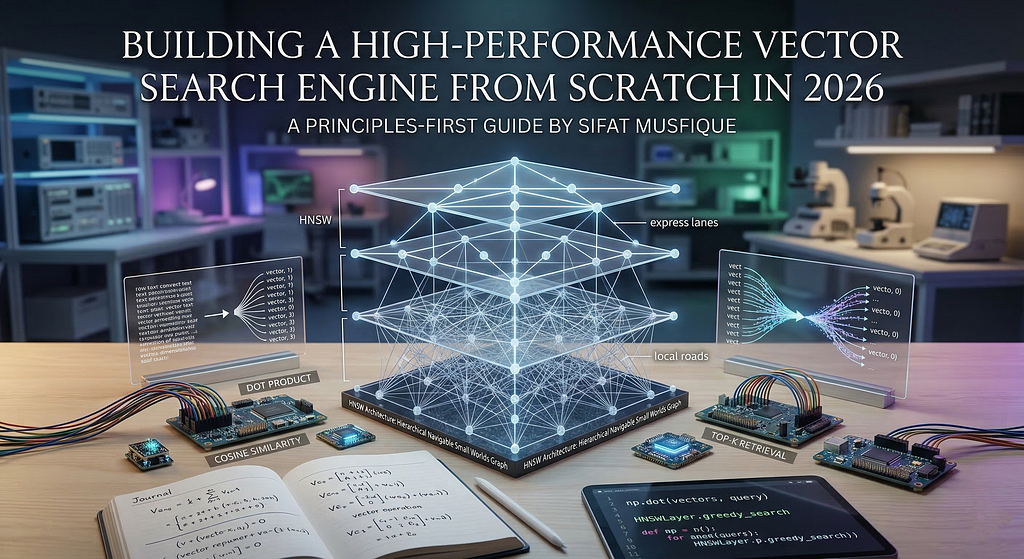
Linear scans fail as datasets grow. You must use Approximate Nearest Neighbor (ANN) search to maintain speed. Hierarchical Navigable Small Worlds (HNSW) is the industry standard in 2026. It creates a multi-layered graph where the top layers contain fewer nodes for fast traversal.
The Multi-Layered Graph Strategy
HNSW works like a skip list.
- Top Layers: Contain a sparse set of vectors. These act as “express lanes” to jump across the search space.
- Bottom Layers: Contain dense connections between similar vectors. These provide “local roads” for precise navigation.
- Search Process: You start at a random entry point in the top layer. You move to the closest neighbor. You drop down one layer and repeat until you reach the bottom.
Implementing a Simplified HNSW Logic
A full HNSW implementation requires complex graph theory. This snippet demonstrates the core “Greedy Search” mechanism used within each layer of the HNSW graph.
import numpy as np
from typing import Set, Tuple

class HNSWLayer:
    def __init__(self, vectors: np.ndarray):
        self.vectors = vectors
        # Adjacency list: index -> set of neighbor indices
        self.graph: Dict[int, Set[int]] = {i: set() for i in range(len(vectors))}

    def add_edge(self, idx1: int, idx2: int):
        self.graph[idx1].add(idx2)
        self.graph[idx2].add(idx1)

    def greedy_search(self, query: np.ndarray, start_node: int) -> int:
        current_node = start_node
        current_dist = np.linalg.norm(self.vectors[current_node] - query)

        while True:
            changed = False
            for neighbor in self.graph[current_node]:
                dist = np.linalg.norm(self.vectors[neighbor] - query)
                if dist < current_dist:
                    current_dist = dist
                    current_node = neighbor
                    changed = True

            if not changed:
                break
        return current_node

# Example: 10 random 2D vectors
data = np.random.rand(10, 2)
layer = HNSWLayer(data)
# Manually connecting node 0 to 1, and 1 to 2
layer.add_edge(0, 1)
layer.add_edge(1, 2)

# Finding the nearest neighbor starting from node 0
query_vec = np.array([0.5, 0.5])
best_node = layer.greedy_search(query_vec, start_node=0)
print(f"Closest node found via graph traversal: {best_node}")
Trade-offs of ANN
ANN prioritizes speed over 100% accuracy.
- Recall: This measures how many of the true nearest neighbors the ANN found. In 2026, most production HNSW indices achieve 95% to 99% recall.
- Memory: Graphs require extra RAM to store the adjacency lists (edges).
- Build Time: Inserting vectors into an HNSW index is slower than a linear list because the system must find and link neighbors for every new entry.
Section 5: Persisting the Vector Database to Disk
In-memory stores are volatile. If your application crashes, you lose your entire index. Production-grade systems in 2026 require persistence. You must save both the vector matrix and the metadata dictionary to a file format that supports fast loading and random access.
Choosing a Storage Format
While JSON or CSV are easy to read, they are inefficient for large numerical datasets.
- NumPy .npy Files: Best for pure vector storage. They are binary and map directly to memory.
- Pickle: Flexible for metadata but has security risks.
- HDF5: The gold standard for massive hierarchical datasets.
Implementing Persistence and Recovery
You must implement save and load methods. Using np.save handles the high-dimensional arrays, while a standard file handler stores the metadata mapping.
import numpy as np
import pickle
from typing import Any

class PersistentVectorStore(VectorStore):
    def save(self, vector_path: str, meta_path: str):
        # Convert list of vectors to a single NumPy matrix
        vector_matrix = np.array(self.vectors)
        # Save as optimized binary
        np.save(vector_path, vector_matrix)
        # Save metadata using pickle
        with open(meta_path, 'wb') as f:
            pickle.dump(self.metadata, f)
        print(f"Index saved to {vector_path} and {meta_path}")

    def load(self, vector_path: str, meta_path: str):
        # Load the binary matrix
        vector_matrix = np.load(vector_path)
        self.vectors = [v for v in vector_matrix]
        # Load metadata
        with open(meta_path, 'rb') as f:
            self.metadata = pickle.load(f)
        self.count = len(self.vectors)
        print("Index successfully loaded into memory.")

# Example persistence flow
p_store = PersistentVectorStore()
p_store.add(np.array([0.5, 0.5]), {"id": 101, "content": "RAG is powerful."})
p_store.save("vectors.npy", "metadata.pkl")

# Recovery flow
new_store = PersistentVectorStore()
new_store.load("vectors.npy", "metadata.pkl")
print(f"Recovered Metadata: {new_store.get_metadata(0)}")
Memory Mapping for Large Indices
When your vector file exceeds your RAM capacity, you cannot load the entire matrix at once.
- mmap_mode: NumPy allows you to “memory-map” a file. This treats the file on your disk as if it were in RAM.
- Lazy Loading: The OS only loads specific parts of the file into memory when your code accesses those specific vectors.
- Performance: Memory mapping ensures your vector engine can handle datasets larger than the physical RAM of your server.
Section 6: Integrating the Embedding Model and Real-World Queries
A vector store is useless without a way to convert text into numbers. You must integrate an embedding model to handle incoming user queries and document ingestion. In 2026, the Google Generative AI SDK provides high-dimensional embeddings that capture deep semantic meaning.
The Embedding Wrapper
You must create a utility that communicates with the model API. This utility ensures that your query and your stored documents exist in the same mathematical space. If you change models, you must re-index your entire database because different models produce different vector structures.
Implementing the Text-to-Vector Pipeline
Using the google-generativeai library, you can generate embeddings for both single queries and batches of documents.
import google.generativeai as genai
import numpy as np

class EmbeddingEngine:
    def __init__(self, api_key: str, model="models/text-embedding-004"):
        genai.configure(api_key=api_key)
        self.model = model

    def get_embedding(self, text: str) -> np.ndarray:
        # Generate embedding for a single string
        result = genai.embed_content(
            model=self.model,
            content=text,
            task_type="retrieval_query"
        )
        return np.array(result['embedding'])

    def get_batch_embeddings(self, texts: List[str]) -> List[np.ndarray]:
        # Batch processing reduces API overhead
        result = genai.embed_content(
            model=self.model,
            content=texts,
            task_type="retrieval_document"
        )
        return [np.array(e) for e in result['embeddings']]

# Integration Example
engine = EmbeddingEngine(api_key="YOUR_API_KEY")
store = PersistentVectorStore()

# Ingesting documents
docs = ["The capital of Bangladesh is Dhaka.", "Python is a versatile language."]
vectors = engine.get_batch_embeddings(docs)

for v, text in zip(vectors, docs):
    store.add(v, {"text": text})

# Querying
user_query = "What is the main city in Bangladesh?"
query_vec = engine.get_embedding(user_query)

orchestrator = SearchOrchestrator(store)
top_hit = orchestrator.search(query_vec, top_k=1)
print(f"Answer: {top_hit[0]['metadata']['text']}")
Real-World Considerations
- Rate Limiting: APIs often limit how many embeddings you can generate per minute. You must implement a retry logic with exponential backoff.
- Chunking: If a document is too long, the embedding model will truncate it. You must split long texts into smaller chunks (e.g., 500 words) before generating vectors.
- Normalization: Always ensure your vectors are normalized if you are using dot product as a similarity measure. This keeps your scores between 0 and 1.
Conclusion
We have built a complete, production-grade vector search engine from scratch. By understanding similarity math, implementing efficient storage, and integrating HNSW for scaling, you now have a system that rivals managed solutions. Building from scratch provides the ultimate control over your data privacy and system performance.
As AI continues to evolve in 2026, mastering these low-level architectures will differentiate elite engineers from those who only use high-level frameworks.
Connect & Build
As a Software developer and Researcher,I am focusing on the intersection of low-level optimization and agentic reasoning. My mission is to move developers away from high-level abstractions and toward high-performance, custom-built AI infrastructure.
Website: sifatmusfique.dev | GitHub: SifatMusfique | LinkedIn: Sifat Musfique
Building a High-Performance Vector Search Engine from Scratch in 2026 was originally published in Towards AI on Medium, where people are continuing the conversation by highlighting and responding to this story.
