Building a Free AI Research Digest: From arXiv to Your Inbox Using Llama 3.1, Groq, and SendGrid

How I built a free AI research newsletter from scratch — and everything that broke along the way
As part of my Applied Gen AI course, I’ve been putting concepts into practice by building real projects.
This is one of them.
Table of Content
· 1. The Problem I Was Trying to Solve
· 2. What Is AI Research Digest?
· 3. The Architecture — How It Works
· 4. The Tech Stack
· 5. Building Phase by Phase — What Worked First Try
· 6. Everything That Broke
∘ 6.1 Gmail SMTP — Silently Blocked
∘ 6.2 Resend — Sandboxed to Your Own Email
∘ 6.3 SendGrid — DMARC Rejection
∘ 6.4 The HuggingFace Inference API — The One That Cost the Most Time
· 7. Under the Hood — The Ranking Algorithm
∘ The Scoring Factors
∘ What I Would Change
· 8. Prompt Engineering — Getting Structured Output From an LLM
∘ The Problem With Free-Form Prompts
∘ The Structured Prompt
∘ One Limitation Worth Acknowledging
· 9. Edge Cases I Had to Handle
∘ Edge Case 1 — Too Few Papers Match the User’s Selected Topics
∘ Edge Case 2 — All Topics Selected (The Default State)
∘ Edge Case 3— Duplicate Papers Across Sources
∘ Edge Case 54— The LLM Ignores the Prompt Format
· 10. What’s Next
· 11. Try It Yourself
1. The Problem I Was Trying to Solve
Every day, hundreds of AI research papers get published on arXiv. Transformer architectures, new fine-tuning techniques, safety benchmarks, diffusion model improvements — the field moves fast, and it shows no signs of slowing down.
Keeping up with it properly is harder than it sounds. It is not just the volume — though 200 papers a day is genuinely unmanageable for anyone with a job. It is also the quality of information available about that research. Blog posts summarise papers they have not fully read. Social media threads strip findings down to a single provocative sentence, often without linking to the original. Newsletter aggregators pull from other aggregators until the original meaning is diluted beyond recognition. By the time an insight reaches most people, it has passed through several layers of reinterpretation — each one introducing a little more noise, a little less accuracy.
If you want to know what the AI research community is actually working on, there is really only one reliable option: go directly to the source.
What I wanted was straightforward. An email in my inbox every morning pulling directly from arXiv and HuggingFace Papers — the primary sources the research community actually publishes to and cites from — with the most relevant papers from the last 24 hours summarised in plain English. Not reworded abstracts. Not someone else’s interpretation. Something accurate, readable, and trustworthy. Something I could read over coffee, and that a non-technical colleague could understand too.
I could not find a free tool that did this well. So I built one.
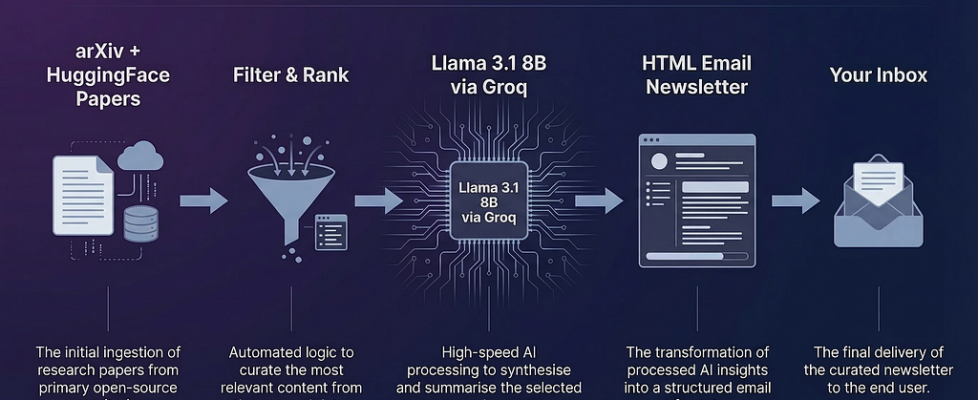
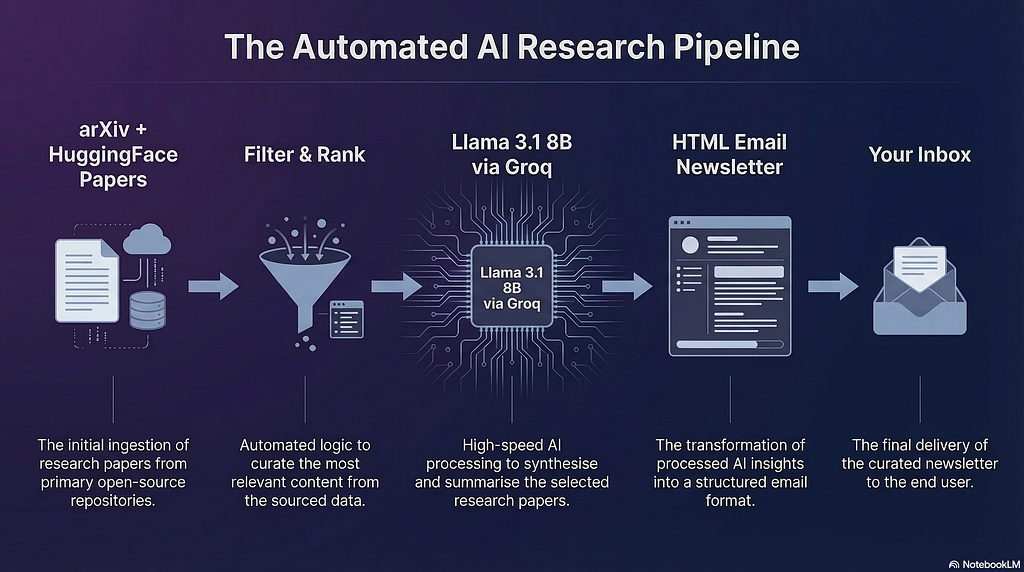
AI Research Digest is an automated pipeline that fetches papers directly from arXiv and HuggingFace Papers, ranks them using a custom scoring algorithm, summarises each one using Llama 3.1 8B, and delivers a styled HTML newsletter to your inbox every morning. You can choose your topics, the number of papers, and set it on a daily schedule. The entire infrastructure costs approximately $3 per year.
This article is not a polished tutorial. It is an honest documentation of the build — what I designed, what worked, and what broke along the way. If you are building something similar, I hope the account of the failures is as useful as the account of the solutions.
2. What Is AI Research Digest?
At its core, AI Research Digest is a personalised newsletter engine. Every morning, it wakes up, scans the latest AI research published in the last 24 hours, picks the most relevant papers based on your interests, and sends you a clean HTML email with each paper summarised in plain English.
The summaries are not abstracts copy-pasted from the paper, and they are not someone else’s interpretation of someone else’s summary. Each one is generated directly from the original abstract using Llama 3.1 8B, structured into four parts: a headline that captures the key finding in one sentence, a plain explanation of what the research actually does, a note on why it matters in the real world, and an analogy that makes the concept accessible to anyone. Every summary links directly to the original paper — the reader is always one click away from the primary source.
Here is what a typical digest looks like in your inbox:

Two things are worth being explicit about here. First, the pipeline pulls exclusively from arXiv and HuggingFace Papers. arXiv is the de facto standard repository for AI research — it is where the community publishes, where peer review begins, and where every serious citation traces back to. HuggingFace Papers is community-curated by ML practitioners who surface work they consider significant. There are no blog posts in the pipeline, no aggregator middlemen, no summaries of summaries. Every paper in the digest is a primary source.
Second, the summaries are generated fresh every day from the actual abstract — not cached, not recycled, not editorially filtered by anyone’s agenda. What you read in the digest reflects what the research community published in the last 24 hours, nothing more and nothing less.
The product is built for two kinds of people. Developers and researchers who want to stay current with the field without spending hours on arXiv every day. And non-technical professionals — managers, product leads, executives — who work alongside AI teams and want to understand what the research community is focused on, without needing a PhD to follow along.
It runs entirely on free infrastructure. The only thing I paid for was a domain name.
3. The Architecture — How It Works
The application is a four-phase linear pipeline. Each phase has one responsibility, takes a defined input, and produces a defined output. Nothing more.
┌──────────────────────────────────────────────────────────────┐
│                  GRADIO UI (HuggingFace Space)               │
│         [Email Input]   [Send Now / Daily Schedule]          │
│         [Live Status Log]   [HTML Email Preview Tab]         │
└─────────────────────────┬────────────────────────────────────┘
                          │
              ┌───────────▼───────────┐
              │       app.py          │
              │   run_pipeline()      │  Orchestrates all phases
              │   handle_submit()     │  Streams progress to UI
              └───────────┬───────────┘
                          │
         ┌────────────────┼────────────────┐
         ▼                                 ▼
┌─────────────────┐               ┌─────────────────┐
│  fetcher_arxiv  │               │   fetcher_hf    │  PHASE 1
│  arXiv REST API │               │  BS4 Scraper    │
└────────┬────────┘               └────────┬────────┘
         └──────────────┬──────────────────┘
                ┌───────▼────────┐
                │  filter_agent  │  PHASE 2
                │  Score & Rank  │
                └───────┬────────┘
                ┌───────▼────────┐
                │summariser_agent│  PHASE 3
                │   Groq API     │
                │ Llama 3.1 8B   │
                └───────┬────────┘
                ┌───────▼────────┐
                │newsletter_agent│  PHASE 4
                │ Jinja2 + HTML  │
                │  SendGrid API  │
                └───────┬────────┘
                        │
              ┌─────────▼──────────┐
              │   User's Inbox +   │
              │   Gradio Preview   │
              └────────────────────┘

         ┌──────────────────────┐
         │   job_scheduler.py   │  OPTIONAL
         │    APScheduler       │  Daily cron jobs
         │   Daily 08:00 UTC    │  per subscribed email
         └──────────────────────┘
Phase 1 — Fetch pulls papers from two sources simultaneously. The arXiv fetcher queries five categories — cs.AI, cs.LG, cs.CL, cs.CV, and stat.ML — using their public REST API, filtering to papers published in the last 48 hours. The HuggingFace fetcher scrapes huggingface.co/papers using BeautifulSoup, doing a two-stage fetch: first the listing page for titles and URLs, then each individual paper page for the full abstract.
Phase 2 — Filter & Rank takes the combined pool of up to 100 papers and produces a ranked shortlist. It merges both lists, removes duplicates, filters out low-quality entries, scores every remaining paper using a multi-factor algorithm, and selects the top N while guaranteeing at least one paper from each source.
Phase 3 — Summarise sends each selected paper to Llama 3.1 8B via the Groq API with a structured prompt that instructs the model to respond in four labelled sections. The response is parsed back into a structured object.
Phase 4 — Deliver passes the summarised papers to a Jinja2 HTML template, renders the final email, and posts it to SendGrid’s REST API for delivery.
Each phase is a separate Python class in its own file. They share only a common Paper dataclass. This means each phase can be tested, replaced, or debugged in isolation — which turned out to be very useful when things started breaking.
Why a linear pipeline and not LangChain?
LangChain is designed for dynamic pipelines where an LLM decides what tools to call and in what order. That is genuinely powerful for open-ended agents. But this pipeline always executes the same four steps in the same order — no branching, no tool selection, no dynamic control flow. Introducing LangChain would add abstractions and dependencies without adding any capability. A linear pipeline is fully deterministic. I know exactly what runs, in what order, and where it fails when something goes wrong. For something that needs to reliably deliver an email every morning, that predictability matters more than flexibility.
4. The Tech Stack
Every tool in this stack was chosen deliberately — either for a specific technical reason, or because an earlier choice failed and forced a better one. Here is the full picture.
HuggingFace Spaces — Hosting
HuggingFace Spaces runs Gradio applications for free with a public URL and direct git-based deployment. No server configuration, no Dockerfile, no cloud billing. You push to a git remote, and it deploys.
The tradeoff on the free tier is real though. The Space goes to sleep after 15 minutes of inactivity. When it wakes up, anything stored in memory — including scheduled jobs — is gone. For a portfolio project this is acceptable. For production, you would back the scheduler with a persistent store like PostgreSQL or Redis so jobs survive restarts.
Gradio — User Interface
Gradio is native to HuggingFace Spaces and needs zero additional setup. The UI has four components: an email input, a Send Now / Daily Schedule toggle, a live status log, and an HTML email preview tab.
The feature that made Gradio particularly suitable here is generator-based streaming. The submit handler uses Python’s yield keyword to push status updates to the UI after each pipeline phase completes. Without this, a user clicks Send and stares at a blank screen for 60 to 90 seconds with no indication anything is happening. With it, they see something like this in real time:
📡 Phase 1 of 4 — Fetching papers...
   Querying arXiv API...
   ✅ arXiv: 85 papers fetched
   Scraping HuggingFace Papers...
   ✅ HuggingFace: 20 papers fetched
   📊 Total collected: 105 papers

🔍 Phase 2 of 4 — Filtering & ranking 105 papers...
   ✅ Top 5 papers selected:
      [1] MedMASLab: A Unified Orchestration Framework for Ben...
      [2] Omni-Diffusion: Unified Multimodal Understanding and...
      [3] Reading, Not Thinking: Understanding and Bridging th...
      [4] Influencing LLM Multi-Agent Dialogue via Policy-Para...
      [5] SignalMC-MED: A Multimodal Benchmark for Evaluating ...

🤖 Phase 3 of 4 — Summarising with Llama 3.1 8B via Groq...
   (~15 sec per paper × 5 papers)
   ⏳ [1/5] Summarising: MedMASLab: A Unified Orchestration Framework for B...
   ✅ [1/5] Done in 2.6s
   ⏳ [2/5] Summarising: Omni-Diffusion: Unified Multimodal Understanding a...
   ✅ [2/5] Done in 0.4s
   ⏳ [3/5] Summarising: Reading, Not Thinking: Understanding and Bridging ...
   ✅ [3/5] Done in 0.6s
   ⏳ [4/5] Summarising: Influencing LLM Multi-Agent Dialogue via Policy-Pa...
   ✅ [4/5] Done in 0.6s
   ⏳ [5/5] Summarising: SignalMC-MED: A Multimodal Benchmark for Evaluatin...
   ✅ [5/5] Done in 0.5s
   ⏱ Total summarisation time: 4.6s

📧 Phase 4 of 4 — Sending newsletter to *******@gmail.com...
That live feedback is the difference between a tool that feels alive and one that feels broken.
arXiv REST API — Primary Paper Source
arXiv provides a free, unauthenticated REST API returning structured Atom XML. No API key, no rate limit worries for reasonable usage, well-documented. The fetcher queries five categories
cs.AI  — Artificial Intelligence
cs.LG  — Machine Learning
cs.CL  — Computation and Language
cs.CV  — Computer Vision
stat.ML — Statistics / Machine Learning
The query window is set to 48 hours rather than 24 to account for weekends and publication delays. Papers are deduped later in Phase 2, so pulling slightly more than needed is not a problem.
HuggingFace Papers — Secondary Paper Source
HuggingFace Papers has no public API, so BeautifulSoup scraping was the only option. The fetch is two-stage by necessity: the listing page at huggingface.co/papers contains titles and URLs but not full abstracts. A second request to each individual paper page retrieves the abstract. This is slower than the arXiv API but the community-curation signal is worth it — papers that make it to HuggingFace Papers were surfaced by someone in the ML community as worth reading.
Llama 3.1 8B Instruct via Groq — Summarisation
This was not my original choice. The full story is in Section 6. Llama 3.1 8B is Meta’s open-source model fine-tuned for instruction following. It produces clean structured output when given explicit labels in the prompt — which is exactly what this pipeline needs. The Groq API uses OpenAI-compatible chat completion format:
{
    "model": "llama-3.1-8b-instant",
    "messages": [{"role": "user", "content": prompt}],
    "max_tokens": 700,
    "temperature": 0.7
}
Groq runs Llama on custom LPU hardware. Responses come back in one to two seconds. The free tier gives 14,400 requests per day — more than sufficient for a daily digest pipeline.
SendGrid — Email Delivery
Also not my original choice. Three providers failed before this one. SendGrid’s free tier sends up to 100 emails per day over HTTPS (port 443 — never blocked by hosting platforms), and supports proper DKIM and DMARC domain authentication, which is non-negotiable for Gmail deliverability. The API integration is a single POST request:
requests.post(
    "https://api.sendgrid.com/v3/mail/send",
    headers={"Authorization": f"Bearer {SENDGRID_API_KEY}"},
    json={"personalizations": [...], "from": {...}, "content": [...]}
)
A 202 response means accepted and queued. Not 200 — SendGrid does not confirm delivery synchronously. The email is queued and sent within seconds.
Porkbun — Domain
airesearchdigest.cv registered for approximately $3. The domain exists for one reason: email authentication. Gmail will not deliver emails where the From domain is not authenticated with the sending server. You cannot use a Gmail address as the From field in SendGrid because Google owns gmail.com. Owning your own domain lets you add SendGrid’s CNAME records to your DNS, prove ownership, and send authenticated email that lands in inboxes rather than spam.
Jinja2 — Email Templating
Industry-standard Python templating — the same engine used in Flask and Django. The HTML email template is entirely separate from the pipeline logic. It loops over papers, renders source badges, formats dates, and handles the dark-themed layout. Changing the email design requires touching only email_template.html, nothing else in the pipeline.
APScheduler — Scheduling
A lightweight Python library that registers background cron jobs. One call to scheduler.add_job() sets up a daily run at 08:00 UTC for a given subscriber, storing their preferences — paper count, sources, and topics — as arguments on the job so every scheduled run respects what they configured.
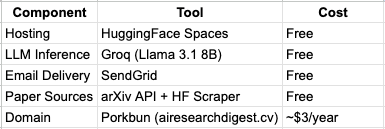
The Full Cost Breakdown
5. Building Phase by Phase — What Worked First Try
Not everything in this project was a struggle. Before getting to what broke, it is worth documenting what worked cleanly from the start — partly for completeness, and partly because understanding the stable parts makes the failures easier to isolate.
The arXiv Fetcher
The arXiv REST API is one of the most developer-friendly public APIs I have worked with. No authentication, no rate limit headaches for reasonable usage, well-structured Atom XML responses. The fetcher queries five categories with a 48-hour window, parses the response into a list of Paper dataclass objects, and returns them. It worked correctly on the first run and never needed revisiting.
The 48-hour window rather than 24 was a deliberate choice. arXiv does not publish on weekends, and submission timestamps can lag. A 24-hour window on a Monday morning would miss everything published Friday. The filter agent handles duplicates downstream, so pulling a slightly wider window costs nothing.
The HuggingFace Papers Fetcher
The scraper required a bit more care. HuggingFace Papers has no public API, so BeautifulSoup was the only option. The two-stage fetch — listing page first for titles and URLs, then individual paper pages for full abstracts — added complexity but worked reliably once the correct CSS selectors were identified. The community-curation signal this source provides is worth the extra fetch overhead. Papers that appear on HuggingFace Papers were put there by ML practitioners who considered them significant — a quality filter that no algorithm can fully replicate.
The Filter and Ranking Algorithm
The scoring model came together cleanly. Each paper receives points across four independent factors: recency (max 30 points), title keyword relevance (max 25 points), abstract keyword relevance (max 20 points), and abstract length as a proxy for detail (max 15 points). A topic personalisation bonus of up to 15 additional points is applied when the user has filtered by specific topics.
After scoring, a balanced selection algorithm guarantees at least one paper from each source before filling remaining slots by score. This prevents a situation where all five papers in a digest come from the same provider on a given day — source diversity is enforced structurally, not left to chance.
The algorithm is simple by design. A more sophisticated approach — TF-IDF weighting, semantic embeddings, learned ranking — would produce marginally better results but would also introduce model dependencies, latency, and maintenance overhead. For a daily digest of five papers, a well-tuned linear scoring model is entirely sufficient and far easier to reason about when something behaves unexpectedly.
The Email Template
The Jinja2 HTML template worked on the first render. Dark-themed, paper cards with source badges, a gradient read button for each paper, and a clean footer. Keeping the template entirely separate from the pipeline logic paid off immediately — iterating on the email design meant editing one HTML file, with no risk of touching pipeline code.
The Gradio UI
The streaming UI came together without major issues. The generator-based yield pattern in the submit handler streams phase-by-phase status updates to the live log in real time. The interface has four components — email input, mode toggle (Send Now vs Daily Schedule), a paper count slider from 3 to 10, and topic and source filter checkboxes. Validation runs before the pipeline starts: if no sources are selected, or no topics are selected, the pipeline does not run and the user sees an immediate error rather than a silent failure partway through.
One design decision worth noting: the topic filter includes a graceful fallback. If a user selects only niche topics — say, only Science & Healthcare — and fewer than three papers match on a given day, the pipeline automatically falls back to the full paper pool rather than sending a near-empty digest. The topic bonus in the scoring model still pushes matching papers to the top, so on-topic papers rank above off-topic ones even in fallback mode. The user gets a useful digest regardless of how narrow their topic selection is.
6. Everything That Broke
This is the section I wish existed when I was building. Every problem below cost time that it should not have — not because the solutions were complicated, but because the root causes were not obvious from the surface symptoms. Here is the honest account.
6.1 Gmail SMTP — Silently Blocked
What I tried
The original plan for email delivery was Gmail SMTP. Simple, free, no new accounts or API keys. Configure the host, port, credentials, and send. It is the standard approach most tutorials suggest.
What happened
Every connection attempt timed out. No error message, no rejection notice — just silence. The code appeared to run correctly. Nothing arrived.
The root cause
HuggingFace Spaces blocks outbound connections on port 587 — the standard SMTP port — as a platform-level security policy to prevent spam from their infrastructure. The connection was dying at HuggingFace’s firewall before it ever reached Gmail’s servers. There was nothing wrong with the SMTP configuration. The port was simply not available.
The fix
Switch to an email provider that operates entirely over HTTPS on port 443 — the same port used by every website on the internet, which hosting platforms never block. That meant moving away from SMTP entirely and towards an API-based email service.
The lesson here is not specific to HuggingFace. Any managed hosting platform — Heroku, Railway, Render — is likely to have similar port restrictions. If you are building an application that sends email and you plan to host it on a managed platform, assume SMTP is blocked and design around an API provider from the start.
6.2 Resend — Sandboxed to Your Own Email
What I tried
Resend is a modern email API built for developers. It operates over HTTPS, has a clean API, good documentation, and a free tier. It looked like the right solution after the SMTP failure.
What happened
Emails delivered successfully in testing. The moment I tried sending to any email address other than my own verified address, delivery silently failed.
The root cause
Resend’s free tier operates in sandbox mode. You can only send to email addresses you have personally verified in their dashboard. To send to anyone else — including real users — you need to verify a domain. This limitation is not prominently documented during onboarding. It only becomes apparent when you test with a second email address and nothing arrives.
The fix
Switch to SendGrid, which allows sending to any email address on the free tier once your sender domain is verified. The domain verification requirement is the same — you still need to own a domain and authenticate it — but there is no sandbox restriction on recipients.
6.3 SendGrid — DMARC Rejection
What I tried
After switching to SendGrid, I configured the From address as my personal Gmail address. SendGrid accepted the request and returned a 202 response. The email appeared to send successfully.
What happened
The email never arrived. No bounce notification, no error from SendGrid — just a clean 202 and then nothing in the inbox.
The root cause
DMARC alignment failure. Gmail has strict authentication rules: the domain in the From address must match a domain that has been authenticated with the sending server via DNS records. Google owns gmail.com. When SendGrid sends an email claiming to be from a Gmail address, Gmail’s servers look up the DNS records for gmail.com, find no authorisation for SendGrid, and silently reject the message.
The 202 from SendGrid does not mean the email was delivered — it means SendGrid accepted it into their queue. What happens after that depends entirely on whether the receiving mail server trusts the sender. In this case, it did not.
The fix
Register a domain you actually own and authenticate it with SendGrid. The process involves adding three CNAME records to your domain’s DNS settings — records that SendGrid provides — which prove to receiving mail servers that SendGrid is authorised to send email on behalf of that domain. Once those records are in place and verified, emails from your custom domain pass DMARC checks and land in inboxes.
The domain airesearchdigest.cv was registered on Porkbun for approximately $1. Three CNAME records added in Porkbun’s DNS panel, verified in SendGrid, and the problem was resolved. This is now the only paid component in the entire stack.
6.4 The HuggingFace Inference API — The One That Cost the Most Time
This is the failure worth telling in detail.
What I tried
The summarisation phase was originally built on the HuggingFace Inference API — a free service at api-inference.huggingface.co that allowed you to call any hosted model by name. No separate account, no additional API key beyond the HuggingFace token already in use for the paper fetcher. I used Zephyr-7B initially, then switched to Mistral-7B when Zephyr produced inconsistent output formatting.
What happened
After deploying to HuggingFace Spaces, the pipeline ran on schedule and emails arrived as expected. The summaries were structured. Everything looked correct.
Except every single paper had the exact same summary:
“This research contributes to the advancement of artificial intelligence.”
“Think of it like researchers finding a better way to solve a complex puzzle that computers face.”
My first assumption was a parsing bug. The model was presumably generating output, but my parser was failing to extract the labelled sections correctly. I rewrote the parser with multiple fallback strategies — primary label splitting, paragraph position fallback, regex variations. The output did not change. Every paper still showed the same two sentences.
I then assumed the prompt format was wrong — that Mistral was ignoring the structured labels entirely and generating free-form text that the parser could not handle. I rewrote the prompt. Same result.
It was only when I opened the raw logs from HuggingFace Spaces that the actual error became visible. It had been there from the first run:
HTTP 410: {"error": "https://api-inference.huggingface.co is no longer
supported. Please use https://router.huggingface.co"}
The root cause
HuggingFace has permanently shut down the free tier of its Inference API. HTTP 410 does not mean temporarily unavailable — it means gone, permanently. Every API call had been failing from the first run. The pipeline never crashed because the summariser had retry logic with a hardcoded fallback: three attempts, each returning 410, then silently inject generic sentences and continue. The design intended to make the pipeline resilient had instead made a fatal failure completely invisible.
The fallback text looked plausible enough to pass a quick glance. The emails arrived, the structure was there, the pipeline reported success. Only reading the raw logs revealed that the LLM had never run at all.
The fix
Switch the summarisation layer entirely to Groq. Groq is a cloud AI provider that runs open-source models — Llama, Mixtral, Gemma — on custom LPU hardware. Their free tier provides 14,400 requests per day. Responses come back in one to two seconds, compared to fifteen or more on standard GPU inference.
The pipeline was back up within the hour. The summaries that arrived in the next test run were genuinely generated by the model — specific to each paper, structured correctly, different every time.
The broader lesson
There are three things this incident made clear.
The first is to read the logs before touching the code. The root cause was visible in the logs from run one. I spent time rewriting the parser and the prompt before I looked at the actual error. In hindsight, the correct first response to any unexpected behaviour is always to read the raw logs — not to start modifying code based on assumptions.
The second is that HTTP status codes carry specific meaning. 410 is not 404. 404 means not found — the resource may exist elsewhere or may return later. 410 means permanently gone — do not retry, do not look for it somewhere else, find an alternative. Understanding the distinction saved significant time once I knew where to look.
The third is that silent failures are more dangerous than loud ones. A pipeline that crashes with a clear error on run one is caught immediately. A pipeline that silently degrades and produces plausible-looking output can run undetected for days. The fallback mechanism that kept the pipeline running was the right instinct for transient failures — a temporary API timeout, a network blip. It was the wrong instinct for permanent failures. The fix is to distinguish between the two: retry and fall back gracefully for transient errors, but fail loudly and immediately for permanent ones like 410.
7. Under the Hood — The Ranking Algorithm
With up to 100 papers fetched every morning and only 5 slots in the digest, the ranking algorithm is one of the most consequential parts of the pipeline. A poor ranking means the wrong papers get summarised, the wrong topics reach the reader, and the digest loses its value quickly.
The algorithm I built is a Linear Additive Scoring Model. Each paper receives points independently across a set of weighted factors, those points are added together into a single score, and papers are sorted highest to lowest. The top N are selected, subject to a source diversity guarantee described below.
It is not the most sophisticated approach possible. Semantic embeddings, learned ranking models, and TF-IDF weighting would all produce more nuanced results. But for a daily digest of five papers, a well-tuned linear model is entirely sufficient, fully transparent, and easy to debug when something ranks unexpectedly. Every decision in the scoring can be traced to a single number.
The Scoring Factors
Factor 1 — Recency (max 30 points)
Recency is the highest-weighted factor because freshness is the primary value of a daily digest. A paper published today is worth more to the reader than an equally relevant paper published five days ago. The scoring uses a step decay:
Published today        →  30 points
Published yesterday    →  20 points
Published within 3 days →  10 points
Published within a week →   5 points
Older than a week      →   0 points
The 48-hour fetch window means almost all papers score 20 or 30 on recency. The decay primarily differentiates papers when the fetcher picks up older entries near the edge of the window.
Factor 2 — Title Keyword Relevance (max 25 points)
The title is the strongest signal for what a paper is actually about. A paper with the term “large language model” or “alignment” or “diffusion” in its title is explicitly about that topic — not just tangentially related to it. The scorer checks the title against a list of approximately 30 high-signal AI keywords and awards 5 points per match, capped at 25.
Title matches are weighted higher than abstract matches because the title represents the author’s own summary of the paper’s primary contribution.
Factor 3 — Abstract Keyword Relevance (max 20 points)
The same keyword list is applied to the abstract. Abstract matches confirm that the paper genuinely covers the relevant topic rather than merely mentioning it in the title. Weighted slightly lower than title matches — 5 points per match, capped at 20.
The keyword list itself covers the current landscape of AI research: model types and architectures (transformer, diffusion, multimodal), active research areas (rlhf, chain of thought, hallucination, emergent), and high-attention applications (code generation, robotics, safety, evaluation). The list is intentionally maintained as a flat constant in the codebase — easy to update as the field evolves.
Factor 4 — Abstract Length (max 15 points)
Abstract length serves as a proxy for the depth and completeness of the paper’s self-description. Longer abstracts give the summariser more material to work with and tend to correlate with more thoroughly written papers. The scoring uses three thresholds:
800+ characters   →  15 points
600+ characters   →  10 points
300+ characters   →   5 points
Below 300         →   0 points  (but above the 100-char quality filter minimum)
Topic Personalisation Bonus (max 15 points)
When a user has selected specific topics — for example, only LLMs & NLP and Safety & Alignment — papers matching those topics receive up to 15 additional points based on keyword hit count within the selected topic definitions. This bonus matters most in fallback mode: when fewer than three papers match the user’s selected topics and the pipeline falls back to the full paper pool, the bonus ensures that on-topic papers still float to the top of the ranking above off-topic ones.
Source Diversity — The Balanced Selection Algorithm
Scoring alone does not guarantee a useful digest. On any given day, arXiv might publish a cluster of highly relevant papers that dominate the top scores entirely — resulting in a digest with zero HuggingFace Papers. That would mean losing the community-curation signal that makes HuggingFace Papers worth including in the first place.
The balanced selection algorithm enforces source diversity structurally. After scoring and sorting, it reserves one slot for the top-scoring arXiv paper and one slot for the top-scoring HuggingFace paper before filling the remaining slots by score across both sources. This guarantees at least one paper from each source in every digest, regardless of how the scores distribute on a given day.
The result is a shortlist that is both high quality — ranked by a transparent, tunable scoring model — and meaningfully diverse across the two most trusted sources of AI research available.
What I Would Change
The most significant limitation of keyword matching is that it is lexical, not semantic. A paper about “instruction tuning” scores well. A paper that covers the same concept but uses the phrase “supervised fine-tuning on human demonstrations” scores zero on that keyword, even though the two are describing closely related ideas.
The natural next step is to replace keyword matching with sentence embeddings — representing each paper’s abstract as a vector and measuring cosine similarity against topic definitions. This would handle synonyms, related concepts, and domain-specific phrasing that no keyword list can fully anticipate. The tradeoff is added latency and a dependency on an embedding model. For a future version, it is the right direction.
8. Prompt Engineering — Getting Structured Output From an LLM
Summarising a research paper in plain English sounds straightforward. In practice, getting a language model to do it consistently, in a parseable format, across hundreds of papers with varying writing styles and levels of technical complexity — that requires more thought than the task initially suggests.
The Problem With Free-Form Prompts
The first version of the prompt was simple:
Summarise this research paper in plain English for a non-technical audience.

Title: {title}
Abstract: {abstract}
Llama followed the instruction. It produced readable summaries. But every summary was different in structure — sometimes a single paragraph, sometimes bullet points, sometimes a numbered list, sometimes starting with “This paper presents…” and sometimes with “Researchers have developed…”. Readable for a human, but impossible to parse programmatically into the four labelled sections the email template expected.
A newsletter that renders correctly requires consistent, predictable output. Free-form prompts do not produce that.
The Structured Prompt
The solution was to give the model an explicit role, a clear task, and — most importantly — mandatory output labels that the parser could reliably detect:
You are a research assistant summarising AI research for non-technical readers.

Paper: {paper.title}
Abstract: {paper.abstract[:800]}

Reply using EXACTLY these 4 labels. Do not skip any. Do not add anything else.

HEADLINE: [one sentence capturing the key finding]
WHAT IT DOES: [2 sentences explaining what was built or discovered, no jargon]
WHY IT MATTERS: [1 sentence on real-world impact]
ANALOGY: [one sentence starting with: Think of it like]
Several decisions in this prompt are deliberate.
Explicit labels in uppercase. Uppercase labels are visually distinct from the body text and easier to detect with a simple string search. They also tend to be reproduced faithfully by instruction-tuned models because they look like structural markers rather than natural language.
Hard constraints on length. “One sentence” and “Two sentences maximum” prevent the model from writing paragraphs when brevity is needed. Without these constraints, Llama will often write as much as it can — which is not what a digest reader wants.
The analogy instruction. Requiring the analogy to start with “Think of it like” gives the parser a reliable anchor. It also produces more concrete, grounded analogies than an open-ended instruction like “provide an analogy” — the fixed opening forces the model to complete a sentence rather than introduce one.
Abstract truncated to 800 characters. Llama 3.1 8B has a context window large enough to handle full abstracts, but longer inputs do not meaningfully improve summary quality for this use case. Most of the signal in an abstract is in the first few sentences. Truncating at 800 characters keeps token usage efficient and response times fast without sacrificing quality.
One Limitation Worth Acknowledging
Summarising from the abstract alone introduces an inherent constraint. Abstracts are written by the paper’s authors to represent their work — but they are also written to attract readers, which means they can overstate findings, omit caveats, or frame results more broadly than the paper’s body supports. The digest summarises what the abstract says, not what the full paper proves.
This is a known limitation. The link to the original paper is always present precisely because the digest is intended as a starting point, not a final verdict. Readers who want to evaluate the research properly should read the paper. The digest exists to help them decide which papers are worth that time.
9. Edge Cases I Had to Handle
Building a pipeline that runs autonomously every day against live data sources means edge cases are not hypothetical — they happen on real runs, often on the first week of deployment. Here are the ones that required explicit handling and the reasoning behind each solution.
Edge Case 1 — Too Few Papers Match the User’s Selected Topics
The scenario
A user subscribes and selects only one niche topic — say, Science & Healthcare. On a given day, the AI research community published heavily in LLMs and Computer Vision, and only one paper touched on medical AI. The pipeline now has a choice: send a one-paper digest, or do something smarter.
Why it matters
A one-paper digest is a bad experience. The user will either think the tool is broken or unsubscribe. Worse, silently sending a thin digest with no explanation erodes trust in the product.
The fix
A minimum threshold of three papers — MIN_PAPERS_STRICT = 3 — is enforced before topic filtering is applied. If fewer than three papers match the selected topics after filtering, the pipeline falls back to the full unfiltered paper pool and proceeds with normal scoring. The topic personalisation bonus in the scoring model still applies, which means on-topic papers rank above off-topic ones even in fallback mode. The user gets a full, useful digest. The most relevant papers to their interests still appear at the top.
The fallback is logged clearly in the pipeline output so the behaviour is visible and traceable:
⚠️ Only 1 paper matched topics ['🔬 Science & Healthcare']
   — falling back to full pool of 68 papers
Edge Case 2 — All Topics Selected (The Default State)
The scenario
A user has not changed the default topic selection — all six topics are ticked. Running the full topic filter against all keywords on every paper in the pool is unnecessary work that produces the same result as no filtering at all.
The fix
Before running the topic filter, the pipeline checks whether the selected topics equal the full topic list. If they do, the filter step is skipped entirely and the full paper pool is passed directly to the scoring stage. This avoids scanning 100 papers against 100+ keywords on every run when the output would be identical to skipping the scan. A small optimisation, but a clean one.
Edge Case 3— Duplicate Papers Across Sources
The scenario
The same paper appears on both arXiv and HuggingFace Papers. This happens regularly — a paper gets submitted to arXiv and the same day someone surfaces it on HuggingFace Papers. Without deduplication, the same paper could appear twice in the same digest.
The fix
Deduplication runs as the first step in Phase 2, checking both normalised paper IDs and normalised titles. When a duplicate is detected, the arXiv version is kept. The reasoning: arXiv entries have richer metadata — longer abstracts, structured author lists, full category tags — which gives the summariser more to work with. The HuggingFace community-curation signal has already served its purpose by confirming the paper is worth including; the arXiv version is the better raw material for summarisation.
Title normalisation strips punctuation, collapses whitespace, and lowercases before comparison — so minor title variations between the two sources do not result in duplicates slipping through.
Edge Case 54— The LLM Ignores the Prompt Format
The scenario
Llama 3.1 8B does not always reproduce the exact output format the prompt specifies. Common deviations include: bold markdown labels (**HEADLINE:** instead of HEADLINE:), lowercase labels (headline: instead of HEADLINE:), numbered labels (1. HEADLINE:), preamble before the first label (Sure! Here is the summary: HEADLINE:…), and occasionally a completely free-form response with no labels at all.
The fix
The multi-strategy parser handles this with three levels of fallback as described in Section 8. What is worth adding here is the failure boundary: if all three parsing strategies fail to extract at least two coherent sections from the model’s response, the pipeline does not crash or skip the paper. It substitutes the paper’s abstract directly as the summary content, logs the parsing failure with the raw model output for inspection, and continues to the next paper.
The digest sends. One paper has an abstract instead of a structured summary. That is an acceptable degradation — far better than a broken pipeline or a missing paper.
10. What’s Next
The current version of AI Research Digest works. It fetches, ranks, summarises, and delivers reliably every morning. But there are several directions I would take it with more time, and it is worth being honest about which limitations are minor polish and which are genuine architectural gaps.
Semantic Ranking With Embeddings
The most impactful improvement to the pipeline would be replacing keyword matching in the ranking and topic filter with sentence embeddings. The current keyword approach is lexical — it matches exact strings. A paper about “instruction tuning” scores well. A paper covering the same concept under the phrase “supervised fine-tuning on human demonstrations” scores zero on that keyword despite being directly relevant.
Sentence embeddings would represent each paper’s abstract as a vector in a high-dimensional space and measure cosine similarity against topic definitions. This handles synonyms, domain-specific phrasing, and conceptual overlap that no keyword list can anticipate. The tradeoff is a dependency on an embedding model and added latency per paper. For a future version, it is the right direction.
Persistent Scheduling
The current scheduler stores jobs in memory. When the HuggingFace Space restarts — which happens regularly on the free tier after periods of inactivity — all scheduled jobs are lost. Subscribers who set up a daily digest have to re-register.
The fix is straightforward: APScheduler supports persistent job stores backed by PostgreSQL or Redis. Migrating to a persistent store means jobs survive restarts and subscribers do not lose their preferences. This is the most important production-readiness gap in the current architecture.
Summary Quality Evaluation
There is currently no objective measure of whether the summaries are good. They look reasonable, they are structured correctly, and informal feedback has been positive — but that is not the same as a measured quality signal. Adding automated evaluation using ROUGE scores, or an LLM-as-judge approach where a second model scores each summary against the original abstract, would give a basis for improving the prompt over time rather than relying on qualitative impression.
Full Paper Parsing
Summarising from the abstract alone has a fundamental ceiling. Abstracts are written to attract readers, which means they can overstate findings or omit caveats that the paper’s body makes clear. Fetching and parsing the full PDF — using a library like PyMuPDF — and summarising from the introduction and conclusion sections would produce more accurate, more nuanced summaries. The tradeoff is significantly higher token usage per paper and longer pipeline run times. Worth exploring for a premium tier.
11. Try It Yourself
AI Research Digest is live on HuggingFace Spaces and fully open source. If you work in AI, follow the field, or simply want a quieter way to stay informed without spending an hour on arXiv every morning — it is worth trying.
The setup takes about thirty seconds. Enter your email, choose your topics, set the number of papers, and either send a digest immediately or schedule one for 08:00 UTC every morning. No account required. No subscription. No data stored beyond what is needed to send your scheduled digest.
🔗 Try it here: HuggingFace Space
🔗 Source code: GitHub Repo
If you found this article useful — or if something in your own build broke in a way I did not cover — I would genuinely like to hear about it. The comments are open.
And if you are curious what topic you would want in your daily digest, drop it below. It is a good way to find out whether Science & Healthcare actually has enough daily paper volume to avoid the fallback threshold.
Some of my other posts you may find interesting
- System Prompts Explained: How Understanding Them Makes You a Better AI Communicator
- The 3‑Stage Training Pipeline Behind ChatGPT, Claude, and Gemini (Explained Simply)
Building a Free AI Research Digest: From arXiv to Your Inbox Using Llama 3.1, Groq, and SendGrid was originally published in Towards AI on Medium, where people are continuing the conversation by highlighting and responding to this story.
