Build a FinOps agent using Amazon Bedrock AgentCore

Managing costs across multiple AWS accounts often requires finance teams to query data from several sources to get a complete view of spending and optimization opportunities. In this post, you learn how to build a FinOps agent using Amazon Bedrock AgentCore that helps your finance team manage AWS costs across multiple accounts. This conversational agent consolidates data from AWS Cost Explorer, AWS Budgets, and AWS Compute Optimizer into a single interface, so your team can ask questions like “What are my top cost drivers this month?” and receive immediate answers.
You learn to set up the architecture, deploy the solution using AWS Cloud Development Kit (AWS CDK), and interact with your cost data through natural language queries. The solution uses AgentCore, Anthropic Claude Sonnet 4.5, the Strands Agent SDK, and the Model Context Protocol (MCP).
You will have conversation memory that retains 30 days of context, so you can ask follow-up questions without repeating information. Over 20 specialized tools cover the full spectrum of cost management, from analysis to optimization, alleviating the need to manually navigate multiple AWS consoles. Natural language interaction makes cost data accessible to team members across your organization.
Solution overview
This solution consists of two main components: the authentication and frontend layer and the Amazon Bedrock AgentCore Runtime with tools and memory. Amazon Cognito manages user authentication while the AgentCore Runtime processes cost management queries. The authentication and frontend layer uses AWS Amplify to host the web application interface and Amazon Cognito for user authentication. Amazon Cognito handles user authentication and provides temporary AWS credentials through Identity Pools.
The custom agent for FinOps is hosted on AgentCore Runtime and built with the Strands Agent that integrates with Amazon Bedrock to access a Large Language Model (LLM). Amazon Bedrock AgentCore Gateway manages tool invocations and routes requests to backend services using AWS Identity and Access Management (IAM) authentication. MCP Servers are hosted on AgentCore Runtime to provide access to AWS Billing and Cost Management tools. AgentCore Memory maintains conversation history for up to 30 days of context retention. AgentCore Identity manages the OAuth 2.0 credential lifecycle for secure communication between the Gateway and MCP server runtimes. It stores the Amazon Cognito M2M client credentials as an OAuth credential provider and issues tokens on behalf of the Gateway when it needs to authenticate with the MCP runtimes.
With these components in place, the following section examines how they work together in the complete architecture.
Architecture diagram
The following diagram represents the solution architecture, which contains five key sections:
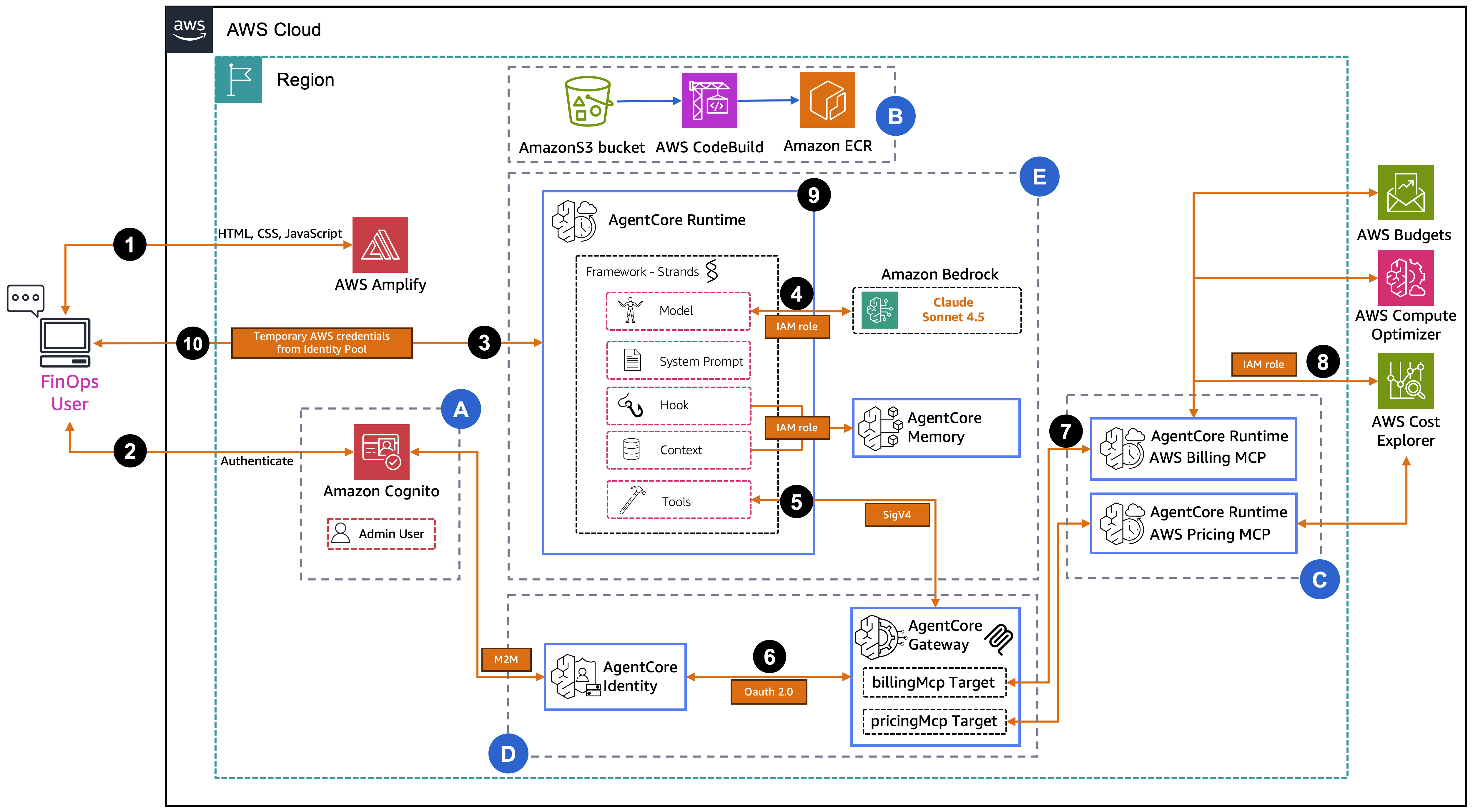
Section A – Authentication Infrastructure: First, the FinOpsAuthStack CDK stack deploys the authentication infrastructure (Amazon Cognito User Pool, Identity Pool, M2M client, resource server, and IAM roles). The User Pool handles user authentication, the M2M client enables machine-to-machine OAuth 2.0 flows between the Gateway and MCP runtimes, and the Identity Pool provides temporary AWS credentials that allow the frontend application to securely communicate with the AgentCore Runtime.
Section B – Image Build Infrastructure: Next, the FinOpsImageStack CDK stack deploys the container image build pipeline (Amazon S3 bucket, AWS CodeBuild projects, and Amazon Elastic Container Registry (Amazon ECR) repositories). CodeBuild clones the upstream AWS Labs MCP servers, applies a stdio-to-HTTP transformation (patching them for streamable-http transport), and builds AWS Graviton (ARM64) container images that are stored in Amazon ECR for use by the AgentCore Runtimes.
Section C – MCP Server Runtimes: The FinOpsMCPRuntimeStack CDK stack deploys two AgentCore Runtimes running the transformed AWS Labs MCP servers (Billing and Pricing). Each runtime is configured with JWT authorization using the AuthStack’s Amazon Cognito and has specific IAM permissions for the AWS APIs it accesses. For example, AWS Billing and Cost Management and AWS Compute Optimizer for the Billing runtime, and AWS Pricing for the Pricing runtime.
Section D – AgentCore Gateway: The FinOpsAgentCoreGatewayStack CDK stack deploys the AgentCore Gateway with AWS_IAM authorization, an OAuth credential provider (registered with AgentCore Identity using the AuthStack’s Cognito M2M credentials), and two MCP server targets pointing to the Billing and Pricing runtimes. The Gateway provides a unified tool discovery and invocation endpoint, handling OAuth token exchange for outbound authentication to the MCP runtimes.
Section E – Main Agent Runtime: Finally, the FinOpsAgentRuntimeStack CDK stack deploys the main AgentCore Runtime. It uses the Strands Agent Framework with Claude Sonnet 3.7 to orchestrate model invocations and tool calls through the Gateway. It also deploys AgentCore Memory for conversation history. The Runtime connects to the Gateway via IAM SigV4 authentication, discovers 24 tools from both MCP servers, and routes tool requests through the Gateway to retrieve cost, billing, and pricing data.
Using the web application
Now that you understand the architecture, let’s walk through a sample request flow. For example, what happens when a user asks “What are my AWS costs for January 2026?”
- The FinOps user accesses the web application hosted on AWS Amplify, which serves the frontend (HTML, CSS, JavaScript).
- The user authenticates with Amazon Cognito. Amazon Cognito validates the credentials and returns temporary AWS credentials from the Identity Pool.
- The frontend sends the user’s question to the AgentCore Runtime and uses the temporary AWS credentials to call
InvokeAgentRuntime. - The Strands agent inside the runtime sends the question along with 24 available tool definitions to Claude Sonnet 4.5 on Amazon Bedrock. The model analyzes the question and decides it needs to call the
billingMcp__cost_explorer - The agent receives the tool call request from the model and routes it to the AgentCore Gateway using IAM SigV4 authentication (
InvokeGateway). - The Gateway must authenticate with the MCP runtime. It contacts AgentCore Identity to obtain an OAuth 2.0 token using the registered credential provider (backed by Cognito M2M client credentials).
- The Gateway sends the MCP tools/call request with the OAuth token to the Billing MCP Runtime.
- The Billing MCP Runtime executes the actual API call to AWS Cost Explorer and requests cost and usage data for January 2026 using its execution role.
- The cost data flows back through the chain. Billing MCP Runtime responds to the Gateway, then the Gateway responds to the agent. The agent sends the cost data back to Amazon Bedrock, where Claude generates a natural language summary of the January 2026 costs.
- The formatted response is returned to the FinOps user, displaying the cost breakdown in the chat interface.
Prerequisites
Before you begin, verify that you have:
- An AWS account with appropriate permissions for the following services:
- Amazon Bedrock, AgentCore, Amazon ECR, AWS Lambda, Amazon Cognito, AWS CodeBuild, and IAM
- AWS Command Line Interface (AWS CLI) (v2.x) configured with credentials
- Node.js (v18 or later) and npm installed
- Python 3.13 or higher installed
- AWS CDK installed and bootstrapped in your AWS account
- Install:
npm install -g aws-cdk - Bootstrap:
cdk bootstrap aws://AWS-ACCOUNT-NUMBER/AWS-REGION
- Install:
Deploy the solution using AWS CDK
This solution deploys to the us-east-1 AWS Region. The deployment uses the AWS CDK to provision the infrastructure through three AWS CloudFormation stacks.
To deploy the solution:
Step 1: Clone the repository
Step 2: Set environment variables
Replace your-email@example.com with your email address to receive the temporary admin password:
Step 3: Deploy using CDK
The deployment script installs CDK dependencies, builds TypeScript code, bootstraps the CDK if needed, then deploys the three stacks in sequence. The process takes approximately 15-20 minutes. After completion, you will have five CloudFormation Stacks within your account.
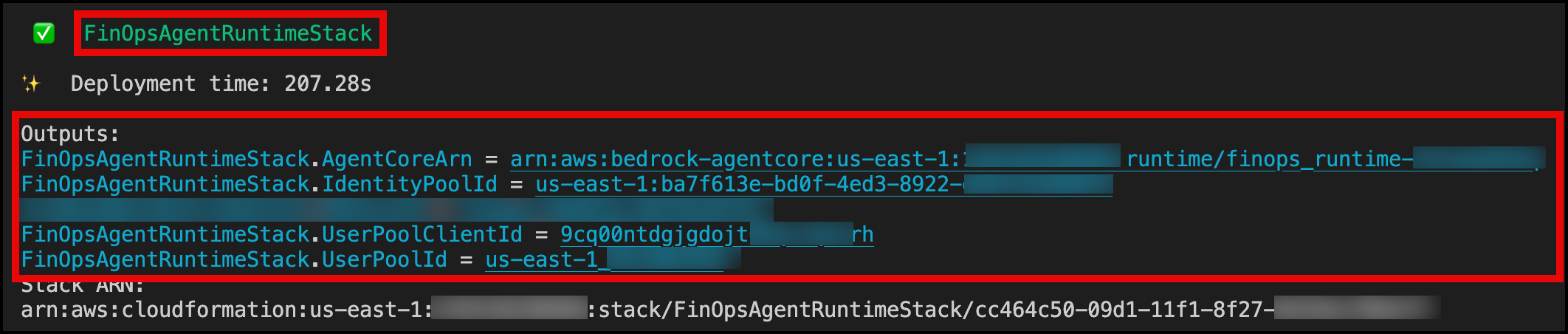
After deployment completes of the last CloudFormation Stack FinOpsAgentRuntimeStack, note the following outputs from the terminal:
User Pool Id– Cognito Identity Pool IDUser Pool Client Id– Cognito User Pool Client IDIdentity Pool Id– Identity Pool IDAgentCore ARN– AgentCore runtime ARN
The following screenshot shows you what the Outputs will look like.
You will receive an email with a temporary password for the admin user.
With the infrastructure deployed, you can now configure and use the web application to interact with your cost data.
Deploy the Amplify application
While we provide a sample frontend hosted on AWS Amplify, you can integrate the solution with your own custom frontend or connect it to your existing enterprise communication tools. The frontend application requires manual deployment using code from the GitHub repository:
- Download the frontend code
AWS-Amplify-Frontend.zipfrom GitHub. - Navigate to AWS Amplify in the AWS Management Console.
- Choose Deploy without Git provider.
- Upload the application .zip file.
- Wait for deployment to complete.
- Note the generated domain URL.
Understanding the MCP servers
MCP servers (AWS Billing and Cost Management MCP Server and AWS Pricing MCP Server) provide cost management and pricing tools. Each MCP server is designed to handle specific types of queries. The AWS Billing and Cost Management MCP Server focuses on historical spend analysis, budget monitoring, cost anomaly detection, and optimization recommendations using your actual AWS account data. The AWS Pricing MCP Server handles forward-looking queries by providing real-time pricing data from the AWS Price List API, enabling cost estimation for new workloads and infrastructure as code (IaC) projects.
Using the web application
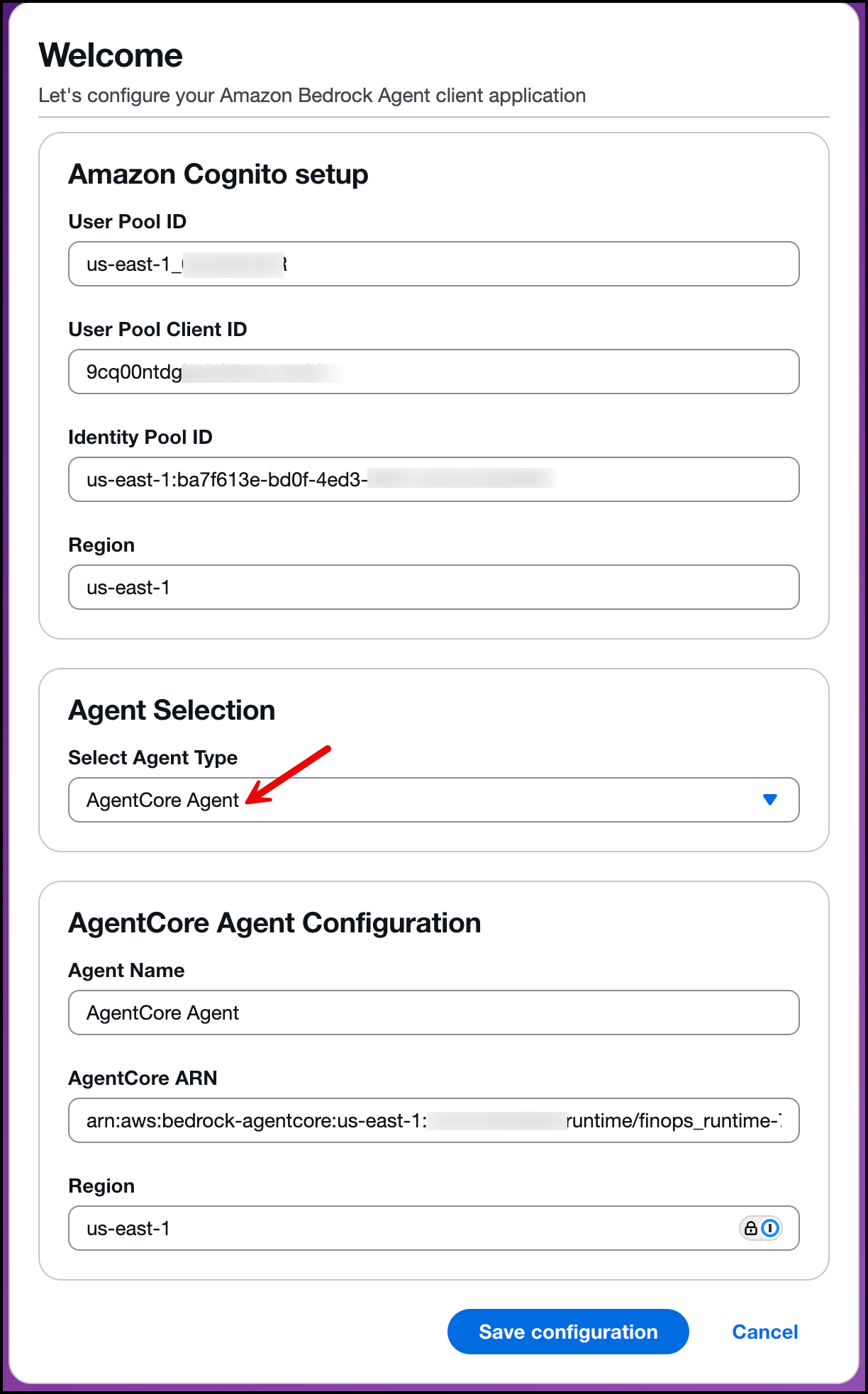
Open the URL provided after creating your AWS Amplify application. You will be prompted to enter your Amazon Cognito and AgentCore configuration details. Input the values from your stack output (collected earlier). From the Agent Type menu, select AgentCore Agent, enter the deployment Region, and choose an Agent Name (in this example, we use AgentCore Agent). Save the configuration as shown in the following image:
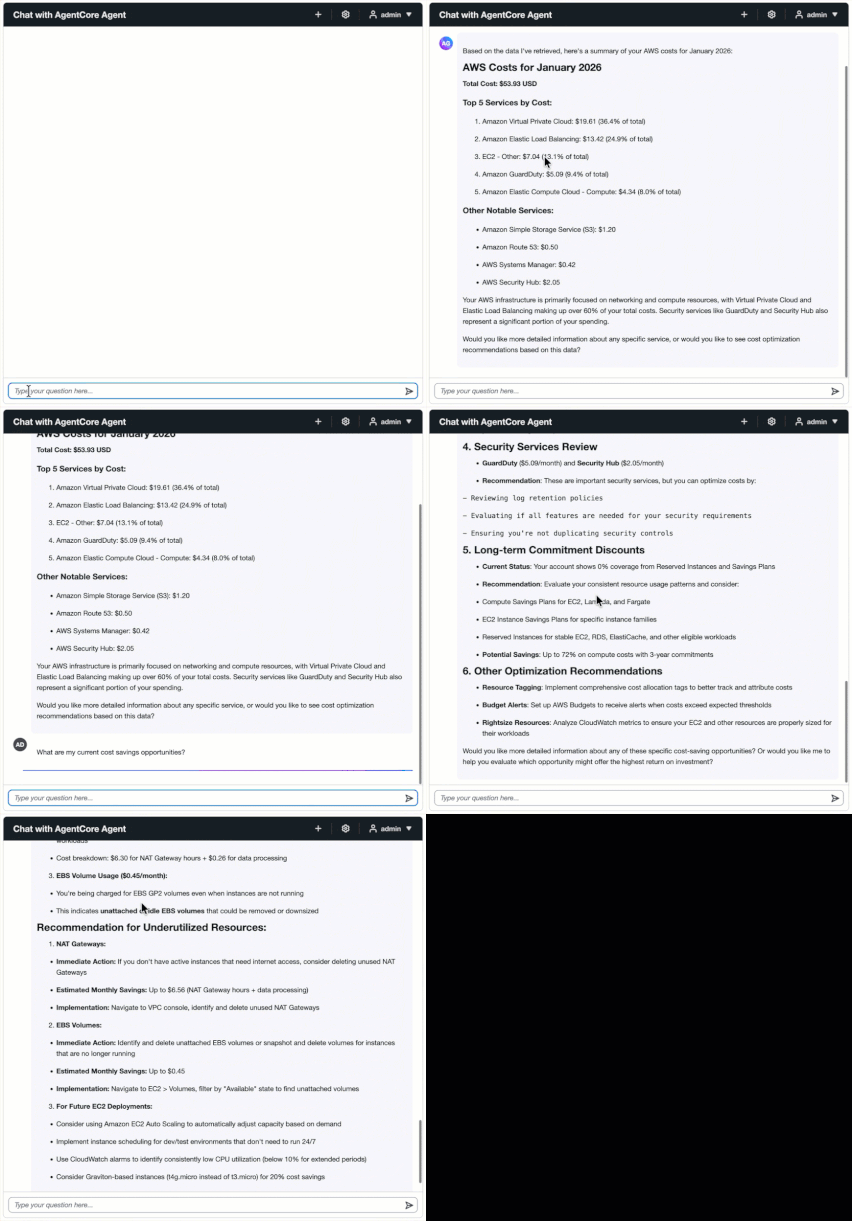
Sign in with your username and the temporary password sent to your email. At first sign-in, you will be asked to reset your password. After resetting your password, you can start asking questions. For example, ask “What are my AWS costs for January 2026?” When you ask about costs, the system retrieves data using the get_cost_and_usage tool to retrieve your cost data and provides a detailed breakdown by service.
Ask “What are my current cost savings opportunities?” The agent calls multiple tools to identify optimization opportunities:
get_rightsizing_recommendations– identifies over-provisioned or underutilized resourcesget_savings_plans_recommendations– suggests commitment-based discount plansget_compute_optimizer_recommendations– provides compute optimization insights
Next, ask “Can you give me details of any underutilized EC2 instances?” Because of conversation memory, follow-up questions maintain context from the previous question and provide detailed information about specific instances.
See this interactive session in action in the following video.
Here are additional sample queries to try:
- “Show me my costs by Region for the last 30 days”
- “What’s my cost forecast for the next 3 months?”
- “Compare pricing for t3.micro and t3.small instances”
- “Are there any cost anomalies in my account?”
- “What’s my free tier usage status?”
- “Show me my budgets and their current status”
- “What’s the pricing for Lambda in us-east-1?”
- “Get rightsizing recommendations for my EC2 instances”
Conversational memory in action
AgentCore Memory maintains context across multiple questions:
You: “What are my top 5 services by cost?” Agent: (Provides list of top 5 services)
You: “What about the second one?” Agent: (Remembers the previous list and provides details)
You: “How can I optimize it?” Agent: (Provides optimization recommendations)
See this interactive session in action in the following video.
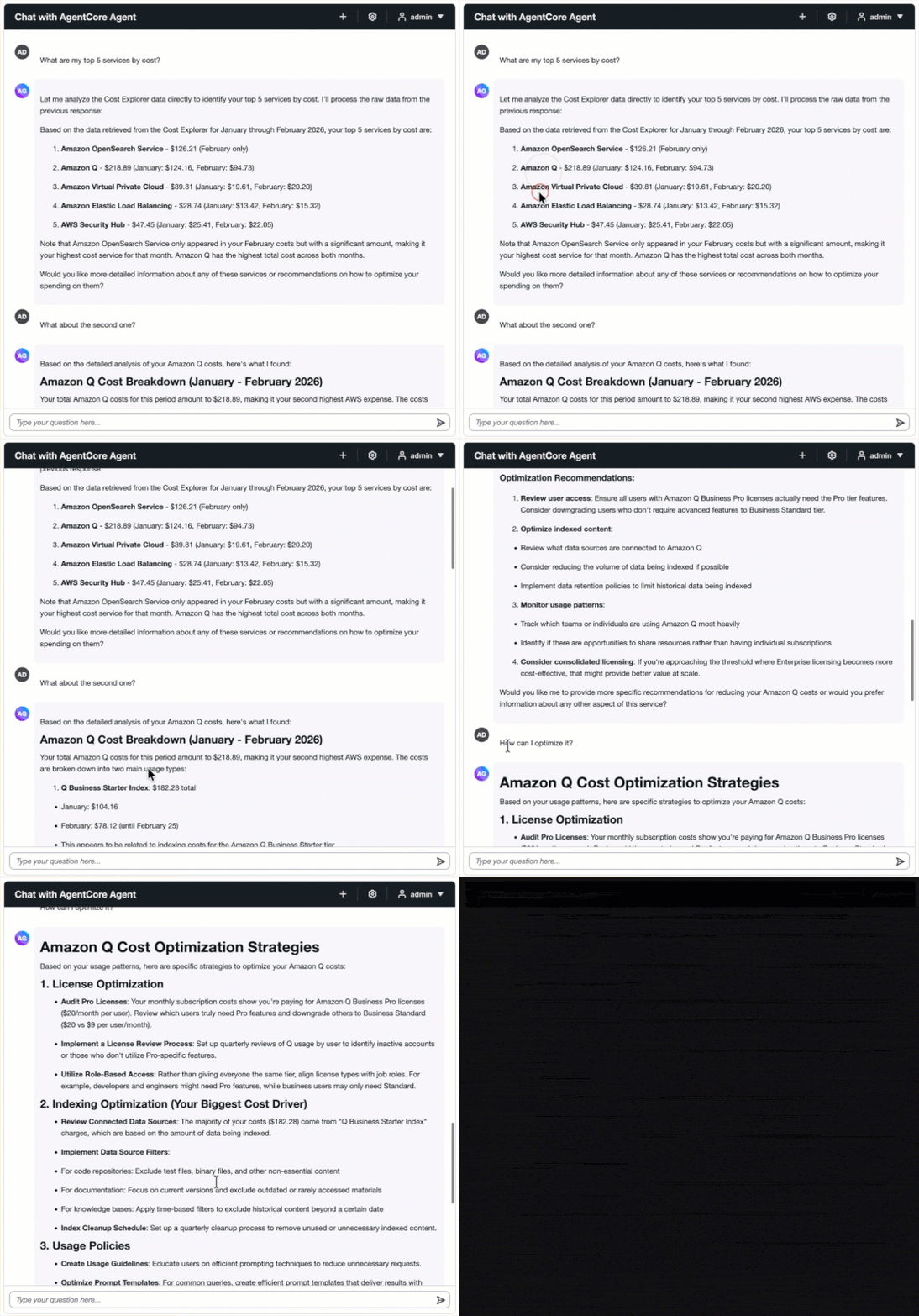
AgentCore Memory automatically manages conversation history, and the Strands session manager retrieves relevant context for each request.
Clean up
To avoid incurring future charges, delete the resources created by this solution.
Delete the stacks:
You will be asked with the following:
Are you sure you want to delete: FinOpsAgentRuntimeStack, FinOpsAgentCoreGatewayStack, FinOpsMCPRuntimeStack, FinOpsAuthStack, FinOpsImageStack (y/n)
Type y and this will delete the stacks.
Delete the Amplify application:
- In the Amplify console, in the left-hand navigation for your app, choose App settings, and select General settings.
- In the General settings section, choose Delete app.
Conclusion
In this post, we showed you how to build a FinOps agent using AgentCore. The agent provides natural language access to cost analysis and optimization recommendations by consolidating data from AWS Cost Explorer, AWS Budgets, and Compute Optimizer.
The architecture combines AgentCore Runtime, Gateway, Memory, Identity, the Strands Framework, MCP, and Claude Sonnet 4.5. You can extend this foundation to other use cases like DevOps automation, security analysis, and compliance monitoring. Get started today by visiting the GitHub repository.
About the authors

Salman Ahmed
Salman is a Senior Technical Account Manager at AWS. He specializes in guiding customers through the design, implementation, and support of AWS solutions. Combining his networking expertise with a drive to explore new technologies, he helps organizations successfully navigate their cloud journey. Outside of work, he enjoys photography, traveling, and watching his favorite sports teams.

Ravi Kumar
Ravi is a Senior Technical Account Manager in AWS Enterprise Support who helps customers in the travel and hospitality industry to streamline their cloud operations on AWS. He is a results-driven IT professional with over 20 years of experience. Ravi is passionate about generative AI and actively explores its applications in cloud computing. In his free time, Ravi enjoys creative activities like painting. He also likes playing cricket and traveling to new places.

Sergio Barraza
Sergio is a Senior Technical Account Manager at AWS, helping customers on designing and optimizing cloud solutions. With more than 25 years in software development, he guides customers through AWS services adoption. Outside of work, Sergio is a multi-instrument musician playing guitar, piano, and drums, and he also practices Wing Chun Kung Fu.
