Architect’s Guide to Agentic Design Patterns: The Next 10 Patterns for Production AI

21 Agentic Design Patterns Driving Enterprise AI
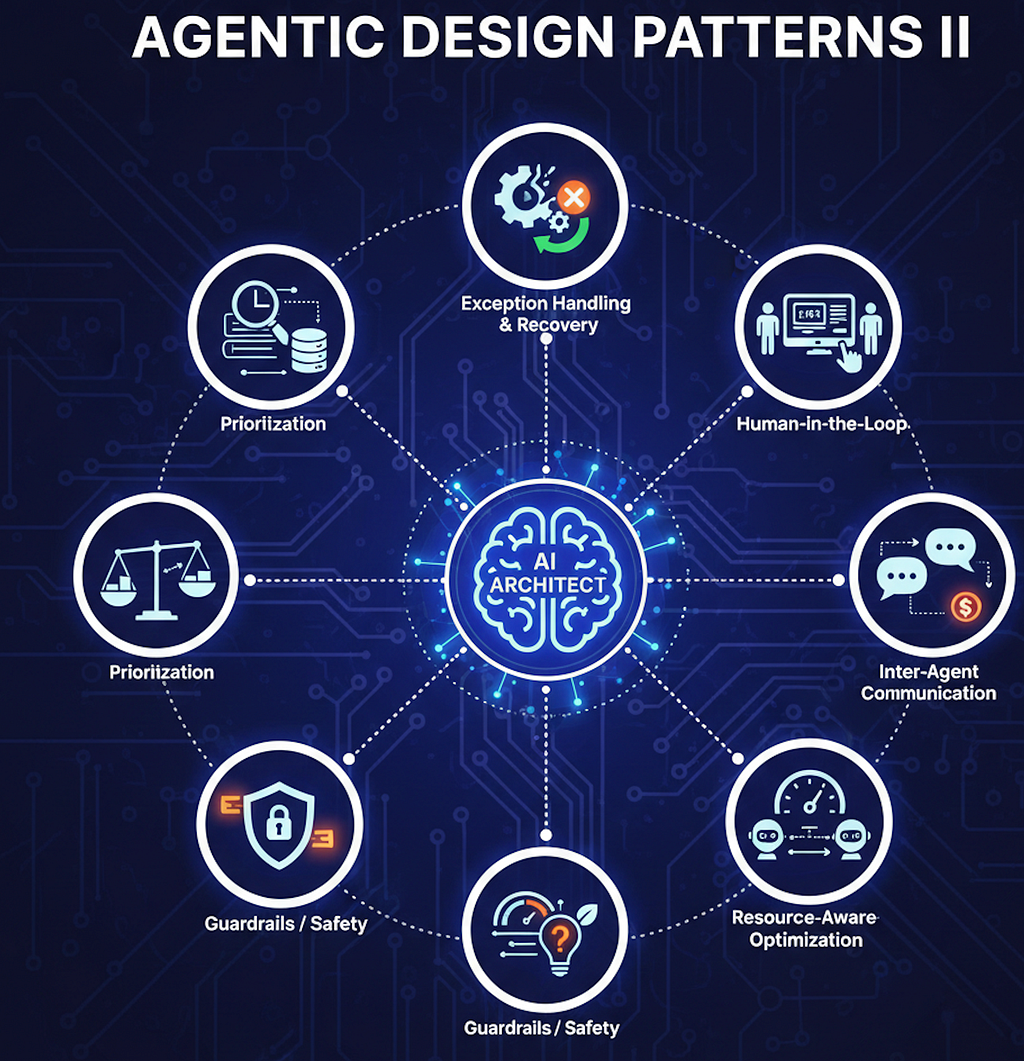
If you caught the first part of this series, you know we’ve already laid the groundwork by exploring several fundamental Agentic Design Patterns based on the excellent frameworks in Antonio Gulli’s book. If you missed it, you can catch up on first part here.
Architect’s Guide to Agentic Design Patterns
In this article, we’re picking up right where we left off to tackle the remaining patterns that turn simple bots into truly intelligent, goal-oriented systems. Let’s dive into the rest of the blueprint!
12. Exception Handling and Recovery Pattern
This pattern acts as a safety net for AI agents, ensuring they don’t simply “break” when things go wrong. Instead of stopping, the agent identifies the issue and attempts to fix it or gracefully step back. We can look at this process as a three-stage cycle:
- Detection – The agent monitors its own work and the environment. It looks for “red flags” like a 500 Internal Server Error from an API, a tool providing gibberish output, or a process taking way too long to finish.
- Handling – Once “red flag” is raised, the agent follows a response plan. It might Retry the action, switch to a Fallback (an alternative method), or Log the error so humans can see what happened later.
- Recovery – This is “fix” phase. The agent might perform a State Rollback (undoing the last action) or use Self-Correction mechanism to change its plan so it doesn’t hit the same wall twice.
Practical Applications 🏗️
- Web Scraping Agents
If a website blocks the agent, it detects the error and switches to a different proxy or slows down its request rate (Fallback/Retry). - Smart Home Automation
If a smart light fails to turn on, agent detects “offline” status and notifies owner or tries a different hub (Notification/Recovery). - Automated Trading
If a trade fails due to high volatility, the system performs a State Rollback to prevent financial loss and alerts a human operator (Escalation). - Customer Service Bots
If a bot can’t understand a complex request, it uses Graceful Degradation by providing a basic FAQ or escalating to a human agent.
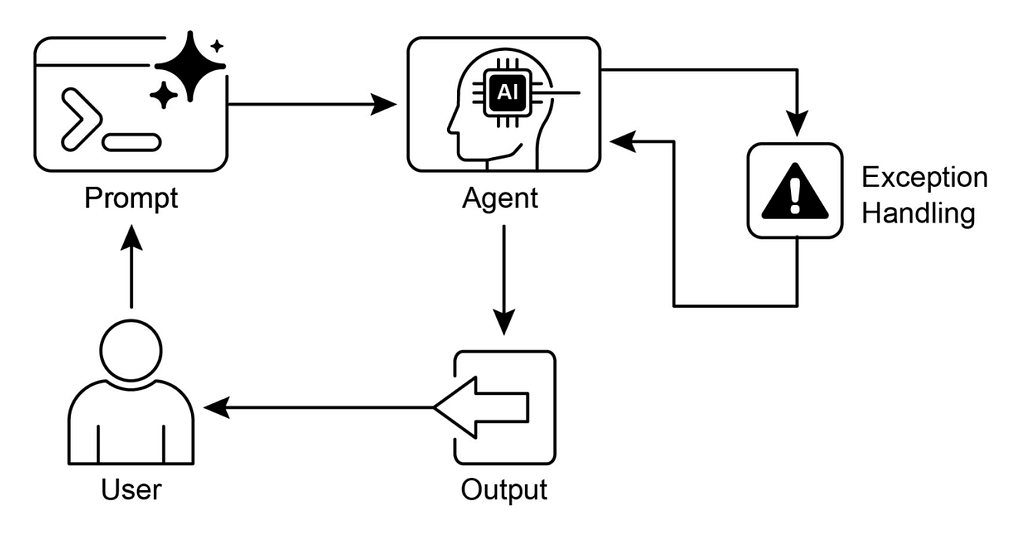
Implementating Exception Handling and Recovery with Google ADK
In a SequentialAgent workflow, Exception Handling and Recovery pattern ensures that if one “link” in the chain breaks, the entire process doesn’t just crash. Instead, the system detects the failure and triggers a predefined recovery path — like asking for a different payment method instead of canceling the whole trip.
The output of Booking Agent Ex: a reserved room is passed to Payment Agent. If the Payment Agent hits an exception (like a declined card), pattern kicks in to manage the state and attempt a fix.
from google_adk import LlmAgent, SequentialAgent, exceptions

# Define our specialist agents
booking_agent = LlmAgent(name="HotelBooker",
                  instructions="Reserve the hotel room.")
payment_agent = LlmAgent(name="PaymentProcessor",
                   instructions="Charge the user's card.")

# Define a recovery function for payment failures
def handle_payment_failure(error, context):
    print(f"⚠️ Error Detected: {error}")
    # Instead of stopping, we 'recover' by asking for a new card
    return "The previous card was declined. Please provide a different payment method to keep your reservation."

# Implement pattern within workflow
try:
    # standard sequential flow
    workflow = SequentialAgent(agents=[booking_agent, payment_agent])
    result = workflow.run("Book a room in NYC and charge my saved Visa.")
except exceptions.ToolExecutionError as e:
    # RECOVERY STAGE: If payment_agent fails, we trigger our recovery logic
    recovery_instruction = handle_payment_failure(e, result.context)
    # We could then re-run the payment_agent with the new info
    print(f"Adjustment: {recovery_instruction}")
- If it’s a “Transient Error” (like a 500 timeout), the system can automatically try again.
- If primary payment gateway is down, agent switches to a secondary one. Ex: switching from Stripe to PayPal.
- If the agent can’t fix it after 3 tries, it notifies a human operator.
Summary — Exception Handling and Recovery Pattern 📋
- What ❓
A structured approach to identifying, managing, and recovering from errors during agent operation. It involves detecting issues (like API timeouts or malformed data), executing a response plan (like retries or fallbacks), and restoring the system to a stable state. - Why 💡
Agents operate in “noisy” real-world environments where tools fail, networks lag, and LLMs occasionally produce nonsense. This pattern prevents a single error from cascading into a total system failure, allowing the agent to be more reliable and autonomous. - Rule of Thumb 👍
Use this whenever an agent interacts with external tools, APIs, or complex data processing pipelines. It is essential for “long-running” tasks where you cannot afford for the entire process to restart due to a transient error.
Pros
- The system can “self-heal” from minor issues like temporary network outages.
- Fewer “crashes” mean humans don’t have to manually restart processes or fix data mid-workflow.
- Allows for “State Rollbacks,” ensuring that if a transaction fails halfway through, the system doesn’t leave data in a corrupted state.
Cons
- Writing recovery logic for every possible error (404, 500, timeouts, etc.) can significantly increase the amount of code.
- Retrying a failed API call 3 times adds time to the user’s wait.
- If an agent is “too good” at recovering, it might hide a serious underlying bug that actually needs a developer’s attention.
13. Human-in-the-Loop (HITL) Pattern
Let’s explore the Human-in-the-Loop (HITL) Pattern together. In the world of AI agents, this pattern is the bridge between autonomous machine logic and human judgment. It ensures that for high-stakes or complex decisions, a human remains part of the process to provide oversight, guidance, or final approval.
The HITL process typically follows a cycle where the agent and human collaborate to reach a successful outcome:
- Task Initiation – The agent begins a task, such as reviewing a legal contract or analyzing a financial transaction.
- Trigger Point – The agent reaches a stage requiring human input. This could be due to an Escalation Policy
Ex: “Always ask a human if the refund is over $500” or low confidence in its own decision. - Human Intervention – A human reviews the agent’s work. This might involve Decision Augmentation, where the agent provides options and human picks the best one.
- Feedback Integration – The human provides Feedback for Learning. The agent doesn’t just take the answer; it “learns” from the correction to improve future performance.
- Task Completion – Once the human approves or adjusts the action, the agent finalizes the process.
Practical Applications & Use Cases 🏗️
- Legal Document Review
The agent flags potential risks or anomalies; the lawyer makes the final legal determination. - Financial Fraud Detection
The agent identifies suspicious patterns; a fraud analyst confirms if it’s a real threat or a false alarm. - Autonomous Driving
The car handles standard navigation, but a human must take over in complex or “edge case” traffic situations. - Content Moderation
The agent filters obvious spam, but humans review borderline cases involving nuance or cultural context. - Generative AI Refinement
Humans rate or edit AI-generated text to ensure it meets specific brand tones or safety standards.
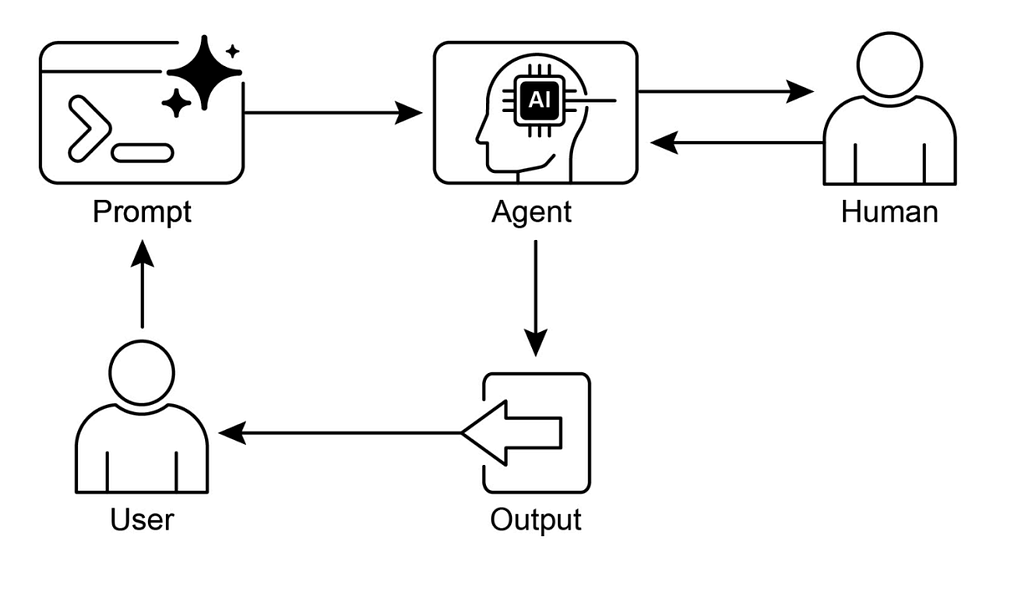
Implementating HITL pattern with Google ADK
In a technical support context, the agent handles the routine troubleshooting but “raises its hand” when a problem becomes too technical or the user becomes frustrated.
In Google ADK, we implement this by creating a tool that serves as an Escalation Point. When the agent calls this tool, it pauses its autonomous execution and waits for a human signal.
from google_adk import LlmAgent, Tool

# Define Human Escalation Tool
# This tool acts as the bridge to a human operator.
def escalate_to_human(issue_summary: str, priority: str):
    """Call this tool when technical issues are too complex or
    the user is highly frustrated."""
    # In a real app, this would send a Slack/Email alert or
    # open a ticket in a dashboard.
    return f"SUCCESS: Issue '{issue_summary}' escalated to a human expert (Priority: {priority})."

escalation_tool = Tool.from_function(escalate_to_human)

# Define Support Agent
# We give it clear instructions on WHEN to stop being autonomous.
support_agent = LlmAgent(
    name="TechSupportPro",
    instructions="""You are a technical support assistant.
    1. Try to solve basic booking errors (wrong dates, name typos).
    2. If the error is a 'System Database Failure' or the user is angry,
       use the escalate_to_human tool immediately.
    3. Never guess on security-related issues.""",
    tools=[escalation_tool]
)

# Sample Interaction

user_input = "The system says 'Error 500: Database Corrupted'. Fix it now!"
response = support_agent.run(user_input)
- It prevents AI from making “hallucinated” promises (ex: promising a full refund it isn’t authorized to give).
- The agent does the “boring” work (gathering logs, summarizing the issue), so the human can focus only on the final, critical decision.
- You can hard-code rules into the tool or the prompt to ensure the agent must hand off high-priority tickets.
Summary — Human-in-the-Loop Pattern: The Essentials 📑
- What ❓
The recognition that AI often lacks nuanced judgment, ethical reasoning, and common sense. Fully autonomous systems in high-stakes areas carry risks of severe financial or safety consequences because they cannot handle ambiguity like humans can. - Why 💡
It creates a symbiotic partnership. The AI handles the massive data processing and “heavy lifting,” while humans provide validation and intervention. This ensures AI actions stay aligned with human values and improves the model over time through a continuous feedback loop. - Rule of Thumb 👍
Use HITL for high-stakes domains (healthcare, finance, law) where errors are costly. It is essential for tasks requiring nuance (content moderation) or when you need human-labeled data to refine a model’s quality.
Pros
- Combining human intuition with AI speed leads to results that are more accurate than either could achieve alone.
- Having a human “sign off” on decisions makes the system more transparent and ethically sound.
- Human corrections act as high-quality training data, allowing the AI to “level up” its performance over time.
Cons
- The system is only as fast as the human reviewer. This can create “traffic jams” in high-volume workflows.
- Human labor is significantly more expensive than API tokens or server time.
- The system might inherit the subjective prejudices or errors of the human reviewers if they aren’t properly trained.
14. Knowledge Retrieval Pattern
This pattern commonly known as Retrieval-Augmented Generation (RAG). 📚 This pattern allows an agent to look up specific information from a reliable source before generating an answer, ensuring that its responses are grounded in facts rather than just its training data.
Think of RAG as an “open-book exam” for AI. Instead of guessing, it follows this sequence:
- Query Input: The user asks a question
Ex “What is our company’s policy on remote work?” - Information Retrieval: The system searches a specific database or document set for the most relevant “chunks” of text related to that question.
- Context Augmentation: The retrieved text is added to the user’s original prompt as “context”.
- Grounded Generation: The LLM reads the context and the question together to produce an answer that is strictly based on the provided documents.
Practical Applications & Use Cases
- Enterprise Search & Q&A
Employees can ask questions about internal handbooks or wikis and get accurate, cited answers. - Customer Support
Helpdesks use RAG to pull the latest troubleshooting steps from technical manuals to assist users. - Personalized Recommendations
By retrieving a user’s past preferences or profile data, the agent can suggest content tailored to them. - News Summarization
The agent retrieves the latest headlines from a live feed to summarize events that happened after its training cutoff.
Let’s explore the fundamental building blocks that allow AI agents to “understand” and retrieve information. These concepts form the backbone of patterns like Knowledge Retrieval (RAG).
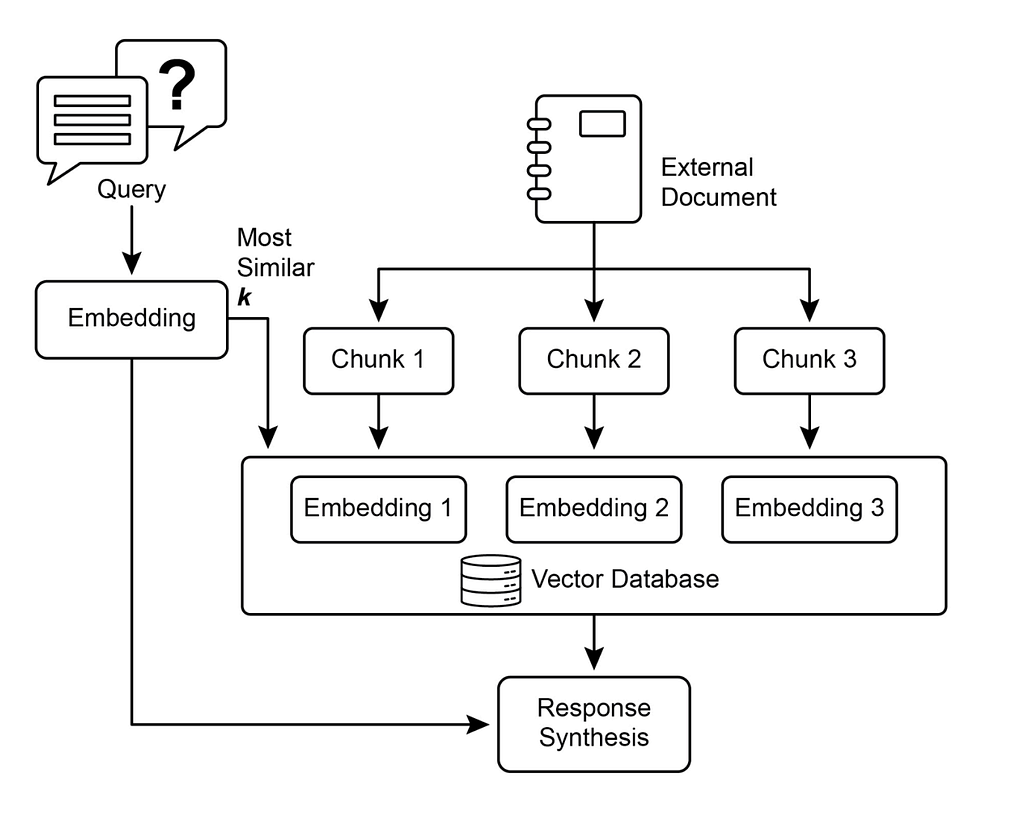
- Embeddings 🔢
The process of turning text into long lists of numbers (vectors) that represent the meaning of the words. - Chunking ✂️
Breaking long documents into smaller, meaningful pieces so the AI can find specific sections easily. - Semantic Similarity 🧠
Measuring how related two pieces of text are based on their meaning, rather than just matching keywords. - Vector Databases 🗄️
Specialized storage systems designed to hold and search through millions of embeddings quickly.
While basic RAG is great for simple lookups, newer architectures have emerged to handle more complex reasoning and massive, interconnected data. Here is an overview of the most prominent RAG variants:
- Standard RAG
Retrieves text “chunks” based on semantic similarity.
Simple Q&A where the answer is contained in one or two paragraphs. - GraphRAG
Combines text with a Knowledge Graph. It maps relationships between entities (People, Places, Concepts).
High-level “bird’s-eye view” questions
Ex: “What are the main themes in these 1,000 documents?” - Agentic RAG
Uses an AI agent to decide how to search. It can plan, use multiple tools, and critique its own findings.
Multi-step research where the agent must “think” and reformulate queries if the first search fails. - Corrective RAG (CRAG)
Includes a “Self-Correction” step to evaluate if the retrieved info is actually relevant before answering.
High-precision environments where “hallucinating” on bad search results is not an option.
No matter the type, RAG systems face a few persistent “pain points”:
- Retrieval Quality: If the search finds wrong documents (“garbage in”), the answer will be wrong (“garbage out”). 🗑
- Context Window Limits: Trying to stuff too many retrieved documents into the prompt can confuse the model or exceed its memory. 🧠
- Data Freshness: Keeping the vector database updated as new information arrives can be technically difficult. 🔄
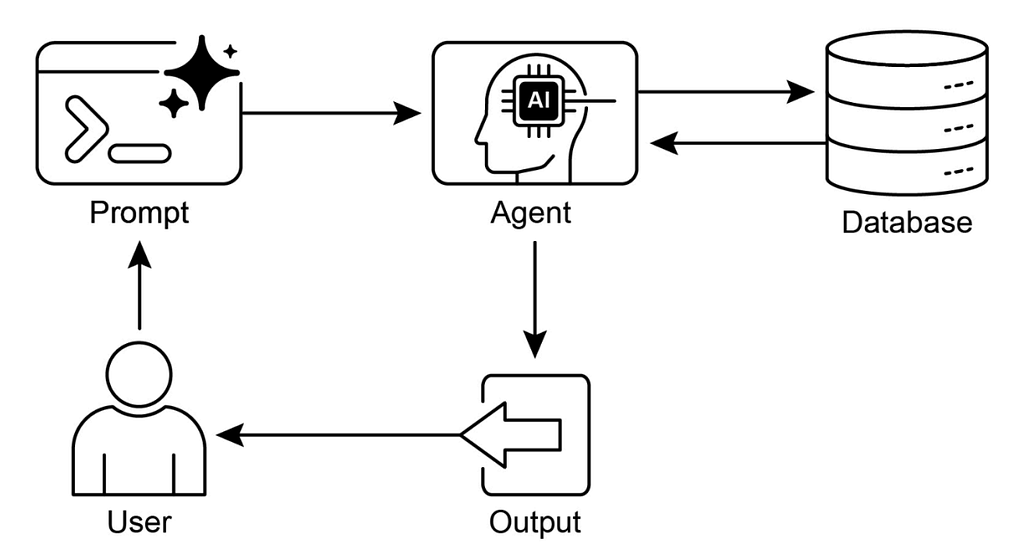
Implementating RAG pattern with Google ADK
The core of this pattern is providing an agent with “source of truth” so it doesn’t have to rely on its internal training data, which might be outdated or incorrect regarding specific company policies.
In the ADK, this is often handled by a memory service that connects to a RAG Corpus in Google Cloud Vertex AI.
Corpus Selection – The agent is connected to a specific RagCorpus containing your booking policy documents.
Semantic Search – When a user asks a question, the VertexAiRagMemoryService converts the query into an embedding and searches the corpus.
Filtering & Ranking:
SIMILARITY_TOP_K 🔝 — Determines how many relevant “chunks” of text to retrieve (e.g., the top 3 matches).
VECTOR_DISTANCE_THRESHOLD – Sets the strictness of the match. A lower distance means the retrieved text must be more semantically similar to the query.
Augmentation – The agent receives these chunks as context and uses them to answer the user’s specific question.
from google_adk import LlmAgent
from google_adk.memory import VertexAiRagMemoryService

# Setup RAG Memory Service
# This connects to a pre-created RAG Corpus in Vertex AI
rag_memory = VertexAiRagMemoryService(
    project_id="your-project-id",
    location="us-central1",
    rag_corpus_id="your-booking-policy-corpus-id",
    # Retrieve the top 3 most relevant policy snippets
    similarity_top_k=3,
    # Ensure snippets are highly relevant (lower value = more strict)
    vector_distance_threshold=0.35
)

# Define Agent with RAG capabilities
policy_agent = LlmAgent(
    name="BookingPolicyAssistant",
    instructions="""You are an expert on hotel booking policies.
    Use the provided context from the RAG corpus to answer questions.
    If the answer isn't in the context, say you don't know.""",
    memory=rag_memory
)

# Sample Query

user_input = "What is the cancellation policy for premium suites?"
response = policy_agent.run(user_input)
Relationship between TOP_K and THRESHOLD is crucial.
If your SIMILARITY_TOP_K is high, the agent gets more information but risks getting “noisy” or irrelevant data.
If your VECTOR_DISTANCE_THRESHOLD is too low (too strict), the agent might not find any information at all if the user’s wording is slightly different from the document.
Summary — Knowledge Retrieval (RAG) Pattern 📖
- What ❓
LLMs are limited by static training data. They lack real-time information or private, domain-specific context, leading to outdated or inaccurate responses for specialized tasks. - Why 💡
RAG connects the LLM to external knowledge sources. It retrieves relevant snippets and appends them to the prompt, grounding the response in verifiable data. It transforms the AI into an “open-book” reasoner. - Rule of Thumb 👍
Use RAG when the task requires up-to-date or proprietary information not in the original training data. It’s ideal for internal Q&A systems and fact-based customer support.
Pros
- Because the model is looking at specific documents, it is much less likely to “make things up.”
- You can easily cite the specific source or document where the information came from.
- You can update the knowledge base (the documents) without having to retrain the expensive AI model.
Cons
- If the search engine finds the wrong documents, the AI will give a “confidently wrong” answer based on that bad context.
- Adding a search step before generating the text makes the overall response time longer.
- Managing “chunking,” “embeddings,” and “vector databases” adds significant engineering overhead.
15. Inter-Agent Communication Pattern
is a foundational structure in multi-agent systems where multiple specialized AI agents work together to solve complex problems that a single agent could not handle alone.
Instead of a single “do-it-all” model, this pattern follows a collaborative cycle:
- Specialization – The system is designed with multiple agents, each specialized for a specific task (e.g., one for flight search, another for hotel booking).
- Task Delegation – A primary application or “manager” agent defines the overall goal and breaks it down, assigning specific sub-tasks to the appropriate specialized agents.
- Information Exchange – Agents communicate with each other or the main application. This can be independent work or direct interaction where one agent’s output becomes another’s input.
- Tool Integration – Agents use specialized tools (APIs, functions, or data stores) to gather real-world data needed by the other agents in the system.
- Synthesis & Delivery – The outputs from various agents are compiled into a seamless, unified result for the user.
Ex: Travel Booking App ✈️🏨
Imagine a travel application powered by multiple agents:
- Agent A (Flight Specialist): Searches for the best flight options based on the user’s dates.
- Agent B (Hotel Specialist): Finds available hotels that match the user’s budget and proximity to the airport.
- Agent C (Activities Specialist): Suggests local attractions based on the user’s interests.
These agents communicate to ensure the flight arrival time aligns with the hotel check-in and the suggested activities.
Practical Applications & Use Cases
- Multi-Framework Collaboration
Allows different specialized agents (e.g., a code agent and a security agent) to work across different platforms to ensure a prototype is both functional and secure. - Automated Workflow Orchestration
Streamlines complex business processes, such as ecommerce order fulfillment, where agents automatically update inventory, process payments, and send shipping notifications. - Dynamic Information Retrieval
One agent might use a sentiment analysis tool as a “skill” to gauge a user’s satisfaction during an interaction, passing that insight to a customer service agent to adjust its tone.
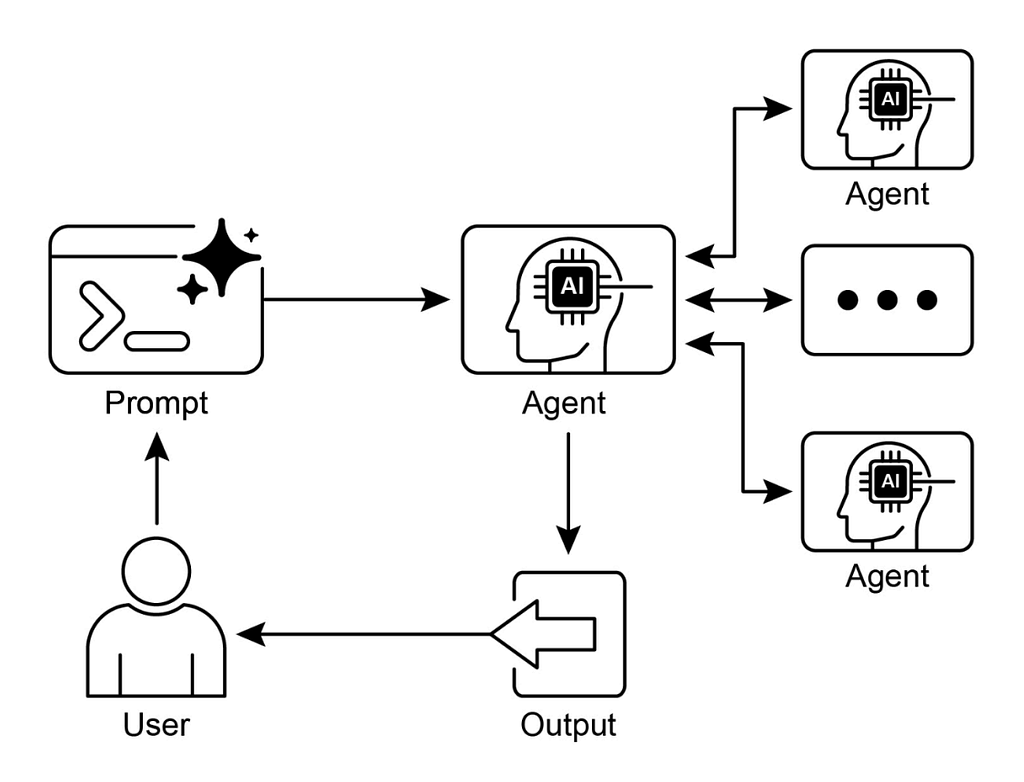
Agent-to-Agent (A2A) Protocol is a standardized communication language that allows AI agents to work together like human colleagues, even if they were built by different companies using different technologies.
Let’s break down the core concepts you mentioned using a real-world example: Corporate Travel Assistant.
- A2A Client
The agent that starts the request. It acts as “manager” delegating work.
Your Personal Assistant Agent needs to book a trip. It decides it can’t book flights itself, so it acts as a Client. - A2A Server
The “specialist” agent that receives the request and does the actual work.
A specialized Flight Booking Agent (owned by an airline) acts as the Server to process the flight search.
Discovery and Identity
Before agents can talk, they need to find each other and understand what they are capable of.
- Agent Card
Think of this as a digital business card or LinkedIn profile in JSON format. It lists the agent’s name, its specific skills.
Ex: “international flight booking”, its endpoint URL, and how it wants to be authenticated. - Agent Discovery
This is the process of the Client finding the Server’s Agent Card. Often, this happens by looking at a “well-known” URL like example.com/.well-known/agent.json or using a central Agent Registry.
Communications and Tasks
In A2A, work is structured as a Task.
- Task Object
Instead of just sending a message, Client creates a “Task” with unique ID. - Lifecycle
The task moves through states: submitted ➡️ working ➡️ input-required if the agent needs to ask you a question ➡️ completed.
Ex: Your assistant sends a task: “Find a flight to Tokyo”. The flight agent moves the task to working. If it needs your passport number, it moves to input-required.
Interaction Mechanisms
How do the agents stay in sync while the work is happening?
- Synchronous Request/Response
Client asks a quick question, and Server answers immediately. (Good for simple things, like “What is your version number?”) - Asynchronous Polling
Client sends a task and then periodically “checks in”
Ex: every 30 seconds by asking, “Is the flight search done yet?” - Streaming (Server-Sent Events — SSE)
Server keeps a “live wire” open to the Client. As it finds flight options, it “streams” them one by one so Client can show them to you in real-time. - Push Notifications (Webhooks)
For tasks that take a long time (like waiting for visa approval), Server sends “ping” to Client’s URL only when the status changes.
Security: “Trust” Layer
Since agents are exchanging sensitive data (like your travel preferences or credit card tokens), security is mandatory.
- Mutual TLS (mTLS)
Standard encryption (HTTPS) only proves the Server is who they say they are. In A2A, mTLS requires both Client and Server to show “digital ID cards” (certificates) to each other. This ensures that only authorized agents can join the conversation. - Principle of Least Privilege
The Agent Card defines exactly what the agent is allowed to do, preventing it from accessing data it doesn’t need.
Implementating A2A pattern with Google ADK
Inter-Agent Communication Pattern (specifically Agent-to-Agent or A2A) allows specialized agents to collaborate by treating each other as services. Instead of one giant agent trying to learn every API, we build a “team” where a TravelPlannerAgent orchestrates a FlightAgent and a HotelAgent.
In Google ADK, this is powered by the A2A Protocol, where agents exchange AgentCards to discover capabilities and use Tasks to track work.
1. Define Specialized Agents
Each agent needs an AgentCard (its identity) and an AgentSkill (its capability). They use MCP to talk to external booking engines.
from google_adk import A2AAgent, AgentCard, AgentSkill, McpTool

# --- Flight Agent Setup ---
flight_mcp = McpTool(service_url="https://api.flights.com/mcp")
flight_skill = AgentSkill(
    name="book_flight",
    description="Search and book commercial flights",
    tools=[flight_mcp]
)

flight_agent = A2AAgent(
    name="FlightBooker",
    card=AgentCard(id="flight-agent-001", description="Expert at air travel"),
    skills=[flight_skill],
    port=8001  # Hosted on its own port
)

# --- Hotel Agent Setup ---
hotel_mcp = McpTool(service_url="https://api.hotels.com/mcp")
hotel_skill = AgentSkill(
    name="book_hotel",
    description="Reserve hotel rooms and suites",
    tools=[hotel_mcp]
)

hotel_agent = A2AAgent(
    name="HotelBooker",
    card=AgentCard(id="hotel-agent-002", description="Expert at accommodations"),
    skills=[hotel_skill],
    port=8002  # Hosted on a different port
)
2. Orchestrator (TravelPlannerAgent)
Orchestrator doesn’t have booking tools; instead, it has “Agent Tools” that allow it to send tasks to the other two.
from google_adk import OrchestratorAgent, A2AClient

# Orchestrator acts as an A2A Client to connect to the others
travel_planner = OrchestratorAgent(
    name="TravelPlanner",
    instructions="Coordinate flights and hotels to create a seamless itinerary."
)

# Register the remote agents via their AgentCard endpoints
travel_planner.register_remote_agent("http://localhost:8001/agent.json")
travel_planner.register_remote_agent("http://localhost:8002/agent.json")
3. Execution via A2A Tasks
When TravelPlanner needs to book something, it uses Tasks/Send mechanism. This is asynchronous: it sends request and monitors status.
# Conceptual A2A Task Flow
task_response = travel_planner.send_task(
    target_agent_id="flight-agent-001",
    payload={"action": "book", "from": "SFO", "to": "LHR", "date": "2026-05-10"}
)

print(f"Task ID: {task_response.task_id} | Status: {task_response.status}")
Summary — Inter-Agent Communication (A2A)
- What ❓
Individual agents often live in “silos.” They lack a common language to talk to agents built on different frameworks, making it hard to solve multi-faceted problems that require combining specialized skills. - Why 💡
The A2A protocol creates an open, HTTP-based standard for interoperability. Tools like the Agent Card allow agents to discover each other’s skills and delegate tasks regardless of the technology they use. - Rule of Thumb 👍
Use this when you need two or more agents to collaborate, particularly across different frameworks (like Google ADK and LangGraph). It’s the go-to for modular workflows and dynamic skill discovery.
Pros
- You can swap out a “Flight Agent” for a better one without breaking your “Hotel Agent” or the main “Orchestrator”.
- Each agent can be optimized for one specific job (coding, research, math) using the best model or tool for that task.
- It’s easier to add new features by simply creating and “registering” a new specialized agent in the network.
Cons
- Every time agents talk to each other over a network, it adds latency (wait time) to the final response.
- It’s harder to track down where an error happened when information is passing through four different agents.
- Ensuring all agents stay “in sync” regarding the user’s state Ex: if the user changes their mind about the trip dates requires careful state management.
16. Resource-Aware Optimization Pattern
Resource-Aware Optimization Pattern acts as a “smart thermostat” for AI agents. Instead of always using the most powerful (and expensive) model for every task, this pattern allows the agent to assess available resources — like money, time, and power — and adjust its behavior accordingly.
It works as:
- Resource Monitoring – The system constantly tracks current constraints, such as API budget, battery life, or maximum allowable latency.
- Task Analysis – The agent evaluates the upcoming task’s complexity. Does this need a “PhD-level” model, or can a smaller, faster model handle it?
- Model/Tool Selection – Based on monitoring and analysis, agent selects the best tool for job. It might choose a “small” model for a simple summary and a “large” model for complex reasoning.
- Execution & Feedback – Agent performs task and checks if resource usage stayed within limits. If a task fails or takes too long, it can “scale up” for the next attempt.
Practical Applications & Use Cases
- Cost-Optimized LLM Usage
Using a cheaper model (like Gemini Flash) for routine data extraction and only calling a flagship model (like Gemini Pro) for final creative review. - Latency-Sensitive Operations
In a real-time chat, the agent might skip a complex “thinking” step to ensure the user gets a response in under one second. - Adaptive Task Allocation
Routing simple customer queries to an automated bot while reserving human agents (a high-cost resource) for complex emotional support. - Service Reliability Fallback
If a primary high-performance API is hitting rate limits, the agent automatically switches to a local, smaller model to keep the service running. - Energy & Data Management
On mobile devices, the agent might limit the number of search queries or use lower-resolution data processing to save battery and data.
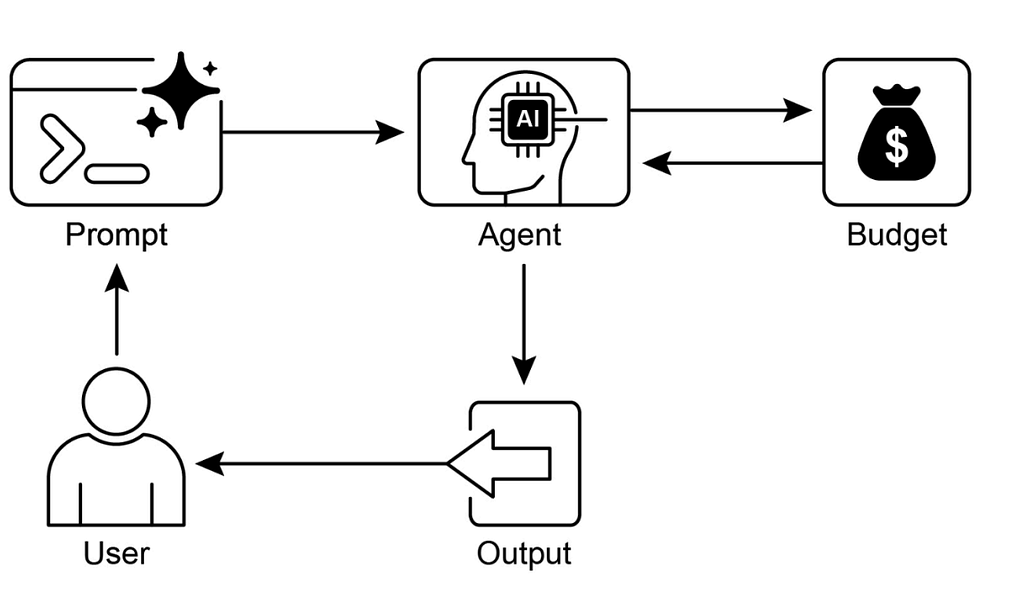
Implementating Resource Aware Optimization pattern
In Google ADK, we can implement this using Router Agent. This agent acts as a traffic controller, assessing incoming request and directing it to the most appropriate “resource” (model).
In this snippet, we set up a hierarchical structure where a high-capacity model plans the trip, but a high-speed model handles the data fetching.
from google_adk import RouterAgent, LlmAgent, ModelType

# Define our "Specialists" with different resource profiles
# Gemini Pro for heavy reasoning (Higher Cost/Intelligence)
planner_agent = LlmAgent(
    name="ChiefPlanner",
    model=ModelType.GEMINI_PRO,
    instructions="You are a high-level architect. Create complex, multi-day itineraries."
)

# Gemini Flash for quick tool execution (Lower Cost/Higher Speed)
executor_agent = LlmAgent(
    name="QuickFetch",
    model=ModelType.GEMINI_FLASH,
    instructions="You are a fast data retriever. Fetch prices and availability quickly."
)

# Define Routing Logic
def route_task(user_input):
    # If the input involves planning, logical breakdown, or multi-step reasoning
    if any(word in user_input.lower() for word in ["plan", "itinerary", "organize"]):
        return "ChiefPlanner"
    # If it's just a simple lookup or data fetch
    return "QuickFetch"

# Create Resource-Aware Router
router = RouterAgent(
    name="TravelRouter",
    agents={
        "ChiefPlanner": planner_agent,
        "QuickFetch": executor_agent
    },
    routing_logic=route_task
)

# Example Execution
response = router.run("Check the price for a flight to Tokyo tomorrow.") # Routes to Flash
- You avoid spending “Pro” credits on “Flash” tasks.
- Simple tasks finish in milliseconds rather than seconds.
- Your system can handle more simultaneous users because you aren’t bottlenecking everything through your most complex model.
Summary — Resource-Aware Optimization Pattern
- What ❓
The management of computational, temporal, and financial resources. It addresses the trade-off between output quality and the cost/speed of producing it, preventing systems from being unnecessarily expensive or slow. - Why 💡
By using a Router Agent to classify task complexity, the system can send simple tasks to inexpensive models and complex ones to powerful LLMs. This ensures the system stays within budget and performance targets without sacrificing intelligence when it’s needed most. - Rule of Thumb 👍
Implement this when you have strict API budgets, need low latency, or are deploying on hardware with limited power (like edge devices). It’s essential for multi-step workflows where tasks vary in difficulty.
Pros
- Significantly reduces operational expenses by not “over-paying” for simple reasoning tasks.
- Improves user experience by providing faster responses for straightforward queries.
- Allows the system to handle a higher volume of requests by optimizing how the “heavy-duty” models are utilized.
Cons
- “Router Agent” itself takes time and resources to run, which can add a slight delay to every request.
- Developing and maintaining accurate logic to classify tasks correctly can be difficult.
- If the router incorrectly sends a complex task to a basic model, the quality of the answer may suffer.
17. Reasoning Techniques Pattern
Reasoning Techniques Pattern is a foundational strategy in agentic systems that helps AI move beyond simple text generation toward structured, logical problem-solving. This pattern provides “mental framework” for an agent to think through complex problems before delivering a final answer.
It works as
- Decomposition – Agent breaks a large, complex prompt into smaller, more manageable sub-questions or logical steps.
- Chain-of-Thought (CoT) -Instead of jumping to a conclusion, the agent generates an intermediate sequence of reasoning steps. This allows the model to “talk to itself” to verify logic at each stage.
- Self-Correction/Verification – After generating a reasoning path, the agent reviews its own logic to identify potential errors or hallucinations before finalizing the output.
- Consensus or Selection – In advanced setups (like “Self-Consistency”), the agent might generate multiple reasoning paths and choose the most common or logically sound conclusion.
Practical Applications & Use Cases 🏗️
- Medical Diagnosis
The agent analyzes symptoms, patient history, and lab results step-by-step to rule out conditions rather than guessing. - Legal Analysis
An agent reviews case law and statutes, applying logical “tests” to determine how a law might apply to a specific set of facts. - Code Debugging
The agent “traces” the execution of a program line-by-line to find exactly where the logic breaks. - Mathematical Problem Solving
Breaking a multi-step word problem into individual algebraic equations to ensure computational accuracy. - Strategic Planning
Analyzing market trends, competitor actions, and internal resources to build a multi-year business roadmap.
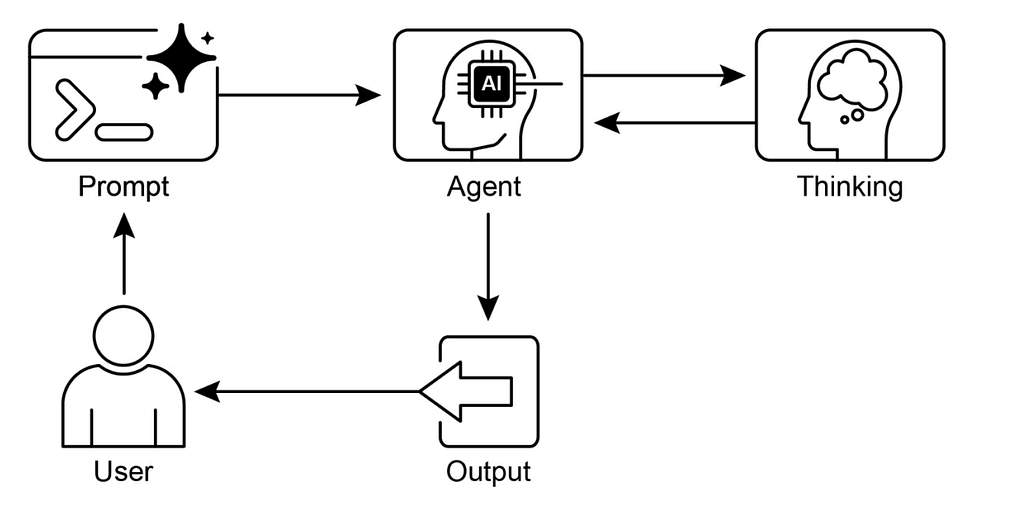
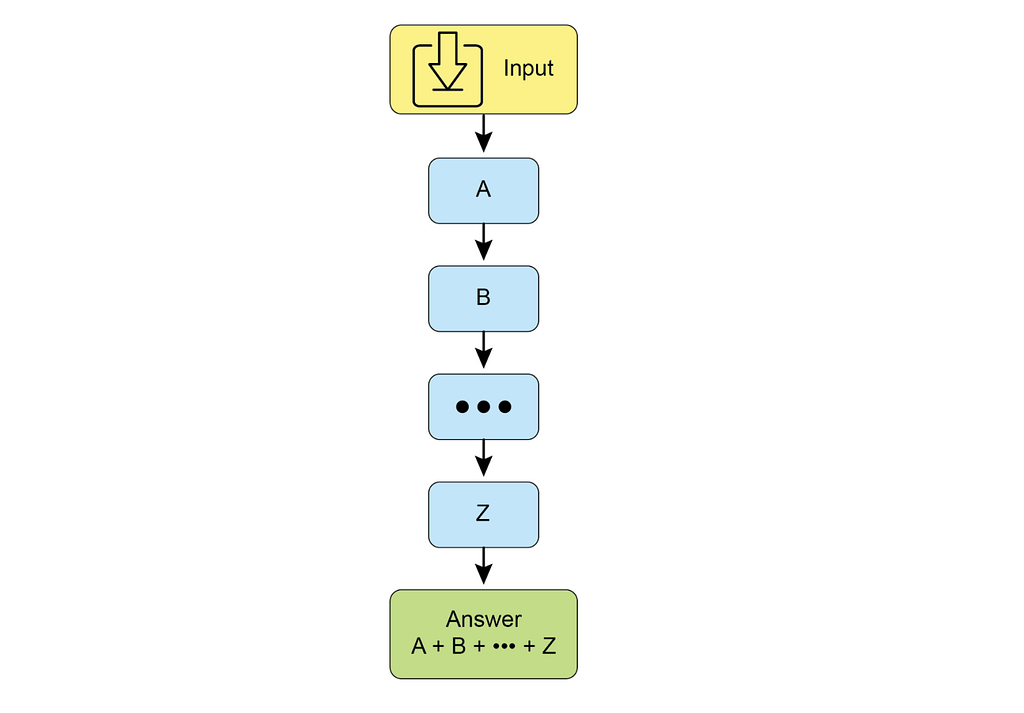
1. Chain-of-Thought (CoT)
Agent breaks a complex problem into a linear sequence of intermediate reasoning steps.
- Step 1: Analyze the user request.
- Step 2: List the necessary sub-tasks.
- Step 3: Solve each sub-task in order.
- Step 4: Consolidate into a final answer.
Ex:
User: “Book a flight from NYC to London for under $600 and a hotel near the airport.”
CoT Reasoning:
“First, I need to search for flights from JFK/LHR. I see a flight for $550.”
“The user’s budget is $600, so $550 is valid.”
“Now, I must find hotels within 5 miles of LHR.”
“I found ‘Airport Inn’ for $120.”
“Final Plan: Book Flight A for $550 and Hotel B for $120.”
2. Tree-of-Thought (ToT)
Unlike linear CoT, ToT allows agent to explore multiple “branches” or options at once, evaluate them, and even backtrack if a branch leads to a “dead end.”
- Step 1: Generate multiple possible “thoughts” (options).
- Step 2: Evaluate each option (e.g., “Is this flight too expensive?”).
- Step 3: Prune (discard) bad options and continue down the promising ones.

Ex:
Branch A: Search for direct flights (Result: $800 — Discard because it’s over budget).
Branch B: Search for flights with 1 stop (Result: $450 — Keep).
Branch C: Search for nearby airports like Gatwick (Result: $400 — Keep).
Evaluation: “Branch C is the cheapest and leaves more money for the hotel. Let’s proceed with C.”
3. Self-Correction (Self-Refinement)
Agent reviews its own draft for errors, hallucinations, or logic gaps before showing it to the user.
- Step 1: Generate initial answer.
- Step 2: Self-critique the answer based on constraints.
- Step 3: Rewrite the answer to fix any issues.
Ex:
Draft: “I’ve booked your flight for Dec 12th and your hotel for Dec 13th.”
Self-Critique: “Wait, if the flight arrives on the 12th, the user needs the hotel on the 12th, not the 13th. I should fix the date.”
Refined: “I’ve booked your flight and hotel for Dec 12th to match your arrival.”
4. Program-Aided Language Models (PALMs)
The agent writes code (like Python) to handle the logic or math, rather than trying to “guess” the numbers itself. This ensures 100% accuracy for calculations.
- Step 1: Translate the natural language problem into a Python script.
- Step 2: Execute the script in a secure environment.
- Step 3: Use the script’s output as the final answer.
Ex:
User: “Calculate the total cost for 3 people with a 15% group discount on a $500 flight.”
PALM Action: Writes total = (500 * 3) * 0.85
Result: “The total is $1,275”. (Avoids “hallucinating” the math).
5. ReAct (Reasoning + Acting)
Agent alternates between “Thinking” and “Acting” (using a tool). Each “Action” produces an “Observation” that informs the next “Thought”.
- Step 1: Thought (“I need to find a flight”).
- Step 2: Action (Call search_flights).
- Step 3: Observation (“Flight 101 is $400”).
- Step 4: Repeat until the goal is met.
6. Debate Patterns (CoD & GoD)
The system uses multiple agents (or internal personas) to “debate” a solution.
- Chain of Debates (CoD) – Agents take turns critiquing the previous agent’s reasoning.
- Graph of Debates (GoD) – A more complex network where multiple “debates” happen in parallel, and final “judge” agent decides the winner.
7. MASS (Multi-stage Optimization Strategy)
An advanced framework (Multi-Agent System Search) that optimizes how agents are prompted and connected.
- Block-Level – Optimizes the prompt for a single agent (e.g., the “Flight Searcher”).
- Workflow Topology – Optimizes the path the data takes (e.g., should we search flights before or during the hotel search?).
- Workflow-Level – Refines the entire system-wide prompt for the best performance.
Summary — Reasoning Techniques Pattern
- What ❓
A structured approach to complex problem-solving that moves beyond direct answers. It enables agents to handle multi-step tasks requiring logical inference, decomposition, and strategic planning by making the internal “thought” process explicit. - Why 💡
These techniques provide a framework (like Chain-of-Thought or Tree-of-Thought) that guides LLMs to explore multiple paths and self-correct. Integrating reasoning with action (ReAct) allows agents to adapt based on tool feedback, leading to more transparent and robust outcomes. - Rule of Thumb 👍
Use this when a problem requires multi-step logic, tool interaction, or strategic adaptation. It is essential when the “work” or thought process is just as important as the final answer itself.
Pros
- Breaking down problems reduces the chance of logical “hallucinations” or calculation errors.
- Users can see the intermediate steps, making it easier to trust the result or spot where a mistake happened.
- Allows agents to tackle “wicked problems” that involve many moving parts and external tools.
Cons
- :Generating “thoughts” and intermediate steps takes more time, making the response slower for the user.
- Reasoning requires more tokens to be generated, which increases the API cost per request.
- If the agent makes a mistake in the first step of its chain of thought, the entire subsequent logic can fail (cascading error).
18. Guardrails/Safety Pattern
Guardrails/Safety Pattern acts as a protective layer or “buffer” around an AI agent. Its goal is to ensure that while the agent is being helpful and creative, it doesn’t accidentally generate harmful content, leak private data, or perform unauthorized actions.
Think of guardrails as a security checkpoint that monitors information flowing both in and out of the agent:
- Input Validation/Sanitization – Before the agent even sees a user’s request, the system checks for malicious intent, such as “prompt injection” (trying to trick the AI) or offensive language.
- Behavioral Constraints – At the prompt level, the agent is given strict instructions on its role (e.g., “You are a helpful assistant and must never provide legal advice”).
- Tool Use Restrictions – Agent’s ability to act is limited. Ex: travel agent might be allowed to search for flights but forbidden from actually charging a credit card without a specific authorization.
- Output Filtering/Post-processing – After agent generates a response, but before user sees it, the system scans text for bias, toxicity, or sensitive information (like passwords or social security numbers).
- External Moderation & Human Oversight – High-stakes responses might be sent to a specialized Moderation API or a Human-in-the-Loop for a final safety check.
Practical Applications & Use Cases 🏗️
- Customer Service Chatbots
Ensuring the bot stays polite and doesn’t make false promises about refunds. - Educational Tutors
Preventing the assistant from giving answers to a test or engaging in inappropriate topics with students. - Legal Research Assistants
Clearly stating that the information provided is for research and is not official legal advice. - Recruitment Tools
Filtering out biased language to ensure fair treatment of all job applicants.
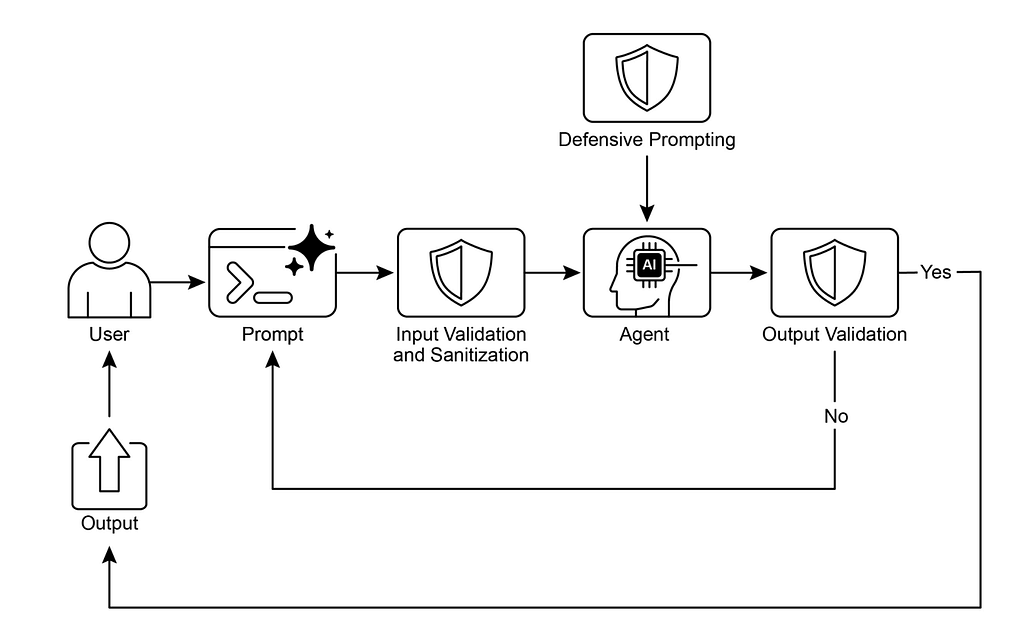
Implementating Guardrail design pattern
In Google ADK, safety is implemented in layers: from the model’s core settings to custom logic that intercepts data before and after the agent “thinks”.
- Built-in Gemini Safety Features
Before writing a single line of custom logic, you can configure underlying model’s sensitivity to categories like hate speech, harassment, or dangerous content.
from google_adk import LlmAgent, ModelType
from google_adk.safety import SafetySetting, HarmCategory, HarmBlockThreshold

# Set strict thresholds for the underlying model
safety_settings = [
    SafetySetting(category=HarmCategory.HATE_SPEECH, threshold=HarmBlockThreshold.BLOCK_LOW_AND_ABOVE),
    SafetySetting(category=HarmCategory.DANGEROUS_CONTENT, threshold=HarmBlockThreshold.BLOCK_LOW_AND_ABOVE),
]

booking_agent = LlmAgent(
    name="SafeBookingBot",
    model=ModelType.GEMINI_1_5_FLASH,
    safety_settings=safety_settings
)
2. Callbacks for Security Guardrails
This is where you implement input sanitization and output filtering. ADK provides hooks to inspect data at every stage of the lifecycle.
def input_sanitizer(request):
    """Filter malicious input or off-topic queries before they reach the model."""
    forbidden_terms = ["medical advice", "legal counsel", "hack"]
    if any(term in request.text.lower() for term in forbidden_terms):
        request.text = "The user asked for forbidden advice. Remind them you only book hotels."
    return request

def output_validator(response):
    """Ensure the agent hasn't generated offensive language or private data."""
    if "SSN" in response.text or "password" in response.text:
        response.text = "I'm sorry, I cannot display sensitive information."
    return response

# Registering callbacks
booking_agent.register_callback("before_model_callback", input_sanitizer)
booking_agent.register_callback("after_agent_callback", output_validator)
3. In-Tool Guardrails
Tools (like a booking API) are most “dangerous” part of an agent because they interact with real world. You can wrap tools in safety logic to prevent unauthorized actions.
from google_adk import McpTool

def secure_booking_tool(booking_data):
    # Validation: Ensure the stay duration is reasonable
    if booking_data['nights'] > 30:
        return "Error: Bookings over 30 days require human approval."

    # Execute actual API call
    return hotel_api.create_booking(booking_data)

# Add tool-specific guardrails
booking_tool = McpTool(
    name="hotel_booker",
    function=secure_booking_tool,
    # before_tool_callback can be used here to verify user permissions
)
- before_model_callback stops “prompt injection” or off-topic rants from confusing the agent.
- after_agent_callback serves as a “final check” to make sure the agent didn’t hallucinate a policy or leak data.
- In-tool guardrails ensure the agent can only perform actions within specific “lanes” (e.g., no bookings longer than 30 days).
Summary — Guardrails/Safety Pattern
- What ❓
A system of constraints designed to manage the unpredictable behavior of autonomous agents. It addresses risks like harmful/biased outputs, jailbreaking attempts, and factual errors that could lead to legal or reputational damage. - Why 💡
It provides a multi-layered defense mechanism (input validation, output filtering, and tool restrictions) to ensure agents operate safely and ethically. The goal is to guide the agent’s behavior so that it remains trustworthy and beneficial without unnecessarily limiting its utility. - Rule of Thumb 👍
Implement guardrails in any application where the AI’s output affects users, systems, or brand reputation. They are critical for customer-facing bots, content generation, and sensitive industries like healthcare, finance, or legal research.
Pros
- Users and organizations are more likely to adopt AI when they know it has “seatbelts” to prevent catastrophic errors.
- Protects against adversarial attacks (jailbreaking) and accidental leaks of private data (PII).
- Helps meet legal and regulatory requirements by enforcing ethical guidelines and industry-specific rules.
Cons
- Each safety check (scanning input, checking output, calling moderation APIs) adds milliseconds to the response time.
- If guardrails are too strict, the agent might refuse to answer perfectly safe questions, making it less useful (the “preachy” AI problem).
- Safety logic must be constantly updated to stay ahead of new types of prompt injection and evolving cultural sensitivities.
19. Evaluation and Monitoring Pattern
Evaluation and Monitoring Pattern is the continuous feedback loop that ensures an agent is performing as expected. While other patterns focus on how an agent acts, this pattern focuses on how well it is acting over time.
In an agentic system, you don’t just evaluate the final answer; you evaluate the entire “journey” the agent took to get there.
1. Preparing for Agent Evaluations
Before testing, you must establish a baseline for what “good” looks like:
- Define Success – Clear criteria for a “win” (e.g., in a booking app, success is a confirmed reservation that matches all user preferences).
- Identify Critical Tasks – The non-negotiable actions (e.g., checking flight availability, calculating total price).
- Choose Relevant Metrics – Common metrics include Accuracy, Latency (speed), Cost per Task, and User Satisfaction.
2. What to Evaluate? (“Two-Pronged” Approach)
Agent evaluation is deeper than standard chatbot testing because agents are autonomous.
- Trajectory & Tool Use
“reasoning path.” Did the agent use the right tools? Was the sequence efficient? Did it loop unnecessarily?
Ex: Agent searched for a hotel before checking if the flight was available. (This might be flagged as an inefficient trajectory). - Final Response
The quality, correctness, and relevance of the output provided to the user.
Ex: Did the agent provide the correct flight number and the total price including tax?
Imagine you are monitoring Corporate Travel Agent.
- Observation – You notice agent’s success rate dropped from 95% to 80%.
- Trajectory Audit – You look at logs and see that agent is calling SearchFlight tool, getting a “no results” error, and then just stopping instead of trying a nearby airport.
- Metric Analysis – You find that Latency is high because the agent is “over-thinking” simple queries.
- Adjustment – You update the agent’s instructions to provide “fallback” options if a search fails.
Practical Applications & Use Cases 🏗
- Performance Tracking
Real-time dashboards to see if agents are meeting their SLAs (Service Level Agreements). - A/B Testing
Running two versions of an agent (e.g., one with RAG and one without) to see which performs better. - Drift & Anomaly Detection
Identifying when an agent starts acting strangely — perhaps due to an update in the underlying LLM or changes in external APIs. - Compliance & Safety Audits
Regularly checking agent logs to ensure no private data (PII) was leaked and safety guardrails remained active. - Enterprise Systems
Scaling agents across a large organization while maintaining consistent quality and cost control.
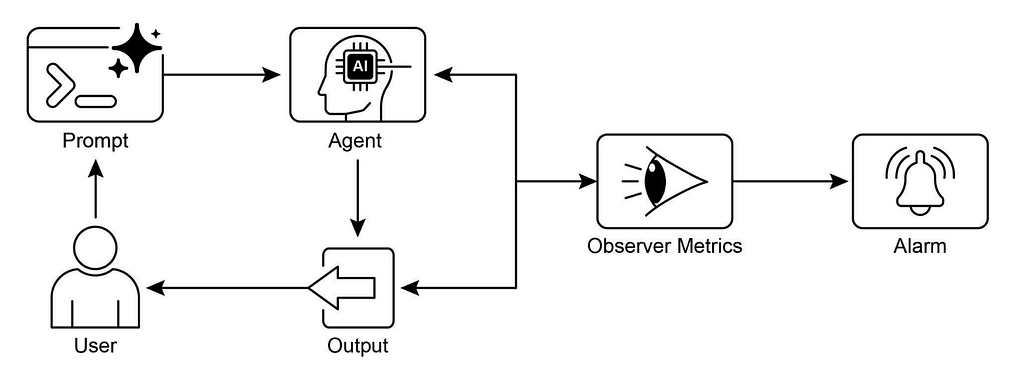
Implementating Evaluation and Monitoring Pattern
In Google ADK is designed to move beyond simple “pass/fail” testing. Because agents are autonomous, ADK evaluates both Final Answer (destination) and Tool Trajectory (journey).
Two Approaches to Testing
- Test File (.py)
You write standard Python pytest code.
You define an input and assert that the agent’s response contains specific keywords or calls specific tools.
Quick, unit-test style checks for specific edge cases. - Evalset File (.jsonl)
A structured file containing dozens or hundreds of “Golden Records” User Input + Expected Output + Expected Tool Calls.
Bulk testing to measure the overall “accuracy percentage” of a new agent version.
Evaluation Criteria: “Scoring Rubric”
ADK uses specialized metrics to judge different parts of the agentic process:
- tool_trajectory_avg_score: Did the agent call the right tools in the right order?
Ex: Did it call check_flight before book_flight? - response_match_score: A mathematical check (ROUGE-1) to see how many words in the agent’s answer match your “Golden” reference answer.
- final_response_match_v2: An LLM-as-a-judge metric. A second, “Teacher” LLM reads agent’s answer and reference answer to see if they mean the same thing, even if the wording is different.
- hallucinations_v1: The judge checks if the agent’s response is actually supported by the retrieved context (Groundedness).
- safety_v1: Checks if the agent violated any safety policies during the interaction.
Imagine we are evaluating our Hotel Booker Agent. We want to ensure it handles “Budget Constraints” correctly.
Golden Record (in your Evalset):
- Input: “Find me a hotel in Paris for under $150.”
- Expected Tool: hotel_search_api(location=”Paris”, max_price=150)
- Reference Answer: “I found the Hotel de Ville for $140.”
ADK Run:
- Execution – ADK runs the agent against this input.
- Trajectory Check – Agent accidentally calls hotel_search_api without max_price filter.
ADK gives a low tool_trajectory_avg_score - Semantic Check – Agent answers “I found a great spot for $140 called Hotel de Ville”.
final_response_match_v2 gives a high score because the meaning is correct despite the different wording. - Feedback – Developer sees that while the answer was okay, agent’s logic (tool use) was inefficient.
To Run Evaluations
ADK provides 3 ways to trigger these tests:
a. Web-based UI (adk web)
- How: Run the command in your terminal.
- Use: Best for manual “vibe checks”. You can talk to the agent and see the tool calls side-by-side in a dashboard.
b. Programmatically (pytest)
- How: Run pytest my_agent_test.py.
- Use: Best for developers during the coding process to ensure they haven’t “broken” existing features (Regression testing).
c. Command Line Interface (adk eval)
- How: Run adk eval –evalset my_queries.jsonl.
- Use: Best for CI/CD pipelines. It generates a summary report (e.g., “Accuracy: 88%”) before you deploy the agent to production.
Implementating Evaluation and Monitoring Pattern
Here is how you would implement the monitoring, detect the failure in the Trajectory, and fix it using the ADK.
- “Before” State: Failing Trajectory
Initially, the agent lacks instructions on what to do when a tool returns an empty result.
from google_adk import LlmAgent, ModelType, McpTool

# Simple flight search tool that might return empty lists
def search_flights(destination: str):
    # Simulating a "No Results" scenario for a specific airport
    if destination == "SFO":
        return []
    return [{"flight": "GA101", "price": 300}]

flight_tool = McpTool(name="SearchFlight", function=search_flights)

# INITIAL AGENT: No fallback logic

agent = LlmAgent(
    name="FlightAgent",
    model=ModelType.GEMINI_1_5_FLASH,
    tools=[flight_tool],
    instructions="Find flights for the user. If no flights are found, inform them."
)
- Monitoring and Identifying the “Drop”
Using adk eval, you would run a test set. The evaluation would flag a low tool_trajectory_avg_score because agent called tool once, failed, and gave up immediately.
Observation in Logs:
Step 1: Thought: “I will search for flights to SFO”.
Step 2: Action: SearchFlight(destination=”SFO”) ➡️ Observation: []
Step 3: Final Response: “Sorry, no flights found.”
(User is unhappy; Success Rate ⬇️) - “After” State: Optimization & Fallback Logic
To fix success rate and address Latency (over-thinking), we refine instructions to include a specific “fallback trajectory” and a “concise reasoning” mandate.
# UPDATED AGENT: With Fallback Instructions
optimized_agent = LlmAgent(
    name="OptimizedFlightAgent",
    model=ModelType.GEMINI_1_5_FLASH,
    tools=[flight_tool],
    instructions="""
    1. Search for flights to the requested destination.
    2. FALLBACK: If SearchFlight returns no results, automatically
       search for flights to the nearest major hub (e.g., OAK for SFO).
    3. EFFICIENCY: Be concise. Do not explain your internal logic unless
       it fails twice. This reduces latency.
    """
)
- Running ADK Evaluation Programmatically
You can use pytest with ADK to ensure your “Success Rate” goes back up.
import pytest
from google_adk.testing import AgentTestContext

def test_flight_fallback():
    with AgentTestContext(optimized_agent) as ctx:
        # We simulate the user asking for SFO (which we know returns [])
        response = ctx.run("Book a flight to SFO")

        # MONITORING CHECK:
        # Did the agent try a second tool call (fallback) instead of giving up?
        assert len(ctx.tool_calls) >= 2
        assert "OAK" in str(ctx.tool_calls)
        print("Trajectory Success: Agent attempted fallback search.")
- ADK lets you see that agent “gave up” at Step 2. Without monitoring the Trajectory, you’d only see the failed final answer, not the reason why it failed.
- If the logs show the agent generating 500 words of “Thought” before calling a simple tool, you’ve identified Latency bottleneck.
- Evaluation isn’t just for finding bugs; it’s for refining“Prompt Topology” to make the agent faster and more resilient.
Since we’ve identified that the agent was “over-thinking,” we used Resource-Aware Optimization concept by telling it to be concise.
Summary — Evaluation and Monitoring Pattern
- What ❓
A system for continuous assessment of agents in dynamic environments. Traditional software testing isn’t enough for the probabilistic nature of LLMs. This pattern addresses issues like data drift, unexpected tool-calling behavior, and deviations from goals that happen after an agent is live. - Why 💡
It provides a systematic framework using clear metrics (accuracy, latency, token cost) and advanced methods (Trajectory Analysis and LLM-as-a-Judge). This creates a feedback loop for A/B testing and anomaly detection, ensuring the agent stays aligned with its original objectives. - Rule of Thumb 👍
Use this whenever you deploy an agent to a live production environment. It is essential for comparing different model versions, meeting regulatory compliance in high-stakes domains (like finance or health), and detecting “performance drift” over time.
Pros
- You can deploy agents with confidence, knowing you will be alerted the moment their success rate drops or they start hallucinating.
- A/B testing and trajectory analysis allow you to scientifically prove that a new prompt or tool actually makes the agent better.
- Provides a clear paper trail of every action the agent took and why, which is critical for legal and safety compliance.
Cons
- Building a “Golden Dataset” (reference answers) and setting up LLM-as-a-Judge metrics takes significant time and expertise.
- Using an LLM to “judge” another LLM’s work adds to your total API consumption costs.
- Qualitative metrics like “helpfulness” or “tone” can be difficult to define perfectly, leading to “judges” that might be biased or inconsistent.
20. Prioritization Pattern
Prioritization Pattern addresses the challenge of managing an agent’s task queue or action selection by establishing a structured methodology for deciding what to do next. This pattern ensures that agentic systems remain responsive and aligned with high-level objectives in complex, dynamic environments.
It works as
- Criteria Definition – The system establishes specific metrics or rules to evaluate tasks. This includes:
- Urgency: How time-sensitive is the task?
- Importance: How much does this task impact the primary goal?
- Dependencies: Is this task required before others can start?
- Resource Availability: Are the necessary tools or data ready?
- Cost/Benefit: Is the effort worth the expected outcome?
- User Preferences: Personalized rules for specific users.
2. Task Evaluation – Each potential task is assessed against these criteria. This can range from simple rule-based logic to complex scoring or reasoning performed by an LLM.
3. Scheduling or Selection Logic – An algorithm (often using a queue or planning component) selects the optimal next action based on the previous evaluations.
4. Dynamic Re-prioritization – The agent continuously monitors for new events or changing deadlines. If a critical event occurs, it can modify its current sequence to adapt immediately.
Ex: Automated Customer Support Agent
Imagine an AI agent managing a support queue for a travel company:
- Step 1 (Criteria)
The agent is programmed to prioritize “Flight Cancellations” (Urgency/Importance) over “General Inquiries” (Low Urgency). - Step 2 (Evaluation)
A user asks, “How much for a flight to Paris?” while another says, “I am stranded at JFK right now!”.
The agent scores the stranded passenger’s request as a higher priority. - Step 3 (Scheduling)
The agent places the stranded passenger at the top of its action queue. - Step 4 (Re-prioritization)
While helping the stranded passenger, a third user reports a “Security Breach”. The agent immediately pauses the current task to handle the security alert, demonstrating dynamic adaptability.
Practical Applications & Use Cases
- Automated Customer Support
Sorting incoming tickets by urgency. Ex: stranded passengers vs. general inquiries. - Cloud Computing
Allocating resources to critical workloads during peak traffic. - Autonomous Driving Systems
Deciding between immediate safety maneuvers (e.g., braking) and navigation tasks. - Financial Trading
Prioritizing trades based on market volatility and potential profit. - Project Management
Dynamically adjusting task orders based on new deadlines or resource changes. - Cybersecurity
Ranking alerts and responding to high-risk threats first. - Personal Assistant AIs
Managing a user’s schedule by prioritizing important meetings over routine tasks.

Implementating Prioritization Pattern
In Google ADK, this can be implemented by using a custom task queue or a manager agent that calculates “Priority Scores” before delegating to worker agents.
Below python implementation shows how an agent can evaluate multiple incoming messages and re-order its execution queue dynamically.
from google_adk import LlmAgent, ModelType, Task, PriorityQueue
import time

# Define Priority Levels
URGENCY_LEVELS = {
    "SECURITY_BREACH": 100,  # Critical / Immediate
    "FLIGHT_CANCELLATION": 80, # High / Stranded
    "BOOKING_INQUIRY": 20     # Low / General
}

def evaluate_priority(message):
    """Logic to score incoming requests based on keywords/intent."""
    msg = message.lower()
    if "security" in msg or "breach" in msg:
        return URGENCY_LEVELS["SECURITY_BREACH"]
    if "stranded" in msg or "cancelled" in msg:
        return URGENCY_LEVELS["FLIGHT_CANCELLATION"]
    return URGENCY_LEVELS["BOOKING_INQUIRY"]

# Setup Orchestrator with a Priority Queue
class PrioritizedBookingAgent(LlmAgent):
    def __init__(self, **kwargs):
        super().__init__(**kwargs)
        self.queue = PriorityQueue()
    def add_to_queue(self, user_id, request_text):
        priority = evaluate_priority(request_text)
        self.queue.put(priority, {"user": user_id, "task": request_text})
        print(f"Added task for {user_id} with priority score: {priority}")
    def process_next(self):
        if not self.queue.empty():
            current_task = self.queue.get()
            print(f"Executing: {current_task['task']} for User: {current_task['user']}")
            # Execute the task logic here
            return self.run(current_task['task'])

# Running Scenario
agent = PrioritizedBookingAgent(
    name="Dispatcher",
    model=ModelType.GEMINI_1_5_FLASH
)

# Simulation: Three requests arrive almost simultaneously
agent.add_to_queue("User_A", "How much for a flight to Paris?") # Score: 20
agent.add_to_queue("User_B", "I am stranded at JFK right now!") # Score: 80
agent.add_to_queue("User_C", "URGENT: SECURITY BREACH REPORTED") # Score: 100


# The agent processes User_C first, then User_B, then User_A
agent.process_next()
Summary — Prioritization Pattern 📊
- What ❓
A structured methodology that enables agents to rank tasks, goals, or sub-actions. In complex environments with conflicting objectives and finite resources, this pattern prevents inefficiency and operational failure by ensuring the agent acts purposefully rather than randomly. - Why 💡
It provides a standardized solution for decision-making under pressure. By evaluating tasks against criteria like urgency, importance and resource cost, the agent can dynamically adapt to new events (like a security breach) while maintaining progress on high-level strategic goals. - Rule of Thumb 👍
Use this pattern when your agent must manage multiple, often conflicting tasks autonomously. It is critical for systems operating in dynamic environments where real-world stakes — like safety, financial loss, or user satisfaction — depend on doing the “right thing” at the “right time”
Pros
- Drastically improves productivity by ensuring resources are always allocated to the highest-value tasks first.
- Allows the agent to “pivot” instantly when a high-priority event (like a fraud alert) occurs, without losing track of pending work.
- For human-in-the-loop systems, the agent can pre-filter and rank the most critical items, allowing humans to focus only on what truly matters.
- Ensures that daily micro-actions are always contributing toward the overarching macro-objective.
Cons
- If high-priority tasks keep arriving, low-priority (but still necessary) tasks might be delayed indefinitely.
- Defining what makes a task “important” is subjective and difficult to code. A slight error in the scoring logic can lead to the agent ignoring critical work.
- The act of constant re-prioritization and evaluation itself consumes tokens and time, which can slightly increase latency for every incoming request.
21. Exploration and Discovery Pattern
Exploration and Discovery Pattern is an agentic design pattern that enables intelligent systems to move beyond reactive tasks and actively investigate their environment. It allows agents to seek out novel information, uncover hidden patterns, and identify “unknown unknowns.”
Rather than following a fixed script, an agent using this pattern operates with a level of curiosity — systematically probing data or environments to expand its own knowledge base.
The pattern functions through an iterative loop of hypothesis generation and environmental probing:
- Objective Setting & Domain Identification – Agent starts with a broad goal. Ex: “Find new battery materials” or “Identify security flaws”.
It identifies the “search space” it needs to explore. - Hypothesis Generation – Based on its current knowledge, agent proposes a theory or a specific path to investigate.
Ex: “If I test this specific chemical combination, it might have high conductivity.” - Probing & Data Collection – Agent takes an action to test the hypothesis. This could involve running a simulation, querying a database, or probing a software system.
- Observation & Evaluation – Agent analyzes the results of its probe. It looks for anomalies, patterns, or specific “discovery signals” that differ from its expectations.
- Knowledge Integration & Iteration: Agent saves what it learned to its internal memory. This new information updates its understanding and informs the next “Hypothesis” (Step 2), creating a continuous cycle of discovery.
Imagine Cybersecurity Agent tasked with protecting a corporate network.
- Step 1 (Objective): Find unpatched vulnerabilities in the web server.
- Step 2 (Hypothesis): “The login page might be susceptible to a specific type of SQL injection.”
- Step 3 (Probing): Agent sends a series of non-destructive, varied inputs to the login field to see how database responds.
- Step 4 (Observation): It notices the server takes 2 seconds longer to respond to one specific input — a signal of a potential vulnerability.
- Step 5 (Iteration): It logs this “discovery” and generates a new hypothesis to test if that delay can be exploited to access data, narrowing its search until a flaw is confirmed.
Practical Applications & Use Cases 🏗️
- Scientific Research Automation
Agents design and run experiments (like Google’s Co-Scientist) to discover new drug candidates or materials. - Market Research & Trend Spotting
Agents scan social media and news to identify emerging consumer behaviors before they become mainstream. - Game Playing Ex, AlphaGo
Agents explore millions of potential game states to discover “emergent strategies” that human players haven’t used. - Creative Content Generation
Agents explore vast combinations of styles and themes to generate novel artistic or musical compositions. - Personalized Education
AI tutors explore a student’s performance data to discover “learning gaps” and dynamically adjust the curriculum.

Implementating Exploration & Discovery Pattern
Google ADK to build an agent that explores the web for travel trends.
from google.adk.agents import Agent
from google.adk.tools import google_search
from google.adk.runners import Runner
from google.adk.sessions import InMemorySessionService

# Define Discovery Instructions
# We tell agent NOT to just answer a question, but to "discover" trends.
TREND_DISCOVERY_PROMPT = """
You are a Travel Market Research Analyst.
Your goal is to DISCOVER emerging travel trends for 2026.
1. Perform 3 initial searches for keywords like 'underrated travel destinations 2026' or 'travel search surges'.
2. Identify 2 specific locations that appear in multiple sources but aren't mainstream.
3. Use flight data trends to see if interest is translating to actual search volume.
4. Report the 'Why', 'Who' (audience), and 'Evidence' (URLs).
"""

# Assemble Exploration Agent
trend_agent = Agent(
    name="TrendExplorer",
    model="gemini-1.5-pro", # Pro models are better for complex discovery
    instruction=TREND_DISCOVERY_PROMPT,
    tools=[google_search],
    description="Actively explores the web to find upcoming travel trends."
)

# Setup Environment
session_service = InMemorySessionService()
runner = Runner(agent=trend_agent, session_service=session_service)

# Execute Discovery Loop
def discover_trends():
    print("Agent is starting exploration...")
    # The agent will independently decide how many searches to run based on instructions
    events = runner.run(user_id="analyst_1", session_id="discovery_01",
                        new_message="Identify the top 3 emerging travel trends for 2026.")

    for event in events:
        if event.is_final_response():
            print(f"nDiscovery Report:n{event.content}")


discover_trends()
Summary — Exploration and Discovery Pattern
- What ❓
A proactive approach where agents move beyond predefined data to actively seek out “unknown unknowns.” It addresses the limitations of static, pre-programmed information by enabling agents to investigate open-ended problems and expand their own understanding through autonomous inquiry. - Why 💡
By utilizing a structured framework — often emulating the scientific method — specialized agents can collaborate to generate, review, and evolve hypotheses. This automates the labor-intensive parts of research, allowing the system to navigate vast landscapes of data to generate genuinely new knowledge and accelerate innovation. - Rule of Thumb 👍
Use this pattern in complex or rapidly evolving domains where the solution space is undefined. It is ideal for scientific research, trend spotting, and creative tasks where the goal is to discover new insights or strategies rather than just optimizing a known workflow.
Pros
- Leads to breakthroughs that human researchers might miss by connecting dots across massive datasets.
- The system “learns” as it explores, making it highly effective in shifting markets or new scientific frontiers.
- Allows for “high-throughput” discovery (e.g., testing thousands of chemical combinations or market variables simultaneously).
- Unlike humans, agents can explore paths that might seem “unlikely” or “counter-intuitive” leading to truly novel discoveries.
Cons
- Continuous searching, probing, and hypothesis-testing can consume a high volume of tokens and compute power.
- Without strong “Objective Setting” an exploration agent can get lost in irrelevant data or “rabbit holes”.
- It is difficult to measure the “success” of a discovery mission until a breakthrough actually happens, making it hard to set traditional KPIs.
- In the search for “novelty”, agents might occasionally mistake noise for a signal, requiring strong Guardrails or Critique Agents to verify findings.
And there you have it — the patterns are complete!
Over these two articles, we’ve journeyed through the full spectrum of Agentic Design Patterns, wrapping up these final 10 essential strategies that take AI from simple automation to true, architected autonomy.
Thank you so much for following along with this series! If these patterns sparked some new ideas for your next project, please give this article a clap and share your thoughts in the comments.
Architect’s Guide to Agentic Design Patterns: The Next 10 Patterns for Production AI was originally published in Towards AI on Medium, where people are continuing the conversation by highlighting and responding to this story.
