Anthropic’s mid-tier model punches up

Read Online | Sign Up | Advertise

Good morning, {{ first_name | AI enthusiasts }}. Anthropic spent the last two weeks shipping its best-ever models. The twist is that the cheaper one might matter more.
The new Sonnet 4.6 goes toe-to-toe with Opus 4.6 across coding, finance, and computer use benchmarks at 1/5 the cost — cutting the gap between what the best AI can do and what most companies can actually afford to deploy.
Reminder: Our next live workshop is today at 2 PM EST — join and learn how to leverage Claude as a workflow architect to build powerful AI automations. RSVP here.
In today’s AI rundown:
-
Anthropic’s powerful Claude Sonnet 4.6
-
Apple going all-in on AI wearables
-
Create a royalty-free jingle in 30 seconds
-
Figma turns Claude Code builds into editable designs
-
4 new AI tools, community workflows, and more
LATEST DEVELOPMENTS

Image source: Anthropic
The Rundown: Anthropic just rolled out Claude Sonnet 4.6, its latest mid-tier model that matches or beats the flagship Opus 4.6 across finance, computer use, coding, and office benchmarks at 1/5 of the price — while featuring a 1M token context window.
The details:
-
On SWE-Bench Verified for coding, Sonnet 4.6 came in at 79.6%, just below Opus 4.6’s 80.8% — while costing just 1/5 as much to run.
-
Sonnet 4.6 outscored Opus 4.6 on agentic financial analysis and office-task benchmarks, a first for the mid-tier Claude model.
-
Early Claude Code testers preferred Sonnet 4.6 over its predecessor 70% of the time, also winning over Opus 4.5 at a 59% rate.
-
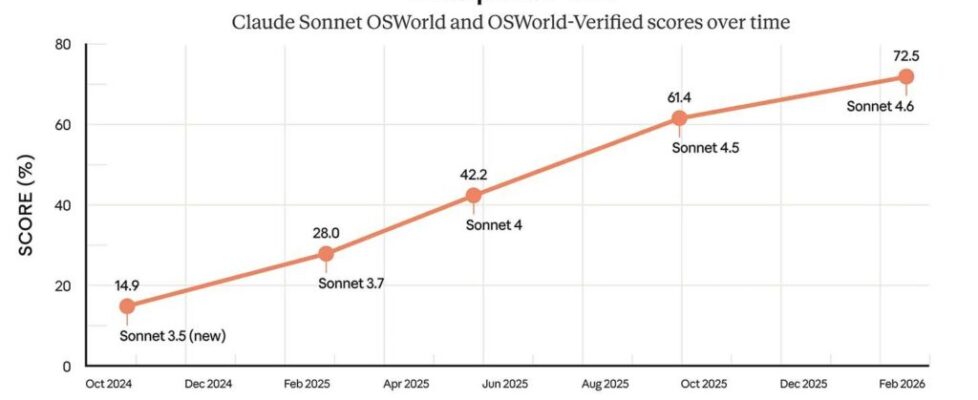
Computer use capabilities also keep climbing, with Sonnet’s OSWorld scores jumping from under 15% in late 2024 to 72.5%.
Why it matters: Anthropic is running a trickle-down playbook at warp speed, shipping near Opus-caliber capabilities to its cheaper line just weeks after the flagship upgrade. With strong Chinese models continuing to undercut everyone on price, Sonnet 4.6 looks like Anthropic’s bid to better compete for the volume layer of the agentic boom.
TOGETHER WITH HUBSPOT
🧠 100+ ChatGPT prompts to revolutionize your workflow

The Rundown: HubSpot’s free, comprehensive “How to Use ChatGPT at Work” guide provides 100+ ready-to-use prompts to help professionals boost efficiency and adopt AI-driven workflows.
Inside, you’ll find:
-
A quick crash course to master ChatGPT in under 30 minutes
-
Practical industry use cases to spark real-world inspiration
-
100+ prompts to streamline tasks and accelerate productivity
-
Expert tips to tackle common AI roadblocks with confidence
Get your free copy and join 10,000+ professionals leveling up with AI.

Image source: Lovart / The Rundown
The Rundown: Apple is reportedly fast-tracking three camera-equipped AI wearables, according to Bloomberg — including smart glasses, a pendant, and new AirPods all designed to give Siri real-time visual awareness through the iPhone.
The details:
-
The glasses will feature dual cameras, Apple-designed frames, no display, and a production target of late this year ahead of a 2027 launch.
-
The pendant will act as an always-on camera and mic for your iPhone, internally dubbed the phone’s “eyes and ears”.
-
Camera-equipped AirPods could ship as early as this year, using low-res sensors to feed Siri visual context and building on live-translation features.
-
All three devices will tie into Apple’s revamped Siri, which is expected to get a chatbot-style interface in iOS 27 later this year, powered by Google’s Gemini.
Why it matters: AI wearables from Apple (that actually feature a working model) would immediately shake up the mainstream hardware landscape and vault the tech giant into the AI spotlight. But these devices depend on a Siri overhaul that we still need to see to actually trust after years of absolutely brutal delays and underdelivering.
AI TRAINING
🔊 Create a royalty-free jingle in 30 seconds

The Rundown: In this guide, you will use Suno AI to create a custom jingle, background music, and sound effects for your brand. The best part is they’re all royalty-free and can be created from basic text prompts.
Step-by-step:
-
Go to Suno.com and click Create. Use a prompt like: “Upbeat indie pop podcast intro with acoustic guitar and light percussion, think tech podcast”
-
The basic structure is [genre] + [instruments] + [use case]. We recommend asking Gemini to interview you about your brand, then have it write the prompt
-
Once you prompt and get a good, usable jingle, click Remix and Edit > Cover. Now, you can make variations by changing the speed, instruments, or genre
-
Try different combinations until you have three variations for background music, one podcast intro, and your main jingle.
Pro tip: You can also go to → Suno Create → Sounds tab to create short “stings” for transitions in your content.
PRESENTED BY BLAND AI
📞 Voice AI for every conversation

The Rundown: Bland AI automates phone calls for over 250+ enterprise customers. No phone trees. No hold music. Just faster, smarter customer conversations.
Here are some of the outcomes they’ve driven for businesses:
-
Idaho Finance saved $750k/yr by replacing their IVR with AI Voice Agents
-
MyPlanAdvocate added $40M/yr by automating their inbound lead qualification
-
And Needle saves $1M/yr by automating outbound calls
Book a demo today to see how they can work for your business.
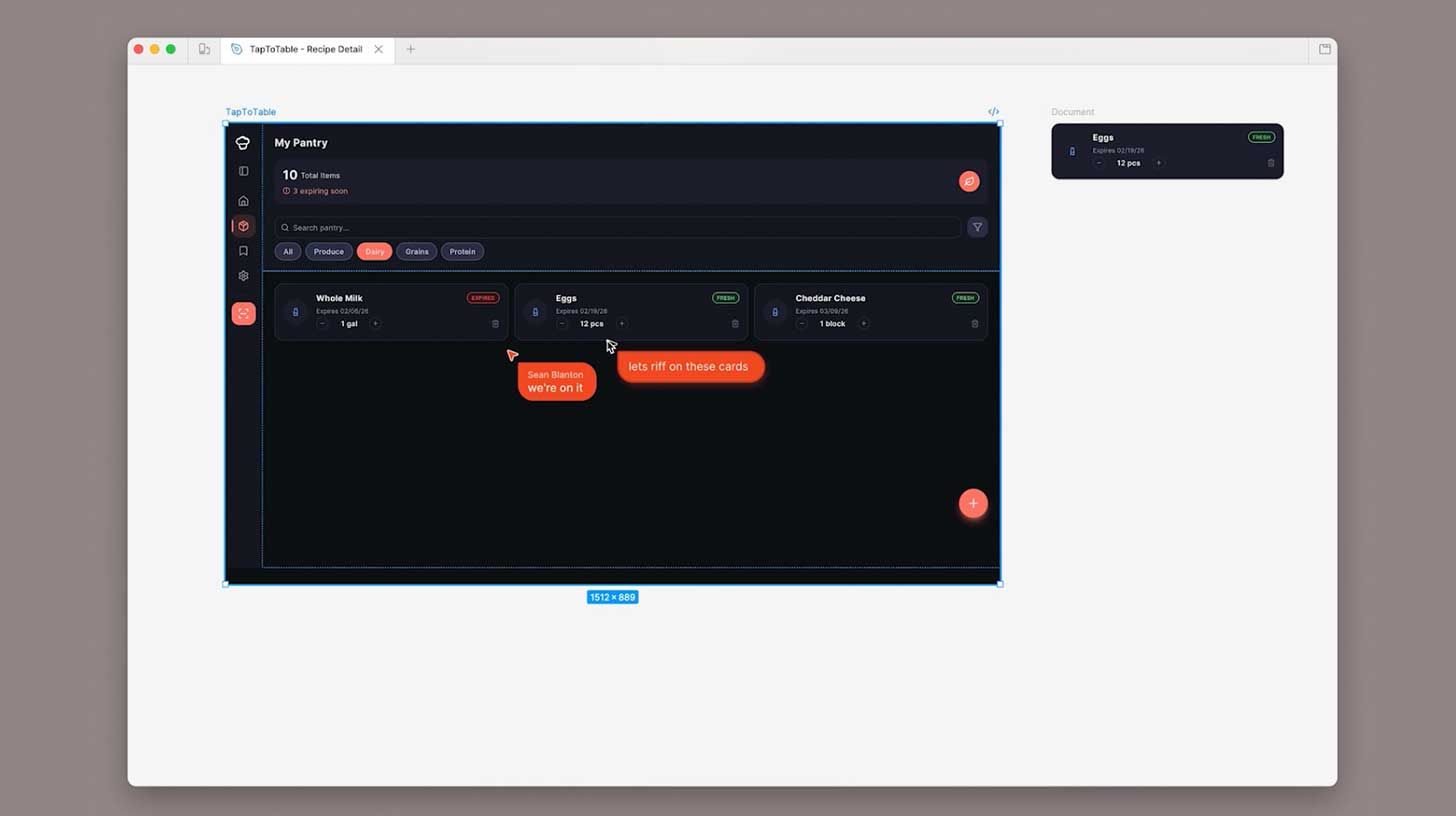
Image source: Figma
The Rundown: Figma just introduced a new “Code to Canvas” integration with Anthropic that lets developers capture interfaces built in Claude Code and convert them into fully editable design files on Figma’s canvas.
The details:
-
The feature grabs live UI from a browser and turns it into native Figma layers that can be duplicated, annotated, or rearranged.
-
Figma’s existing MCP server closes the loop, letting developers pull edited designs back into coding environments without losing the shared context.
-
Devs can capture entire multi-step flows at once, keeping the full user journey intact so teams can review and edit the experience side by side.
-
The launch comes as Figma stock has cratered roughly 85% from last summer’s high amid a broader SaaS selloff driven by AI coding fears.
Why it matters: This generation of AI coding tools has made it trivial to build a working UI, but Figma is hoping to be the polished, shippable design layer on top of raw vibe-coded prototypes. But with model capabilities only improving, that polishing layer may also soon be automated — something the markets appear to notice as well.
QUICK HITS
🛠️ Trending AI Tools
-
🗣️ Unwrap Customer Intelligence – Turn unstructured customer feedback into data-backed insights that inform your product roadmap*
-
🧠 Claude Sonnet 4.6 – Anthropic’s upgraded mid-tier model with 1M context
-
🎨 Recraft V4 – New image AI for typography, and production-level outputs
-
🌎 Tiny Aya – Cohere’s small, open-source model covering 70+ languages
*Sponsored Listing
📰 Everything else in AI today
xAI began rolling out the long-awaited Grok 4.20 in a public beta, featuring a new agent workflow that uses four agents working in parallel to research and handle tasks.
Meta and Nvidia announced a new multiyear AI chip deal spanning millions of GPUs and CPUs to help power the tech giant’s AI infrastructure buildout.
Cohere Labs open-sourced Tiny Aya, a 3.35B parameter multilingual model that handles 70+ languages with strong gains for typically underrepresented dialects.
French AI startup Mistral made its first-ever acquisition, with serverless platform Koyeb joining to boost its Mistral Compute cloud infrastructure arm.
WordPress launched a new AI assistant capable of editing layouts, generating images, and rewriting content directly inside the editor for streamlining website design.
COMMUNITY
🤝 Community AI workflows
Every newsletter, we showcase how a reader is using AI to work smarter, save time, or make life easier.
Today’s workflow comes from reader Yilin Q. in Australia:
“I use Gemini like my personal basketball assistant — I record our games, throw the video at it, and it magically breaks everything down for me.
It tells me where I messed up, what I actually did well, and even spots the opponents’ bad habits, like who always forgets to switch or which corner they leave wide open. It’s like having a super nerdy assistant coach who never gets tired, never lies to make me feel better, and helps me plan how to play smarter next game.”
How do you use AI? Tell us here.
🎓 Highlights: News, Guides & Events
-
Read our last AI newsletter: Anthropic-Pentagon AI feud escalates
-
Read our last Tech newsletter: Apple’s 2026 product blitz
-
Read our last Robotics newsletter: Apptronik’s $935M humanoid moment
-
Today’s AI tool guide: Create a custom royalty-free jingle in 30 seconds
-
RSVP to workshop today @2PM EST: Agentic Workflows Bootcamp pt.2
See you soon,
Rowan, Joey, Zach, Shubham, and Jennifer — the humans behind The Rundown

