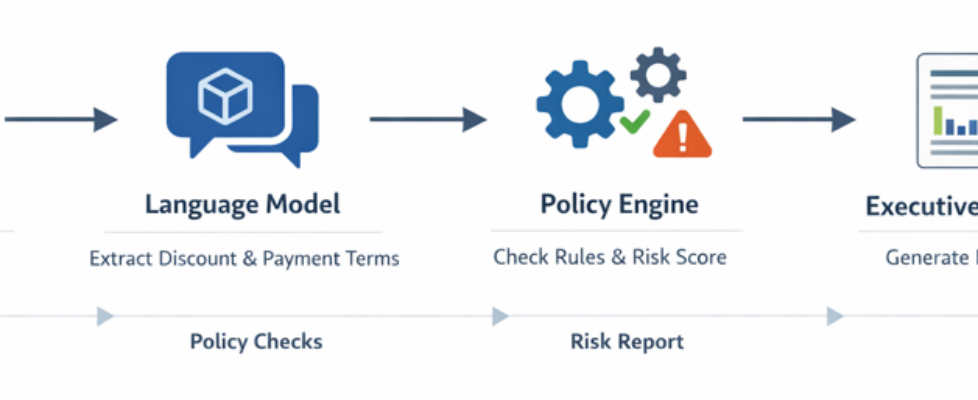
Agentic AI in Action — Part 12 — Building a Deal Desk Intelligence Agent with LangChain and OpenAI

Building a Deal Desk Intelligence Agent with LangChain and OpenAI
Most enterprise AI journeys begin with prompts. Teams use language models to summarize documents, classify tickets, or generate insights from unstructured text. These are valuable capabilities and often the first step in adopting AI across the organization.
However, operational teams such as Revenue Ops or Deal Desk typically need more than text generation. They need consistent, policy driven decisions. Beyond understanding language, the system must apply rules, enforce thresholds, and produce outcomes that are repeatable and auditable.
Every day someone reads through dozens or hundreds of CRM notes and decides whether a deal is safe to approve or risky enough to escalate.
A typical deal note might read:
- The customer is evaluating a multi year rollout across regions
- Procurement is pushing for a forty two percent discount due to competitive pressure
- Finance is requesting ninety day payment terms to align with their internal budget cycle
A human reviewer immediately interprets this as:
- The deal requires escalation or approval
- The discount is too high
- The payment cycle is too long
This reasoning is not artificial intelligence. It is simply business policy applied to messy language.
This is where an agent based design becomes powerful. Instead of asking an LLM to decide everything, we split responsibilities. If there is one hard truth in enterprise AI, it is this: you cannot prompt your way to a reliable business process. While language models are exceptional at understanding the nuances of a salesperson’s CRM note, they can be unreliable at enforcing strict numerical policies such as consistently knowing if a 42% discount violates a 40% threshold.
To build a Deal Desk Intelligence Agent that Revenue Ops can actually trust, we have to stop treating the LLM as a standalone decision-maker. Instead, we need a hybrid approach where AI interprets the language, but deterministic code enforces the rules. An agent coordinates the sequence of steps. Together they behave like a quiet digital analyst that reads notes, checks rules, and produces a clean summary for leadership.
The flow is straightforward.
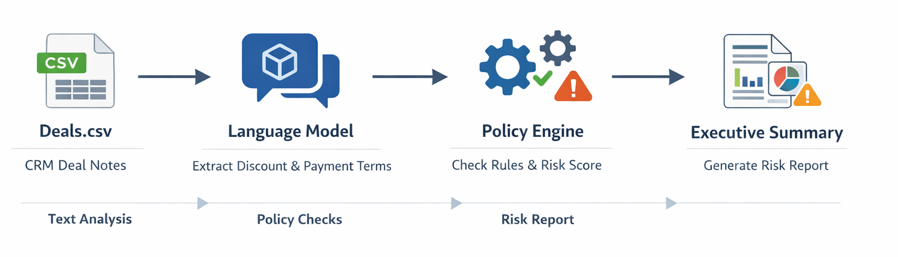
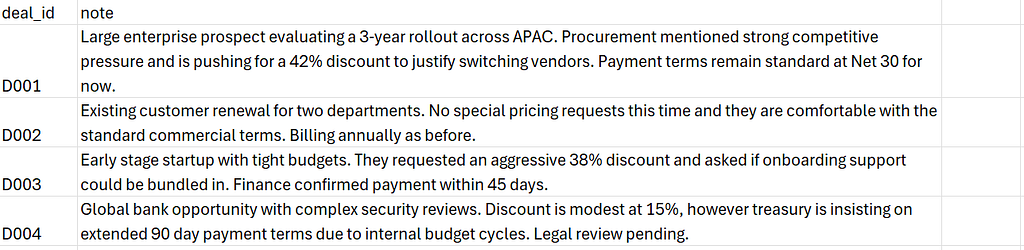
We begin with a simple CSV export (deals.csv) that resembles a CRM extract. (Few samples rows are displayed below for reference). Each row contains a deal identifier and a free form note written by a salesperson.
The LLM would read the note and extract structured information such as discount percentage and payment days. Small Python tools apply exact numeric thresholds. Finally the LLM converts the structured results into a short executive summary that a manager can read in seconds.
LangChain as the Orchestration Backbone of the Agent
LangChain is a framework designed to build applications where language models can interact with external tools, data, and logic in a structured and reliable way. Instead of using an LLM as a standalone text generator, LangChain enables it to act as part of an orchestrated system by calling Python functions, enforcing business rules, accessing datasets, and coordinating multi-step workflows.
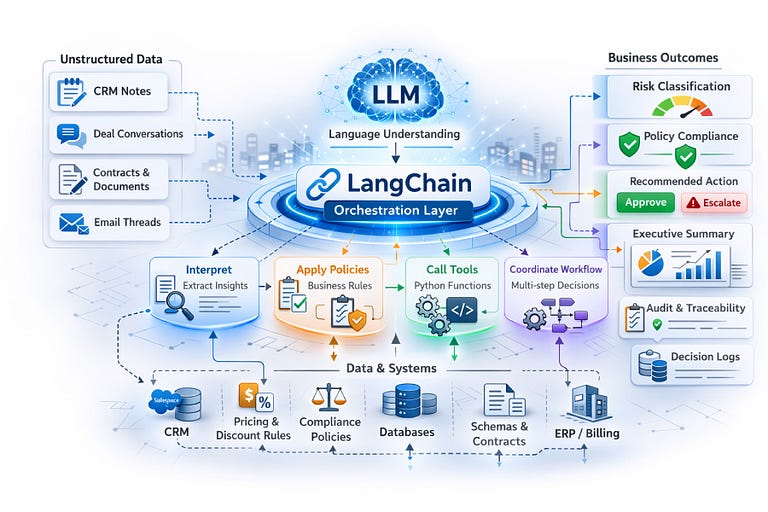
In the Deal Desk Intelligence Agent, LangChain is critical because it allows the LLM to focus on interpreting unstructured CRM notes while deterministic policy tools enforce exact thresholds, ensuring decisions remain consistent, auditable, and production-ready rather than purely prompt-driven.
High-Level Architecture:
At a high level, the Deal Desk Intelligence Agent architecture is divided into three functional zones that cleanly separate AI interpretation from deterministic business logic.
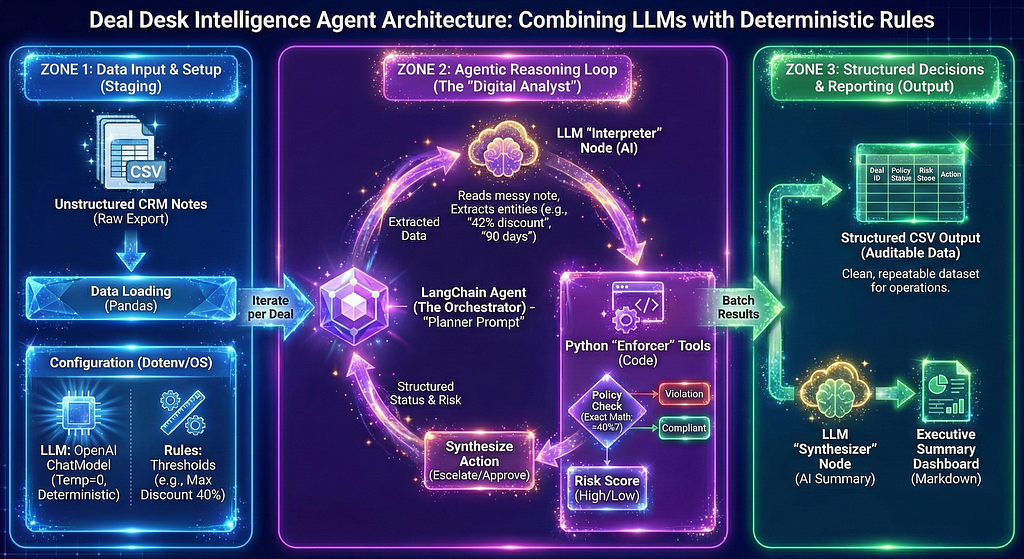
Zone 1 (Data Input & Setup): The process begins here. Raw, unstructured CRM notes are ingested and the operational environment, including strict LLM parameters and numeric policy thresholds, is configured.
Zone 2 (The Agentic Reasoning Loop): This serves as the system’s “Digital Analyst.” Within this loop, a LangChain orchestrator dynamically coordinates between an LLM that interprets messy human language and Python tools that mathematically enforce business rules, ensuring decisions are made without hallucination.
Zone 3 (Structured Decisions & Reporting): The processed data finally flows here, generating both a granular, auditable CSV dataset for the operations team and a concise, LLM-synthesized executive summary for leadership. This separation guarantees that the system remains intelligent, perfectly consistent, and fully auditable.
What follows is a step by step notebook implementation. In ten steps, we will walk through the entire process, starting with the environment setup and concluding with a generated executive summary. The link to access the notebook and the dataset is provided at the end of the blog.
Step 1: Install Libraries

The first step installs the libraries that orchestrate the workflow. LangChain handles tool calling and agent behavior. The OpenAI client provides access to the language model. Pandas loads tabular data. Dotenv loads environment variables so that keys and configuration stay outside the code.
Step 2: Environment + Model Configuration
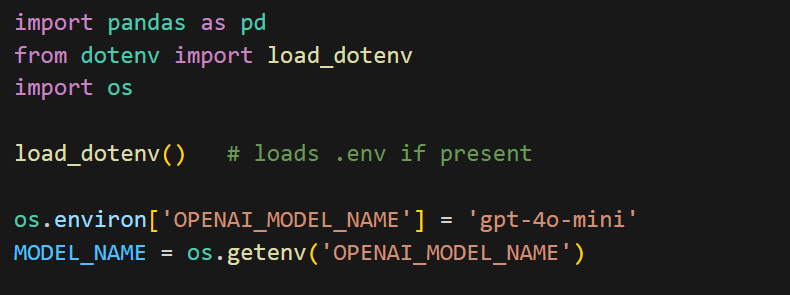
This step sets up the environment and loads configuration for the notebook. pandas is imported for working with CSV data later, while load_dotenv reads values from a .env file so API keys and settings are not hardcoded in the code. The os module is used to access those environment variables, where your Open AI key is stored.
load_dotenv() loads the variables into memory, after which the model name is set and retrieved using OPENAI_MODEL_NAME. This makes the LLM configurable, so you can switch models without changing the rest of the script. The final line simply confirms which model will be used for the run.
Step 3: Initialize the LLM
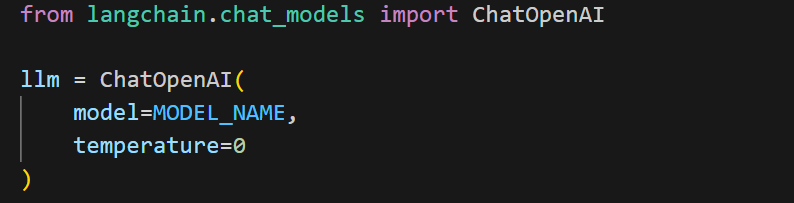
ChatOpenAI from LangChain acts as a wrapper around models hosted by OpenAI. The model=MODEL_NAME parameter dynamically selects the model you configured earlier through environment variables, keeping the setup flexible. Setting temperature=0 makes the responses deterministic and consistent, which is important for business workflows where decisions should be repeatable rather than creative.
In short, this cell creates the LLM instance that powers the entire agent.
Step 4: Load the data file

This step loads the deals.csv file into a pandas DataFrame so each deal note can be processed programmatically
Step 5: Define Deterministic Policy Rules as Agent Tools
This step defines the deterministic business rules that the agent will use to make decisions.

The @ tool decorator from LangChain turns each Python function into a callable tool that the LLM can invoke during reasoning. Instead of relying on the model to judge whether a discount is “high” or “low,” these tools enforce the policy numerically and consistently.
The policy_check function takes the raw deal note text and uses simple regular expressions to extract numbers that look like a discount percentage or payment days. It then compares those values against fixed thresholds. If the discount is greater than or equal to forty percent or the payment term is sixty days or more, it returns “Violation” (in this case, signifying that discount is too high or the payment cycle is too long), otherwise it returns “Compliant”. This keeps the decision logic exact and auditable.
The risk_score function simply converts that policy result into “High” or “Low” risk labels.
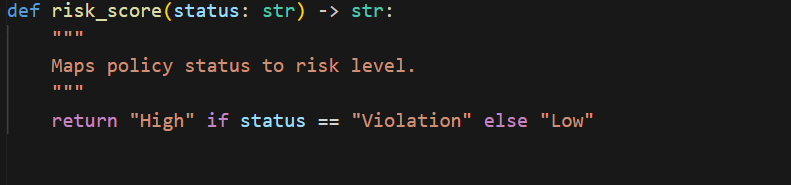
Together, these tools move rule enforcement out of prompts and into code, ensuring predictable and repeatable decisions.
Step 6: Create the Planner Prompt
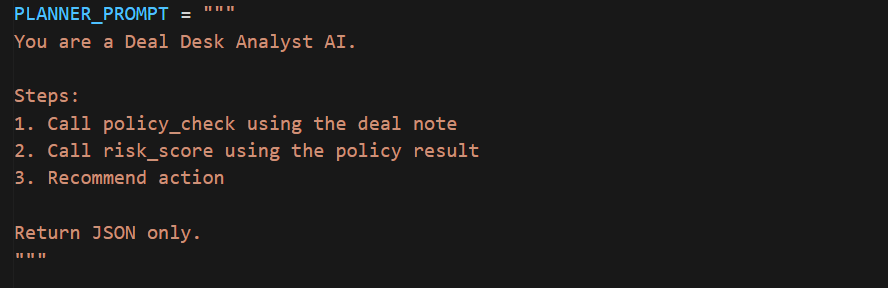
This step defines the planner prompt that guides how the agent should behave. It instructs the LLM to follow a clear sequence by calling the policy tools, computing risk, and recommending an action, while returning the output in structured JSON so the results remain consistent and easy to process programmatically.
Step 7: Create the Agent
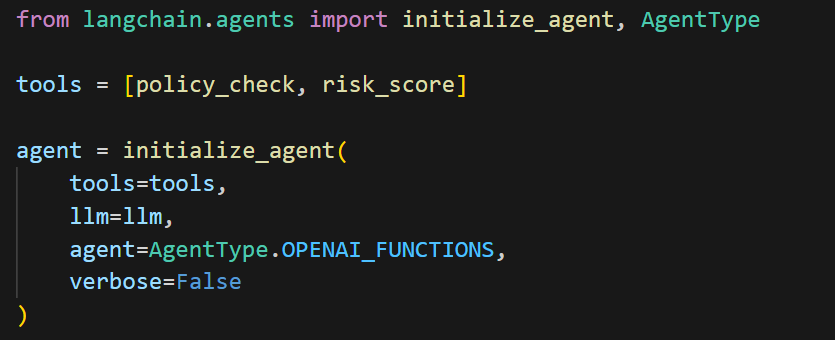
This step creates the agent that orchestrates the entire workflow using LangChain. The two policy functions are grouped into a tools list and passed to initialize_agent along with the LLM, allowing the model to automatically decide when to call each tool while processing a deal note. Setting AgentType.OPENAI_FUNCTIONS enables structured tool calling, and verbose=False keeps the execution output clean. In short, this combines the model and rules into a single AI analyst that can reason and act.
Step 8: Batch Process Deals
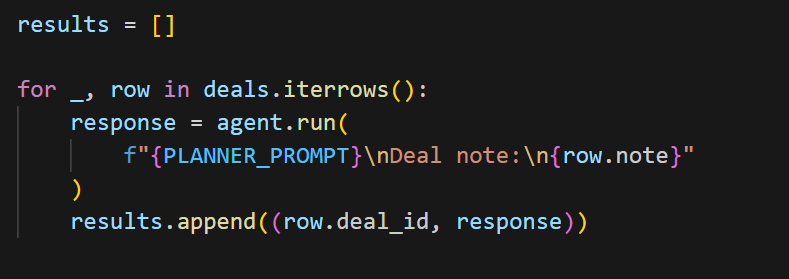
This step runs the agent across every deal in the dataset and collects the results. The loop iterates through each row of the deals DataFrame, sends the deal note to the agent along with the planner prompt, and lets the agent analyze it using the LLM and policy tools.
The returned decision is then stored in the results list alongside the corresponding deal ID, creating a complete set of deal level outcomes for further reporting or export.
Step 9: Apply Policy Rules and Generate Structured Decisions
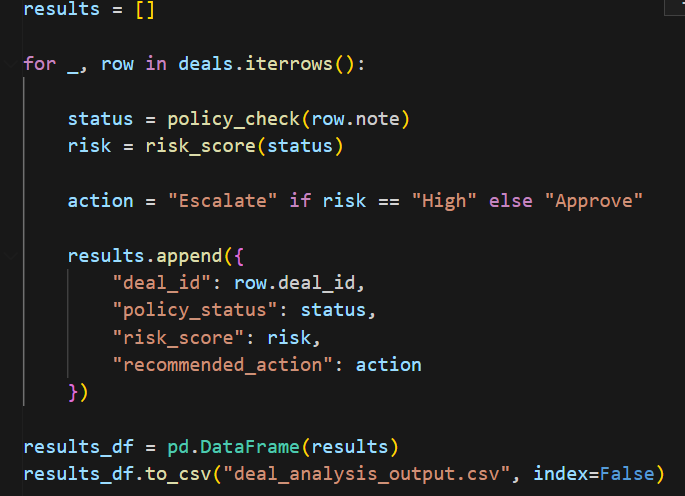
This step processes each deal note using deterministic policy rules and saves the results in a structured, tabular format.
The loop iterates through every row in the deals DataFrame and applies the policy_check tool directly to the note text to determine whether it violates any thresholds. The returned status is then passed to risk_score to classify the deal as high or low risk. Based on that risk level, a simple business action is assigned, either escalate or approve. Each deal’s outcomes are collected as a dictionary.
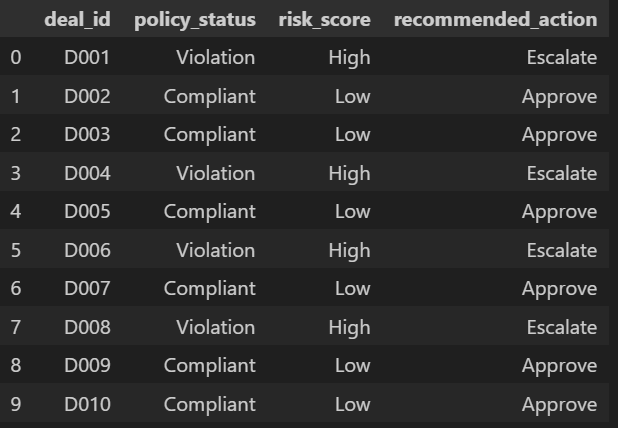
After processing all rows, the list of dictionaries is converted into a pandas DataFrame and written to a CSV file. This produces a clean, structured output with separate columns for deal ID, policy status, risk score, and recommended action, making it easy to analyze or share.
Step 10: Generate the Executive Summary
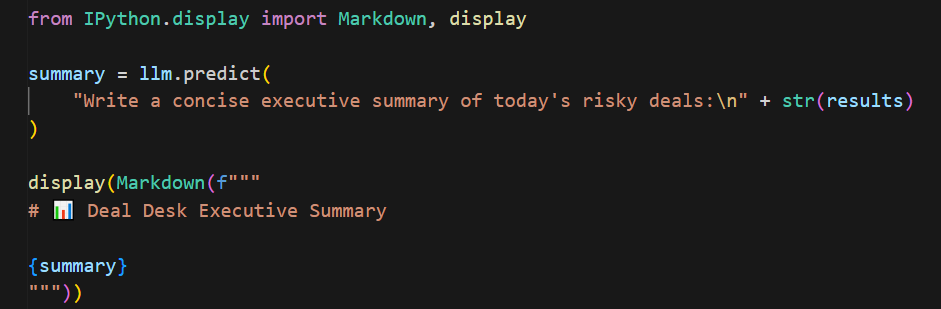
This step generates a leadership friendly summary of the analysis and displays it neatly in the notebook.
The llm.predict() call sends all the deal results to the language model and asks it to write a concise executive summary in plain business language. Instead of printing raw text, the output is then rendered using IPython.display.Markdown, which formats the summary with a clear heading and clean layout inside the notebook.
This makes the final output easier to read and presentation ready, similar to a short report rather than console text.
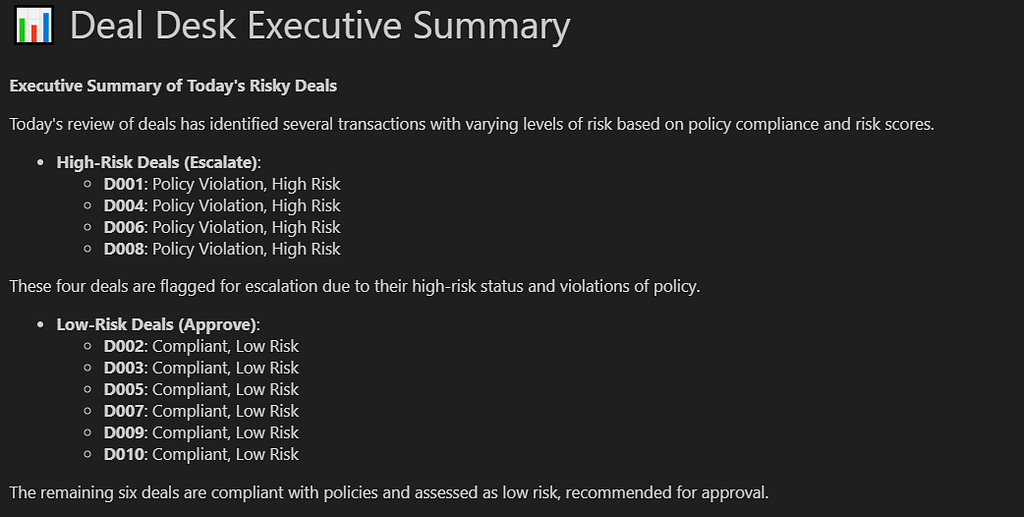
In summary, what we built here is a simple, but powerful pattern. Instead of treating the language model as a decision maker, we used it where it is strongest, which is understanding messy human text and communicating insights clearly. The actual business decisions were enforced through deterministic rules written in code. The agent simply orchestrated both. This separation keeps the system reliable, auditable, and easy to evolve.
For teams like Revenue Ops or Deal Desk, this approach turns hours of repetitive manual review into a consistent and automated workflow. Notes that once required careful reading are now translated into structured signals, evaluated against policy, and summarized into leadership ready insights in minutes. The result is not just automation, but standardization. Every deal is evaluated the same way, every time.

More importantly, this design scales beyond this one use case. The same pattern applies to loan approvals, claims processing, fraud checks, compliance monitoring, or any process where business rules must be applied to unstructured text. Swap the policy logic, keep the architecture, and the agent adapts.
Agentic AI is not about replacing prompts or replacing rules. It is about combining both thoughtfully. Let the LLM interpret language. Let code enforce policy. Let agents coordinate the workflow. When these pieces work together, you move from interesting demos to dependable systems that deliver real business value.
The data and notebook associated with this blog can be accessed here.
I share hands-on, implementation-focused perspectives on Generative & Agentic AI, LLMs, Snowflake and Cortex AI, translating advanced capabilities into practical, real-world analytics use cases. Do follow me on LinkedIn and Medium for more such insights.
Agentic AI in Action — Part 12 — Building a Deal Desk Intelligence Agent with LangChain and OpenAI was originally published in Towards AI on Medium, where people are continuing the conversation by highlighting and responding to this story.
