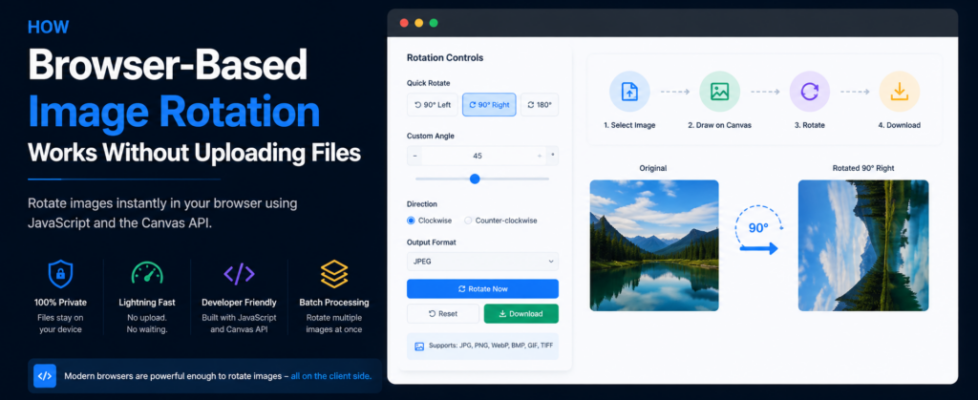
How Browser-Based Image Rotation Works Without Uploading Your Files

Image rotation is one of the most common image editing tasks.
Whether you’re fixing a sideways photo from a phone, rotating scanned documents, or preparing images for presentations, the operation itself is simple.
Yet many online tools still upload your image to a remote server before rotating it.
For such a lightweight task, that extra upload often adds unnecessary waiting time and raises privacy concerns.
Modern browsers can handle image rotation locally using built-in Web APIs, allowing users to rotate images without sending files anywhere.
This article explains how browser-based image rotation works, why client-side processing is becoming the preferred approach, and the technologies that make it possible.
Why Many Online Image Rotators Still Upload Files
Traditional web applications were designed around server-side processing.
The workflow usually looks like this:
- Upload the image
- Wait for the upload to finish
- Rotate the image on the server
- Generate a new file
- Download the processed image
For large photos, the upload often takes longer than the actual rotation.
It also means the original image temporarily leaves your device.
Although this architecture still makes sense for complex editing, simple transformations don’t always require a server anymore.
Why Image Rotation Works Well Inside the Browser
Unlike AI image editing or heavy rendering, rotating an image is mathematically simple.
Modern browsers already provide everything needed to perform this task locally.
The browser can:
- Read image files
- Decode the image
- Rotate pixels
- Export a new image
All without making a single network request.
Keeping processing inside the browser provides several benefits.
- Faster processing
- Better privacy
- Reduced server costs
- Instant preview
- Offline capability
How Browser-Based Image Rotation Works
The entire workflow happens inside the browser.
Step 1: Reading the Image
The first step is loading the image selected by the user.
JavaScript reads the file directly from the local device.
const input = document.getElementById("image");

input.addEventListener("change", (e) => {
    const file = e.target.files[0];

    const reader = new FileReader();

    reader.onload = function(event) {
        const img = new Image();
        img.src = event.target.result;
    };

    reader.readAsDataURL(file);
});
At this point, the image exists only inside browser memory.
No upload occurs.
Step 2: Drawing the Image on a Canvas
Once the image loads, it is drawn onto an HTML Canvas.
Canvas allows JavaScript to manipulate every pixel.
const canvas = document.createElement("canvas");
const ctx = canvas.getContext("2d");

canvas.width = image.width;
canvas.height = image.height;

ctx.drawImage(image, 0, 0);
Canvas becomes the workspace where image transformations happen.
Step 3: Rotating the Canvas
Rotation is performed using Canvas transformations.
canvas.width = image.height;
canvas.height = image.width;

ctx.translate(canvas.width / 2, canvas.height / 2);

ctx.rotate(90 * Math.PI / 180);

ctx.drawImage(
    image,
    -image.width / 2,
    -image.height / 2
);
Instead of modifying the original file, the browser redraws the image using a different orientation.
Step 4: Exporting the Result
After rotation, the browser creates a new downloadable image.
const rotatedImage = canvas.toDataURL("image/jpeg", 0.9);

downloadLink.href = rotatedImage;
downloadLink.download = "rotated-image.jpg";
Everything happens locally.
The original image never leaves the device.
Supporting Common Rotation Angles
Most image editors provide quick rotation buttons.
Typical options include:
- Rotate 90° Left
- Rotate 90° Right
- Rotate 180°
- Custom Angle
Since Canvas uses radians internally, JavaScript converts degrees before rotating.
function degreesToRadians(angle) {
    return angle * Math.PI / 180;
}
This makes supporting different rotation angles straightforward.
Batch Image Rotation
Modern browsers can also rotate multiple images during the same session.
A batch workflow usually looks like this:
- Select multiple files.
- Read each image independently.
- Rotate each canvas.
- Generate new images.
- Download all results.
Because every image is processed locally, there’s no need to upload dozens of files to a server.
Challenges Developers Should Consider
Although image rotation seems simple, there are several implementation details worth considering.
Preserve Image Quality
Repeated transformations should avoid unnecessary quality loss.
Handle Large Images
Very large images consume more browser memory.
Efficient Canvas management helps prevent slowdowns.
Support Transparent Images
PNG images require transparency support after rotation.
The canvas background should remain transparent when appropriate.
Respect EXIF Orientation
Photos captured by phones often contain EXIF orientation metadata.
Ignoring this information can produce unexpected results.
Reading EXIF metadata before rendering helps display images correctly.
Offer Multiple Output Formats
Users may prefer different formats depending on their workflow.
Common export options include:
- JPEG
- PNG
- WebP
Providing multiple choices improves flexibility.
Why Client-Side Image Editing Is Becoming More Common
Browser capabilities have improved significantly over the last few years.
Tasks that once depended entirely on backend servers can now execute directly on the user’s device.
Examples include:
- Image compression
- Image cropping
- Image resizing
- Image rotation
- Format conversion
This shift reduces server workloads while providing a faster experience for users.
For lightweight editing tasks, browser-based processing has become both practical and reliable.
Final Thoughts
Image rotation may be one of the simplest editing operations, but it highlights how modern browsers have evolved.
Instead of relying on server-side processing for every task, many common image transformations can now happen entirely inside the browser.
This approach offers several advantages:
- Faster performance
- Better privacy
- Lower infrastructure costs
- Immediate feedback
- Offline capability
As Web APIs continue improving, client-side image editing will likely become the default approach for many everyday image processing tasks.
