Semantic Caching: The Optimization Every AI Team Skips

Why your AI system keeps paying full price for questions it’s already answered
You’ve tuned your prompts. You’ve swapped models twice looking for the right cost-to-quality ratio. You’ve probably rewritten your RAG retrieval logic more times than you’d like to admit. And yet, on a random Tuesday, your inference bill still climbs like it owes you money.
Here’s the part nobody wants to hear: the fix was never in the prompt. It was in the request you never needed to send at all.
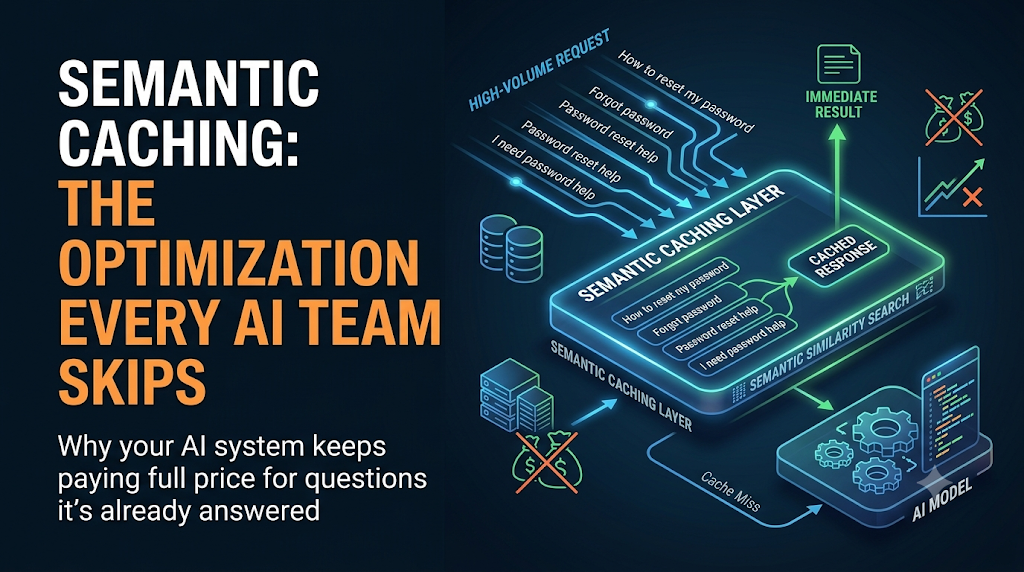
Most AI teams cache almost nothing, or they cache the wrong thing. They reach for exact-match caching — the same trick we’ve used since the early days of web servers — and act surprised when hit rates hover near zero. Exact-match caching works when inputs repeat character-for-character. Language doesn’t work that way. “How do I reset my password” and “I forgot my password, help” are the same question wearing different clothes, and a naive cache treats them as strangers.
That gap is where semantic caching lives, and it’s the layer most production AI systems are quietly missing.
Exact-Match Caching Was Built for a Different Era
Traditional caching keys off identity. You hash the input, you check if that exact hash exists, you return the stored result if it does. This works beautifully for deterministic systems — database queries, static API responses, compiled assets.
It falls apart the moment your input is natural language, because natural language has effectively infinite surface variation for a finite number of underlying intents. Two users can ask the same question in a thousand different ways, and an exact-match cache will treat every single phrasing as a brand-new, never-before-seen request — meaning a brand-new, never-before-paid-for trip to the model.
If your production logs show a cache hit rate under 5%, this is almost certainly why.
What Semantic Caching Actually Does
Semantic caching replaces “is this input identical” with “is this input close enough in meaning.” Instead of hashing raw text, you embed the incoming query into a vector space, then search a vector store for previously answered queries that sit within some similarity threshold. If a close-enough neighbor exists, you return its cached response — no model call required. If nothing qualifies, you fall through to the model, then store the new query-response pair for the next lookalike request.
At a structural level, it looks like this:
Incoming Query
      │
      ▼
Embed Query ──────────────┐
      │                   │
      ▼                   │
Vector Similarity Search  │
      │                   │
      ▼                   │
 Match ≥ threshold?       │
   │         │            │
  Yes        No           │
   │         │            │
   ▼         ▼            │
Return    Call Model ◄────┘
Cached         │
Response       ▼
           Store (query,
           response, embedding)
The mechanism is simple. The judgment calls buried inside it are not.
The Part Everyone Underestimates: The Threshold
Every semantic cache lives or dies on one number — the similarity threshold that decides whether a cached answer is “close enough” to reuse. Set it too loose, and you’ll confidently serve a cached answer about canceling a subscription to someone asking about upgrading one. Set it too tight, and your cache hit rate collapses back toward exact-match territory, and you’ve built an expensive vector store for nothing.
This is not a value you set once in config and forget. It needs to be tuned per use case, monitored over time, and — this is the part teams skip — different for different categories of query. A customer support FAQ bot can tolerate a looser threshold than a system answering questions about medical dosages or financial transactions, where a near-miss isn’t a minor UX hiccup, it’s a liability.
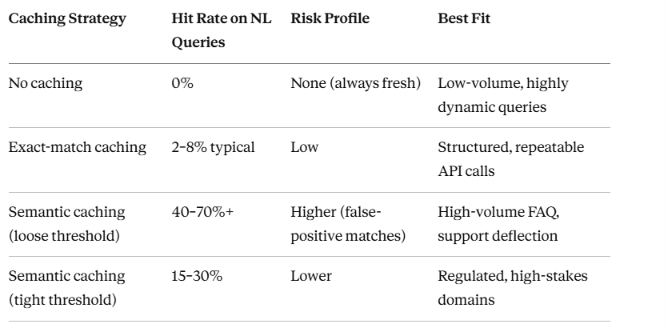
The numbers above are illustrative ranges drawn from common production patterns, not a guarantee — your actual hit rate depends entirely on how repetitive your query distribution really is.
Where the Economics Actually Change
The pitch for semantic caching usually stops at “you save money on tokens,” which is true but undersells it. The real shift is in your latency profile. A cache hit returns in single-digit milliseconds from a vector lookup. A cache miss still has to make the full round trip to the model — network hop, queue time, generation time. For latency-sensitive interfaces (voice assistants, live chat widgets, anything with a human waiting on the other end), the difference between a system that’s 60% cached and one that’s 5% cached isn’t incremental. It’s the difference between “feels instant” and “feels like software.”
Cost follows the same curve, but with a catch worth naming: embedding every incoming query and running a similarity search isn’t free. At low volume, the infrastructure overhead of running a vector store can exceed what you’d save on token costs. Semantic caching is a high-volume optimization. If you’re serving a few hundred requests a day, you likely don’t need it yet. If you’re serving a few hundred thousand, you’re probably losing real money by not having it.
The Failure Modes Nobody Puts in the Blog Post
Stale answers with a long shelf life. A cache doesn’t know when the world has changed. If your product pricing updated yesterday, every semantically similar pricing question today will confidently serve yesterday’s number until that entry expires or gets manually invalidated. Cache invalidation strategy is not optional — it’s the second half of the feature, not a follow-up task.
Semantic drift inside a single conversation. A query like “what about the enterprise tier” means something completely different depending on what was asked three turns earlier. Caching at the single-query level without conversational context will produce technically-similar-looking matches that are contextually wrong. Most semantic caching libraries handle isolated queries well and multi-turn context poorly — worth testing before you trust it in a chat interface.
Cache poisoning through repetition. If a flawed or hallucinated response gets cached, and enough subsequent queries are similar enough to hit it, you’ve now built infrastructure that scales your error instead of your accuracy. A bad answer that used to affect one user now confidently affects every user who phrases things similarly. This is the argument for treating your cache as a monitored, auditable data store — not a black box.
Embedding model mismatches. If you change your embedding model — for a version upgrade, a cost optimization, a vendor switch — every previously cached entry was indexed in a different vector space. Old entries won’t reliably match against new queries anymore. Teams that don’t plan for this end up with a slow, silent degradation in hit rate that looks like a bug and is actually an unmigrated cache.
What the Tooling Landscape Actually Looks Like
You don’t need to hand-roll this. The building blocks are mature:
- Vector-store-backed caches (Redis with vector search, GPTCache, Momento) give you the embed-store-retrieve loop as a drop-in layer in front of your model calls.
- Managed embedding APIs handle the vectorization step, though the choice of embedding model matters more than most teams initially assume — smaller, cheaper embedding models can shift your similarity math in ways that quietly change your effective threshold.
- TTL and invalidation hooks are the unglamorous part of every one of these tools, and the part worth reading the documentation for before you read anything about performance benchmarks.
The tooling isn’t the hard part. The hard part is deciding, deliberately, what “close enough” means for your specific domain — and revisiting that decision as your product changes.
When to Skip It Entirely
Semantic caching isn’t a default. Skip it if:
- Your query volume is low enough that infrastructure overhead outweighs savings.
- Your domain genuinely requires fresh, individualized responses every time (creative generation, personalized recommendations built on live user state).
- You can’t tolerate the risk of a near-miss answer being served with full confidence, and you don’t yet have the monitoring in place to catch it when it happens.
Caching everything is not the goal. Caching the right layer, with a threshold you actually understand, is.
The Real Lesson
Every team obsesses over the model. Fewer teams obsess over the request path the model never needed to see. Semantic caching isn’t exotic — the concept is a decade old in spirit — but it remains one of the highest-leverage, least-implemented optimizations in production AI systems today, precisely because it lives in the unglamorous middle of the stack: not the model, not the prompt, not the UI. Just the plumbing that decides whether you needed to ask at all.
If your AI system is still treating every question like it’s never been asked before, it’s not your model that’s inefficient. It’s your architecture.
Semantic Caching: The Optimization Every AI Team Skips was originally published in Towards AI on Medium, where people are continuing the conversation by highlighting and responding to this story.
