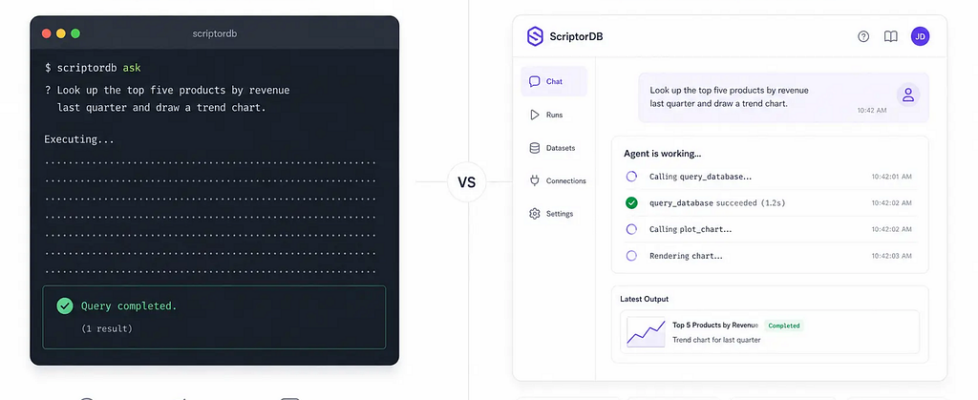
Why I Refused to Expose Pydantic AI to My Frontend — Research Notes

In my previous article, I explained why Pydantic AI accounts for only 73 lines of ScriptorDB’s codebase. The remaining engineering effort lies in everything surrounding the framework.
One of those pieces is streaming.
Although agent.run() can execute an Agent in a single call, building a production frontend requires far more than a final return value. That led us to build an application-level event translation layer instead of exposing Pydantic AI’s internal event stream directly.
This article explains why.
View the previous article in medium
TL;DR
We built an application-level event translation layer for ScriptorDB: the backend listens to Pydantic AI’s raw event stream, translates it into six stable frontend events ( run_start, text_delta, tool_call, tool_result, trace, run_end), and then pushes them via SSE (Server-Sent Events).
The core of this decision isn’t about showing off technically; it’s about adhering to an architectural principle: never expose the LLM framework’s internal data structures to the frontend or the persistence layer. As a result, the frontend only needs a dead-simple reducer to manage state, the persistence format is decoupled from the framework version, and the protocol layer (SSE) can be swapped out at any time without affecting inference or state logic.
Where the Problem Originates
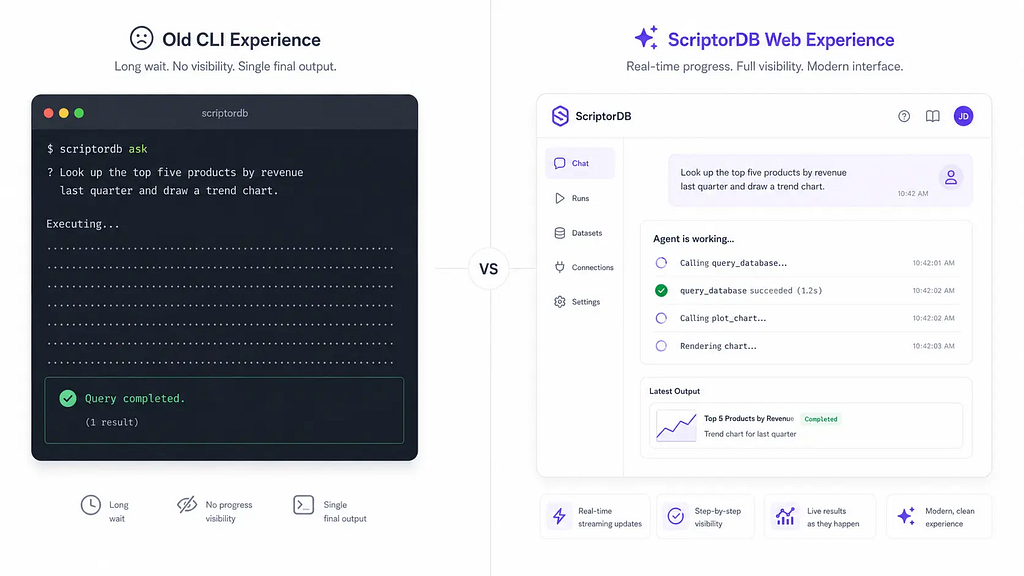
Comparison of a static CLI output versus a streaming ScriptorDB web interface showing real-time tool call progress.
Pydantic AI can execute an agent with a single call to agent.run(). That works perfectly for a CLI, where the only thing you care about is the final answer.
A production web application is different. Users don’t just wait for a result-they expect to see the execution unfold. They want to know which tool is running, whether it succeeds or fails, and why a run stops unexpectedly.
In ScriptorDB’s earliest CLI prototype, we simply called agent.run(), waited for an AgentRunResult, and printed result.data. There was no frontend, no sessions, and no streaming state. One line of code was enough.
That assumption broke down as soon as we introduced a React frontend. A request like “Look up the top five products by revenue last quarter and draw a trend chart” might trigger multiple tool calls, each taking several seconds. If a database query fails halfway through, the user shouldn’t stare at a loading spinner until a generic “Run Error” finally appears. The interface should reveal what is happening while the Agent is still running.
In short, a CLI only needs the result. A production product needs the process.
The Shortcut We Deliberately Avoided
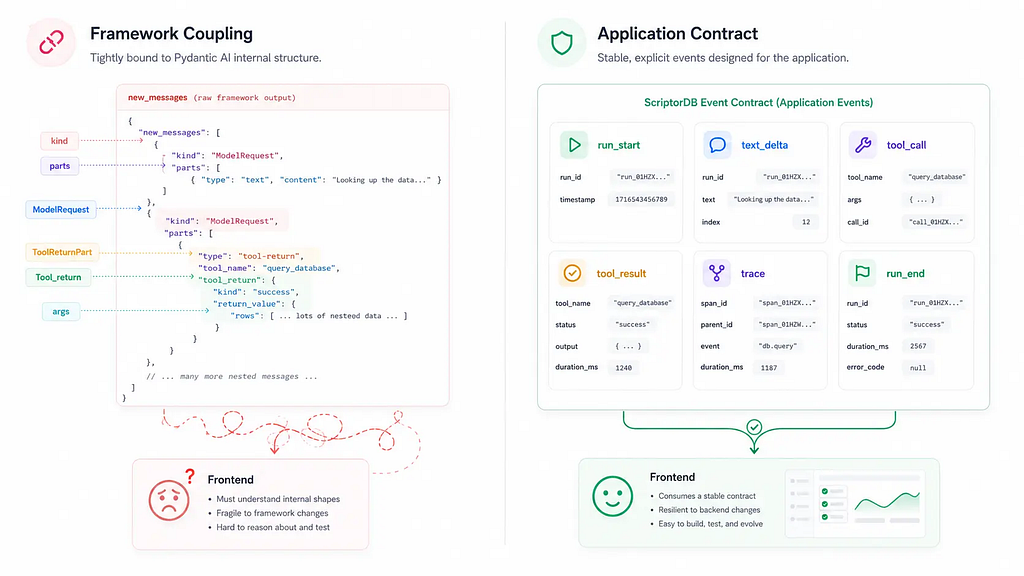
Once we accepted that a frontend needs execution visibility, the most obvious solution seemed straightforward: serialize result.new_messages() and send it directly to the frontend:
Wait for agent.run() to finish, serialize new_messages into JSON, return it to the frontend via an API, and let the frontend parse out what tools were called and what text was output.
We didn’t get far before abandoning this approach. The reasons were highly practical:
First, new_messages is an internal framework structure. When you call result.new_messages(), you receive a list of ModelMessage objects. Ignoring some internal fields, a simplified serialized version looks roughly like this:
[
  {"kind": "request", "parts": [{"content": "Look up last quarter's revenue..."}]},
  {"kind": "response", "parts": [{"tool_name": "query_database", "args": {"sql": "SELECT ..."}}]},
  {"kind": "request", "parts": [{"tool_return": "...", "tool_name": "query_database"}]},
  {"kind": "response", "parts": [{"content": "Based on the query results..."}]}
]
This is Pydantic AI’s own messaging protocol. If the frontend receives it, it has to understand concepts like kind, parts, and tool_return before it can figure out “what tool was called and whether it succeeded or failed.” Furthermore, field naming, serialization methods, and even type annotations might change as the framework upgrades. If we pass this directly to the frontend and persist it to disk, we are essentially surrendering our “format sovereignty.”
Second, the frontend doesn’t need to know the LLM message format. The frontend only cares about: what the tool_name is, whether the status is running or success, how long it took to execute, what the output is, and what the error_code is. The ToolReturnPart only contains the serialized tool result; it lacks unified execution metadata.
Third, the routing layer would become a hodgepodge. If we let the FastAPI route call agent.run() directly, the routing code would simultaneously take on inference invocation, protocol conversion, persistence logic, and error handling. That is not a router’s job.
So we made a decision: under no circumstances will we expose Pydantic AI’s internal data structures directly to the frontend or the persistence layer. We needed our own event contract.
A Stable Set of Application Events
Before writing any code, we asked ourselves: what exactly does the frontend need to know?
The answer was simpler than we imagined:
- run_start – The Agent has started executing
- text_delta – The LLM is streaming output token by token
- tool_call – The Agent invoked a specific tool
- tool_result – The tool finished executing, bringing back a result or an error
- trace – Step logs intended for the debugging panel
- run_end / error / metadata – The run has ended or encountered an error
That’s it. The frontend doesn’t need to know framework concepts like ModelRequest, ToolReturnPart, or FunctionToolCallEvent. It only needs events with application semantics.
This realization dictated the direction of our entire implementation.
How We Built the Bridge
With this principle in place, the real question became: where exactly should this translation layer live?
If we simply let the FastAPI route call agent.run(), parse events, format SSE, and persist data right inside the endpoint, the routing code would bloat rapidly. That is not what routes are for.
ScriptorDB’s approach breaks the pipeline down into three layers, each with only a single reason to change:
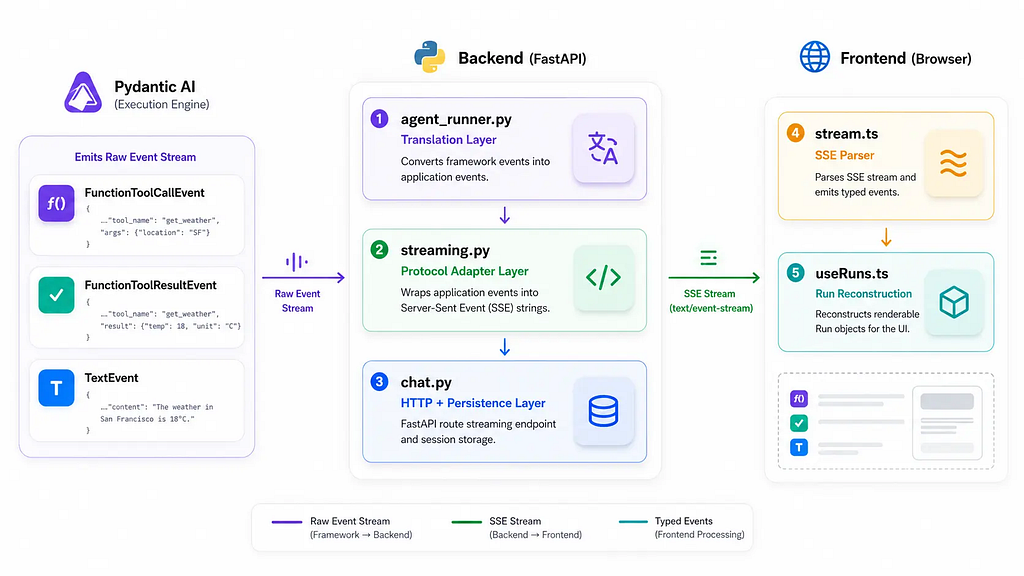
Pydantic AI Event Stream
        ↓
agent_runner.py   → Translates framework events into application events (dicts)
        ↓
streaming.py      → Wraps application events into SSE strings
        ↓
chat.py           → HTTP lifecycle + persistence wrapping up
        ↓
Frontend stream.ts→ Parses SSE streams, triggers state updates
        ↓
useRuns.ts        → Reconstructs events into renderable Run objects
The key isn’t the number of layers, but that each layer holds exactly one responsibility-meaning they can evolve independently.
agent_runner.py: The Translation Layer
This is the core of the whole design. run_agent_stream() creates an asyncio.Queue, starts agent.run() as a background task, and then intercepts Pydantic AI’s raw events within event_stream_handler, translating them into our application events and pushing them into the Queue.
Why use an asyncio.Queue? Because event_stream_handler is called by Pydantic AI’s internal coroutine, while the SSE response is consumed by a different coroutine. The Queue decouples the producer from the consumer, ensuring the agent isn’t blocked if SSE transmission is slow.
The secret to event translation is that it’s not just “renaming.” For example, when a FunctionToolResultEvent arrives, we need to:
- Unwrap the ToolResult to extract success, output, and error_code.
- Use RunTracker.tool_duration_ms() to calculate the execution time.
- Package the tool name, arguments, status, error code, and execution time into a tool_result event that the frontend can render directly.
RunTracker is a lightweight in-memory tracker that logs all metadata for a single Agent Run: which tool started when, when it ended, what the final output was, and whether the status is completed or error. It never touches the database; it is strictly maintained in memory, and once the stream concludes, chat.py converts it into a StoredRun for persistence.
streaming.py: The Protocol Adapter Layer
stream_agent_response() pulls dict events from agent_runner.py and converts most of them directly into SSE strings. However, it does two extra things:
First, filtering new_messages. These messages are collected during the stream but are not pushed to the frontend, because the frontend doesn’t need them. After the stream ends, they are passed to chat.py for persistence.
Second, enriching model metadata. The metadata event is supplemented with canonical_slug, display_name, and provider_specific_id. This is done so the frontend displays “Claude 3.5 Sonnet” rather than a cryptic internal vendor ID-echoing the Canonical Model Registry we discussed in the first article.
chat.py: The HTTP Lifecycle Layer
The FastAPI route only does three things:
- Calls stream_agent_response() to return a StreamingResponse.
- Once the stream finishes, appends the messages from new_messages_collector to the Session.
- Converts the run metadata from run_collector into a StoredRun and saves it into the SessionStore.
The route doesn’t touch Agent details or SSE formatting; it solely handles HTTP and persistence. This is a level of coupling we are perfectly comfortable with.
Looking back, what we did wasn’t just “renaming framework events and sending them to the frontend.” We were defining an application protocol -a contract independent of any LLM framework that simply describes “what happened during the Agent’s execution.”
Consequently, the Frontend Got Simpler
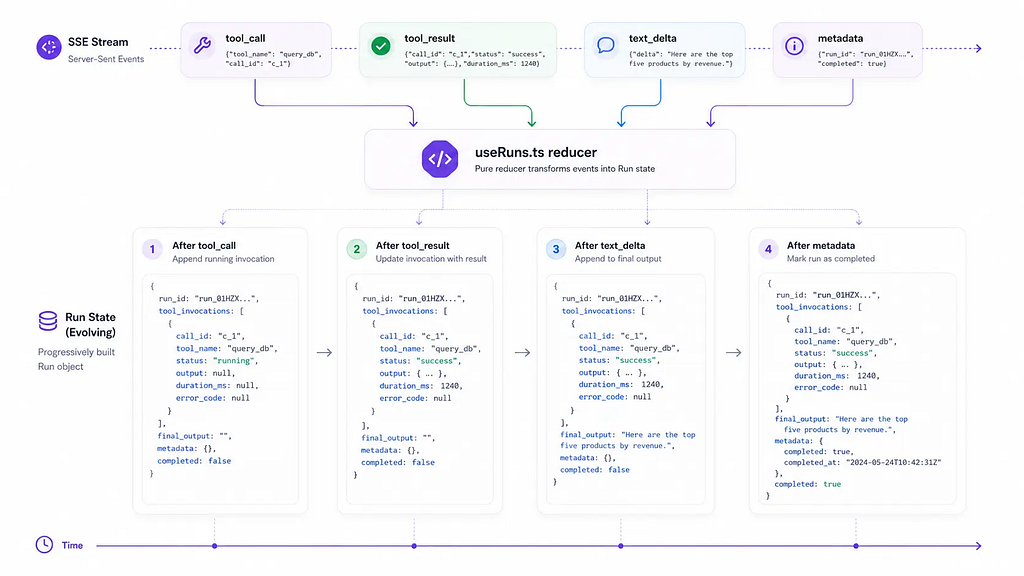
Because the backend handled the heavy lifting of translation, the frontend actually ended up with less code.
frontend/src/api/stream.ts does just one thing: it reads the SSE stream, parses the event: and data: lines into a StreamRunEvent, and passes them to the higher layers via callbacks.
frontend/src/hooks/useRuns.ts maintains a reducer that incrementally builds the Run state based on the event type:
- tool_call → Appends an entry with a running status to the tool_invocations array.
- tool_result → Finds the corresponding call_id, updates its status to success or error, and populates output, duration_ms, and error_code.
- text_delta → Appends the text snippet to final_output.
- metadata → Marks the Run as completed.
The frontend has no idea what ModelMessage, ToolReturnPart, or FunctionToolCallEvent are. It only recognizes our custom set of events, allowing it to complete state management with a single reducer. This is the direct payoff of backend translation: a much lighter frontend.
Pitfalls We Encountered and Trade-offs We Made
Exception Handling. When agent.run() throws an exception internally, the consumer pulling from the Queue cannot be allowed to deadlock. We catch the exception in a try/except block and yield an error event followed by a run_end event, ensuring the frontend can properly terminate its loading state.
Event Granularity. We unified the abstraction of all tool invocations into tool_call / tool_result, hiding the discrepancies between different providers. The cost is that some provider-specific, fine-grained events are lost; the benefit is a frontend protocol that remains stable in the long run.
Timing of Persistence. We can’t hit the disk with every single event; data must be written in bulk after the entire run concludes. Otherwise, performance would suffer, and if a run were to fail midway, the Session would be left with an incomplete state.
Deduplicating new_messages. The new_messages list returned by Pydantic AI typically includes the ModelRequest containing the user’s initial input. Before saving to the Session, we check: if the first message is purely a UserPromptPart, we strip it out, because the user’s message was already saved separately.
Ultimate Benefits
The benefits of this design are gradual, but their impact is profound:
Protocol Agnostic. We’re using SSE today, but if we ever need to switch to WebSockets tomorrow, we’d only have to modify streaming.py. agent_runner.py and the frontend would remain completely unaffected.
Testability. The core logic within agent_runner.py -event translation and RunTracker state updates-can be fully covered by unit tests without having to spin up an LLM.
Observability. Every tool invocation carries its duration_ms, error_code, and trace_steps. You can inspect the run logs directly during debugging and auditing.
Conclusion
Pydantic AI’s agent.run() is designed for a “caller.” It assumes you only need the final result. But a frontend in a production system is an “observer”-it needs to see the process.
This gap cannot be bridged by the framework alone, because a framework doesn’t know what kind of product it will be embedded into. ScriptorDB’s solution isn’t to relentlessly hack the framework, but to build a translation layer just outside its boundaries: translating framework events into application events, translating application events into a transport protocol, and handing that transport protocol off to the frontend.
This translation layer isn’t specific to Pydantic AI. The same architectural boundary applies whether your backend is LangGraph, OpenAI Agents SDK, or a custom orchestrator.
Originally published at https://aivault.dev.
Why I Refused to Expose Pydantic AI to My Frontend — Research Notes was originally published in Towards AI on Medium, where people are continuing the conversation by highlighting and responding to this story.
