How to Use OpenCode for Free in 2026

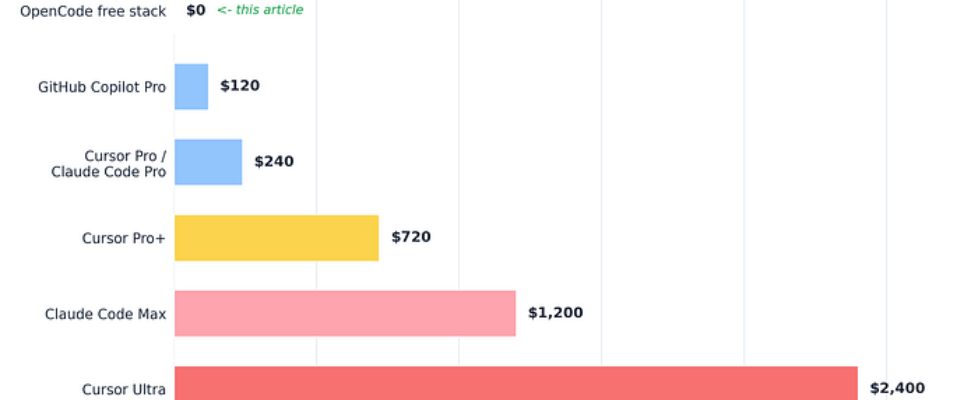
Author(s): Kamrun Nahar Originally published on Towards AI. OpenCode for Cheapskates. A Love Letter. The $2,400 Coding Robot and the $0 One That Does the Same Job Every free model, hidden setting, and quota trick for OpenCode, collected from the corners of the internet and tested for a month. Here’s the 2026 market in one sentence. AI coding help costs $20 a month for the normal tier, $60 to $100 for the serious tier, and $200 a month, which is $2,400 a year, for the tier named after people who’ve stopped checking their bank app. I paid none of it for a month and lost nothing but excuses. This article is the complete setup, every trick included, written so a total beginner can follow along. Real 2026 pricing for individual plans. The green bar is not a rendering error. The tool is OpenCode, an open source coding agent with one of the biggest star counts on GitHub. The free models come from five different places that no single tutorial ever lists together. That’s the whole gap this article closes. What it actually looks like. Less hacker movie, more friendly text app. The Five Words You Need (60 Seconds, Then We’re Done With Theory) A terminal is texting your computer instead of clicking it. That’s all it is. A model is the rented artificial brain, like GPT or Gemini. An agent is a model with hands, it doesn’t just discuss your files, it opens them, edits them, runs your tests, and reads the errors. A token is how models count text, in word-chunks, and every limit you’ll ever hit is measured in them. The context window is the model’s short-term memory, a whiteboard of fixed size, and everything it should know must fit on the whiteboard. Remember the whiteboard. It returns later, holding your quota hostage. The entire vocabulary barrier, dissolved. You now speak fluent nerd. Why Any of This Is Free (the Part That Sounds Like a Scam and Isn’t) When an AI lab launches a new model, it needs feedback and word of mouth more than it needs your twenty dollars, so launch-window models go free, the way supermarkets hand out cheese cubes. You’re not stealing. You’re the focus group. The samples just sit in five different aisles, and OpenCode is the one cart that can roll through all of them. That’s my Easiest Topic on Earth metaphor and the last metaphor-heavy paragraph, I promise. Tricks from here on. The star curve of a tool people actually use, not one being advertised at you. Free samples aisle, but for artificial brains. You are the focus group, not the mark. Setup, Fully Narrated (10 Minutes) # Downloads the installer and runs it in one move. Read it first at# opencode.ai/install if you’re paranoid. I did. It’s short and boring.curl -fsSL https://opencode.ai/install | bash# Node users, identical result via npm.npm install -g opencode-ai# The step everyone skips, then suffers. Enter YOUR PROJECT folder first.cd my-project# Launch. That’s the whole install.opencode What every character means. curl downloads things. f fails quietly on server errors instead of saving garbage, s hides the progress bar, S still shows real errors, L follows the file if it moved. The | pipe pours the download straight into bash, the program that runs text commands. So line one reads “download the installer and run it now.” The npm route does the same through Node’s package manager, with -g meaning global, available from any folder. cd walks you into your project. Windows users want WSL, Windows’ built-in Linux mode, one search away. Why the folder matters. OpenCode sees only the folder you launch from. Right folder, instant coworker who read the codebase. Home folder, and it will offer to refactor your tax documents with total sincerity. Lane 1. The Zen Free Models (Zero Setup, Frontier Brains) Type /models inside OpenCode. The team runs a gateway called Zen, and it always carries several launch-window models at $0. Right now that means Grok Code Fast 1 from xAI, GLM, MiniMax, and a stealth model from an unnamed lab legally called Big Pickle. One login. No card. Trick inside the trick, the lineup rotates, so glance at the Zen page monthly, yesterday’s free flagship becomes paid the same week a new one lands free. The free rows rotate monthly. Screenshot yours, it’s a historical document. The fine print, said like a friend. During free periods your prompts may help train these models. Perfect for side projects and homework. Wrong for anything under an NDA. Lane 5 handles that case. A frontier lab had one shot at a legendary name and chose pickle. Unironically iconic. Lane 2. The Copilot Allowance You Already Own Own a GitHub account? You own AI requests. Copilot’s free tier includes 50 premium requests a month, and OpenCode can spend them. Type /connect, choose GitHub Copilot, open github.com/login/device, enter the short code. Done. Fifty a month is an emergency flare, not a lifestyle, but flares matter at 11 PM. Fifty free premium requests hiding in an account you already own. Lane 3. Gemini’s Enormous Free Tier Google gives roughly 1,500 free requests per day on Gemini Flash, resetting every morning. Grab a free key at aistudio.google.com, no card needed, hand it to OpenCode once, select a Gemini model in /models. For raw daily volume nothing free comes close. The catch is per-minute rate limits, so it dislikes rapid-fire spam, which you shouldn’t be doing anyway after the whiteboard section. The most valuable free button in AI right now, hiding in plain sight. Lane 4. OpenRouter and the $10 Trick OpenRouter is a marketplace of models from dozens of labs, and 28+ of them are marked free, their names ending in :free. Default limit, 50 requests a day. Now the community’s favorite open secret. Load $10 of credit once, not monthly, once ever, and your free-model limit jumps to 1,000 a day, twentyfold, permanently. It’s the only money in this article and it’s optional. I’ve seen worse deals […]
