I Tried Making Image Generation 90x Cheaper. Here’s What Worked.

Replacing a paid image API looked simple. Then I met NVIDIA’s GPU names, three kinds of 8-bit, and a model that loaded fine and generated pure static.
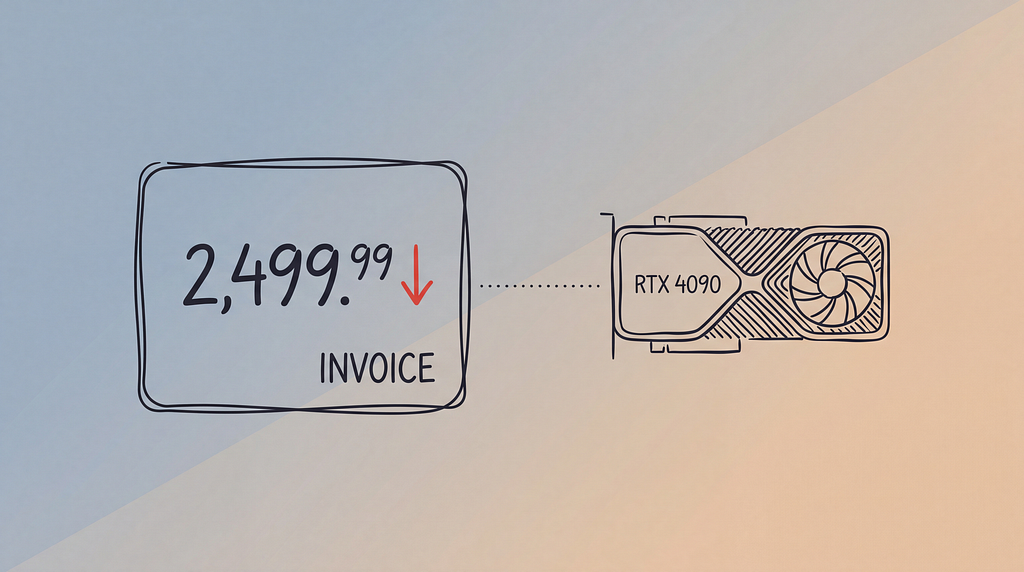
The bill had a comma in it.
We edit a lot of product images where I work, a fashion-discovery startup. For months that ran on Nano Banana, Google’s Gemini 2.5 Flash Image, at $0.039 an image. Four cents is nothing until you are making several variants for every product in a big catalog. Then it is a monthly number with a comma in it, sitting in a dashboard, waiting for someone to ask why.
So I went looking for a cheaper way to do the same job. Take an open image editor, run it on a rented GPU, pay for electricity instead of API calls. I tried a few models on Replicate. Most were close, but Qwen-Image-Edit, Alibaba’s open 20B editor, was the one that kept a shirt looking like the same shirt with similar patterns and cuts after the edit. Open weights, good edits, no meter running. Done, I thought…
It was not done. The model was the easy part. The week went to what I ran it on, and to one fact nobody warns you about: the architecture in a GPU’s name decides which cheap, fast number formats it can run, and that decides the bill. The card I ended up on was an RTX 4090, because it is the cheapest GPU with FP8 tensor cores. Everything before that conclusion is why.
An NVIDIA GPU’s name is a spec sheet
Per image is the unit that matters, not per hour. A pricier card that runs a faster format can still be cheaper per image. The fast formats come from quantization, shrinking the model’s numbers from 16 bits to 8 or 4. Which of those run fast is set by the architecture printed in the name.
Consumer cards say it in the first two digits: 40 is Ada, 50 is Blackwell, and the 90 is just the top tier. Datacenter cards use the architecture’s initial: A100 is Ampere, H100 is Hopper, B200 is Blackwell. Under the name sits the number your code cares about, the compute capability. An RTX 4090 is 8.9, which you target as sm_89. You don’t have to trust any of this. Ask the card:
import torch
print(torch.cuda.get_device_name(0), torch.cuda.get_device_capability(0))
# NVIDIA GeForce RTX 4090 (8, 9)  ->  sm_89  ->  Ada  ->  FP8 yes, FP4 no
The format your card can’t run (FP8) is the cheap one
Tensor cores only accelerate the formats they were built for, and that is fixed per generation:
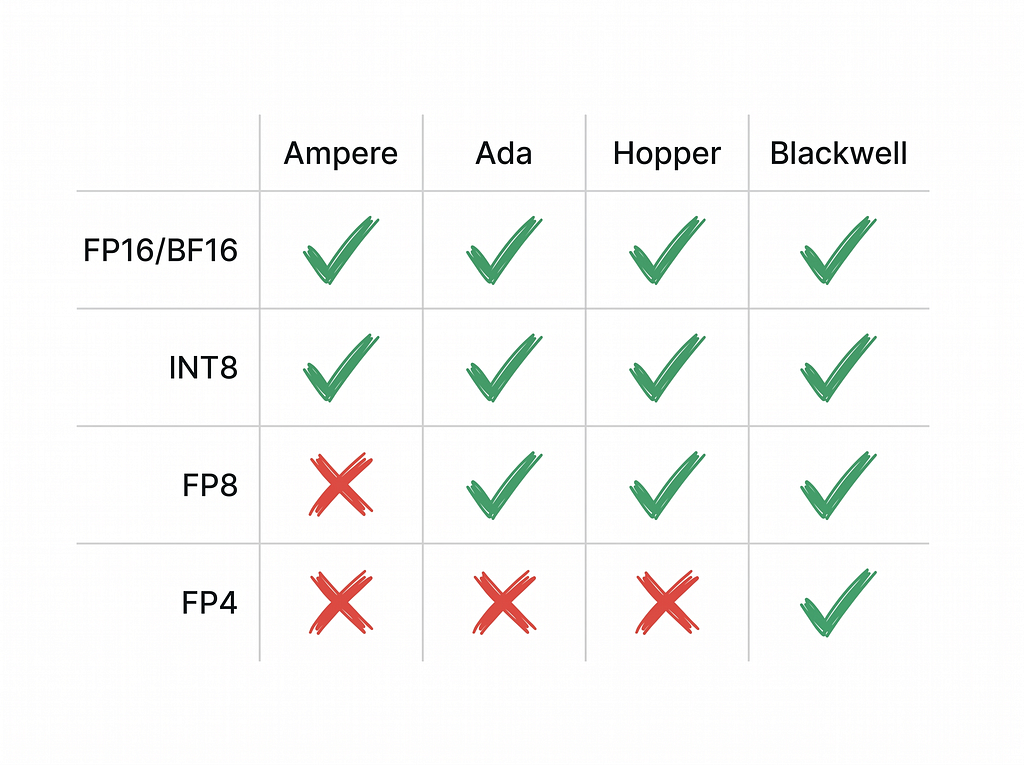
Read the FP8 row. FP8 arrived with Hopper and is on Ada, so the 4090 has it. Ampere does not: the A100 and the 3090 have no FP8 path at all. FP4, the 4-bit format, is Blackwell only, not even on Hopper.
The 4090 reports compute capability 8.9, and some docs say FP8 needs 9.0, which is why people assume the 4090 cannot do it. That 9.0 is NVIDIA’s Transformer Engine, not the silicon. The 4090 has FP8 tensor cores; it just lacks Hopper’s scaling hardware, so 4090 FP8 is real, just not H100 FP8.
That is the whole case for the 4090. It is the cheapest card that can run FP8 at all.
“8-bit” is three different things: FP8, INT8, and FP4
I thought 8-bit quantization was one thing. It is at least three, and two of them are not the same.
Picture the weights as a library. INT8 weight-only shrinks every book to a pocket edition, half the shelf space. But to read a page you photocopy it back to full size first: the math still runs in bf16. You save memory, not time. In torchao’s H100 benchmark INT8 weight-only runs at 0.65x to 0.91x of bf16. Sometimes even slower than this.
FP8 is the other animal. It is a real 8-bit float, and the tensor cores multiply it directly, so you get the memory saving and an actual speedup. Same eight bits, opposite outcome, because one keeps the work full-size and the other does not. So the FP8 vs INT8 question is not really about size. Both are eight bits. It is about whether the tensor cores light up.
The night the model loaded and made static
Getting to FP8 took three tries.
First I quantized to INT8 weight-only in diffusers with a 4-step distilled Lightning LoRA. It worked, and it crawled: seven seconds a step, because torchao’s compiled kernels did not match my torch version and quietly dropped to a slow path. Pin torchao to your torch and it goes away.
Then the obvious FP8: point diffusers at a ready-made FP8 checkpoint. It loaded with no error. I hit generate and got pure noise. I sat there refreshing the output folder, watching a 20-billion-parameter model produce television snow, certain it was my prompt before I admitted it was the loader. The file used a ComfyUI-style scaled format, and in my run diffusers loaded the weights but not the scale factors, so it ran raw FP8 as if it were real numbers. Just static, while the credits burned. Although the format was right, the loader could not read it.
What worked was LightX2V, an engine built for this, with native FP8 and the offloading to fit a 58GB model on a 24GB card. FP8, the distillation fused in, text encoder resident, transformer streamed in phases. About 4.5 seconds an image, six times faster than the INT8 path. That is what runs now.
Almost none of that week was the model. It was CUDA and torch and cuDNN not lining up: Ada wants CUDA 11.8 or newer, a 5090 wants 12.8 and breaks wheels that ran fine on the 4090, and “libcudnn.so.9 not found” is a rite of passage. The fix was unglamorous. A five-second pre-flight check that fails before you have paid to download 40GB of weights, then a pinned base image I now refuse to touch.
The cost per image: $0.0004 versus $0.039
Per image, on RunPod community pods (late June 2026, and prices move):
GPU         Arch        VRAM    ~$/hr            FP8?
---------   ---------   -----   -------------    ----------
RTX 3090    Ampere      24GB    ~$0.22-0.46      No
RTX 4090    Ada         24GB    ~$0.34-0.69      Yes
L40S        Ada         48GB    ~$0.79-0.99      Yes
RTX 5090    Blackwell   32GB    ~$0.99           Yes (+FP4)
A100 80GB   Ampere      80GB    ~$1.39-1.49      No
H100 80GB   Hopper      80GB    ~$2.69-3.29      Yes
Through the FP8 column the 4090 picks itself. The cheaper cards are Ampere with no FP8, so they strand you on the slow path. The pricier FP8 cards do not run this job enough faster to make up the hourly gap. At about 4.5 seconds an image (my own number) and roughly $0.34 to $0.69 an hour, the GPU time works out to:
(0.69 / 3600) * 4.5  =  ~$0.00086    # high
(0.34 / 3600) * 4.5  =  ~$0.00043    # low
So $0.0004 to $0.0009 of GPU time per image against $0.039 for the API. Forty-five to ninety times cheaper, with one honest asterisk: that is GPU time only, for a card kept busy. Idle pods, storage, and a week of my time are not in it. For what it is worth, AWS’s nearest single-GPU box, a g5.xlarge, is an Ampere A10G at about a dollar an hour, weaker than a 4090 and no FP8 either. It was not close.
What I’d change
FP8 is in production and I am not done with it. The 4090’s FP8 is not Hopper-grade, so there is speed left on the table, and FP4 on a Blackwell card is the obvious next rung. I could not find a clean FP8-versus-full-precision quality benchmark for this model, so I am going on my own eyes: on our product shots the FP8 output looks identical.
The method is the part that lasts. Read the name, find the format the card can run, then do the per-image math. Picking the GPU took an afternoon. Making FP8 actually run took the rest of the week, and no price table warns you about that half.
I Tried Making Image Generation 90x Cheaper. Here’s What Worked. was originally published in Towards AI on Medium, where people are continuing the conversation by highlighting and responding to this story.
