LangGraph Checkpointing Is Not Free: A Production Postmortem


The LangGraph docs make checkpointing look like a two-line concern. Add a PostgresSaver, wire it into your graph config, and you get persistence, resumable runs, human-in-the-loop pauses, and time-travel debugging. All of it is backed by a table in Postgres you already have.
Then you ship to production. Threads start accumulating. You push an update that adds a new field to your state schema. Half your running threads fail to deserialize on resume. You dig in and discover that interrupt/resume semantics behave differently when you have parallel branches. Your checkpoint table has grown to 40GB in six weeks with no retention policy. Welcome to checkpointing in production — the feature nobody warned you about.
TL;DR
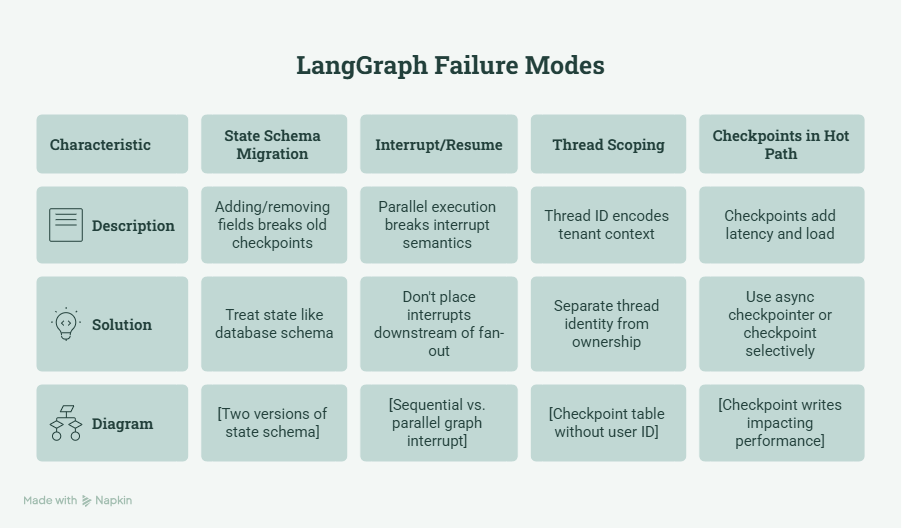
- Checkpoint schema changes require explicit migration — LangGraph won’t handle it for you, and old threads will silently break.
- interrupt_before / interrupt_after have undefined behavior during mid-fan-out in parallel subgraph execution.
- Thread-scoped checkpointing doesn’t compose cleanly with multi-tenant systems — you’ll need user-scoped indexing and a naming convention from day one.
- Every graph step writes a full checkpoint blob to Postgres. This is in your hot path. At scale, it matters.
- MemorySaver does not reproduce serialization bugs. Your dev/prod environment mismatch is hiding failures.
What Checkpointing Actually Does
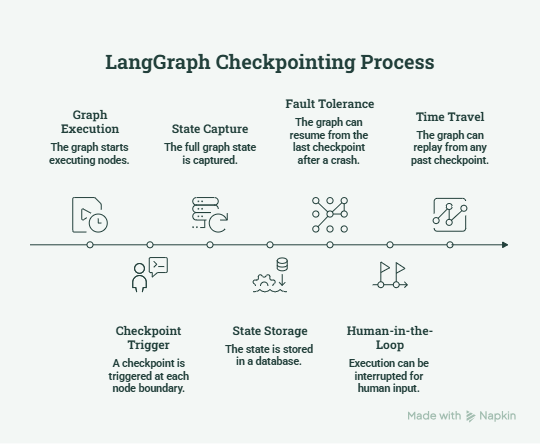
Before the failure modes, a precise model of what’s happening. LangGraph’s checkpointing system persists the state of a graph execution at each node boundary. The checkpoint captures the full graph state—every key in your TypedDict, the pending tasks, and the execution position and stores it under a (thread_id, checkpoint_id) pair.
┌──────────────────────────────────────────────────────────┐
│                     LangGraph Runtime                    │
│                                                          │
│  Node A ──▶ [CHECKPOINT] ──▶ Node B ──▶ [CHECKPOINT]    │
│                  │                           │           │
│                  ▼                           ▼           │
│         ┌────────────────────────────────────────┐       │
│         │          PostgresSaver                 │       │
│         │  thread_id | checkpoint_id | state_blob│       │
│         └────────────────────────────────────────┘       │
└──────────────────────────────────────────────────────────┘
This gives you three capabilities:
- Fault tolerance: a thread that crashes mid-execution can resume from the last saved checkpoint.
- Human-in-the-loop: you can interrupt execution before a node, surface state to a human, collect input, and then resume.
- Time travel: you can replay from any past checkpoint, which is invaluable for debugging.
Setting up PostgresSaver looks like this:
from langgraph.checkpoint.postgres import PostgresSaver
from psycopg import Connection

DB_URI = "postgresql://user:password@localhost:5432/mydb"
with Connection.connect(DB_URI) as conn:
    checkpointer = PostgresSaver(conn)
    checkpointer.setup()  # Creates checkpoint tables if they don't exist
graph = my_compiled_graph.compile(checkpointer=checkpointer)
config = {"configurable": {"thread_id": "thread-abc-123"}}
result = graph.invoke({"messages": [...]}, config=config)
Simple. Now here’s what breaks.
Failure Mode 1: State Schema Migration Is Entirely on You
Your graph state is a TypedDict. You store it as a blob in Postgres at each checkpoint. When you add a new field to that TypedDict — or remove one, or change its type — every checkpoint written before that change now deserializes into a shape your code no longer expects.
# Week 1: your state
class AgentState(TypedDict):
    messages: list[AnyMessage]
    tool_calls: list[dict]

# Week 3: you add context tracking
class AgentState(TypedDict):
    messages: list[AnyMessage]
    tool_calls: list[dict]
    user_context: dict        # New field
    execution_trace: list[str]  # New field
Any thread that has an existing checkpoint in Postgres will resume in this new schema. Depending on how your graph accesses user_context — if a node assumes it’s present and reads it directly, you’ll get a KeyError at runtime, with no migration error, no warning, and no obvious connection to the schema change that caused it.
LangGraph doesn’t have a built-in migration system. The fix is to treat your state schema like a database schema from day one:
class AgentState(TypedDict):
    messages: list[AnyMessage]
    tool_calls: list[dict]
    # Always provide defaults for new fields to maintain backward compat
    user_context: Annotated[dict, lambda x, y: y]  # reducer
    execution_trace: Annotated[list[str], operator.add]

def safe_node(state: AgentState) -> dict:
    # Defensive access: never assume new fields are present in resumed threads
    ctx = state.get("user_context", {})
    trace = state.get("execution_trace", [])
    # ...
More importantly, maintain a version key in your state. When a thread resumes, check the version. If it’s behind, run an explicit migration step as the first node — or fail loudly with a message that’s actually debuggable.
Failure Mode 2: Interrupt/Resume Breaks Under Parallel Execution
interrupt_before and interrupt_after let you pause graph execution at a node boundary, hand off to a human, collect input, and resume. The pattern is central to human-in-the-loop agent design.
It works cleanly in sequential graphs. It becomes undefined in graphs with parallel branches.
# Sequential — interrupt works as expected
graph = StateGraph(AgentState)
graph.add_node("plan", planner_node)
graph.add_node("review", review_node)      # interrupt_before this
graph.add_node("execute", executor_node)
graph.compile(checkpointer=checkpointer, interrupt_before=["review"])
Now introduce parallelism via LangGraph’s Send API:
# Parallel fan-out — interrupt semantics break
def router(state: AgentState) -> list[Send]:
    return [
        Send("worker", {"task": t}) for t in state["tasks"]
    ]

graph.add_conditional_edges("plan", router)
graph.add_node("worker", worker_node)     # 3 workers run in parallel
graph.add_node("review", review_node)     # interrupt_before here
If interrupt_before=[“review”] fires after all workers complete, you’re fine. But if one worker is slow and the runtime checkpoints mid-fan-out, you now have a checkpoint that represents a partial parallel execution state. When you resume, the runtime may re-execute completed workers, skip failed ones, or resume from an inconsistent intermediate. The behavior depends on your checkpoint granularity and which worker states were actually persisted.
The rule of thumb that holds up in production: don’t place interrupts downstream of fan-out nodes unless you’ve explicitly verified what partial state looks like. For human-in-the-loop patterns, place interrupts before the fan-out, not after.
Failure Mode 3: Thread Scoping Doesn’t Compose with Multi-Tenancy
Every checkpoint is scoped to a thread_id, which is a plain string. LangGraph has no concept of a user, a tenant, or an organization — that’s your responsibility to build.
The instinct is to encode tenant context in the thread ID:
thread_id = f"user-{user_id}:task-{task_id}"
config = {"configurable": {"thread_id": thread_id}}
This works for routing individual requests. It breaks the moment you need to answer questions like “show me all active threads for user X” or “cancel every pending task for tenant Y.”
The checkpoint table looks like this under the hood:
-- LangGraph's checkpoint table (simplified)
CREATE TABLE checkpoints (
    thread_id    TEXT NOT NULL,
    checkpoint_id UUID NOT NULL,
    parent_id    UUID,
    state        BYTEA,         -- full serialized state
    created_at   TIMESTAMPTZ DEFAULT now(),
    PRIMARY KEY (thread_id, checkpoint_id)
);
There’s no user_id column. Querying “all threads for user X” means either a LIKE scan on thread_id (slow at scale) or maintaining a separate lookup table that you keep in sync.
The cleaner production pattern:
# Maintain a thread registry alongside checkpoints
class ThreadRegistry:
    def create_thread(self, user_id: str, task_type: str) -> str:
        thread_id = f"{uuid4()}"  # opaque ID — no user info encoded
        # Store (thread_id, user_id, task_type, created_at) in your own table
        self.db.insert("thread_registry", {
            "thread_id": thread_id,
            "user_id": user_id,
            "task_type": task_type,
        })
        return thread_id
Separate the concern of thread identity (LangGraph’s job) from thread ownership (your job). This also future-proofs you for access control — checking whether a user can access a thread doesn’t require parsing string IDs.
Failure Mode 4: Checkpoints Are in Your Hot Path
This one is easy to miss because it only becomes visible at scale. By default, LangGraph writes a checkpoint after every node execution. For a 12-node graph processing 500 concurrent threads, that’s 6,000 checkpoint writes per graph execution cycle — all synchronous, all going to Postgres.
A healthy Postgres instance handles checkpoint writes in the 2–10ms range. That adds latency to every node transition, compounding across a graph’s depth. A 12-node graph with 5ms average checkpoint latency is adding 60ms of pure I/O overhead per execution—before any actual compute.
At 500 concurrent executions, you’re also hitting Postgres with ~500 concurrent writes at each node boundary. Watch your connection pool. The default pool sizes in most application configs assume a different request pattern.
Two levers:
# Option 1: Async checkpointer for non-blocking writes (LangGraph supports this)
from langgraph.checkpoint.postgres.aio import AsyncPostgresSaver

async with await AsyncPostgresSaver.from_conn_string(DB_URI) as checkpointer:
    graph = compiled.compile(checkpointer=checkpointer)
# Option 2: Checkpoint selectively - not every node needs persistence
# Only checkpoint at true recovery points: after expensive operations,
# before human-in-the-loop steps, at subgraph boundaries
graph.add_node("expensive_op", expensive_node)   # checkpoint here
graph.add_node("cheap_transform", cheap_node)    # skip or batch
Also, implement a retention policy immediately. There’s no built-in TTL on checkpoints. A 15-node graph running 1,000 threads/day generates ~15,000 checkpoint rows/day. Each checkpoint blob can be 5–50KB, depending on state complexity. At 50KB average, that’s 750MB/day with zero retention — 270GB/year. Set up a scheduled job that deletes checkpoints older than your recovery window.
-- Run this daily; keep only the last 7 days
DELETE FROM checkpoints
WHERE created_at < NOW() - INTERVAL '7 days'
  AND thread_id NOT IN (
    SELECT thread_id FROM thread_registry WHERE status = 'active'

  );
Gotchas: What Nobody Tells You
1. MemorySaver is not a faithful test double.
In development, you almost certainly use MemorySaver — it’s in-process, fast, and requires no infrastructure. The problem: MemorySaver stores Python objects directly; PostgresSaver serializes them to bytes and deserializes them on resume. Any custom object in your state that doesn’t serialize cleanly (Pydantic models with validators that fire on construction, objects with non-default __reduce__ methods, or LangChain tool instances) will pass every test with MemorySaver and blow up in production.
Run at least part of your integration test suite against a real PostgresSaver pointed at a test database. The cost of the infrastructure is one Docker container. The cost of discovering this in prod is considerably higher.
2. thread_id is stringly-typed all the way down.
config[“configurable”][“thread_id”] is a raw string. There’s no typed ThreadId wrapper, no compile-time check, and no runtime validation that the thread you’re trying to resume actually exists. A typo in thread construction silently creates a new thread rather than resuming the intended one. If you’re constructing thread IDs programmatically, centralize that logic in a single function and write a test for it.
3. Time travel has a correctness hazard, not just a cost.
Replaying from a past checkpoint is invaluable for debugging. It’s dangerous in production if your graph has side effects that have already been executed—external API calls, database writes, and emails sent. Replaying from checkpoint N-5 will re-execute those side effects unless your nodes are explicitly idempotent. This is not a LangGraph problem; it’s a general replay problem. But LangGraph’s time-travel UI makes it easy to trigger accidentally. Document which nodes have side effects and add idempotency keys before you enable time-travel tooling for your team.
Conclusion
Checkpointing is LangGraph’s highest-leverage production feature and its least-understood operational dependency. Teams that treat it as an afterthought—writing in PostgresSaver, shipping, and moving on—consistently hit the same set of failures: schema migration surprises, interrupt edge cases in parallel graphs, unbounded checkpoint storage, and serialization bugs that only surface under real persistence.
The teams that ship it cleanly have one thing in common: they treat checkpointing like a database—with migrations, retention policies, access control patterns, and integration tests that run against real Postgres. The abstraction is good enough that you don’t need to understand its internals to use it. But you do need to understand what you’re building on top of it.
LangGraph’s persistence layer is still maturing. The async checkpointer, scoped storage APIs, and checkpoint garbage collection tools are all evolving. That’s expected for a system moving this fast. What shouldn’t catch you off guard is the operational gap between what the docs show and what production demands. Now you know where the edges are.
LangGraph Checkpointing Is Not Free: A Production Postmortem was originally published in Towards AI on Medium, where people are continuing the conversation by highlighting and responding to this story.
