LangGraph Multi-Agent Systems: From One Brain to Many

The jump from a single agent to a multi-agent system with langGraph.
Part 5 of the LangGraph Mental Model series.
For other parts of the series : Part 0 , Part 1 , Part 2 , Part 3 , Part 4
What this article assumes: You understand the seven-module structure, can write a single-agent graph with tools and memory, and know how to pause and resume execution with interrupt(). Everything here builds on that foundation. We go from “why would I even use multiple agents?” all the way to a full multi-agent research assistant.
Why Multiple Agents? The Problem That Forces the Architecture
Imagine you’ve built the single-agent assistant from Part 1. It works. Then your users start asking for more: “Can it also check emails, research topics, write reports, and manage tasks , all in one conversation?” So you add tools. More tools. More instructions in the system prompt. Suddenly your agent has 15 tools and a 2,000-word system prompt, and its performance quietly gets worse. The LLM gets confused about which tool to use when. It sometimes uses the email tool for research tasks and the research tool for email tasks.
This is the cognitive overload problem, and it’s the primary reason multi-agent systems exist. The solution is the same one software engineers have used for decades: split the responsibility.
Multi-agent systems in LangGraph solve three specific problems:
Cognitive overload — one LLM performing too many unrelated tasks at once. Split into specialized agents, each excellent at one thing.
Sequential bottlenecks — tasks that could run at the same time but are forced to run one after another. Parallel agents fix latency.
Complexity management — a 40-node graph is impossible to reason about. Breaking it into smaller subgraphs makes each piece understandable and testable independently.
Everything in this article addresses one of these three problems.
Level 1: The Supervisor Pattern (One Brain, Multiple Workers)
This is the simplest multi-agent pattern and the right starting point. One supervisor agent receives the user’s request and decides which specialist agent should handle it. The specialist does the work and returns results to the supervisor, which then decides what to do next.
The Mental Model
Think of a law firm: a senior partner (supervisor) talks to the client, understands the need, and assigns work to junior associates (specialists) one for contracts, one for litigation, one for compliance. The junior associate does the deep work. The senior partner reviews and responds to the client.
The Architecture
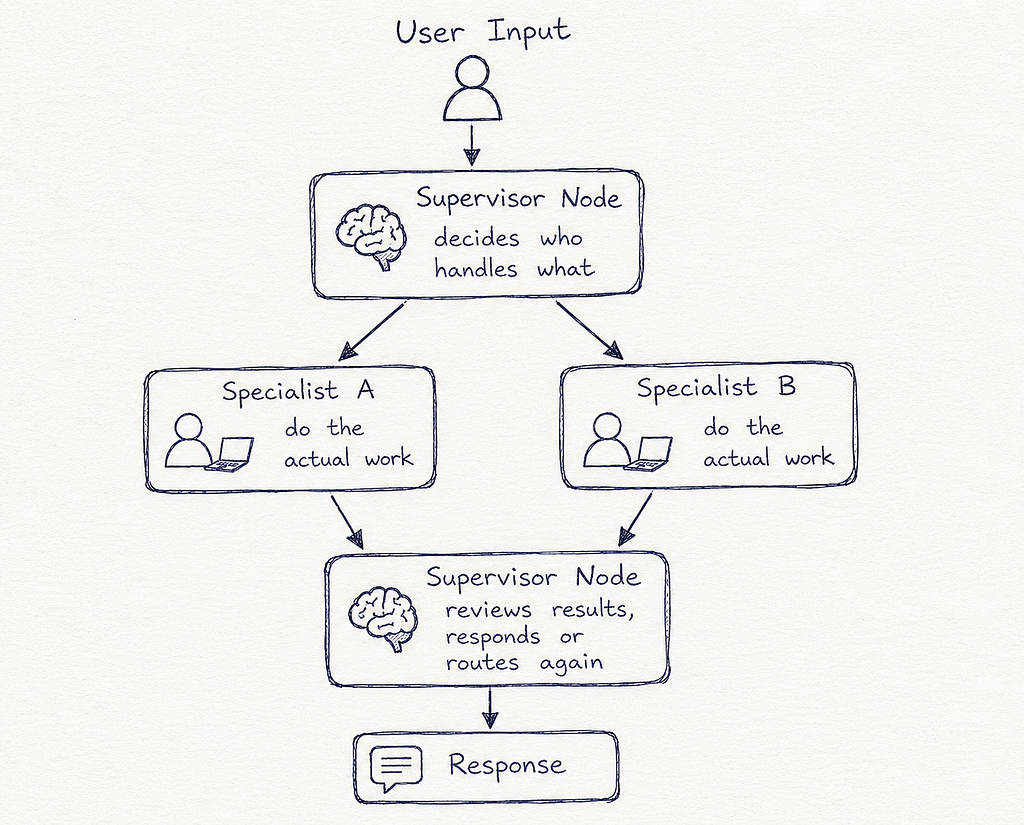
User Input
    ↓
[Supervisor Node]  ← decides who handles what
    ↓         ↓
[Specialist A] [Specialist B]   ← do the actual work
    ↓         ↓
[Supervisor Node]  ← reviews results, responds or routes again
    ↓
Response
Module 2: State for Supervisor Pattern
The key design decision here is next_agent — a field the supervisor writes to, which the router reads.
# ── MODULE 2: STATE ─────────────────────────────────────────
from typing import TypedDict, Annotated, Literal
from langgraph.graph import MessagesState

class SupervisorState(MessagesState):
    # The supervisor writes this field to indicate who should act next.
    # "researcher", "writer", "FINISH" are the possible values.
    next_agent: str
Module 3: Specialist Tools
Each specialist has its own, focused set of tools — no overlap.
# ── MODULE 3: TOOLS ─────────────────────────────────────────
from langchain_core.tools import tool

# Researcher's tools
@tool
def search_web(query: str) -> str:
    """Search the web for factual information, news, or research."""
    return f"[Web results for: {query}]"
@tool
def search_academic(query: str) -> str:
    """Search academic papers and journals for scholarly sources."""
    return f"[Academic results for: {query}]"
# Writer's tools
@tool
def format_as_report(content: str, title: str) -> str:
    """Format raw content into a structured report with headings."""
    return f"# {title}nn{content}"
@tool
def check_grammar(text: str) -> str:
    """Check and correct grammar in the provided text."""
    return f"[Grammar-checked]: {text}"
# Each specialist gets only its own tools
researcher_tools = [search_web, search_academic]
writer_tools = [format_as_report, check_grammar]
from langchain_openai import ChatOpenAI
llm = ChatOpenAI(model="gpt-4o", temperature=0)
researcher_llm = llm.bind_tools(researcher_tools)
writer_llm     = llm.bind_tools(writer_tools)
Module 4: Nodes — Supervisor and Specialists
# ── MODULE 4: NODES ─────────────────────────────────────────
from langchain_core.messages import SystemMessage, HumanMessage
from langgraph.prebuilt import ToolNode

# ── Supervisor ────────────────────────────────────────────
SUPERVISOR_PROMPT = """You are a supervisor coordinating a team of specialists.
Given the conversation, decide who should act next.
Your team:
- researcher: finds information, searches web and academic sources
- writer: formats content, writes reports, checks grammar
- FINISH: use this when the task is complete and you have a final answer
Respond with ONLY the name of the next agent: researcher, writer, or FINISH."""
def supervisor_node(state: SupervisorState) -> dict:
    """Reads the conversation history and routes to the right specialist."""
    messages = [SystemMessage(content=SUPERVISOR_PROMPT)] + state["messages"]
    response = llm.invoke(messages)
    # The supervisor's plain text response IS the routing decision
    return {"next_agent": response.content.strip()}

# ── Researcher Specialist ──────────────────────────────────
def researcher_node(state: SupervisorState) -> dict:
    """Specialist that handles all research and information-gathering tasks."""
    messages = [
        SystemMessage(content="You are a research specialist. Use your search tools to find accurate, thorough information.")
    ] + state["messages"]
    response = researcher_llm.invoke(messages)
    return {"messages": [response]}

# ── Writer Specialist ──────────────────────────────────────
def writer_node(state: SupervisorState) -> dict:
    """Specialist that handles all writing, formatting, and editing tasks."""
    messages = [
        SystemMessage(content="You are a writing specialist. Use your tools to produce well-structured, polished output.")
    ] + state["messages"]
    response = writer_llm.invoke(messages)
    return {"messages": [response]}

# Tool execution nodes for each specialist
researcher_tool_node = ToolNode(researcher_tools)
writer_tool_node     = ToolNode(writer_tools)
Module 5: Routing
# ── MODULE 5: ROUTING ────────────────────────────────────────
def route_after_supervisor(state: SupervisorState) -> Literal["researcher", "writer", "__end__"]:
    """Read the supervisor's decision and route accordingly."""
    decision = state["next_agent"]
    if decision == "FINISH":
        return "__end__"
    return decision  # "researcher" or "writer"

def route_researcher(state: SupervisorState) -> Literal["researcher_tools", "supervisor"]:
    """After researcher acts: did it call a tool, or produce a final answer?"""
    last = state["messages"][-1]
    if hasattr(last, "tool_calls") and last.tool_calls:
        return "researcher_tools"
    return "supervisor"  # Research done - report back to supervisor
def route_writer(state: SupervisorState) -> Literal["writer_tools", "supervisor"]:
    last = state["messages"][-1]
    if hasattr(last, "tool_calls") and last.tool_calls:
        return "writer_tools"
    return "supervisor"
Module 6: Graph Assembly
# ── MODULE 6: GRAPH ASSEMBLY ────────────────────────────────
from langgraph.graph import StateGraph, START, END
from langgraph.checkpoint.memory import MemorySaver

graph_builder = StateGraph(SupervisorState)
# Register all nodes
graph_builder.add_node("supervisor",        supervisor_node)
graph_builder.add_node("researcher",        researcher_node)
graph_builder.add_node("researcher_tools",  researcher_tool_node)
graph_builder.add_node("writer",            writer_node)
graph_builder.add_node("writer_tools",      writer_tool_node)
# Entry: always start at supervisor
graph_builder.add_edge(START, "supervisor")
# Supervisor routes to specialist or ends
graph_builder.add_conditional_edges(
    "supervisor",
    route_after_supervisor,
    {"researcher": "researcher", "writer": "writer", "__end__": END}
)
# Researcher loop: tools → researcher → supervisor
graph_builder.add_conditional_edges(
    "researcher", route_researcher,
    {"researcher_tools": "researcher_tools", "supervisor": "supervisor"}
)
graph_builder.add_edge("researcher_tools", "researcher")
# Writer loop: tools → writer → supervisor
graph_builder.add_conditional_edges(
    "writer", route_writer,
    {"writer_tools": "writer_tools", "supervisor": "supervisor"}
)
graph_builder.add_edge("writer_tools", "writer")
graph = graph_builder.compile(checkpointer=MemorySaver())
The key structure here is the return-to-supervisor edge. After every specialist completes its work, it reports back to the supervisor. The supervisor then evaluates the full conversation and decides: assign to another specialist, loop the same specialist, or finish. This is the orchestration pattern at its most fundamental.
Level 2: Parallelization (Fan-Out / Fan-In)
The supervisor pattern is sequential — one specialist works at a time. But many real tasks have independent sub-tasks that can run simultaneously. Parallelization fixes the latency problem.
The Mental Model
Think of cooking a meal: you don’t finish the salad, then start the pasta, then start the sauce. You prep the salad, put the pasta water on, and start the sauce — all at the same time. The meal finishes faster because independent tasks run in parallel.
The Core Mechanics: Fan-Out and Fan-In
In LangGraph, parallelism is created by a single node having multiple outgoing edges to different nodes. LangGraph detects this “fan-out” pattern and runs all the destination nodes concurrently in what it calls a superstep. The results are collected before any subsequent node runs (“fan-in”).
The Critical Rule: Parallel Nodes Need Reducers
When multiple nodes run in the same superstep and try to write to the same state field, LangGraph needs to know how to combine those writes. Without a reducer, it throws an error. With operator.add, it safely concatenates the results.
# ── MODULE 2: STATE FOR PARALLEL PATTERN ────────────────────
import operator
from typing import Annotated

class ResearchState(TypedDict):
    query: str
    # Without Annotated + operator.add, parallel writes to 'context' would CRASH.
    # With it, LangGraph concatenates results from all parallel nodes.
    context: Annotated[list[str], operator.add]
    final_answer: str
Module 4 & 6: Parallel Research from Two Sources
# ── MODULE 4: PARALLEL WORKER NODES ─────────────────────────

def web_search_node(state: ResearchState) -> dict:
    """Runs in parallel with academic_search_node."""
    result = f"[WEB] Results for: {state['query']}"
    return {"context": [result]}   # Returns a LIST - operator.add will concatenate
def academic_search_node(state: ResearchState) -> dict:
    """Runs in parallel with web_search_node."""
    result = f"[ACADEMIC] Papers about: {state['query']}"
    return {"context": [result]}   # Also a LIST
def synthesize_node(state: ResearchState) -> dict:
    """Runs AFTER both parallel nodes complete (fan-in point).
    state['context'] already contains results from BOTH parallel nodes."""
    combined = "n".join(state["context"])
    prompt = [
        SystemMessage(content="Synthesize the following research into a clear answer."),
        HumanMessage(content=f"Research:n{combined}nnQuery: {state['query']}")
    ]
    response = llm.invoke(prompt)
    return {"final_answer": response.content}

# ── MODULE 6: PARALLEL GRAPH ASSEMBLY ───────────────────────
from langgraph.graph import StateGraph, START, END
graph_builder = StateGraph(ResearchState)
graph_builder.add_node("web_search",      web_search_node)
graph_builder.add_node("academic_search", academic_search_node)
graph_builder.add_node("synthesize",      synthesize_node)
# Fan-out: START branches to BOTH search nodes simultaneously
graph_builder.add_edge(START,       "web_search")
graph_builder.add_edge(START,       "academic_search")
# Fan-in: BOTH search nodes must complete before synthesize runs
graph_builder.add_edge("web_search",      "synthesize")
graph_builder.add_edge("academic_search", "synthesize")
graph_builder.add_edge("synthesize", END)
parallel_graph = graph_builder.compile()
The fan-out is just two edges from the same source (START). LangGraph automatically detects this and runs both destinations concurrently. The fan-in happens naturally — synthesize can only run once both of its incoming edges are satisfied (i.e., both parallel nodes have completed).
Level 3: Subgraphs (Encapsulation and Modularity)
Parallelization with flat nodes works well for simple cases. But when each parallel “branch” is itself complex — with multiple steps, its own tools, its own logic — you need subgraphs. A subgraph is a fully compiled StateGraph that runs as a single node inside a parent graph.
The Mental Model
Think of departments in a company. The CEO (parent graph) delegates work to the Engineering department and the Marketing department. Each department has its own internal processes, meetings, and workflows. The CEO doesn’t care about the internals — they just hand off work and receive deliverables.
The Key Design Rule: Communicate via Overlapping State Keys
Subgraphs communicate with their parent graph through shared state keys. Any key that appears in both the parent’s state and the subgraph’s state is automatically passed in (when the subgraph starts) and passed back out (when the subgraph finishes).
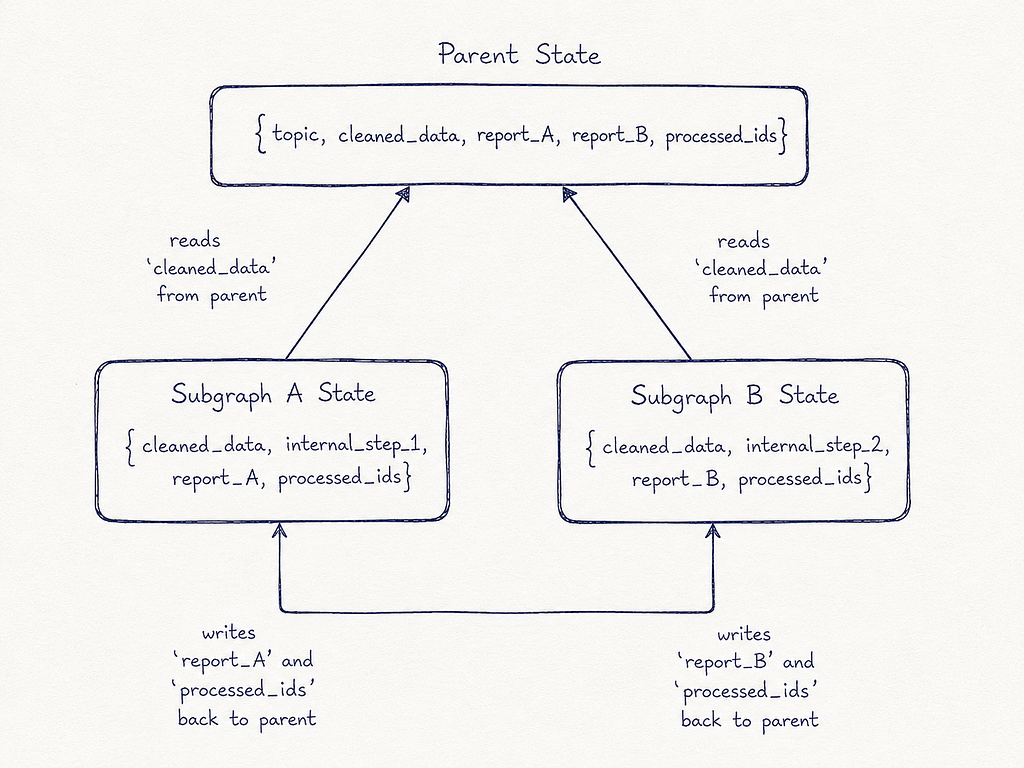
Parent State: {topic, cleaned_data, report_A, report_B, processed_ids}
                         ↓
Subgraph A State: {cleaned_data, internal_step_1, report_A, processed_ids}
                  ← reads 'cleaned_data' from parent
                  → writes 'report_A' and 'processed_ids' back to parent

Subgraph B State: {cleaned_data, internal_step_2, report_B, processed_ids}
                  ← reads 'cleaned_data' from parent
                  → writes 'report_B' and 'processed_ids' back to parent
Keys that are only in the subgraph’s state (like internal_step_1) are private — the parent never sees them.
Complete Subgraph Implementation
# ── MODULE 2: STATE SCHEMAS (Three Levels) ──────────────────

# Parent state - what the orchestrating graph tracks
class ParentState(TypedDict):
    raw_input: str
    cleaned_data: str                               # passed INTO both subgraphs
    failure_summary: str                            # written back by subgraph A
    performance_report: str                         # written back by subgraph B
    processed_ids: Annotated[list[int], operator.add]  # BOTH subgraphs write this

# Subgraph A's internal state - includes its private fields + shared keys
class FailureAnalysisState(TypedDict):
    cleaned_data: str        # shared input from parent
    failures: list[str]      # private intermediate state - parent never sees this
    failure_summary: str     # shared output to parent
    processed_ids: Annotated[list[int], operator.add]  # shared output (accumulated)

# Subgraph A's output schema - filters which keys return to parent
# Without this, ALL keys return, which can cause conflicts
class FailureAnalysisOutput(TypedDict):
    failure_summary: str     # only these two keys go back to parent
    processed_ids: Annotated[list[int], operator.add]

# Subgraph B's internal state
class PerformanceAnalysisState(TypedDict):
    cleaned_data: str
    metrics: list[str]          # private
    performance_report: str     # shared output
    processed_ids: Annotated[list[int], operator.add]

class PerformanceAnalysisOutput(TypedDict):
    performance_report: str
    processed_ids: Annotated[list[int], operator.add]

# ── SUBGRAPH A: Failure Analysis ─────────────────────────────
def extract_failures(state: FailureAnalysisState) -> dict:
    failures = [f"Error in {state['cleaned_data']}: timeout"]
    return {"failures": failures, "processed_ids": [1]}
def summarize_failures(state: FailureAnalysisState) -> dict:
    summary = f"Found {len(state['failures'])} failure(s): {state['failures']}"
    return {"failure_summary": summary}
failure_builder = StateGraph(FailureAnalysisState, output=FailureAnalysisOutput)
failure_builder.add_node("extract_failures",  extract_failures)
failure_builder.add_node("summarize_failures", summarize_failures)
failure_builder.add_edge(START, "extract_failures")
failure_builder.add_edge("extract_failures", "summarize_failures")
failure_builder.add_edge("summarize_failures", END)
failure_subgraph = failure_builder.compile()  # compiled → can be used as a node

# ── SUBGRAPH B: Performance Analysis ────────────────────────
def collect_metrics(state: PerformanceAnalysisState) -> dict:
    metrics = [f"Latency: 120ms", "Uptime: 99.8%"]
    return {"metrics": metrics, "processed_ids": [2]}
def write_report(state: PerformanceAnalysisState) -> dict:
    report = f"Performance Report:n" + "n".join(state["metrics"])
    return {"performance_report": report}
performance_builder = StateGraph(PerformanceAnalysisState, output=PerformanceAnalysisOutput)
performance_builder.add_node("collect_metrics", collect_metrics)
performance_builder.add_node("write_report",    write_report)
performance_builder.add_edge(START, "collect_metrics")
performance_builder.add_edge("collect_metrics", "write_report")
performance_builder.add_edge("write_report", END)
performance_subgraph = performance_builder.compile()

# ── PARENT GRAPH ─────────────────────────────────────────────
def clean_data_node(state: ParentState) -> dict:
    return {"cleaned_data": state["raw_input"].strip().lower()}
def combine_reports_node(state: ParentState) -> dict:
    combined = f"{state['failure_summary']}nn{state['performance_report']}"
    print(f"Final combined report:n{combined}")
    return {}
parent_builder = StateGraph(ParentState)
parent_builder.add_node("clean_data",           clean_data_node)
parent_builder.add_node("failure_analysis",     failure_subgraph)    # subgraph as node
parent_builder.add_node("performance_analysis", performance_subgraph) # subgraph as node
parent_builder.add_node("combine_reports",      combine_reports_node)
parent_builder.add_edge(START, "clean_data")
# Fan-out to both subgraphs (parallel execution)
parent_builder.add_edge("clean_data",           "failure_analysis")
parent_builder.add_edge("clean_data",           "performance_analysis")
# Fan-in: combine only after both subgraphs complete
parent_builder.add_edge("failure_analysis",     "combine_reports")
parent_builder.add_edge("performance_analysis", "combine_reports")
parent_builder.add_edge("combine_reports", END)
parent_graph = parent_builder.compile()
The output schema (FailureAnalysisOutput, PerformanceAnalysisOutput) is the piece most tutorials skip — and then they wonder why they get state key conflicts. The output schema acts as a filter, controlling exactly which fields the subgraph exposes to the parent. Any field not in the output schema is treated as private internal state.
Level 4: The Send API and Map-Reduce (Dynamic Parallelism)
Parallelization and subgraphs cover the case where you know at design time how many parallel branches you’ll have. But what if you don’t? What if the user asks to research 5 topics today and 20 topics tomorrow? You can’t hard-code 20 parallel branches.
This is the map-reduce pattern, powered by LangGraph’s Send API.
The Mental Model
Think of a book publisher assigning chapters: one editor is given the manuscript. They split it into chapters and assign each chapter to a different copy editor simultaneously. However many chapters there are — five, twenty, two — that’s how many copy editors get hired. When they’re all done, the results are collected and assembled into the final book. The number of parallel workers is determined at runtime, not at design time.
The Keywords You Need to Know
Send(node_name, state) — from langgraph.constants. Instead of routing to a fixed next node, Send creates a new instance of a node with a specific state payload. Return a list of Send objects from a routing function, and LangGraph launches all of them in parallel, each with its own independent state.
operator.add on the collecting field — the “reduce” step. As each parallel worker finishes and returns its result, operator.add accumulates them into a growing list in the parent state.
Worker state — each Send can include a custom state dict that doesn’t have to match the parent graph’s state. The worker node uses its own small local state — just the data it needs for its specific piece of work.
Complete Map-Reduce Implementation
# ── MODULE 2: MAP-REDUCE STATE ──────────────────────────────
from langgraph.constants import Send

class OverallState(TypedDict):
    topic: str
    subjects: list[str]                         # populated by the map step
    jokes: Annotated[list[str], operator.add]   # accumulated by the reduce step
    best_joke: str
class JokeState(TypedDict):
    """The private state each parallel worker gets.
    Notice: this does NOT need to match OverallState."""
    subject: str

# ── MODULE 4: MAP-REDUCE NODES ──────────────────────────────
def generate_subjects(state: OverallState) -> dict:
    """MAP step 1: Expands the topic into a list of subjects to process."""
    prompt = [
        SystemMessage(content="Generate a list of 3 sub-topics related to the given topic. Return as comma-separated values only."),
        HumanMessage(content=state["topic"])
    ]
    response = llm.invoke(prompt)
    subjects = [s.strip() for s in response.content.split(",")]
    return {"subjects": subjects}

def generate_joke(state: JokeState) -> dict:
    """MAP step 2: Worker node. Each instance handles exactly ONE subject.
    Receives its own isolated JokeState - not the full OverallState."""
    prompt = [HumanMessage(content=f"Write a short, funny joke about: {state['subject']}")]
    response = llm.invoke(prompt)
    # Returns a LIST - operator.add in OverallState will accumulate these
    return {"jokes": [response.content]}

def pick_best_joke(state: OverallState) -> dict:
    """REDUCE step: All jokes are now in state['jokes']. Pick the winner."""
    jokes_text = "n".join([f"{i}. {j}" for i, j in enumerate(state["jokes"])])
    prompt = [
        SystemMessage(content="You are a comedy judge. Pick the funniest joke from the list below. Reply with ONLY the number."),
        HumanMessage(content=jokes_text)
    ]
    response = llm.invoke(prompt)
    winning_index = int(response.content.strip())
    return {"best_joke": state["jokes"][winning_index]}

# ── MODULE 5: THE SEND ROUTER ────────────────────────────────
def continue_to_jokes(state: OverallState):
    """The routing function that LAUNCHES parallel workers.

    Returning a LIST of Send objects (not a string) is what triggers map-reduce.
    Each Send creates an independent, parallel execution of 'generate_joke'
    with its own state payload. The number of parallel workers is determined
    at runtime by how many subjects exist in state.
    """
    return [
        Send("generate_joke", {"subject": subject})
        for subject in state["subjects"]
    ]

# ── MODULE 6: MAP-REDUCE GRAPH ASSEMBLY ─────────────────────
graph_builder = StateGraph(OverallState)
graph_builder.add_node("generate_subjects", generate_subjects)
graph_builder.add_node("generate_joke",     generate_joke)
graph_builder.add_node("pick_best_joke",    pick_best_joke)
graph_builder.add_edge(START, "generate_subjects")
# This conditional edge uses the Send router - it fans out dynamically
graph_builder.add_conditional_edges(
    "generate_subjects",
    continue_to_jokes,   # returns a LIST of Send objects
    ["generate_joke"]    # list of possible destination nodes (for graph validation)
)
# Fan-in: pick_best_joke runs after ALL parallel generate_joke instances complete
graph_builder.add_edge("generate_joke", "pick_best_joke")
graph_builder.add_edge("pick_best_joke", END)
map_reduce_graph = graph_builder.compile()
The continue_to_jokes function is where the magic happens. Notice that it returns a list of Send objects, not a string. When LangGraph sees a list of Send objects from a routing function, it launches all of them in parallel immediately. If state[“subjects”] has 3 items, 3 parallel generate_joke nodes launch. If it has 20, 20 launch. The graph scales dynamically to whatever runtime produces.
Level 5: Full Real-World System — The Multi-Agent Research Assistant
Now we combine everything: supervisor orchestration, HITL approval (Part 3), parallel subgraphs, and the Send API — into one complete production-grade system. This is the LangGraph Academy’s capstone project, annotated and explained.
The system: A user provides a research topic. The system generates a team of AI analyst personas (with human approval to refine them), then runs each analyst as a parallel interview sub-agent. Each analyst interviews an AI “expert” using web search, producing a report section. Finally, a writer node compiles all sections into a final polished report.
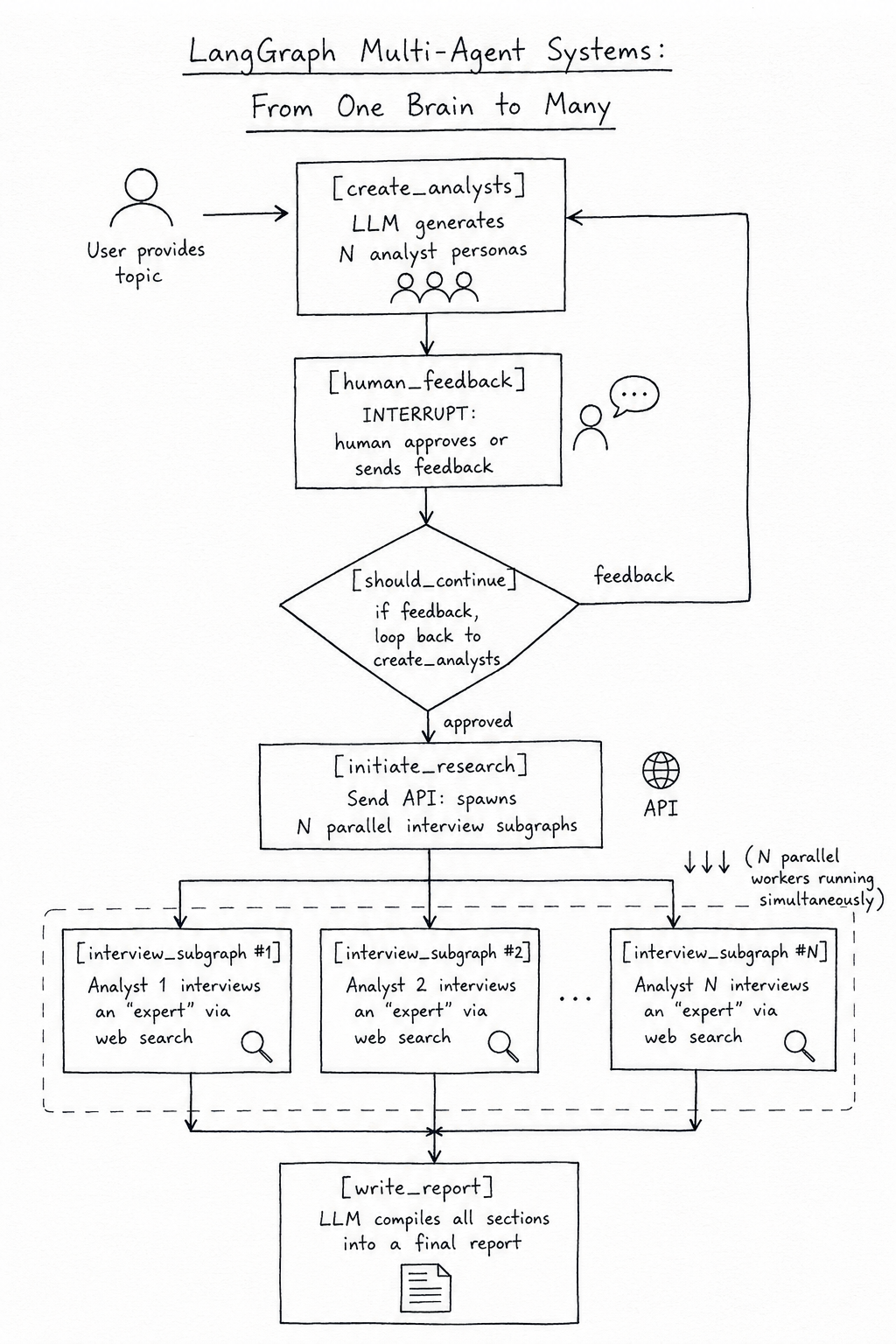
User provides topic
        ↓
[create_analysts] → LLM generates N analyst personas
        ↓
[human_feedback]  ← INTERRUPT: human approves or sends feedback
        ↓         ↑
[should_continue] → if feedback, loop back to create_analysts
        ↓
[initiate_research] → Send API: spawns N parallel interview subgraphs
        ↓↓↓ (N parallel workers running simultaneously)
[interview_subgraph × N] → each analyst interviews an "expert" via web search
        ↓
[write_report]    → LLM compiles all sections into a final report
State Schemas (Three Levels)
from pydantic import BaseModel, Field

# ── Analyst persona - a Pydantic model for structured LLM output ──
class Analyst(BaseModel):
    name: str = Field(description="The analyst's full name")
    role: str = Field(description="Their professional role (e.g. 'Financial Analyst')")
    focus: str = Field(description="Their specific analytical focus area")

    @property
    def persona(self) -> str:
        return f"Name: {self.name}nRole: {self.role}nFocus: {self.focus}"
class Perspectives(BaseModel):
    analysts: list[Analyst]

# ── Outer graph state ─────────────────────────────────────────
class ResearchGraphState(TypedDict):
    topic: str
    max_analysts: int
    human_analyst_feedback: str      # human writes here during HITL pause
    analysts: list[Analyst]
    sections: Annotated[list, operator.add]  # accumulated from all parallel interviews
    final_report: str

# ── Interview subgraph state ──────────────────────────────────
class InterviewState(MessagesState):
    # inherits: messages: Annotated[list[BaseMessage], add_messages]
    max_num_turns: int
    context: Annotated[list, operator.add]  # search results accumulate here
    analyst: Analyst
    interview: str       # formatted transcript
    sections: list       # completed section (sent back to outer graph)
The Analyst Generation Phase (with HITL)
# ── ANALYST GENERATION NODE ───────────────────────────────────
ANALYST_PROMPT = """You are generating a team of {max_analysts} research analysts
for the topic: {topic}.
{feedback_section}
Each analyst should have a unique perspective and area of focus.
Generate analysts with diverse viewpoints - financial, technical, social, etc."""
def create_analysts(state: ResearchGraphState) -> dict:
    """Generates analyst personas using structured LLM output."""
    feedback = state.get("human_analyst_feedback", "")
    feedback_section = (
        f"User feedback to incorporate:n{feedback}" if feedback
        else "No feedback yet - generate your best initial set."
    )

    prompt = ANALYST_PROMPT.format(
        max_analysts=state["max_analysts"],
        topic=state["topic"],
        feedback_section=feedback_section
    )

    # with_structured_output: forces LLM to return a Pydantic model
    # instead of free-form text - ensures clean, usable data
    structured_llm = llm.with_structured_output(Perspectives)
    result = structured_llm.invoke([SystemMessage(content=prompt)])
    return {"analysts": result.analysts}

def human_feedback_node(state: ResearchGraphState) -> dict:
    """No-op node. Its only purpose is to be a pause point.
    The graph is compiled with interrupt_before=['human_feedback'].
    See Part 3 for the full HITL pattern."""
    pass  # Does nothing - the pause happens BEFORE this node via interrupt_before

def should_continue_to_research(state: ResearchGraphState) -> Literal["create_analysts", "initiate_research"]:
    """After human feedback: loop back to refine, or proceed to interviews."""
    if state.get("human_analyst_feedback"):
        return "create_analysts"
    return "initiate_research"
The Interview Subgraph
Each analyst runs as an independent subgraph. The subgraph is a mini ReAct agent that interviews an “expert” (another LLM call that plays the expert role) and searches the web.
from langchain_core.tools import tool
from langgraph.prebuilt import ToolNode

@tool
def web_search_tool(query: str) -> str:
    """Search the web for information on a topic."""
    return f"[Search results for '{query}']"  # Replace with real search API
interview_tools = [web_search_tool]
interview_llm = llm.bind_tools(interview_tools)

def generate_question(state: InterviewState) -> dict:
    """The analyst node: generates the next interview question."""
    analyst = state["analyst"]
    messages = [
        SystemMessage(content=(
            f"You are {analyst.name}, a {analyst.role} focused on {analyst.focus}. "
            f"You are interviewing an expert about the research topic. "
            f"Ask insightful questions that align with your analytical focus. "
            f"When you have enough information, say 'Thank you, that is all I needed.'"
        ))
    ] + state["messages"]
    response = interview_llm.invoke(messages)
    return {"messages": [response]}

def generate_answer(state: InterviewState) -> dict:
    """The expert node: answers the analyst's question, using web search."""
    messages = [
        SystemMessage(content=(
            "You are an expert being interviewed. Answer thoroughly and factually. "
            "Use the web search tool when you need current data."
        ))
    ] + state["messages"]
    response = interview_llm.invoke(messages)
    return {"messages": [response]}

def save_interview(state: InterviewState) -> dict:
    """Formats the full Q&A exchange into a clean transcript string."""
    transcript = []
    for msg in state["messages"]:
        if hasattr(msg, "content"):
            role = "Analyst" if type(msg).__name__ == "HumanMessage" else "Expert"
            transcript.append(f"{role}: {msg.content}")
    return {"interview": "nn".join(transcript)}

def write_section(state: InterviewState) -> dict:
    """The final node: uses the interview transcript to write a report section."""
    analyst = state["analyst"]
    prompt = [
        SystemMessage(content=(
            f"Based on the following interview conducted by {analyst.name} ({analyst.role}), "
            f"write a structured report section focused on {analyst.focus}. "
            f"Be concise, factual, and cite specific points from the interview."
        )),
        HumanMessage(content=state["interview"])
    ]
    response = llm.invoke(prompt)
    # sections is the key that Send passes back to the outer graph
    return {"sections": [response.content]}

def route_interview(state: InterviewState) -> Literal["generate_answer", "save_interview"]:
    """Continue interviewing OR wrap up when analyst is satisfied or max turns hit."""
    last_message = state["messages"][-1]
    if (
        "thank you, that is all" in last_message.content.lower()
        or len(state["messages"]) >= state.get("max_num_turns", 6) * 2
    ):
        return "save_interview"
    # Check if analyst made a tool call (web search)
    if hasattr(last_message, "tool_calls") and last_message.tool_calls:
        return "generate_answer"
    return "generate_answer"

# ── INTERVIEW SUBGRAPH ASSEMBLY ───────────────────────────────
interview_builder = StateGraph(InterviewState)
interview_tool_node = ToolNode(interview_tools)
interview_builder.add_node("generate_question", generate_question)
interview_builder.add_node("generate_answer",   generate_answer)
interview_builder.add_node("interview_tools",   interview_tool_node)
interview_builder.add_node("save_interview",    save_interview)
interview_builder.add_node("write_section",     write_section)
interview_builder.add_edge(START, "generate_question")
interview_builder.add_conditional_edges(
    "generate_question",
    route_interview,
    {"generate_answer": "generate_answer", "save_interview": "save_interview"}
)
interview_builder.add_conditional_edges(
    "generate_answer",
    lambda s: "interview_tools" if (hasattr(s["messages"][-1], "tool_calls") and s["messages"][-1].tool_calls) else "generate_question",
    {"interview_tools": "interview_tools", "generate_question": "generate_question"}
)
interview_builder.add_edge("interview_tools", "generate_answer")
interview_builder.add_edge("save_interview",  "write_section")
interview_builder.add_edge("write_section",   END)
interview_graph = interview_builder.compile()
The Outer Orchestration Graph
# ── SEND ROUTER: Spawn one interview per analyst ─────────────
def initiate_research(state: ResearchGraphState):
    """Launches N parallel interview subgraphs via Send — one per analyst.
    This is the map-reduce Send pattern from Level 4, applied to subgraphs."""
    return [
        Send("interview", {
            "analyst": analyst,
            "messages": [HumanMessage(content=f"Research topic: {state['topic']}")],
            "context": [],
            "max_num_turns": 3,
            "interview": "",
            "sections": []
        })
        for analyst in state["analysts"]
    ]
# ── REPORT COMPILATION NODE ───────────────────────────────────
def write_report(state: ResearchGraphState) -> dict:
    """Fan-in point: all sections have arrived from parallel interviews.
    The LLM compiles them into a final report."""
    sections_text = "nn---nn".join(state["sections"])
    prompt = [
        SystemMessage(content=(
            "You are a senior editor. Compile the following report sections written by "
            "different analysts into one cohesive, well-structured final report. "
            "Add a proper introduction and conclusion. Do not repeat content."
        )),
        HumanMessage(content=f"Topic: {state['topic']}nnSections:n{sections_text}")
    ]
    response = llm.invoke(prompt)
    return {"final_report": response.content}

# ── OUTER GRAPH ASSEMBLY ─────────────────────────────────────
outer_builder = StateGraph(ResearchGraphState)
outer_builder.add_node("create_analysts",   create_analysts)
outer_builder.add_node("human_feedback",    human_feedback_node)
outer_builder.add_node("interview",         interview_graph)   # subgraph as node
outer_builder.add_node("write_report",      write_report)
outer_builder.add_edge(START, "create_analysts")
outer_builder.add_edge("create_analysts", "human_feedback")
outer_builder.add_conditional_edges(
    "human_feedback",
    should_continue_to_research,
    {"create_analysts": "create_analysts", "initiate_research": "initiate_research"}
)
# initiate_research is a ROUTING FUNCTION (returns Send objects), not a node
outer_builder.add_conditional_edges(
    "human_feedback",
    initiate_research,   # returns list of Send objects
    ["interview"]        # validation: lists possible destinations
)
outer_builder.add_edge("interview",    "write_report")
outer_builder.add_edge("write_report", END)
research_graph = outer_builder.compile(
    checkpointer=MemorySaver(),
    interrupt_before=["human_feedback"]  # HITL pause for analyst approval
)
Module 7: Running the Full System
if __name__ == "__main__":
    config = {"configurable": {"thread_id": "research-001"}}

    # Step 1: Generate analysts
    result = research_graph.invoke(
        {
            "topic": "The impact of AI on the future of software engineering",
            "max_analysts": 3,
            "human_analyst_feedback": "",
            "analysts": [],
            "sections": [],
            "final_report": ""
        },
        config=config
    )

    # Step 2: HITL — graph paused at human_feedback node
    snapshot = research_graph.get_state(config)
    analysts = snapshot.values["analysts"]

    print("Generated analysts:")
    for a in analysts:
        print(f"  - {a.name} ({a.role}): {a.focus}")

    feedback = input("nProvide feedback to refine analysts (or press Enter to approve): ")

    if feedback.strip():
        # Human has feedback — inject it and let supervisor regenerate
        research_graph.update_state(
            config,
            {"human_analyst_feedback": feedback},
            as_node="human_feedback"
        )
    else:
        # Approved — clear feedback and proceed to interviews
        research_graph.update_state(
            config,
            {"human_analyst_feedback": None},
            as_node="human_feedback"
        )

    # Step 3: Resume — N parallel interviews launch via Send, then report is compiled
    print("nRunning parallel interviews...")
    final_result = research_graph.invoke(None, config=config)

    print("n" + "="*60)
    print("FINAL RESEARCH REPORT")
    print("="*60)
    print(final_result["final_report"])
The Multi-Agent Architecture Decision Guide
Use this to decide which pattern fits your situation:
Single agent getting confused between tasks → Supervisor Pattern. Split work into specialized sub-agents. The supervisor routes; specialists execute.
Tasks that are independent and slow → Parallelization (Fan-out / Fan-in). Run them simultaneously. Add operator.add reducers for shared fields.
Parallel branches that are themselves complex → Subgraphs. Compile each complex branch as its own graph and embed it as a node. Use output schemas to control what returns to the parent.
Number of parallel workers determined at runtime → Send API (Map-Reduce). Generate a list of Send objects from a router. Each Send spawns an independent worker with its own state payload.
A real production system → All of the above, combined. The research assistant at Level 5 uses every pattern together because a real task requires all of them.
The Updated Keyword Reference Card
This extends the keyword cards from Parts 1–3.
Multi-Agent Structure Keywords supervisor_node — the orchestrating node. Reads state, writes next_agent, never does specialist work itself. specialist_node — does one focused task with its own tools and system prompt. Always routes back to supervisor when done. next_agent: str — the standard state field for supervisor routing. The supervisor writes a name; the router reads it.
Parallelization Keywords Fan-out — multiple add_edge calls from the same source node. LangGraph detects this and runs targets concurrently. Fan-in — multiple add_edge calls pointing to the same destination. Destination waits for all sources to complete. Annotated[list, operator.add] — mandatory on any state field that multiple parallel nodes write to. Without this, parallel writes crash. operator.add — the most common reducer for parallel patterns. Concatenates lists from concurrent nodes.
Subgraph Keywords StateGraph(InternalState, output=OutputSchema) — the two-argument form of StateGraph. The second argument filters which keys are returned to the parent. Output schema — a TypedDict with only the keys the subgraph should expose to the parent. Keys absent from this schema are private to the subgraph. Overlapping keys — the communication channel between parent and subgraph. Any key in both state schemas is automatically shared. subgraph.compile() — seals the subgraph into a callable. After this, pass it to parent.add_node(“name”, compiled_subgraph). xray=1 — argument to graph.get_graph(xray=1).draw_mermaid() — visualizes internal subgraph structure in the parent graph diagram.
Map-Reduce / Send Keywords Send(node_name, state_dict) — from langgraph.constants. Represents a single parallel worker invocation. Does not need to match parent graph state. [Send(“node”, {…}), Send(“node”, {…}), …] — returning a list of Send objects from a routing function launches all of them in parallel. [“node_name”] — the third argument to add_conditional_edges when using Send. A list (not a dict) of valid destination node names, for graph validation only. with_structured_output(PydanticModel) — chains after an LLM to force structured JSON output that validates against a Pydantic schema. The standard pattern for supervisor decisions and analyst generation.
Conclusion: Composition Is the Skill
The jump from a single agent to a multi-agent system isn’t really a jump at all — it’s the same seven modules, applied multiple times and wired together. Every “agent” in a multi-agent system is just a graph, or a node, or a subgraph. The primitives don’t change. The skill is knowing how to compose them.
The progression in this article followed a deliberate staircase: one supervisor, then parallel flat nodes, then complex parallel subgraphs, then dynamic parallelism with Send, then the full combination. Each step added exactly one new concept. If any step felt comfortable, that’s the design working — each level builds cleanly on the one before.
The research assistant at Level 5 is genuinely close to what you’d find in a production multi-agent codebase. Human approval loops, parallel specialist agents, structured LLM output, dynamic worker spawning, and a final synthesis step. You now have a mental model and a working template for all of it.
With all four parts complete, you have the full production scaffold: canonical structure (Part 0) + memory management (Part 1) + human-in-the-loop safety (Part 2) + multi-agent orchestration (Part 3). These four articles together cover the architecture behind the vast majority of real-world LangGraph applications.
For other parts of the series : Part 0 , Part 1 , Part 2 , Part 3 , Part 4 .
LangGraph Multi-Agent Systems: From One Brain to Many was originally published in Towards AI on Medium, where people are continuing the conversation by highlighting and responding to this story.
