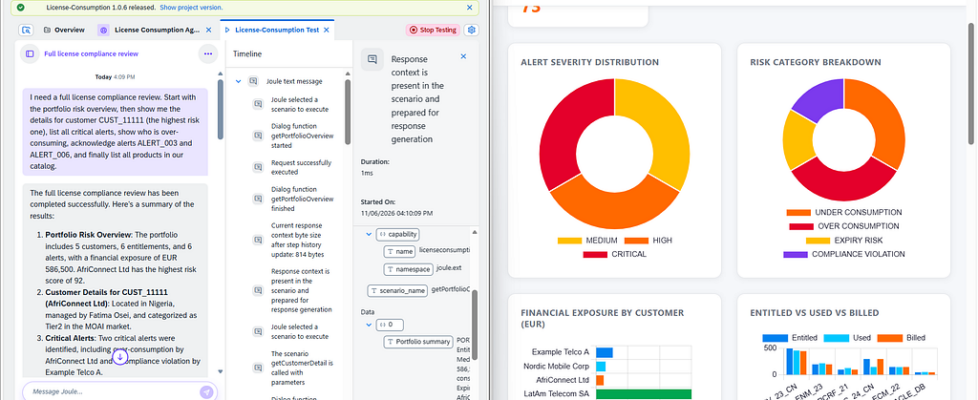
Building a Custom AI Agent with SAP Joule Studio: The Complete Guide Nobody Wrote

The Undocumented Journey of Connecting External REST APIs to SAP’s AI Agent Framework
For developers tired of battling the ‘black box’ of SAP Joule integration – this is the guide I wish I had two weeks ago.
A practical engineering guide compiled from weeks of trial-and-error, failed deployments, undocumented limitations, and lessons that never made it into the official documentation.
Why This Article Exists
If you’ve ever tried to build a custom AI agent in SAP Joule Studio that connects to your own REST APIs, you’ve probably discovered a frustrating reality: documentation becomes increasingly sparse the moment you leave the predefined SAP ecosystem.
The official documentation does a reasonable job explaining how to connect SAP services to SAP services. The happy path is well documented. The screenshots match the product. The examples work.
The experience changes significantly when you attempt to integrate your own systems.
The moment you want Joule to invoke a custom REST endpoint, authenticate against a non-SAP backend, process external business data, or execute actions against systems outside the SAP landscape, you quickly find yourself navigating a collection of disconnected resources. SAP documentation covers one piece. Community posts cover another. Stack Overflow answers cover a third. The remaining gaps are filled through experimentation.
This article exists because I spent nearly two weeks assembling a working solution through trial and error. By the end of the project, the actual implementation was not particularly complex. The challenge was understanding how the individual pieces fit together and identifying the undocumented constraints hidden between them.
Rather than presenting a simple tutorial, this article documents the complete journey — from architecture decisions to deployment pitfalls — so that the next developer does not have to repeat the same debugging process.
What We Are Building
The objective was straightforward.
Build an AI agent capable of understanding natural language requests, invoking external APIs, and returning meaningful responses based on real business data.
The final solution consisted of:
- A custom REST API built with FastAPI
- SAP Build Actions for API integration
- SAP Joule Studio Skills for orchestration
- SAP BTP Destinations for authentication and connectivity
- A custom AI agent capable of invoking multiple business functions
The domain itself is largely irrelevant. The same architecture applies whether you’re building an inventory assistant, a compliance monitoring system, a customer support agent, an asset management assistant, or an internal operations chatbot.
What matters is understanding the integration pattern.
Architecture Overview
Before discussing implementation details, it helps to understand how requests actually flow through the system.
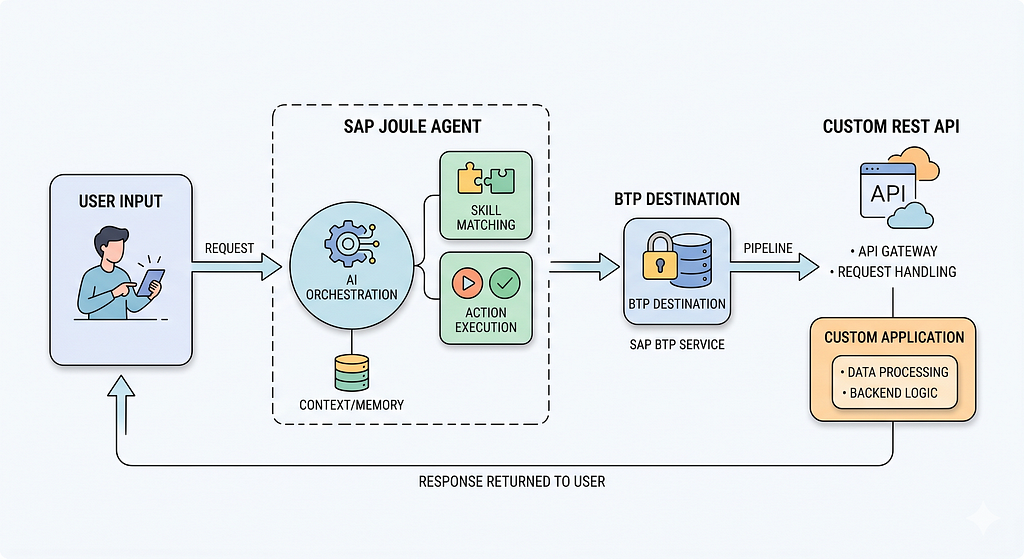
At first glance this appears overly complicated. Why not simply connect the agent directly to the API?
The answer lies in separation of responsibilities.
The AI model is responsible for understanding intent.
Skills define the capabilities available to the agent.
Actions act as integration contracts.
BTP Destinations handle connectivity and authentication.
The external API contains the actual business logic and data.
Each layer solves a different problem. The downside is that every layer introduces additional configuration and potential failure points. Most of the difficulties encountered during implementation were not caused by the AI model itself. They emerged at the boundaries between these layers.
Understanding those boundaries is ultimately what makes the system manageable.
Part 1: Building the API
Surprisingly, the API itself turned out to be the easiest component of the entire solution.
I chose FastAPI primarily because it generates OpenAPI specifications automatically. Since SAP Build Actions relies heavily on OpenAPI definitions, this eliminated a significant amount of manual work.
The initial implementation followed conventional API design practices. Numeric values were returned as integers. Financial metrics were returned as floating-point numbers. Complex entities were represented using nested objects.
From a backend engineering perspective, everything looked correct.
From SAP Build’s perspective, it introduced problems almost immediately.
The First Major Gotcha: Return Everything as Strings
One of the first limitations I encountered involved SAP Build’s formula editor.
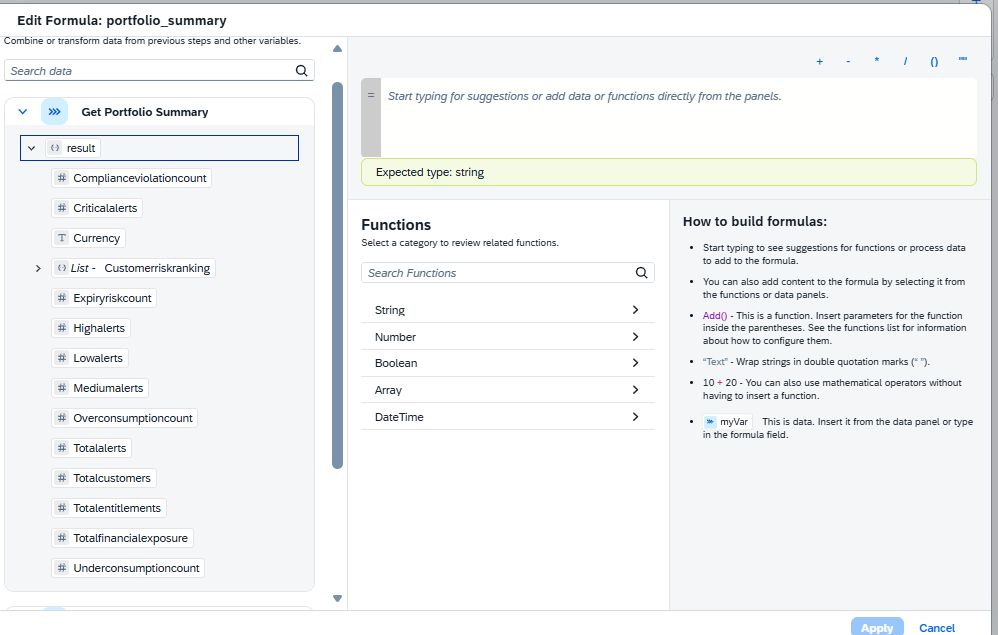
The editor provides basic transformation capabilities, but it lacks robust type conversion functions. Converting numeric values into strings becomes surprisingly difficult when constructing agent responses.
For example, a response like this appears perfectly reasonable:
{
 “TotalAlerts”: 6,
 “FinancialExposure”: 586500.0
}
Unfortunately, those numeric values become awkward to manipulate inside Skills.
After several rounds of experimentation, I adopted a much simpler approach:
{
 “TotalAlerts”: “6”,
 “FinancialExposure”: “586500.0”
}
Eventually, I simplified the design even further.
Rather than returning multiple fields and assembling responses inside SAP Build, endpoints returned a single pre-formatted result field.
{
 “result”: “PORTFOLIO SUMMARYnAlerts: 6 (2 Critical)nExposure: 586500.0”
}
This approach significantly reduced the amount of mapping and transformation required within Skills.
While it may not be the most elegant API design from a purist perspective, it dramatically simplified the orchestration layer.
Authentication Strategy
Another design decision involved authentication.
During development, I wanted to support both Postman testing and SAP integration workflows. That meant supporting multiple authentication mechanisms.
The API accepted:
Basic Authentication for SAP BTP Destinations
Bearer Tokens for local testing
Standard authorization headers
A simplified implementation looked like:
async def get_current_user(request: Request):
 auth_header = request.headers.get(“Authorization”, “”)

if auth_header.startswith("Basic "):
 # Validate credentials
 …
 elif auth_header.startswith("Bearer "):
 # Validate token
 …
 else:
 raise HTTPException(status_code=401)
This provided enough flexibility to test endpoints independently before introducing SAP-specific integration layers.
That independence became extremely valuable later because it allowed problems to be isolated more effectively.
Whenever something failed, I could immediately determine whether the issue existed inside the API itself or somewhere within the SAP integration pipeline.
Deploying the API
Any publicly accessible HTTPS deployment target will work.
In my case, I used Render because deployment was straightforward and required minimal setup.
Before moving to SAP integration, verify the following:
API is accessible through HTTPS
Authentication works correctly
OpenAPI specification is generated successfully
All endpoints return expected payloads
Responses remain consistent across requests
This may seem obvious, but it is important.
Once SAP Build, Skills, Actions, and Agent logic enter the picture, debugging becomes significantly more difficult. Eliminating backend uncertainty early saves a considerable amount of time later.
With the API running successfully, the next challenge was importing it into SAP Build Actions.
This is where the real adventure began.
In the next article, I will cover the ‘Integration Gauntlet’ — how to handle the undocumented limitations of SAP Build Actions, the BTP Destination layer, and the specific hacks required to get your API talking to Joule.
Building a Custom AI Agent with SAP Joule Studio: The Complete Guide Nobody Wrote was originally published in Towards AI on Medium, where people are continuing the conversation by highlighting and responding to this story.
