Build high-performance generative AI systems with Strands Agents, NVIDIA NIM, and Amazon Bedrock AgentCore

Building high-performance generative AI agents requires architecture that can deliver fast inference, coordinate multiple agents, and operate reliably under production workloads. If you are building generative AI agents to automate reviews, power digital assistants, and support complex decision-making workflows, you need these agents to perform well. They must reduce manual effort, respond in near real time, and scale to thousands of interactions without additional infrastructure management. In this post, you’ll learn how to build these high-performance agents on AWS by combining GPU-accelerated inference, serverless orchestration, shared memory, and built-in observability. These capabilities are essential when moving from experimental prototypes to systems that deliver consistent business value.
As agent workloads grow in production environments, inference latency can increase significantly under concurrent requests, leading to slower responses and degraded user experience. Stateless execution environments often cause agents to lose conversational or task context between interactions. This results in repeated work or inconsistent outputs. Limited visibility into agent execution makes it difficult to diagnose failures, understand reasoning paths, or control operational costs. These challenges become more pronounced in multi-agent systems, where several agents must run in parallel, share context, and aggregate results.
You’ll build a multi-agent campaign review system that demonstrates parallel reasoning, context persistence, and traceable execution paths using an integrated architecture that combines NVIDIA NIM for GPU-accelerated inference. Amazon Bedrock AgentCore provides managed runtime, shared memory and built-in observability and Strands Agents provide serverless multi-agent orchestration. This approach supports performance, scalability, and operational insight in production environments. While the example focuses on marketing content review, the same pattern applies to digital assistants, review automation, and retrieval-augmented generation pipelines.
To make these concepts concrete, the following sections walk through a reference architecture and implementation that demonstrates how these components work together in practice.
Solution overview
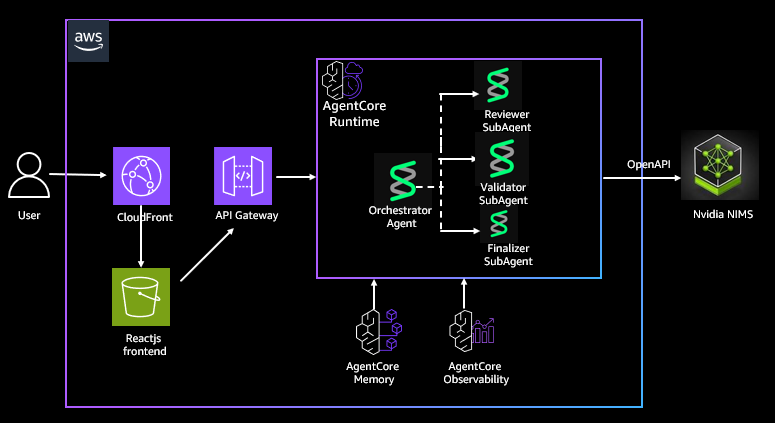
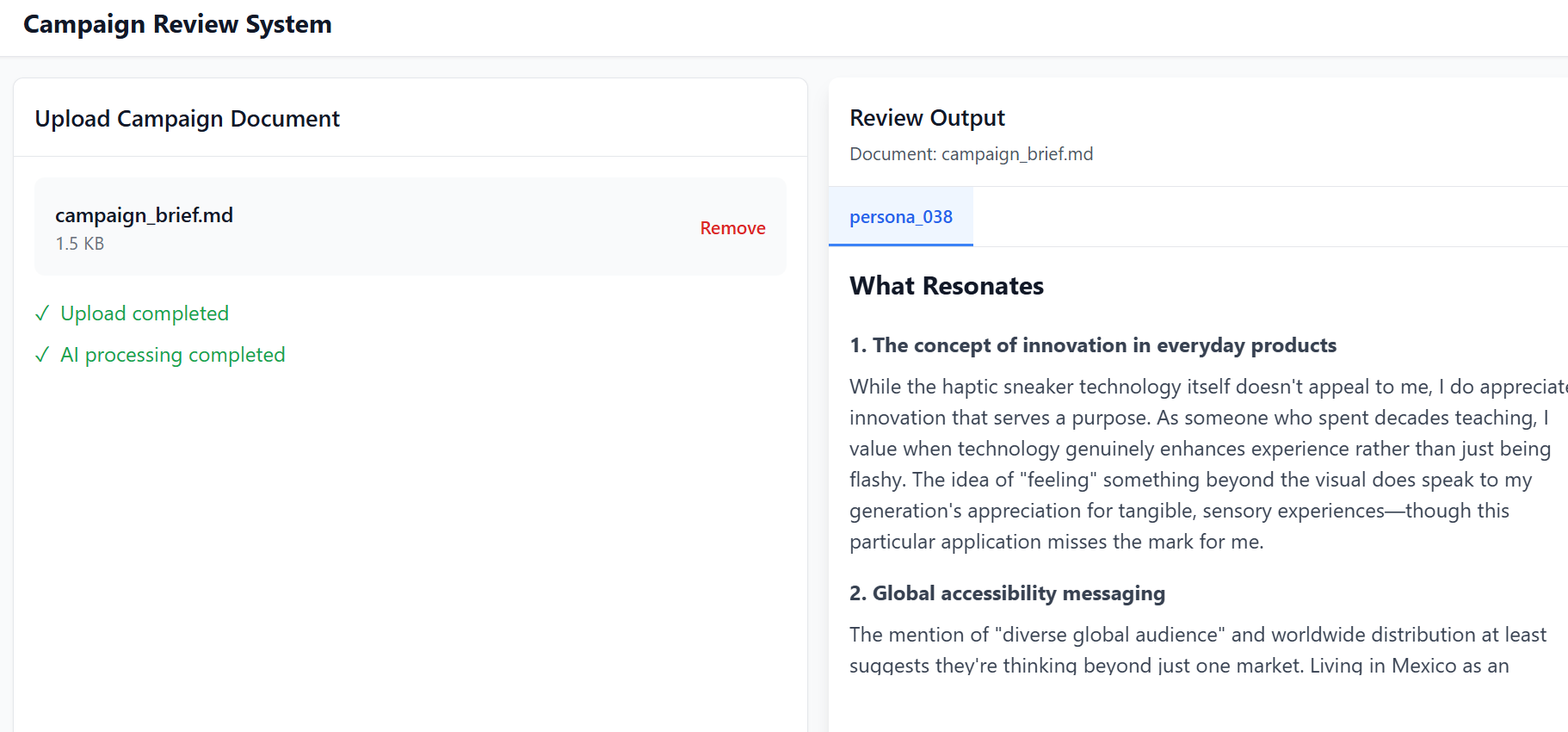
You will build a system that consists of three specialized agents that operate in parallel. A persona reviewer agent evaluates campaign content from multiple audience perspectives and produces resonance scores. A validator agent checks the content against legal and brand guidelines. A finalizer agent aggregates the outputs and produces a consolidated set of recommendations. You submit documents through a React based frontend, which asynchronously polls for results and displays agent feedback as it becomes available.
Our solution uses hosted NVIDIA NIM APIs available via build.nvidia.com to deliver high-performance, GPU-accelerated inference as a fully managed service. These endpoints run optimized large language models on NVIDIA-managed GPU backends. These backends use technologies such as Compute Unified Device Architecture (CUDA), and TensorRT-LLM to provide low-latency, high-throughput responses for agent workflows. By exposing OpenAI-compatible Chat Completion APIs, NIM integrates with the Strands-based multi-agent orchestration layer without requiring model-specific adaptations.
You’ll implement agent orchestration using Strands Agents, AWS’s multi-agent framework for coordinating tool-based reasoning workflows. With Strands, you can model agent interactions explicitly, making it easier to manage parallel execution, control flow, and aggregation of results across multiple agents. You package the Strands orchestrator and specialized agents together as a Docker container and deploy them into Amazon Bedrock AgentCore Runtime. AgentCore Runtime provides a managed execution environment with checkpointing and recovery capabilities. These features help your agents recover gracefully from interruptions and scale to thousands of concurrent invocations without manual infrastructure management.
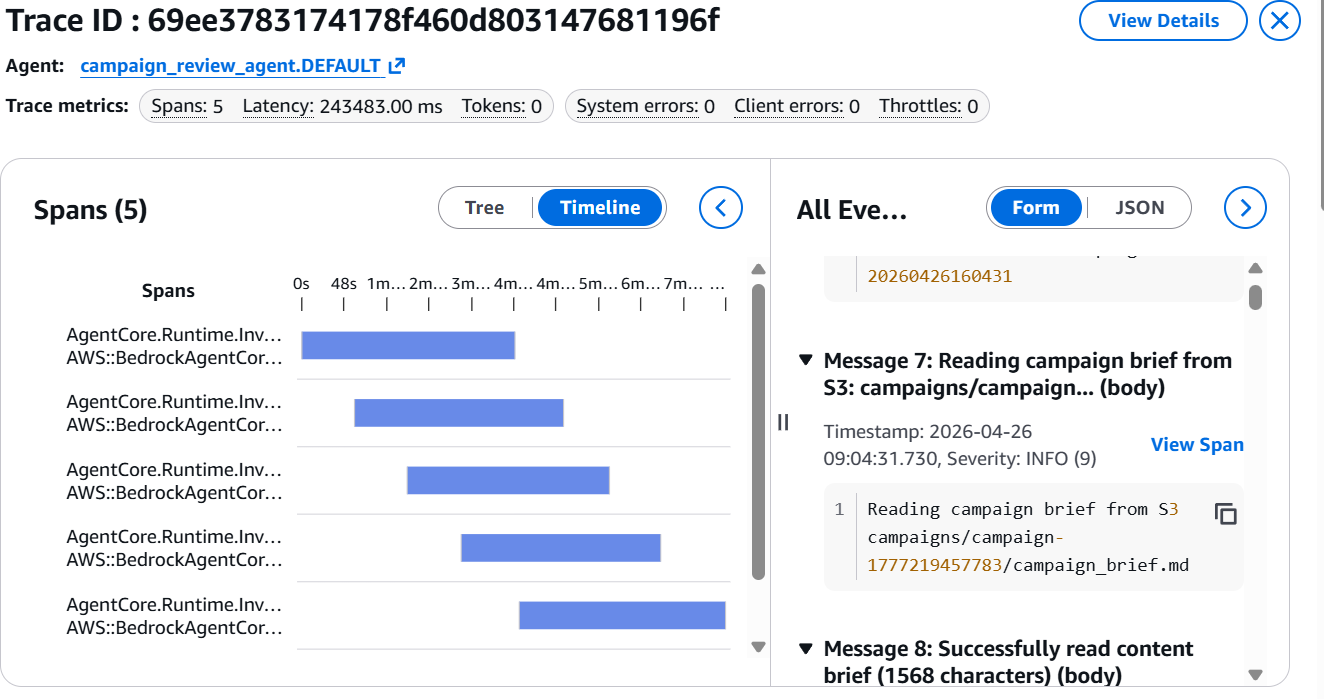
You use Amazon Bedrock AgentCore Observability to provide detailed visualizations of each step in the agent workflow, enabling developers to inspect execution paths, audit intermediate outputs, and debug performance bottlenecks. You can monitor operational metrics such as latency, token usage, and error rates through Amazon CloudWatch. This visibility helps you understand agent behavior and identify performance bottlenecks in production.
You also use Amazon Bedrock AgentCore Memory for shared context across agent invocations and to provide support for multi-turn conversations. You can extend this implementation to provide an AI assistant natural language interface because AgentCore Memory provides built-in support for storing conversational state and history.
One of the core aspects of this solution is ease of deployment into Bedrock AgentCore Runtime using an AWS Serverless Application Model (AWS SAM) template. You invoke an Amazon API Gateway interface provisioned by the template that then packages and deploys your Strands agents and all their dependencies along with enabling AgentCore Observability and AgentCore Memory.
The following architecture diagram shows how NVIDIA NIM, Strands Agents, and Amazon Bedrock AgentCore work together to support inference, orchestration, memory, and observability in your deployment.
Prerequisites
Before you can deploy this solution, you’ll need to set up your development environment with the following tools as prerequisites.
- Install the AWS Command Line Interface (AWS CLI).
- Install the AWS SAM CLI v1.100.0+
- Install Docker v20.x+.
- Install Node.js v18.x+
- Install Python v3.11+
Dependencies
The Strands Agents implementation also needs to have the following dependencies that are packaged in the DockerFile:
- AWS Strands multi-agent framework: strands-agents
- Strands agent tools and utilities: strands-agents-tools
- HTTP library for API calls: requests
- Amazon Bedrock agent core functionality: bedrock-agentcore
- AWS SDK for Python: boto3
Deploy the solution
Now that you understand the architecture, the following steps walk you through deploying the solution in your AWS environment. Note that using NVIDIA NIM requires accepting the NVIDIA AI Enterprise EULA (available during AWS Marketplace subscription or NGC registration).
Our solution is available for download on the GitHub repo. Use the following step-by-step guidance also outlined exactly in the Deployment section of the GitHub repo to deploy and access the solution in your AWS environment:
Step 1: Clone the repository
Step 2: Configure AWS credentials
Configure AWS CLI:
Verify credentials:
Step 3: Set up an Amazon DynamoDB persona table
Make script executable:
Run setup script:
Step 4: Build the AWS SAM application
Step 5: Deploy infrastructure
Use a guided deployment and follow the prompts to provide your stack name, agent name, AWS region and accept the default values for other areas.
Step 6: Get deployment outputs
Get API endpoints:
Save these values:
- ApiEndpoint – HTTP API URL
- CampaignOrchestratorApi – Agent API URL
- CloudFrontURL – Front-end URL
- FrontendBucket – S3 bucket for front end
Step 7: Deploy agent to AgentCore Runtime
This deploys your Strands agent to Bedrock AgentCore and writes the Agent ARN to Systems Manager:
This takes approximately 5 minutes. The API Gateway times out (29 seconds) but the AWS Lambda function continues running.
Monitor progress:
Wait until you see: Agent Core Runtime is READY! and Wrote Agent ARN to SSM.
Verify:
Step 8: Configure front-end environment
Create .env file
Step 9: Build and deploy front end
Install dependencies:
Build frontend:
Get frontend bucket name:
Deploy to S3:
Invalidate CloudFront cache (optional, for updates):
Step 10: Access the application
Get CloudFront URL:
Open the URL in your browser to access the application. Use this campaign_brief.md file as the sample campaign document and upload it on the left panel. You will then be able to view the campaign review output from the multi-agent orchestration in the right panel as shown below:
Navigate to the Bedrock AgentCore Observability console and select your agent for a detailed visualization of each step in your agent workflow as shown below:
Clean up
To avoid recurring charges, clean up your AWS account after trying the solution.
- Delete the AWS CloudFormation stack:
- Delete the DynamoDB table:
Conclusion
In this post, you learned how to build a production-ready generative AI agent system by combining NVIDIA NIM for GPU-accelerated inference with Amazon Bedrock AgentCore and Strands Agents on AWS for serverless orchestration. By separating inference from agent coordination, this architecture supports independent scaling, shared context across agent interactions, and detailed visibility into execution and performance.
The approach in this post provides a practical foundation for multi-agent systems that require parallel reasoning, context persistence, and operational insight. Whether you’re building review automation, digital assistants, or other agent-driven applications, the pattern demonstrated here helps you move from experimental prototypes to systems that can be deployed, observed, and scaled reliably on AWS.
About the authors
 Kanishk Mahajan is Principal – AI/ML with AWS Professional Services. In this role, he leads GenAI and agentic transformations for some of AWS largest customers in Telco and Media & Entertaintment.
 Akshay Parkhi is a Machine Learning Engineer at Amazon Web Services with over 16 years of experience leading enterprise transformation across SAP, cloud, DevOps, and AI/ML. He architects and scales production-grade AI and agentic systems that power critical business outcomes in complex, real-world environments.
