I Got Tired of Being a Human Format Converter Between My AI Agent and My Stakeholders

Every AI coding agent can analyze your data. But when it’s time to share the results, they give you Markdown, a format most stakeholders have never heard of.
Your team lives in Word documents. They know how to open, edit, share, comment on, and forward a .docx file. They don’t know what Markdown is, and they shouldn’t have to.
Here’s what usually happens: you ask Claude Code to summarize something. It gives you beautiful Markdown. Now you copy-paste it into Google Docs or Word, and half the formatting breaks. Tables misalign. Bullet indentation is off. Headings don’t carry over. You spend 20 minutes fixing what should have been done in seconds.
I was doing this every week. Sometimes multiple times a week. Stakeholder reports, data summaries, analysis deliverables. Every single one needed manual reformatting before I could send it out.
At some point I stopped and thought: I’m a data engineer. Why am I spending my time converting formats?
The Problem Runs Deeper Than You’d Think
This isn’t just annoying. It’s a real workflow bottleneck, and it undermines one of the core promises of AI coding agents.
The whole point of having an AI agent in your terminal is to move faster. You pipe data through it, ask it to analyze, summarize, compare, and it does a great job. But getting those results into a format your stakeholders will actually use? That part is still on you.
And it’s not quick. Depending on the report (tables, nested bullets, multiple heading levels), you’re looking at 10 to 30 minutes of reformatting per document. Multiply that by every report you produce in a week.
The agent that saved you an hour of analysis just created 20 minutes of formatting work. Something felt off about that.
So I Built a Skill That Skips Markdown Entirely
Claude Code skills are reusable instruction sets that teach the agent how to do something specific. Think of them as recipes: you install one, and Claude Code learns a new capability.
I built docx-report-skill, a skill that generates polished .docx Word documents directly. No Markdown intermediate step. No copy-paste. No reformatting.
You say:
Create a .docx report summarizing the Q1 sales data
And you get a Word document with:
- Branded tables with colored headers, alternating row shading, and clean borders
- Proper heading hierarchy (H1, H2, H3) with consistent typography
- Page layout with title blocks, headers, footers, and automatic page numbering
- Clickable hyperlinks with optional custom labels
- Bullet lists and body text that are correctly formatted, not Markdown artifacts
You open it in Microsoft Word, Google Docs, LibreOffice, whatever you use. It’s ready to send.
How It Works Under the Hood
The skill is built on three Node.js helper modules, each handling a different part of document generation:
- table-templates.js handles table building with branded formatting: header colors, alternating rows, borders
- typography.js handles heading hierarchy, body text, bullet lists, metadata lines, and hyperlinks
- page-setup.js handles document structure, margins, orientation, headers, footers, and page numbers
All three modules pull their styling from a single configuration file: brand-config.js. There are zero hardcoded colors, fonts, or org names anywhere in the codebase. Everything flows from that one file.
When Claude Code generates a report, it writes a Node.js script that imports these helpers, constructs the document programmatically, and saves it as a .docx file. The skill’s instructions teach Claude Code how to use the helper API correctly: which functions to call, in what order, and with what parameters.
One design choice worth mentioning: report scripts never require(“docx”) directly. The helper modules re-export everything needed from the docx library. This prevents version conflicts and keeps the API surface clean. You can read more about how this works in the skill’s repository.
Brand Customization Takes 30 Seconds
The default color palette ships with a clean teal-and-white theme. But you’ll probably want your own brand on it.
That’s one file. Open references/brand-config.js:
module.exports = {
  ORG_NAME: "Your Company",
  FONT: "Arial",
  COLORS: {
    PRIMARY: "0D7377",       // Headings, table headers, borders
    SECONDARY: "1A1A2E",     // Heading 2 text
    HEADER_BG: "0D7377",     // Table header background
    HEADER_TEXT: "FFFFFF",    // Table header text
    ALT_ROW: "EDF7F7",       // Alternating row backgrounds
    LIGHT_BORDER: "CCCCCC",  // Table borders
    SECTION_BG: "F0F9F9",    // Callout backgrounds
    META_GRAY: "666666",     // Subtitle text
    FOOTER_GRAY: "999999"    // Header/footer text
  }
};
Change your org name, font, and hex colors. Every report generated after that matches your brand. No per-report configuration, no templates to manage.
Installation
The easiest way is to give your AI agent the repo link and ask it to install:
Install this skill into my project: https://github.com/drharunyuksel/docx-report-skill
It will clone it into the right directory, install dependencies, and be ready to use.
Or install manually in three commands:
# Navigate to your project
cd your-project
# Clone into Claude Code's skills directory
mkdir -p .claude/skills
git clone https://github.com/drharunyuksel/docx-report-skill.git
  .claude/skills/docx-report-skill
# Install dependencies
cd .claude/skills/docx-report-skill/references && npm install
Either way, Claude Code auto-detects the skill from its SKILL.md file. Next time you ask for a .docx report, it knows how.
What a Generated Report Looks Like
Here’s an example, a quarterly sales report generated entirely by Claude Code using this skill:
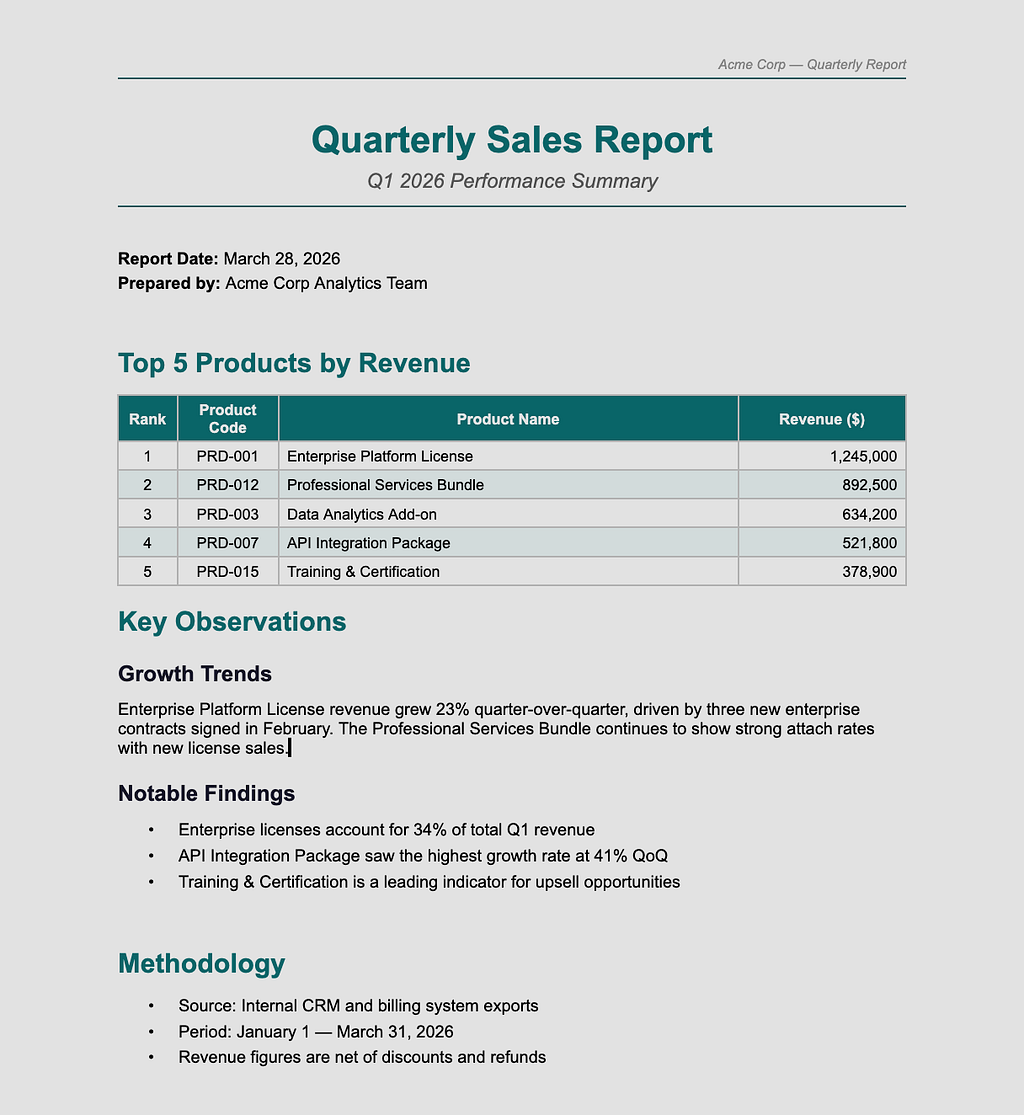
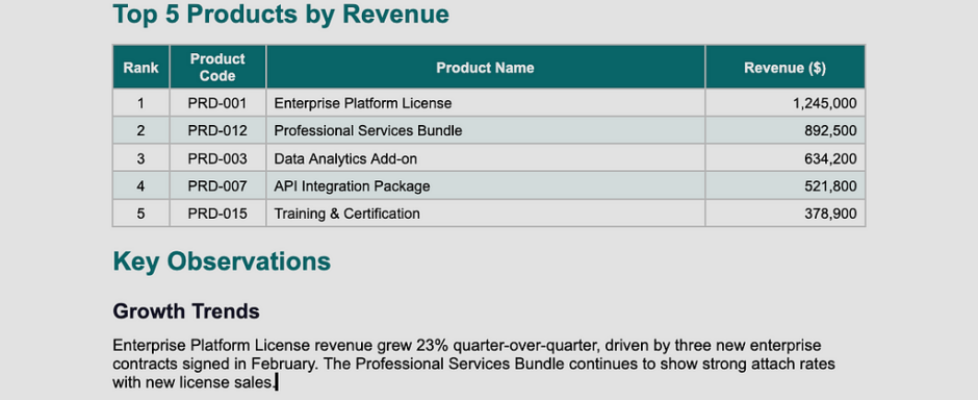
The header shows the org name. The title uses your primary brand color. The table has colored headers with white text, alternating row backgrounds for readability, and clean borders. Headings follow a consistent hierarchy. Bullets are properly indented. Page numbers are in the footer.
This is what opens when you double-click the file. No reformatting needed.
When I Use It
I use this for three categories of work:
- Stakeholder reports like weekly summaries, quarterly reviews, anything that goes to non-technical people
- Data summaries where query results, cohort analyses, or metric breakdowns need to be shared as documents
- Analysis deliverables where the output needs to be a polished artifact, not a Slack message
The common thread is that the audience expects a Word document and doesn’t care how it was produced.
Why Not Just Use Google Docs API or a Template Engine?
A few reasons.
Google Docs API requires auth setup. OAuth tokens, service accounts, scopes, it’s a whole thing. The docx-report-skill runs locally with no authentication, no API keys, no cloud dependencies.
Template engines need templates. You have to design the template first, then fill it in. With this skill, Claude Code designs the document structure on the fly based on your data. Every report can have a different layout because the agent decides what structure fits the content.
And it’s native to the AI agent workflow. You don’t leave your terminal. You don’t open a browser. You don’t switch tools. The same agent that analyzed your data also formats the output. One conversation, one deliverable.
The Bigger Picture
AI coding agents are really good at the thinking part of knowledge work: analyzing, summarizing, comparing, extracting. But the presentation part still assumes your audience speaks developer.
Most stakeholders don’t. They speak Word, PowerPoint, and PDF. Meeting them where they are isn’t optional. It’s the difference between your analysis being read and your analysis sitting in a Slack thread that nobody opens.
If your agent can analyze the data, it should be able to deliver the results in the format your audience actually uses.
Get It
The skill is free and open source under the MIT license.
GitHub: github.com/drharunyuksel/docx-report-skill
Requirements: Node.js 18+, Claude Code (or any AI agent that supports skills).
I’m a data engineer at Enara Health building pipelines and tooling that make clinical data useful. I spend most of my time between BigQuery, Airflow, and Claude Code, trying to make the boring parts of data work disappear. If you’re building with AI agents or just want to swap notes on developer tooling, find me on LinkedIn.
I Got Tired of Being a Human Format Converter Between My AI Agent and My Stakeholders was originally published in Towards AI on Medium, where people are continuing the conversation by highlighting and responding to this story.
