How Agentic RAG Cut My AI Costs by 66% (And Made It Actually Useful)

From confused hallucinations to accurate answers in one week. The complete guide to building smarter AI — no code required
It was demo day. Fifty people in the room. My manager nodding at me from the back row.
I typed the question live: “What’s our employee vacation policy?”
The AI answered with three paragraphs about GDPR compliance, two sentences about industry salary benchmarks, and — buried in paragraph five — a vague mention that “time-off entitlements may vary.”
The actual answer was fifteen days PTO. Seven words. My AI took thirty-eight seconds and delivered corporate confusion soup instead.
That was the day I realized I hadn’t built an AI assistant. I had built an expensive lookup table with a writing degree.
This is the story of what went wrong, what I changed, and the numbers that came out the other side.
The Architecture Nobody Questions
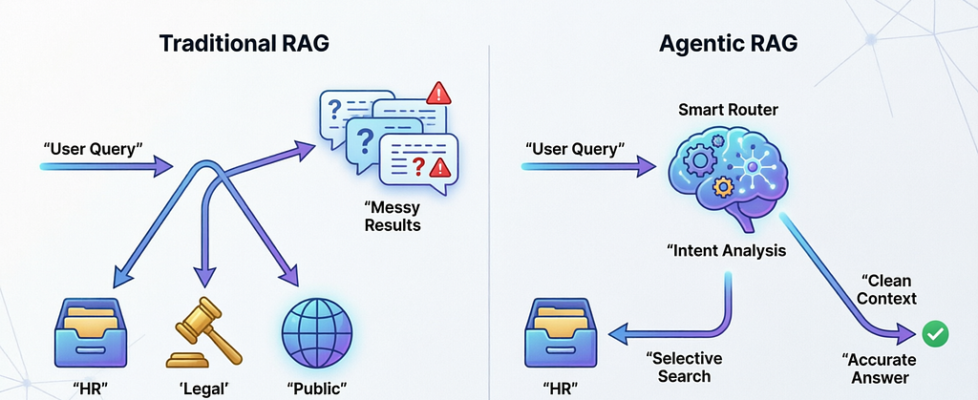
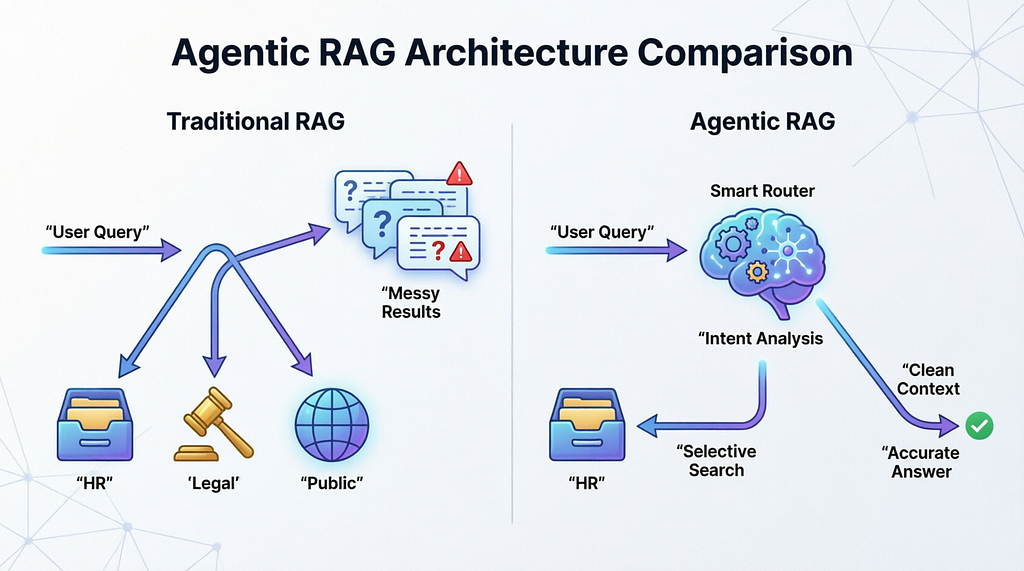
When you build a RAG system that touches multiple data sources, the default pattern looks like this:
User asks a question → search every database simultaneously → combine all results → send everything to the LLM → hope for the best.
It feels logical. More data means better answers, right?
Wrong.
What actually happens is that your LLM gets a prompt stuffed with HR policies, legal disclaimers, public knowledge articles, and technical documentation — all at once — and tries to weave them into a coherent response. The model doesn’t know which source matters. It hedges. It blends. It occasionally invents connections between things that have nothing to do with each other.
This isn’t a model limitation. It’s a systems design failure.
In my case, a simple question about vacation days triggered:
- 5 results from the HR database (relevant)
- 5 results from the legal database (irrelevant)
- 5 results from the public knowledge base (completely irrelevant)
15 chunks of mixed context → confused output → burned trust.
The monthly API bill was $300. Response times averaged 3.2 seconds. User satisfaction sat at 34% after our first internal survey. Hallucination rate hovered around 15%.
I was genuinely considering scrapping the whole thing.
The One Insight That Changed Everything
I came across a concept called Agentic RAG while debugging a retrieval pipeline at 11pm on a Tuesday. The idea is almost offensively simple:
Before you retrieve anything, decide where to retrieve from.
That’s it. That’s the whole idea.
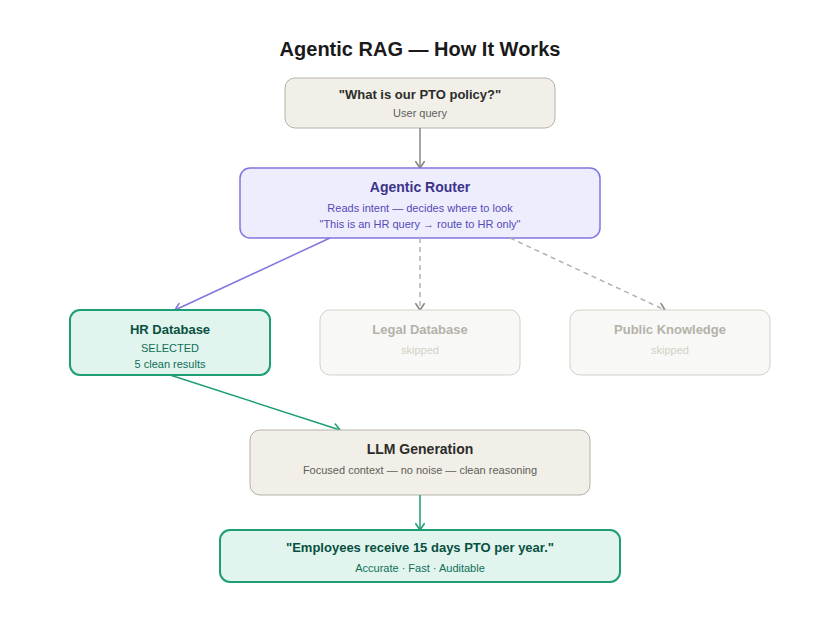
Instead of firing queries at every database simultaneously, you add an agent — a reasoning layer — that reads the incoming question, classifies what kind of question it is, and routes the retrieval to only the relevant source.
The flow changes from:
Question → Search Everything → Mix All Results → Generate
To:
Question → Understand Intent → Route to Right Source → Retrieve → Generate
One extra step. Completely different outcomes.
Why This Works (The Technical Reality)
LLMs are extraordinarily sensitive to context quality. The relationship isn’t linear — it’s closer to exponential. A prompt with 5 highly relevant chunks will consistently outperform a prompt with 20 mixed-relevance chunks.
When you give a model irrelevant context alongside relevant context, two things happen:
Attention dilution. The model spreads its “attention” across all tokens. Irrelevant tokens consume attention budget that should go to the signal.
Confidence collapse. Conflicting signals — an HR policy that says 15 days, a legal doc that discusses leave entitlements generally, a public article about industry norms — force the model into hedging language. It stops being specific because the inputs aren’t specific.
Agentic RAG removes the noise before it hits the model. Cleaner input → cleaner output. Every time.
The Three Router Options
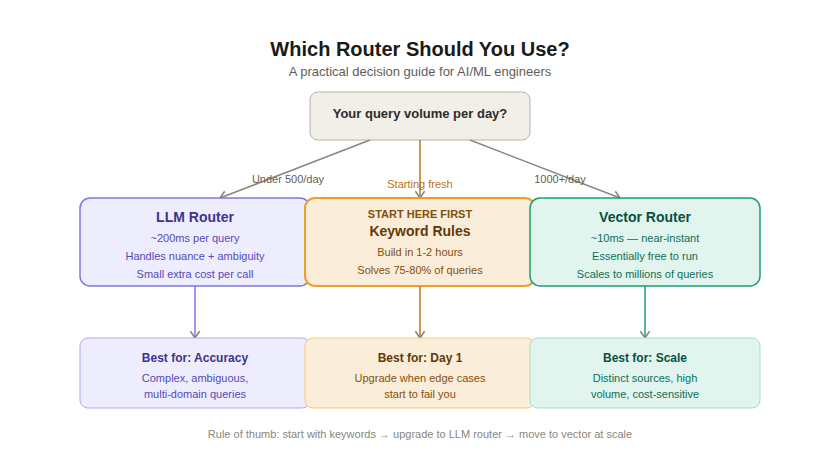
There are three practical ways to build the routing layer. I’ve implemented all three at different points. Here’s the honest breakdown:
Option 1: Keyword Rules (Start Here)
Simple if/else matching. If the question contains “PTO,” “vacation,” “leave,” “benefits” → route to HR. If it contains “contract,” “compliance,” “GDPR,” “legal” → route to Legal. Otherwise → route to general knowledge.
Build time: one hour. Works immediately.
Handles about 75–80% of real production queries correctly. Breaks on edge cases, ambiguous questions, and anything multi-domain. But it’s not embarrassing to ship — it’s a legitimate first step.
Start here. Upgrade when you hit the ceiling.
Option 2: LLM Router (The Smart Layer)
Pass the question to a fast, cheap LLM (not your main generation model) with a system prompt describing each database. Ask it: “Based on this question, which of the following sources should be searched?” It returns a source name. You search that source.
Accuracy: high. Handles nuance, multi-part questions, sarcasm, domain ambiguity.
Cost: one small model call per query. With something like claude-haiku or gpt-4o-mini, this is fractions of a cent. At scale it adds up, but for most production systems it’s trivial.
Latency addition: ~150–250ms.
Use this when accuracy is non-negotiable.
Option 3: Vector Router (The Speed Layer)
Create an embedding for each data source by embedding a paragraph that describes what that source contains. When a query comes in, embed it and run cosine similarity against your source embeddings. Route to the closest match.
No LLM call. ~10ms routing. Essentially free.
Works very well when your data sources are semantically distinct. Struggles when two sources have overlapping content (e.g., HR and Legal often both discuss leave entitlements — the embeddings will be close).
Use this at high volume (1k+ queries/day) when sources are clearly distinct.
The Results (After Eight Weeks)
I ran keyword routing for two weeks, moved to an LLM router in week three, and measured throughout.
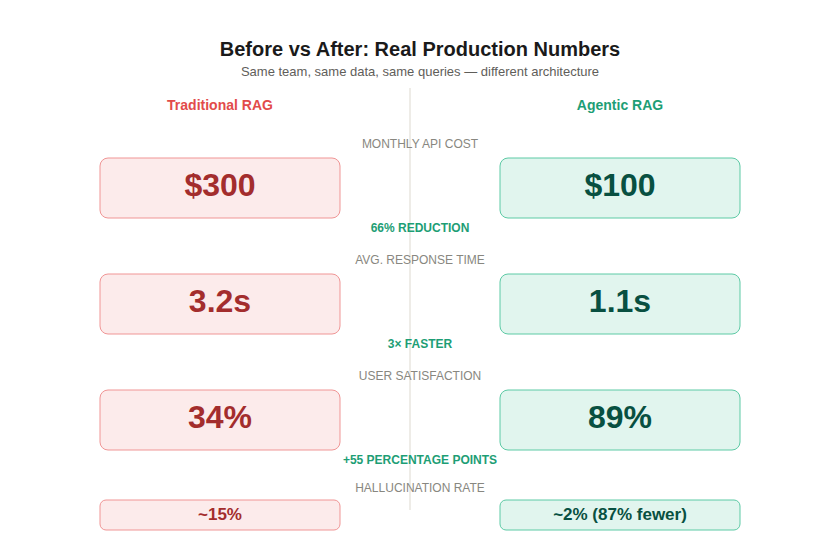
The cost reduction came from two places: fewer database calls per query (1 instead of 3), and smaller generation prompts (5 chunks instead of 15). Smaller prompts are faster to process and cheaper to run.
The accuracy improvement was more dramatic than I expected. Going from 15% to 2% hallucination rate wasn’t just about routing — it was a downstream effect of giving the model cleaner, more focused context. When it doesn’t have to navigate conflicting information, it stops hedging and starts being specific.
The support tickets dropped because the AI was now auditable. When something went wrong, we could say: “This query was routed to HR database, retrieved these five documents, here’s what the model saw.” That transparency alone rebuilt trust with our team faster than any UX change could.
When Agentic RAG Is Worth It
It’s not always the right call. Let me be clear about when it matters and when it doesn’t.
You need it if:
- You have 3 or more meaningfully different data sources
- Some sources contain sensitive data that shouldn’t mix with public context
- Your current system gives vague, multi-domain answers to specific questions
- API costs are growing faster than your user base
- You need compliance-grade source attribution
You can skip it if:
- You have a single, well-structured vector store
- Your queries are all in the same domain
- You’re prototyping or pre-product
- Your current retrieval already works well
The honest heuristic: if adding a new data source would make your AI worse rather than better, you need a routing layer.
The Checklist Before You Build
- List every data source your AI touches. Write a two-sentence description of what each contains.
- Build keyword routing in an afternoon. Ship it.
- Instrument everything. Log which source each query hits. Track accuracy and latency.
- Identify where keyword routing fails. Build that list — those are your edge cases.
- Upgrade to LLM or vector routing based on your volume and accuracy requirements.
- Survey your users at week 4 and week 8. The satisfaction delta will tell you more than any technical metric.
Closing Thought
We spent months obsessing over which model to use, how to chunk our documents, which embedding dimensions to choose. All legitimate questions. But none of them addressed the actual failure: we were putting the wrong information in front of the model in the first place.
Agentic RAG isn’t a fancy optimization. It’s a correction to a foundational architectural mistake that almost every multi-source RAG system makes by default.
Think before you retrieve. The model will handle the rest.
If this changed how you think about your retrieval pipeline, follow me for more pieces on building AI systems that actually work in production — not just in demos.
How PageIndex Actually Works — A Technical Deep Dive
How Agentic RAG Cut My AI Costs by 66% (And Made It Actually Useful) was originally published in Towards AI on Medium, where people are continuing the conversation by highlighting and responding to this story.
