
Video Semantic Analysis Is No Longer a Mystery — Breaking Down the Implementation with Azure OpenAI…

Video Semantic Analysis Is No Longer a Mystery — Breaking Down the Implementation with Azure OpenAI Alone
Background
In one of my previous articles, I shared how to use Azure Content Understanding to perform semantic analysis on multimodal data, including semantic understanding for video. After that post, many readers reached out and asked me to explain how it actually works under the hood. That is exactly why I wrote this article.
In this post, I will walk through how to perform video semantic analysis by using only GPT models on Azure OpenAI. After reading this post, this seemingly magical technology will no longer feel like a “black box” to you.

Video Analysis Architecture Based on Multimodal LLMs
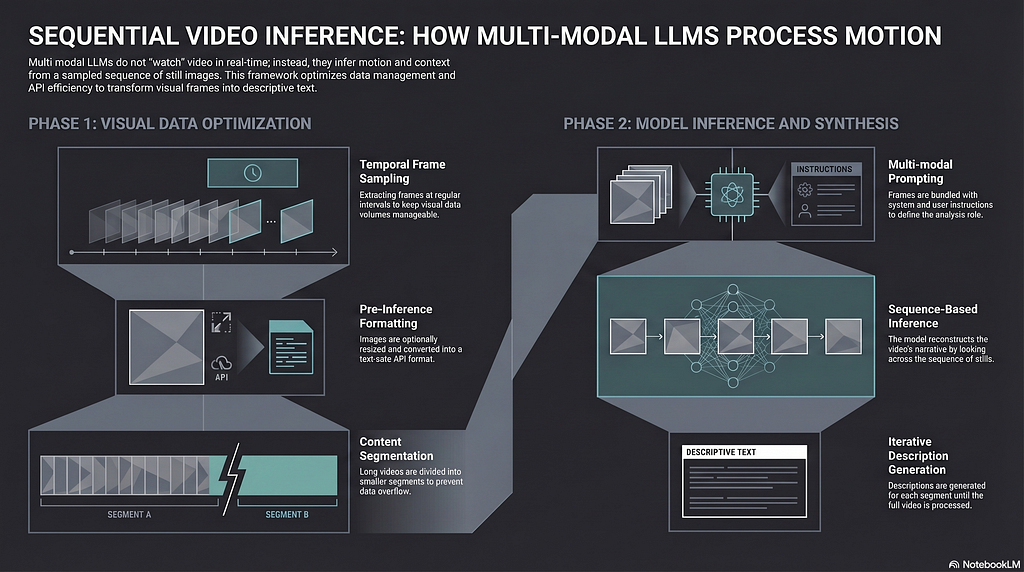
First, we need to understand one important idea: when performing video semantic analysis, a multimodal large language model is not literally “watching the video” the way a human does. This design helps reduce token consumption and control cost.
So the first step in this video analysis framework is to extract static images from the video. These images are called frames. We can use the popular open-source framework OpenCV to do this. We can control the sampling frequency of the frames, and we can also optimize each frame, such as compressing its size, to further improve performance and reduce cost.
Next, we send the sampled frames to a GPT model on Azure OpenAI for analysis. Each frame will receive a semantic description, and when we combine all of these descriptions together, we get an overall understanding of the entire video.
There are two key steps in this framework:
- How to use OpenCV to sample and properly encode frames
- How to use the multimodal capability of a GPT model to analyze the encoded frame data
Let’s focus on these two key components in the following sections.
Key Components
Sampling and Encoding Frames with OpenCV
import base64
import os
import cv2

RESIZE_OF_FRAMES = 2
SECONDS_PER_FRAME = 30

def process_video(video_path, seconds_per_frame=SECONDS_PER_FRAME, resize=RESIZE_OF_FRAMES, output_dir=""):
    base64_frames = []
    video = cv2.VideoCapture(video_path)
    total_frames = int(video.get(cv2.CAP_PROP_FRAME_COUNT))
    fps = video.get(cv2.CAP_PROP_FPS) or 0
    if fps <= 0:
        fps = 1
    frames_to_skip = max(int(fps * seconds_per_frame), 1)
    curr_frame = 0
    if output_dir:
        os.makedirs(output_dir, exist_ok=True)
        frame_count = 1
    while curr_frame < total_frames - 1:
        video.set(cv2.CAP_PROP_POS_FRAMES, curr_frame)
        success, frame = video.read()
        if not success:
            break
        if resize:
            height, width, _ = frame.shape
            frame = cv2.resize(frame, (max(1, width // resize), max(1, height // resize)))
        _, buffer = cv2.imencode(".jpg", frame)
        if output_dir:
            frame_filename = os.path.join(
                output_dir,
                f"{os.path.splitext(os.path.basename(video_path))[0]}_frame_{frame_count}.jpg",
            )
            print(f"Saving frame {frame_filename}")
            with open(frame_filename, "wb") as file_handle:
                file_handle.write(buffer)
            frame_count += 1
        base64_frames.append(base64.b64encode(buffer).decode("utf-8"))
        curr_frame += frames_to_skip
    video.release()
    print(f"Extracted {len(base64_frames)} frames")
    return base64_frames
The function above uses OpenCV to sample frames from a video based on the configured frequency SECONDS_PER_FRAME, then converts each frame into jpeg format and stores it. In addition, the original image data is binary content in jpeg format, so we first need to convert it into base64-encoded binary data, and then represent it as a string with utf-8. That is the purpose of the following line:
base64_frames.append(base64.b64encode(buffer).decode("utf-8"))
Why do we handle it this way? Because OpenAI expects the request payload to be text in JSON format. The original binary content in jpeg format cannot be placed directly into a JSON string for safety reasons. So we need to convert it into a JSON-friendly format: base64. The later processing steps are all based on this utf-8 string.
Next step, let’s examine how to send these frames by using the Azure OpenAI SDK.
Multimodal Analysis Based on Data URLs
Now that we have the encoded frame data, the next question is how to send it to the GPT model in OpenAI. OpenAI uses the Data URL specification, as shown below:
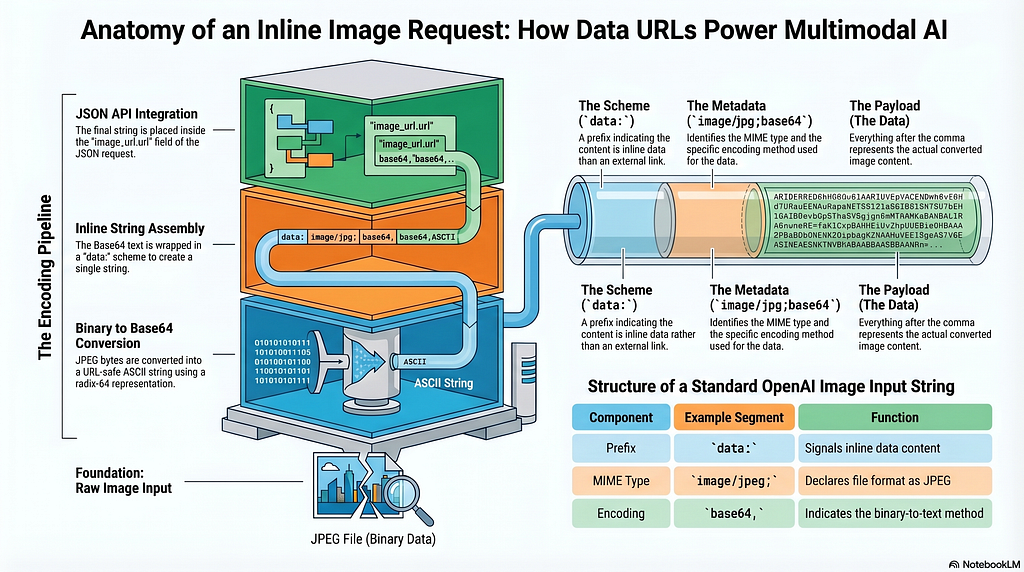
The Data URL standard defines the following format:
data:[<mediatype>][;base64],<data>
In our scenario, the mediatype is image/jpeg, and the data part is the utf-8 encoded string we created above. Based on that, we can build the following method:
import json
from openai import AzureOpenAI
import os
from dotenv import load_dotenv

# Load configuration
load_dotenv(override=True)
# Configuration of Azure OpenAI
aoai_endpoint = os.environ["AZURE_OPENAI_ENDPOINT"]
aoai_apikey = os.environ["AZURE_OPENAI_API_KEY"]
aoai_apiversion = os.environ["AZURE_OPENAI_API_VERSION"]
aoai_model_name = os.environ["AZURE_OPENAI_DEPLOYMENT_NAME"]
default_system_prompt = os.environ.get("SYSTEM_PROMPT", SYSTEM_PROMPT)
# Create AOAI client for answer generation
aoai_client = AzureOpenAI(
    api_version=aoai_apiversion,
    azure_endpoint=aoai_endpoint,
    api_key=aoai_apikey,
)
# Function to analyze the video with GPT-4o
def analyze_video(base64frames, system_prompt, user_prompt, temperature):
    print(f"SYSTEM PROMPT: [{system_prompt}]")
    print(f"USER PROMPT: [{user_prompt}]")
    try:
        response = aoai_client.chat.completions.create(
            model=aoai_model_name,
            messages=[
                {"role": "system", "content": system_prompt},
                {"role": "user", "content": user_prompt},
                {
                    "role": "user",
                    "content": [
                        *map(
                            lambda frame: {
                                "type": "image_url",
                                "image_url": {"url": f"data:image/jpg;base64,{frame}", "detail": "auto"},
                            },
                            base64frames,
                        ),
                    ],
                },
            ],
            temperature=temperature,
            max_tokens=4096,
        )
        json_response = json.loads(response.model_dump_json())
        response = json_response["choices"][0]["message"]["content"]
    except Exception as ex:
        print(f"ERROR: {ex}")
        response = f"ERROR: {ex}"
    return response
Great, right? We simply send the frame data as part of the prompt to the GPT model.
I have shown quite a bit of code above, but no worries. You can find the complete example here: https://github.com/baoqger/AILabs/blob/main/video-analysis-gpt/video-analysis-gpt-app.py
Demo
Based on the core logic above, I prepared a small app to demonstrate the effect:

I am Chris Bao, a Microsoft Certified Trainer focused on the Azure AI platform. I specialize in Azure AI services and Agent development, and I provide training and consulting services for both enterprises and individuals. Contact: baoqger@gmail.com
Video Semantic Analysis Is No Longer a Mystery — Breaking Down the Implementation with Azure OpenAI… was originally published in Towards AI on Medium, where people are continuing the conversation by highlighting and responding to this story.
