
Running a 35B Model Locally with TurboQuant — What’s Actually Possible Right Now


Before diving in, one important distinction: TurboQuant does not quantize model weights. It compresses the KV cache at inference time. This means it doesn’t replace tools like GGUF or AWQ — it stacks on top of them. To understand why that matters, you need to understand what Q4_K_M actually is and why “35B” doesn’t mean the same thing across different models.
First: what does Q4_K_M even mean?
When you download a model from HuggingFace or Ollama, you’ll see filenames like qwen2.5-32b-instruct-Q4_K_M.gguf. GGUF is the file format used by llama.cpp and most local inference tools. The suffix after it tells you how aggressively the model weights were compressed:
- Q4 — each weight number is stored using 4 bits instead of the default 16 bits (FP16). This cuts the file size to roughly 25% of the original.
- K — “K-quant”: a smarter grouping method that quantizes blocks of weights together rather than each number independently. This preserves more accuracy compared to naive 4-bit quantization.
- M — “Medium”: a mixed-precision strategy where the most accuracy-sensitive layers of the model get slightly more bits, and the less sensitive ones get fewer. There’s also Q4_K_S (Small — slightly smaller file, slightly lower quality) and Q4_K_L (Large — slightly bigger, slightly better quality).
The rule of thumb: take the model’s parameter count in billions, multiply by ~0.6, and that’s your approximate Q4_K_M file size in GB. A 7B model is ~4 GB, a 32B model is ~19 GB, a 70B model is ~40 GB.
Q4_K_M is the community default because it delivers 90–95% of full-precision quality at a fraction of the memory cost. It’s what most GGUF uploads on HuggingFace use, and what Ollama pulls by default.
Second: “35B” doesn’t mean one thing — and it matters a lot
This is the part that catches people off guard. There are two very different architectures that can have “35B” in their name:
Dense 35B: all 35 billion parameters activate on every single token you generate. These are older-generation models (think Falcon 40B, older Llama variants). At Q4_K_M, the weights take roughly 21–22 GB. On a 24 GB RTX 4090, that leaves you barely 2 GB for the KV cache — which runs out fast at any real context length.
MoE 35B (e.g. Qwen3.5–35B-A3B): 35 billion parameters exist in the file, but only ~3 billion activate per token. The router picks which “expert” sub-networks handle each token and skips the rest. The model fits in ~20 GB at Q4_K_M, and because it uses far fewer KV heads, its KV cache at 64K context is only around 1.2 GB — even without TurboQuant. This is what most people actually download today when they say “35B model.”
This distinction completely changes the TurboQuant story.
Where TurboQuant actually helps locally
The typical local setup involves two separate compression layers working together:
- Weight quantization (Q4_K_M GGUF): shrinks the downloaded model file so it fits in VRAM at all. This is a one-time conversion done before you run anything.
- TurboQuant KV cache compression: applied at runtime, compresses the key-value vectors generated during inference. This is the piece that makes long contexts usable without running out of memory.
One quick clarification on terminology: throughout this section, “VRAM” means the memory physically built into your GPU — not your regular system RAM. An RTX 4090 has 24 GB of VRAM soldered directly onto the graphics card. This is separate from the 32–64 GB of system RAM in your PC. Model weights and the KV cache need to live in VRAM for the GPU to use them at full speed. If something overflows, llama.cpp can spill to system RAM, but inference slows dramatically because the GPU has to ferry data across the much slower PCIe bus.
Here’s the honest memory picture for a 24 GB RTX 4090, using Mistral Small 3.1 24B as the primary example — one of the most widely deployed open-weight models for local inference:

Mistral Small 3.1 24B Q4_K_M weight size sourced from willitrunai.com benchmarks. KV cache estimates are based on the standard formula (2 × layers × KV heads × head_dim × seq_len × bytes per element) and will vary by architecture.
The conclusion is more nuanced than the original claim: TurboQuant is most impactful for dense models at long context on a 24 GB GPU. If you’re already running a modern MoE like Qwen3.5–35B-A3B, the KV cache pressure is small enough that TurboQuant is a nice-to-have, not a necessity. But if you’re running a dense 27B or 32B model and trying to push context beyond 16K tokens, TurboQuant is the difference between crashing and running.The three paths available today (April 2026)
⚠️ Disclaimer before anything else: Google has not released an official TurboQuant implementation as of April 2026. What exists are community implementations built from the paper’s math. They are experimental, not production-hardened, and will likely need to reconcile differences once Google’s official code lands (expected Q2–Q3 2026). Use these for experimentation, not production.
Path 1: PyPI package (turboquant-kv) — easiest entry point
This is the cleanest way to experiment with TurboQuant in Python, directly wrapping a HuggingFace model.
# Create a project and environment with uv
uv init turboquant-demo
cd turboquant-demo

# Add dependencies — uv resolves, creates the venv, and installs in one step
uv add turboquant-kv
uv add "turboquant-kv[triton]"   # Triton CUDA kernels
uv add "turboquant-kv[hf]"       # HuggingFace Transformers integration
Then run the script directly with uv run — no manual venv activation needed:
uv run python inference.py
Or paste this into inference.py:
import torch
from transformers import AutoTokenizer, AutoModelForCausalLM
from turboquant import TurboQuantModel

model_id = "mistralai/Mistral-Small-3.1-24B-Instruct-2503"
# Use whatever 35B model you have downloaded

tokenizer = AutoTokenizer.from_pretrained(model_id)

# Load the base model first — in 4-bit to fit in 24GB VRAM
model = AutoModelForCausalLM.from_pretrained(
    model_id,
    load_in_4bit=True,        # weight quantization via bitsandbytes
    device_map="auto",
    torch_dtype=torch.float16,
)

# Wrap with TurboQuant — this adds KV cache compression on top
tq_model = TurboQuantModel(model, bits=3)

# Enable fused attention (faster, avoids per-step full dequant)
tq_model.enable_decoder_fused_attention()

# Use exactly like the original model
inputs = tokenizer("Summarize this 50-page document: ...", return_tensors="pt").to("cuda")
with torch.no_grad():
    output = tq_model.generate(
        **inputs,
        max_new_tokens=512,
        use_cache=True,
    )

print(tokenizer.decode(output[0], skip_special_tokens=True))
What bits=3 actually does here: every key and value vector generated during the forward pass gets compressed to 3 bits using PolarQuant + QJL instead of being stored at FP16. For long conversations or long documents, this is what keeps you inside the 24 GB VRAM ceiling.
The –fused path (enable_decoder_fused_attention()) is important — without it, at every generation step the library has to dequantize the entire accumulated KV cache back to float to run attention. With fused Triton kernels, attention is computed directly on the compressed keys. The difference grows with context length: at 512 tokens you barely notice; at 16K tokens it becomes a major factor.
Path 2: 0xSero/turboquant — vLLM integration
If you’re running a local inference server (for example, to serve the model to a local application or n8n pipeline), this fork includes a vLLM adapter.
git clone https://github.com/0xSero/turboquant.git
cd turboquant

# uv detects pyproject.toml/setup.py and installs the package in editable mode
uv sync
uv pip install -e .
The vLLM integration monkey-patches vLLM’s attention backend:
from turboquant.integration.vllm import install_turboquant_vllm

# Call this before creating your LLM instance
install_turboquant_vllm(bits=3, head_dim=128)

from vllm import LLM, SamplingParams

llm = LLM(
    model="path/to/your/35b-model",
    dtype="float16",
    gpu_memory_utilization=0.92,
    kv_cache_dtype="auto",   # TurboQuant overrides this
)

sampling_params = SamplingParams(temperature=0.7, max_tokens=1024)
outputs = llm.generate(["Analyze this document: ..."], sampling_params)
The 0xSero repo includes pre-generated codebook files for d=128 and d=256 at 2, 3, and 4 bits, which avoids recomputing the Lloyd-Max quantizer on first run. The project has validation tests for Theorems 1–3 from the paper, so you can audit whether your installation is actually computing things correctly.
Path 3: turboquant_plus for llama.cpp — if you’re already on llama.cpp
If your current setup is llama.cpp-based (for example, running GGUF models with llama-server or Ollama), the TheTom/turboquant_plus fork adds –cache-type-k and –cache-type-v flags with TurboQuant modes.
git clone https://github.com/TheTom/turboquant_plus.git
cd turboquant_plus

# Build with CUDA support
mkdir build && cd build
cmake .. -DLLAMA_CUDA=ON
make -j$(nproc)
Then run:
./llama-server
  -m /path/to/your-model-q4_k_m.gguf
  --cache-type-k turbo3
  --cache-type-v turbo3
  -c 32768               # 32K context — this is where compression pays off
  -ngl 99                # all layers on GPU
  --host 0.0.0.0
  --port 8080
The available cache type flags are turbo2, turbo3, and turbo4 for 2-, 3-, and 4-bit compression. Community testing across RTX 3090 and 4090 hardware has validated that turbo4 (4-bit) is closest to q8_0 quality, turbo3 gives the best compression/quality tradeoff, and turbo2 is for extreme memory pressure cases.
One practically useful finding from community testing: value cache compression is nearly free. Compressing the V (value) cache down to 2 bits shows zero measurable effect on output quality when you keep the K (key) cache at higher precision. This means an asymmetric config like –cache-type-k turbo3 –cache-type-v turbo2 can squeeze more memory savings without hurting quality. This is an empirical community finding, not a paper claim — validate it on your specific model before relying on it.
What a 35B model on an RTX 4090 actually looks like in numbers
Let’s use a concrete model: Qwen2.5–32B-Instruct (32B parameters, close to 35B example).
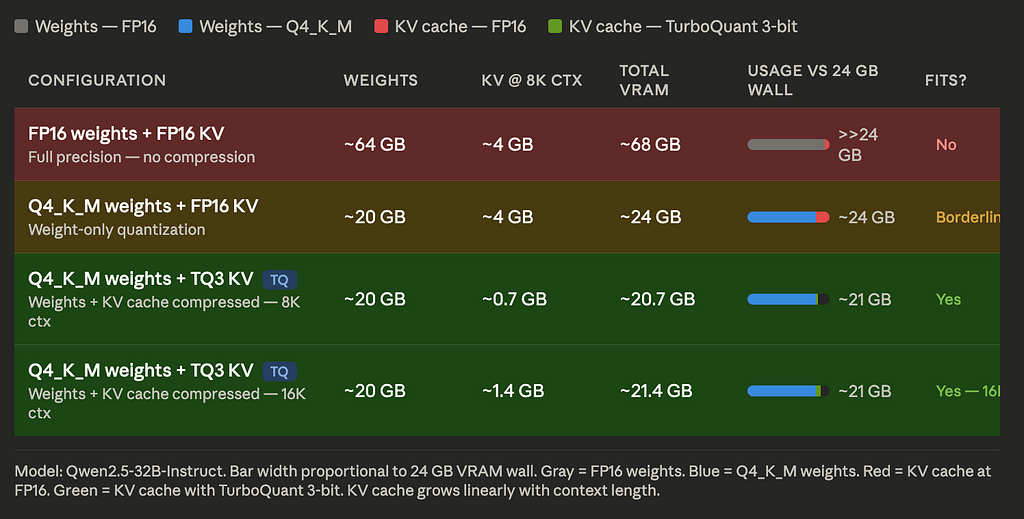
KV cache estimate based on standard formula: 2 × layers × heads × head_dim × seq_len × bytes_per_element. For Qwen2.5-32B: 64 layers, 8 KV heads (GQA), head_dim=128, FP16.
The “borderline” row is the current default for most people running locally. TurboQuant moves you from “it fits if you’re lucky and nothing else is running” to “it fits with room to spare, even at double the context length.”
What to watch out for
Quality below 8B parameters degrades. Community reports consistently find that TurboQuant works well on models ≥ 8B. On smaller models (1B–3B range), compression artifacts become more noticeable. For a 35B model you’re fine.
The speedup is context-length dependent. At short contexts (under 2K tokens), you’ll mainly see memory savings. The attention compute speedup becomes meaningful above 8K tokens and significant above 32K.
These implementations are not official. The codebases are community-built from the paper’s math. When Google’s reference implementation lands (Q2–Q3 2026), test your workload against it before assuming identical behavior.
vLLM and llama.cpp mainline haven’t merged this yet. The llama.cpp discussion thread (#20969) and vLLM issue (#38171) are active. Watch those threads for official merge timelines. When they land, you’ll get TurboQuant as a flag in whatever you’re already using, with no custom forks required.
The stack combination that makes the most sense for local use today
If you’re running a 35B model locally on an RTX 4090 and want to experiment now:
- Download a Q4_K_M GGUF of your chosen model (handles weight compression)
- Use turboquant_plus llama.cpp fork with –cache-type-k turbo3 –cache-type-v turbo2 (handles KV cache compression)
- Set context to 16K–32K — this is the range where the memory savings make the biggest practical difference
- Keep an eye on the official llama.cpp #20969 thread for when this gets merged into mainline
You’re not going to run 128K context on a single 4090 with a 35B model — the weights alone take 20 GB and even with TurboQuant the KV cache at 128K tokens would still need several GB. But 32K context with a 35B model on 24 GB VRAM, at reasonable quality, is genuinely achievable today with this stack.
Running a 35B Model Locally with TurboQuant — What’s Actually Possible Right Now was originally published in Towards AI on Medium, where people are continuing the conversation by highlighting and responding to this story.
