I Told Snowflake’s AI to Find Our Hidden PII. It Did More Than That


Persona: Presto, a data engineer at a mid-size fintech. Two hundred tables. One compliance audit in three weeks. Zero desire to write boilerplate SQL on a Friday afternoon.
The prompt that started everything
Presto, opened Cortex Code (CoCo) inside Snowsight and typed:
“Classify the CUSTOMERS table, tag anything sensitive, and create a masking policy so only DATA_ENGINEER sees real PII. Everyone else gets masked values.”
One sentence. That was it.
Behind the scenes, CoCo broke that into three separate operations — discovery, tagging, and protection — each requiring its own SQL, its own Snowflake feature, its own chunk of documentation. Presto didn’t need to know any of that. She just needed it done.

Before CoCo: the manual grind
Let’s be honest about what this looked like before. To get the same result, Presto would have had to:
Step 1 — Discover PII. Call SYSTEM$CLASSIFY herself, parse the JSON output, figure out which columns are identifiers vs. quasi-identifiers, and decide what matters.
-- just the discovery part, and you still have to read the output
SELECT f.key::STRING AS column_name,
       f.value:"semantic_category"::STRING AS category,
       f.value:"privacy_category"::STRING AS privacy
FROM TABLE(FLATTEN(
  SYSTEM$CLASSIFY('ANALYTICS.PUBLIC.CUSTOMERS', {'auto_tag': true})
)) f;
Step 2 — Tag columns. Create a tag object, then manually apply it to each PII column one by one. Five columns? Five ALTER TABLE statements. Fifty columns across ten tables? You get the idea.
CREATE TAG IF NOT EXISTS ANALYTICS.PUBLIC.PII ALLOWED_VALUES 'NAME','EMAIL','PHONE';
ALTER TABLE ANALYTICS.PUBLIC.CUSTOMERS
  MODIFY COLUMN EMAIL SET TAG ANALYTICS.PUBLIC.PII = 'EMAIL';
-- repeat for every. single. column.
Step 3 — Build and attach a masking policy. Write the policy, test it, attach it to the tag (not to individual columns — most people miss this distinction the first time), then verify it works across roles.
CREATE MASKING POLICY ANALYTICS.PUBLIC.PII_STRING_MASK AS (val STRING)
  RETURNS STRING ->
    CASE WHEN CURRENT_ROLE() IN ('DATA_ENGINEER') THEN val
         ELSE '****'
    END;
ALTER TAG ANALYTICS.PUBLIC.PII SET MASKING POLICY ANALYTICS.PUBLIC.PII_STRING_MASK;
Three features. Multiple docs pages. Probably an hour or two if you’ve done it before. Half a day if you haven’t.
After CoCo: one conversation, same result
Presto typed that single prompt. CoCo responded with a plan — “I’ll classify CUSTOMERS, create a PII tag, apply it to flagged columns, then build a tag-based masking policy scoped to DATA_ENGINEER.” — and started executing.
Within a couple of minutes:
- Classification ran. CoCo identified FIRST_NAME (name), EMAIL (email address), PHONE_NUMBER (phone), and SSN (national identifier). It flagged privacy categories automatically — IDENTIFIER for the direct stuff, QUASI_IDENTIFIER for things like zip code.
- Tags got created and applied. Not one column at a time through a UI. CoCo generated and ran the full batch.
- Masking policy went live. Attached to the tag, so any future column that gets the PII tag is protected instantly. No extra work.
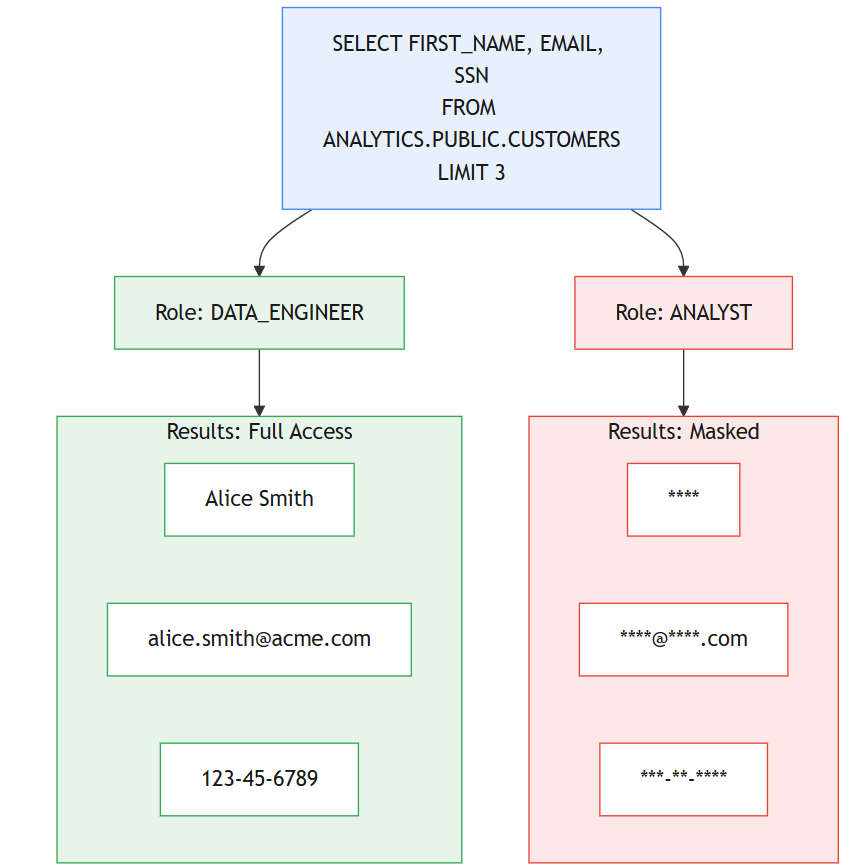
Presto ran a quick check from an analyst role:
-- as ANALYST_ROLE
SELECT FIRST_NAME, EMAIL, SSN FROM ANALYTICS.PUBLIC.CUSTOMERS LIMIT 3;
Result: ****, ****@****.com, ***-**-****
Same query as DATA_ENGINEER? Full values. No data changed. The masking happens at query time, based on who’s asking.
What actually makes this different
It’s not that CoCo writes SQL for you. Lots of tools do that. The thing that caught me off guard is that one prompt triggers a chain of dependent actions. CoCo understands that classification feeds tagging, and tagging feeds masking. It sequences them correctly, uses the output of one step as input to the next, and handles the Snowflake-specific syntax you’d otherwise have to look up.
And here’s the part that matters for governance teams: CoCo runs under your role. It can’t escalate privileges, can’t bypass the policies it just created, can’t see data your role doesn’t have access to. The masking it sets up applies to CoCo itself. That’s not a limitation — that’s the whole point.
The real value, if I’m being practical
Presto’s compliance audit prep went from “block out next week” to “done by lunch.” The PII discovery that used to require a dedicated sprint now fits inside a conversation. And because the masking is tag-based, every new table that gets classified picks up protection automatically. No drift. No forgotten columns.
Could she have done all of this manually? Absolutely. Would she have? Before the audit deadline, with two hundred tables? Probably not all of it.
That gap — between what teams can do and what they actually get around to doing — is exactly where CoCo fits.
Give it a try. Open CoCo in Snowsight and start with:
“What sensitive data exists in my schema? Classify everything and show me what you find.”
See what it comes back with. You might be surprised what’s been sitting in your tables this whole time.
The companion Quickstart Guide walks through this full pipeline with sample data, role-based testing, and edge cases to be shared in the comment box
If you are exploring Snowflake Cortex Code (CoCo) or planning to enable it for your team, happy to connect and exchange thoughts.
I’ve been working closely on Snowflake and modern data platforms, and always open to discuss real-world use cases, challenges, or even different approaches that are working across teams.
Feel free to reach out on LinkedIn : https://www.linkedin.com/in/rahul-sahay-8573923/
Series Note
This is the 4th part of the series on Snowflake Cortex Code (CoCo).
If you haven’t checked the earlier parts, sharing here:
- Cortex Code in Snowflake: How to Use It Without Burning Credits
- How Snowflake Cortex Code (CoCo) Works with RBAC: A Complete Security Guide
- Unlocking Cortex Code: The Agent Architecture, AGENTS.md, and Custom Skills
More parts coming soon.
I Told Snowflake’s AI to Find Our Hidden PII. It Did More Than That was originally published in Towards AI on Medium, where people are continuing the conversation by highlighting and responding to this story.
