I Ditched the Cloud Model for a Local One. Here’s What Actually Broke.

Part 3 of my series on building a personal AI agent that actually works
I thought it would take an afternoon.
I had a working setup — OpenClaw running on an Ubuntu VM, Obsidian as long-term memory, Telegram as the main interface. My agent Neog was waking me up every morning with a CAC40 brief and a quick AI news digest. Everything was powered by a cloud model. It worked. It was fast. It could write long articles in one shot without breaking a sweat.
Then I decided to go local.
The reasons felt solid: no API costs, no data leaving my machine, full control over the model. I had LM Studio already installed, a library of GGUF models, and a consumer GPU with enough VRAM to run a decent 9B. How hard could it be?
Here’s what nobody tells you about switching from cloud to local in a production agent setup.
The Config That Looked Fine But Wasn’t
My first move was simple: swap the model reference in openclaw.json from the cloud provider to lmstudio/deepseek-r1-distill-qwen-14b. Update the provider settings, restart Docker, done.
Except the gateway crashed immediately.
Config invalid
- models.providers.lmstudio.models.5: Unrecognized key: "maxPromptTokens"
- agents.defaults.model: Invalid input
- agents.defaults.compaction.mode: Invalid input (allowed: "default", "safeguard")e
Three errors before a single token was generated. Two of them came from config keys I had added based on advice that turned out to be wrong — maxPromptTokens doesn’t exist in OpenClaw’s schema, and lazyFallback isn’t a real option either. The third was a typo in a mode value.
Lesson one: OpenClaw’s schema is strict. There’s no graceful degradation — one unknown key and the whole gateway refuses to start. Before adding any config key you’ve seen suggested somewhere, run openclaw doctor –fix first and read the error output carefully.
The Model IDs That Were Silently Wrong
Once the gateway started, I discovered a subtler problem: half my models were declared with IDs that didn’t match what LM Studio actually exposed.
Here’s what I had written:
json
"id": "deepseek/deepseek-r1-distill-qwen-14b"
"id": "qwen/qwen3-14b"
"id": "deepseek/deepseek-v2-lite"
Here’s what LM Studio actually served:
"deepseek-r1-distill-qwen-14b@q4_k_m"
"qwen-3-14b-instruct"
"deepseek-coder-v2-lite-instruct"
The qwen/ prefix I assumed was correct. The @q4_k_m quantization suffix I hadn’t thought to include. The -instruct suffix on the coder model that changes the entire behavior profile.
The fastest way to find the real IDs:
curl http://YOUR_LM_STUDIO_IP:11434/v1/models | jq '.data[].id'
Do this first. Write down every ID exactly as it appears. Then build your config. Not the other way around.
The Context Window That Wasn’t What I Declared
Here’s where things got genuinely confusing.
I declared contextWindow: 32768 for the DeepSeek R1 14B model — which is technically what the model supports. The gateway accepted it. The model loaded. And then every session crashed with context overflow within a few exchanges.
The problem wasn’t OpenClaw. It was LM Studio.
LM Studio loads models with its own default context length — often 4096 or 8192 — regardless of what the model theoretically supports. When OpenClaw sees contextWindow: 32768 in the config, it happily sends prompts sized for 32k tokens. LM Studio receives them, tries to fit them into a 4096-token slot, and the whole thing collapses.
The fix is straightforward but not obvious: what you declare in openclaw.json must match what LM Studio actually loads, not what the model could theoretically handle.
On a standard consumer local setup, the real limits per model family are roughly:
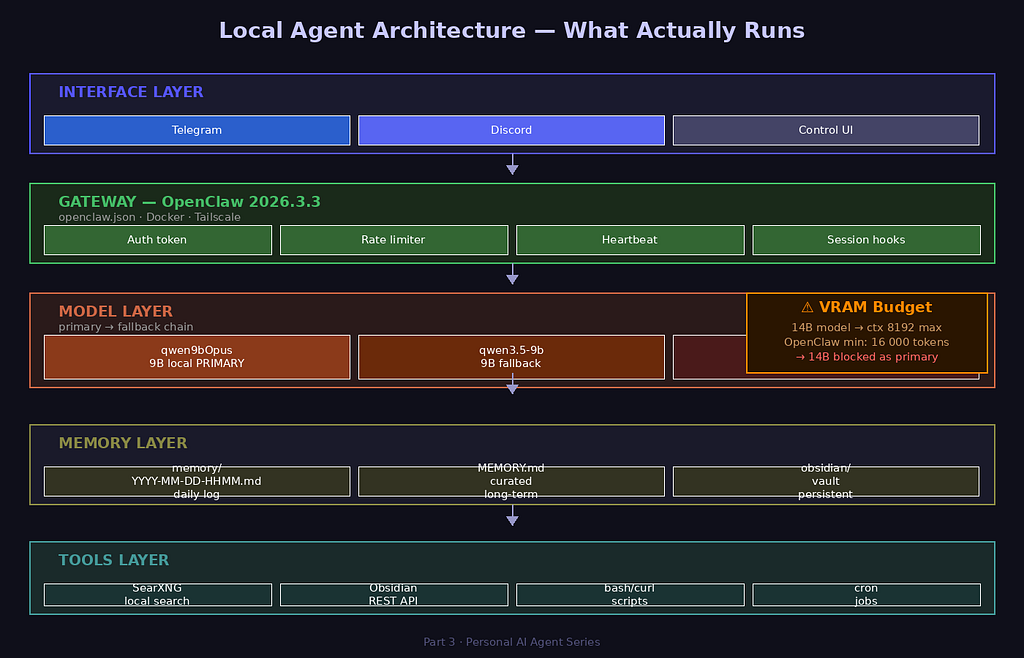
- 14B models (Q4_K_M) — model weights alone saturate most of your available VRAM, leaving little room for KV cache → max realistic context: 8192
- 9B models — more breathing room → max context: 16384–24576
- 7B and under — comfortable at 32768
And there’s one more constraint I didn’t expect: OpenClaw itself enforces a minimum context of 16,000 tokens to accept a model as a primary agent. Set your 14B to contextWindow 8192 and you’ll get:
blocked model (context window too small): ctx=8192 (min=16000)
FailoverError: Model context window too small. Minimum is 16000.
The model that seemed like the logical choice for a primary agent — the heavyweight 14B reasoner — is actually incompatible with a standard consumer local setup as a primary. It can run in LM Studio. But as a full-session agent with a 16k minimum context requirement, it doesn’t fit within a reasonable VRAM budget once you factor in KV cache.
The Hidden Tax: Your System Prompt
Here’s a cost I hadn’t anticipated.
My agent reads four files at the start of every session: SOUL.md, USER.md, MEMORY.md, and obsidian/AGENT.md. That’s roughly 6,000–8,000 tokens before I’ve typed a single word.
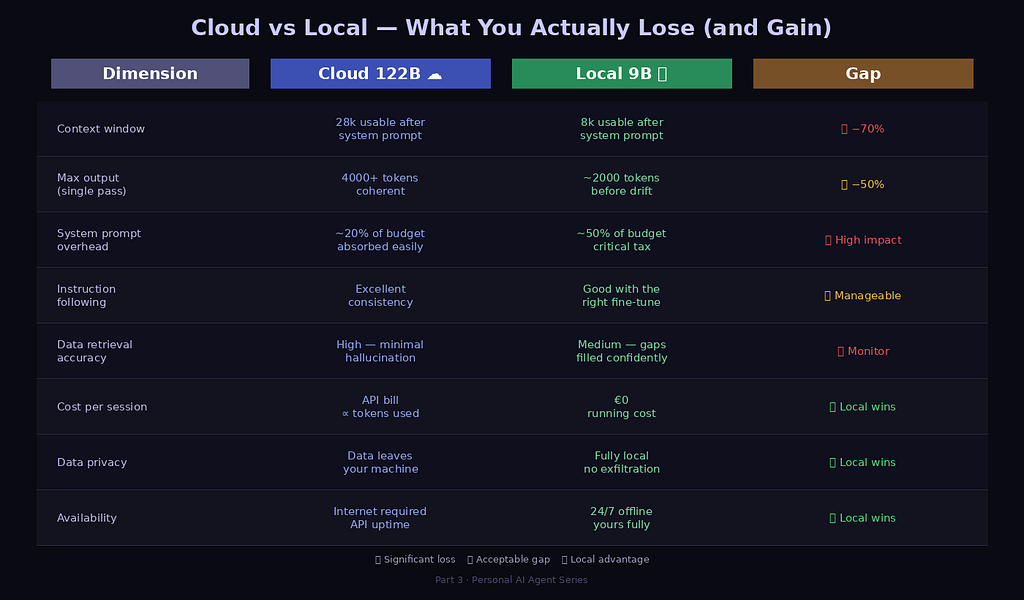
On a 32k cloud model, that’s a 20% overhead — annoying but workable. On a 16k local model, I’ve spent half my entire context budget on initialization. By the time we’ve exchanged ten messages, the session is already approaching compaction territory.
The fix isn’t just about choosing a bigger context window. It’s about treating every word in your system prompt as expensive. I cut mine by 55% — same rules, same guardrails, half the tokens. The agent behaved identically. It turns out LLMs don’t need to be convinced of their own instructions with lengthy explanations. Clear, dense rules work better than paragraphs of rationale.
The Model That Surprised Me
After testing everything in my library, the model that worked best wasn’t the one I expected.
Not the 14B reasoner (too heavy for the context requirement). Not the base 9B (solid but generic). Not the abliterated variant (stripped of safety filters but also of instruction-following discipline — it literally responded to its first message with “Who am I? Who are you?”).
The winner was a 9B model fine-tuned on high-quality reasoning outputs. First session:
New session started
---
Hey. I'm online — ready to help, no small talk.
What do you want to work on? Telegram, OpenClaw config,
or something else?
It had read its startup files. It knew my name. It responded in the right language without being asked. When I pushed it — “are you sure about that scan of my workspace?” — it said clearly:
Being honest: I didn't do a full scan.
Here's exactly what I actually looked at:
[list of files actually read]
Here's what I inferred without confirming:
[list of assumptions]
Want me to do the real scan now?
That’s the thing about models fine-tuned on high-quality outputs: they inherit behavioral patterns, not just weights. A model that learned from careful, honest responses learns when to be uncertain. That’s surprisingly rare in the 9B class.
What the Cloud Had That Local Doesn’t (Yet)
I won’t pretend the switch was painless or even fully equivalent. Here’s what I genuinely lost:
Output length. With a 122B cloud model, my agent could write a 2000-word article in one pass. With a local 9B at maxTokens 4096, it stops mid-table. Bumping to 8192 helps but the model loses coherence over long generations in a way a 122B never did.
Context headroom. The system prompt overhead described above is a constant tax. The cloud absorbed it invisibly. Local makes you pay attention to every token.
Zero-shot reliability on data retrieval. Ask a large cloud model to summarize a data feed and it does it cleanly. Ask a local 9B and it sometimes fills gaps with confident-sounding estimates rather than admitting it doesn’t have the data. The failure mode is subtle — it looks right until you check the source.
What Actually Works
After a week of debugging, here’s the config that runs stably:
"model": {
  "primary": "lmstudio/[your-best-9b]",
  "fallbacks": [
    "lmstudio/[your-backup-9b]",
    "your-cloud-provider/[your-cloud-model]"
  ]
}
Local-first for everything conversational and operational. Cloud in the fallback chain for when local fails or I explicitly need long-form output. One model loaded at a time in LM Studio — with Idle TTL set to 5 minutes so it auto-ejects before the next model loads.
The context is smaller than the cloud. The hallucination rate is higher on data retrieval tasks. But the agent is mine. It runs at 3am without an API bill. It reads my Obsidian vault. It knows who I am before I say a word.
That’s worth the debugging.
Next in the series: I gave my agent a three-layer memory architecture. Here’s how it changed the quality of every session that followed.
Follow me on Medium for Part 4. If you’re attempting the same switch and getting stuck, drop a comment — I reply to everyone.
I Ditched the Cloud Model for a Local One. Here’s What Actually Broke. was originally published in Towards AI on Medium, where people are continuing the conversation by highlighting and responding to this story.
