MCP (Model Context Protocol): Explained Simply

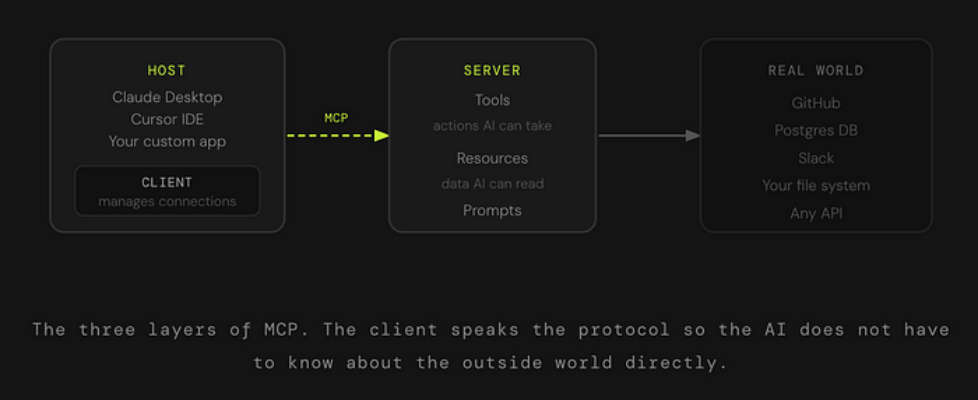
Author(s): Nisarg Bhatt Originally published on Towards AI. Here is something that does not get talked about enough. The AI tools you use every day, including ChatGPT, Claude, Cursor, whatever your favourite is, they all have the same quiet limitation. They know a lot. But they cannot actually see anything happening right now. Not your files. Not your database. Not the Slack message that just came in. Nothing. You could type “what is in my Q4 report?” and the AI would do its best to guess or ask you to paste the content in. It cannot just go look. MCP is what changes that. And the reason you are starting to hear about it everywhere is that in about a year, it went from a niche Anthropic spec to something OpenAI, Google DeepMind, and basically every major AI toolmaker quietly adopted. That kind of consensus does not happen often in this industry. MCP did not invent the idea of AI using tools. It just made everyone agree on how to do it. The Problem Before MCP Existed Imagine you are building an AI assistant for your company. You want it to read from your database, check your calendar, search through internal docs, and maybe send a Slack message when it is done. Totally reasonable ask. Before MCP, every one of those connections was a custom job. Your engineering team had to write a separate integration for each tool. The database connector. The calendar connector. The Slack connector. Each one was built differently, maintained separately, and completely useless if someone wanted to swap out the AI model underneath. Scale that across an industry with dozens of AI models and thousands of tools, and you get a mess. Everyone is building the same plumbing over and over again, incompatibly. The Math That Made This Painful If you have 10 AI models and 20 tools, every unique connection is a custom build. That is 200 separate integrations to maintain. MCP collapses that into 10 plus 20. You build once, plug in anywhere. So What Actually Is MCP? MCP stands for Model Context Protocol. Anthropic released it in November 2024 as an open standard, which means anyone can build on it, and no one owns it. The cleanest analogy is USB-C. Before USB-C, every device had its own charger, its own cable, its own connector shape. Then one standard came along and said: Here is how all of this works now. Your laptop, your phone, your headphones, all talking through the same port. MCP is that port, but for AI models and the tools they need to reach out and touch the world. Instead of every AI application writing its own custom connection to every data source or tool, MCP gives everyone a shared language. An AI that speaks MCP can connect to any tool that speaks MCP. Instantly, without custom code. How It Actually Works MCP has three moving parts. Once you see them, everything clicks. The Host is the application you are actually using. Claude Desktop, Cursor, a custom agent your team built. This is where the conversation happens. The Client lives inside the host and handles all the protocol mechanics. When the AI decides it needs to go do something, the client is the one who figures out which server to talk to, asks what it can do, and sends the request in the right format. The Server is what sits in front of a real tool or data source. There is a GitHub MCP server. A Postgres MCP server. A filesystem server. Each one translates MCP requests into whatever the underlying system actually understands. SQL queries, API calls, file reads, whatever it takes. What Can a Server Actually Offer? Every MCP server can expose three kinds of things to the AI. Here is a concrete example of how these work together. Say you ask your AI assistant: “Find all the open bugs from last week and draft a Slack summary for my team.” The AI uses a resource to read your issue tracker data. Then it uses a tool to send the draft to Slack. If there is a pre-built prompt template your team uses for weekly bug summaries, it pulls that in too. Three primitives, one workflow, zero custom code to glue it together. The Handshake That Makes It All Work The part that is actually clever is how MCP handles discovery. The AI does not need to know in advance what a server can do. When it connects, it just asks. The server says: Here is what I offer. Here are the tools, here are the resources, here are the prompts. The client registers all of that. Now the AI can use any of it, in any combination, without you having to hard-code anything. What this means in practice is that if a server adds a new capability tomorrow, the AI finds it automatically the next time it connects. No code changes on the AI side. Just a new thing to discover. Why This Became the Standard So Fast MCP was not the first attempt at this. What made it stick was that Anthropic shipped it with real working implementations from day one, an SDK in Python and TypeScript, reference servers for common tools like GitHub and file systems, and a debugging inspector. It was not just a spec. It was a working ecosystem from the start. OpenAI and Google DeepMind both adopted it within a few months. What This Means for You If you are a developer or data scientist building anything with AI, MCP matters because it changes the integration tax. Instead of writing and maintaining custom connectors for every tool your AI touches, you build or find an MCP server once and move on. The ecosystem of ready-made servers is already large and growing fast. If you are a technical reader who just wants to understand why AI agents suddenly feel more capable, MCP is a big part of the answer. Agents used to […]
