
MCP vs Meta-Tools vs Skills: Three Ways to Give Your Agent Capabilities (And When to Use Each)

They solve different problems. Most teams pick the wrong one. Here’s how to think about it.
The Confusion Is Everywhere
Each time someone ask me “Should I use MCP servers or build my own tools?” : it depends on what problem you’re solving.
The AI agent ecosystem has converged on three patterns for giving agents capabilities: MCP servers, tools (and what I call Meta-Tools), and skill servers. They solve fundamentally different problems, and mixing them up often leads to architectures that are either over-engineered or painfully limited.
Let me break down what each one actually is, what problem it solves, and when to use it.

MCP: Tools You Don’t Want to Manage — Or Tools You Want to Share
Let’s start with the most misunderstood one.
MCP (Model Context Protocol) is Anthropic’s standard for connecting AI tools to any client. Think USB-C for AI: one protocol, works everywhere.
But here’s what most people miss: MCP has two completely different use cases, and they serve opposite needs.
Use Case 1: Tools You Don’t Want to Manage
When you connect a community MCP server — say, one for Google Calendar or GitHub — you’re plugging in someone else’s tool definitions, someone else’s API logic, someone else’s error handling. You get capabilities instantly, without writing or maintaining a single line of tool code.
# claude_desktop_config.json
{
  "mcpServers": {
    "github": {
      "command": "npx",
      "args": ["-y", "@modelcontextprotocol/server-github"],
      "env": { "GITHUB_TOKEN": "your-token" }
    }
  }
}
# That's it. You now have 15+ GitHub tools.
# You didn't write them. You don't maintain them.
# Someone else handles updates, bug fixes, API changes.
This is the “consumer” side of MCP. You plug it in, you use it, you move on. Perfect for prototyping, perfect for capabilities you don’t want to invest in building.
The honest truth about community MCP servers though:
Most are built as generic solutions. They expose raw API responses, use minimal tool descriptions, and don’t optimize for any specific agent workflow. They’re great for getting started. They’re often terrible for production.
Community MCP Server:
  Tool: "search_files"
  Description: "Search for files"        ← Vague
  Returns: Full API response (2000 tokens) ← Wasteful
  Error handling: Throws exception        ← Fragile
You have zero control over what they return, how they describe themselves to the LLM, or how they handle failures. For a prototype, that’s fine. For a production agent where every token and every tool selection matters, it’s a problem.
Use Case 2: Tools You Build to Share
This is the other side — and the one that makes MCP genuinely powerful as an architecture choice.
When you build your OWN MCP server, you’re not doing it because you need MCP. You’re doing it because you want that tool accessible to multiple agents, multiple clients, or even the world.
You write the tool once. Every MCP client gets it automatically. Your trading agent, your research assistant, your IDE — all share the same tool through the same protocol.
This is particularly valuable when:
- You have multiple agents that need the same capabilities
- You want to open-source a tool and let anyone plug it into their setup
- You’re building infrastructure for a team where different people use different clients
- You’re wrapping your agent, your product and you want to make it universally accessible by other agents.
Use MCP when:
- You need quick capabilities without building them (community servers)
- You want tools accessible from multiple clients or agents (your own servers)
- You’re building tools for a team or for the community
- Portability across clients is necessary
Don’t use MCP when:
- You need tight, dynamic control over tool loading/unloading
- Token efficiency matters and you need on-demand loading
- Your agent needs rich contextual descriptions that change per interaction
- You’re building a single agent that will never share tools
Meta-Tools: Capturing Workflows
Meta-tools solve a completely different problem: iteration budget.
Every LLM agent has a limited number of steps it can take per interaction (typically 15–25). Each tool call consumes one step. When your agent needs to call 5 tools to analyze one stock, and the user asks about 5 stocks, that’s 25 tool calls. Your agent maxes out before it even starts analyzing.
A meta-tool captures a multi-step workflow into a single call.
# WITHOUT meta-tools: 5 calls per stock = 25 calls for 5 stocks
# Agent runs out of iterations, gives incomplete answer
# WITH meta-tool: 1 call per stock = 5 calls for 5 stocks
@tool
async def get_stock_snapshot(ticker: str) -> str:
    """Get complete stock analysis in ONE call.

    Fetches: price, financials, news, sentiment, technicals.
    Returns: Compact formatted summary ready for analysis.

    USE WHEN: User asks for stock analysis or comparison.
    DO NOT USE: When user only needs a specific data point
    (use individual tools instead).
    """
    results = await asyncio.gather(
        get_price_data(ticker),
        get_financial_metrics(ticker),
        get_recent_news(ticker, limit=3),
        get_social_sentiment(ticker),
        get_technical_indicators(ticker),
        return_exceptions=True
    )
    return format_compact_snapshot(ticker, results)
# Before: 25 iterations, agent gives up
# After:   5 iterations, agent has budget left for actual analysis
The key properties of meta-tools:
- They run multiple operations in parallel (async)
- They consolidate results into a compact format
- They handle partial failures gracefully (one API down? rest still works)
- They preserve iteration budget for reasoning
Meta-tools aren’t about convenience — they’re about making complex tasks possible at all.
Without them, your agent literally cannot complete multi-step analyses. Or you need to set to 50 iterations and you are okay if your agent each time take 10 minutes to responses. But at the end the iteration limit isn’t a soft guideline. It’s a hard wall.
The performance impact I see in every client project:
- Tool calls: 70–80% reduction
- Completion rate: from ~40% to 95%+
- Token cost: 60–70% lower (less back-and-forth)
- Response quality: dramatically better (agent has budget for reasoning)
Use meta-tools when:
- Your agent regularly hits iteration limits
- Common workflows involve 3+ sequential tool calls
- You see patterns in tool usage (these 5 always get called together)
- Token cost or time of response is a concern
Don’t use meta-tools when:
- Your agent has simple, single-tool workflows
- You’re still figuring out what tools you need (optimize later)
- Individual tool calls are always sufficient
- You need maximum granularity for every operation
Important: don’t build meta-tools on day 1. Ship with individual tools first. Watch what your agent actually does. Notice the patterns. Then consolidate. You can’t optimize what you haven’t observed.
Skills: Loading What You Need, When You Need It
Skills solve the third problem: context window pollution.
When you register tools with an LLM agent, every tool’s name, description, and parameter schema gets injected into the system prompt. A well-documented tool takes 200–500 tokens. With 40 tools loaded, that’s 10,000–15,000 tokens of tool descriptions — before the conversation even starts.
But the real cost isn’t tokens. It’s description quality.
When 40 tools compete for space, you trim every description to the minimum. “Get data for a stock.” “Search files.” “Send email.” The LLM sees these vague descriptions and picks the wrong tool half the time.
A skill server flips this: load only what you need, but load it with rich descriptions.
# Instead of 40 tools with vague descriptions at startup...
# Start with 3 meta-tools:
@tool
def list_available_skills() -> str:
    """List all skills the agent can load on demand.
    Use this to discover capabilities before attempting
    a task you don't have tools for."""
    ...
@tool
def load_skill(skill_id: str) -> str:
    """Load a skill to gain its tools AND rich usage context.
    The context includes: when to use each tool, when NOT to,
    how to interpret results, and workflow guidelines."""
    ...
@tool
def unload_skill(skill_id: str) -> str:
    """Unload a skill to free context space.
    Use when switching to a different task domain."""
    ...
When the agent loads a skill, it doesn’t just get tool functions. It gets a full operational guide:
# What a loaded skill injects into context:
skill: social_sentiment
tools:
  - get_reddit_posts:
      description: "Fetch recent posts from specified subreddits"
      use_when: "Analyzing retail sentiment, social buzz, meme stock activity"
      do_not_use: "For institutional sentiment or professional analysis"
      returns: "List of posts with title, score, comment count, created date"

  - calculate_social_metrics:
      description: "Compute momentum, volume, and sentiment scores"
      use_when: "After gathering posts, to quantify sentiment"
      interpretation:
        momentum_score: "> 3.5 = strong signal, < 1.5 = weak or declining"
        sentiment_ratio: "> 0.7 = strongly bullish, < 0.3 = strongly bearish"
workflow_tips:
  - "Always call get_reddit_posts before calculate_social_metrics"
  - "Use limit=25 for quick checks, limit=100 for deep analysis"
  - "Reddit sentiment is most useful for large-cap, retail-heavy stocks"
Skills can live anywhere:
- Embedded in your agent code (simple approach)
- On an external skill server (scalable approach via REST API)
- Wrapped as an MCP server (universal access)
The skill server pattern especially shines when multiple agents share capabilities. Your trading agent, your research agent, and your Claude Desktop setup can all load skills from the same server.
Use skills when:
- You have 10+ tools and growing
- Tool descriptions need to be rich and contextual
- Different tasks need different tool sets
- Multiple agents share capabilities
- You want to add tools without redeploying agents
Don’t use skills when:
- You have fewer than 10 tools
- All tools are needed for every interaction
- You’re building a single-purpose agent with a fixed workflow
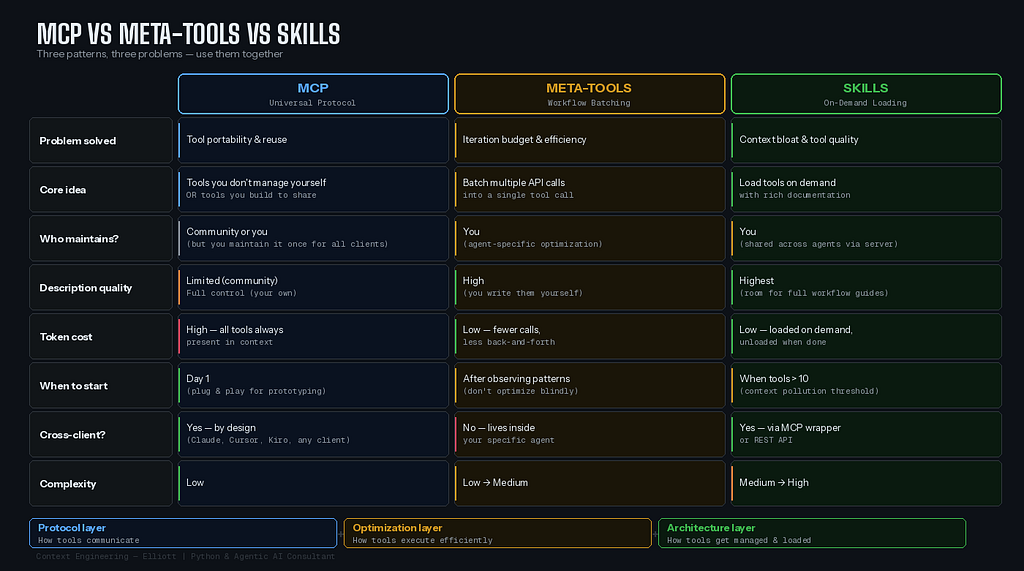
The Comparison: Side by Side
Conclusion
MCP is a protocol, not a solution. It makes tools portable, not better.
Meta-tools are an optimization, not an architecture. They make workflows feasible, not organized.
Skills are an architecture, not a protocol. They make tool management scalable, not portable.
You need the right combination for your agent’s maturity level. A prototype with 5 tools needs none of this complexity. A production agent with 30+ tools across multiple domains needs all three layers working together.
The agents that work in production aren’t the ones with the most tools. They’re the ones where every tool earns its place in the context window — loaded at the right time, with the right description, called in the right way.
That’s the difference between a demo and a product.
Thanks for reading! I’m Elliott, a Python & Agentic AI consultant and entrepreneur. I write weekly about the agents I build, the architecture decisions behind them, and the patterns that actually work in production.
If this clarified the MCP vs meta-tools vs skills confusion for you, I’d appreciate a few claps 👏 and a follow. And if you’ve found a different pattern that works — I’d love to hear about it in the comments.
MCP vs Meta-Tools vs Skills: Three Ways to Give Your Agent Capabilities (And When to Use Each) was originally published in Towards AI on Medium, where people are continuing the conversation by highlighting and responding to this story.
