OpenClaw for Software Engineers: Stop coding, Start engineering

How to use your Claude, Codex and Gemini subscriptions for coding in OpenClaw without getting banned
Claude Code, Codex and Gemini CLI are all great tools for software engineers. They help us to build software faster, free us from code monkey work and let us focus on the high-value engineering tasks. However, working with these tools can be annoying: They get stuck easily, run out of tokens, forget what they did before and simply have all slightly different nuances in their usage. At the same time, we as software engineers don’t want to vendor lock in ourselves with one single tool. We want to use the best model for the task and utilize our subscriptions efficiently. This article is about how to achieve that with OpenClaw, the hyped agentic AI assistant.

What is OpenClaw and how does it help here?
OpenClaw (formerly known as Moltbot or Clawdbot) isn’t just another CLI wrapper or a browser-based chatbot, it is a fully open-source, self-hosted AI agent gateway that runs as a background daemon on your machine (or better on a sandbox). Created by developer Peter Steinberger, it recently took off because it changes how we interact with LLMs, because it has a great integration of Telegram/WhatsApp and other text-based messaging.
Instead of treating your AI like a one-off query machine, OpenClaw treats it like a persistent, autonomous agent. It is designed to solve:
- Being independent from Vendors
- Persisted Memory through simply .md files
- An agent loop that allows proactive and continuous working
- Self-modification and Skills that improve the system on-the-fly
However, by default it’s not created as a development tool, it’s more focused on day-to-day tasks and more like a personal assistant. To really use it as an engineering assistant, I needed to work on stripping away the “order food” or “check my calendar” personal assistant fluff and wiring it directly into my dev environment. If you want this thing to actually write code, debug pipelines, and act as a reliable code monkey you have to configure it properly.
(Disclaimer: Do not run this directly on your host OS and personal computer. Put OpenClaw and the target repository inside a sandboxed Docker container or a dedicated VM. Otherwise, you might get in real trouble)
The Orchestrator
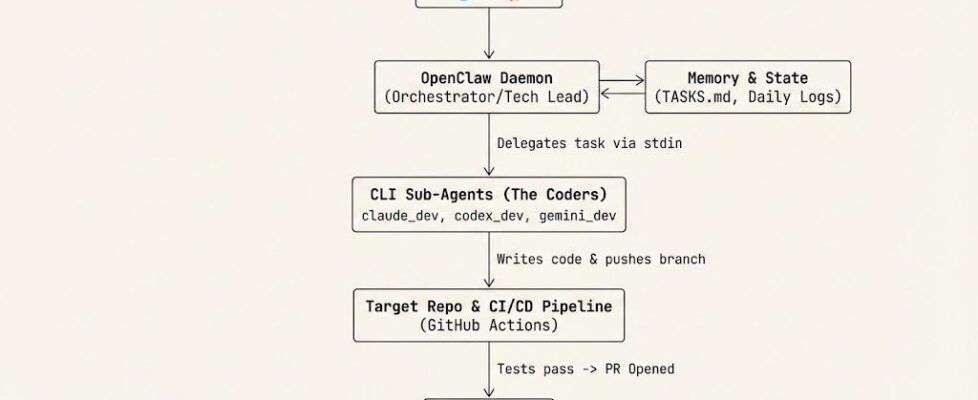
OpenClaw is essentially a routing station and memory manager. It runs as a background daemon uses your messaging apps, like Telegram, Slack, or Discord, as the UI. Instead of you sitting at a terminal staring at a blinking cursor while Claude Code generates a response, waiting for approvals, OpenClaw decouples the interaction. You write a message on Telegram like “Continue work on Task 12: Create REST-API,” and OpenClaw wakes up, looks at its memory, and delegates the heavy lifting to the underlying CLI tools.
My orchestrator is basically a prompt that tells the main agent of OpenClaw to act as a lead developer and project manager. If you read through that orchestrator prompt, you’ll notice one rule: The main agent is not allowed to write code. Not only does this burn through your API quota and token limits, but it also clutters the agent’s context window.
Instead, the orchestrator acts strictly as a Technical Lead. Its job is to have a rough understanding of the project, figure out the current state of the project from the TASKS.md file, and delegate the actual implementation. It creates the Git branches, and then completely steps out of the way.
Through the CodexBar usage CLI, the Orchestrator knows which model is to use and decides based on quota.
The Delegators
When the orchestrator decides a task needs doing, it spawns a sub-agent session. This is where we utilize our different subscriptions efficiently, mapping the complexity of the task to the cost and capability of the model.
I have configured three distinct coding agents, all operating as thin, headless wrappers around their respective CLIs:
- claude_dev (The Reviewer): Reserved mostly for PR reviews and Planning tasks. I personally think Claude (mostly using sonnet 4.6) is great in Architecture and Task writing, but does often implement stuff in a hacky way that is not maintainable.
- codex_dev (The Coder): Powered by OpenAI Codex, this handles the bulk of day-to-day feature implementation. Codex is great in understanding the codebase and implementing stuff.
- gemini_dev (The Refactorer): Great for complex debugging, boilerplate generation, and large context-window tasks. I did not really experiment a lot with gemini, because it’s the last CLI I implemented.
The configuration for these sub-agents is strict. They are not allowed to be “creative” with their environments. They operate under a rigid execution contract:
- Headless Execution: Flags like — dangerously-bypass-approvals-and-sandbox (Codex), — dangerously-skip-permissions (Claude), and — yolo (Gemini) are mandatory. The agent is not allowed to pause and ask me if it’s okay to run a test. It just runs it.
- Hard Timeouts: AI agents get stuck in infinite loops sometimes. Every single execution command is wrapped in explicit timeout, but they are pretty generous. If it hangs, it dies, and the orchestrator has to figure out why and retry. I also allow to continue a session, if the timeout was the reason to stop, while working.
- Low Context: These sub-agents don’t have memory as the orchestrator, but they know what task they work on, have access to the TASKS.md file and of course they can see the current state of the repository.
- Specific Tools: As they should do the most tasks via CLI, I only allowed the CLI usage and most other OpenClaw Tools are forbidden (web browsing, memory, edit files…).
The CLI instructions
For the actual coding, all CLI tools share the repositories’ AGENTS.md, where the coding guidelines (Things like KISS, YAGNI, DRY and project specific stuff). Additionally, I link from these guidelines to a ARCHITECTURE.md and README.md file, which explains the overall picture of the project.
There are usually also instructions about how to verify the work. I usually have Github Actions CI pipelines, where I ask for a green build (formatting, linting + tests). The CLI can use the preinstalled gh CLI to verify that but also run test itself. And finally do the commit (not push or PR).
This is still something that does not work very well. Oftentimes I need to explicitly ask to make the changes and verify the CI pipelines are green. This needs more work.
The core workflow
So key to making it work is enforcing absolute boundaries. The AI is explicitly instructed: never merge a Pull Request.
CLI agents are working and committing but never push or create branches. This is something the orchestrator does. The orchestrator manages the state, the coding agents write the logic, and they iterate until the CI pipeline passes.
The Definition of Done for the CLI agents is the finished coding task, for the orchestrator it is an open PR with green tests. I step in, review the architecture, and hit merge myself.
By stripping away the conversational fluff and forcing the AI to interact exclusively through Git, headless CLI wrappers, and Markdown tracking files, we turn these models from neat chatbots into a relentless, persistent coding pipeline. It’s not magic; it’s just systems engineering applied to LLMs.
https://github.com/digital-thinking/agentic-engineering-openclaw
OpenClaw for Software Engineers: Stop coding, Start engineering was originally published in Towards AI on Medium, where people are continuing the conversation by highlighting and responding to this story.
