I Built a 4-Sensor “Recall Engine” with Qdrant — And It’s the Missing Piece in AV Safety

I didn’t start this project because I wanted to build “yet another vector search demo.”
I started because one thought kept bothering me whenever I read about autonomous driving edge cases:
We log everything, but we don’t remember anything.
In an AV pipeline, you can have terabytes of camera frames, LiDAR sweeps, radar returns, GPS traces, and incident notes. But when something sketchy happens again and again — same type of near-misses, same cut-ins at dusk, same low-light pedestrian vibe — the system behaves like it’s seeing it for the first time. That’s what is called edge-case amnesia. It’s not that the data is missing. It’s that we can’t recall it fast enough, with context, in a usable form.
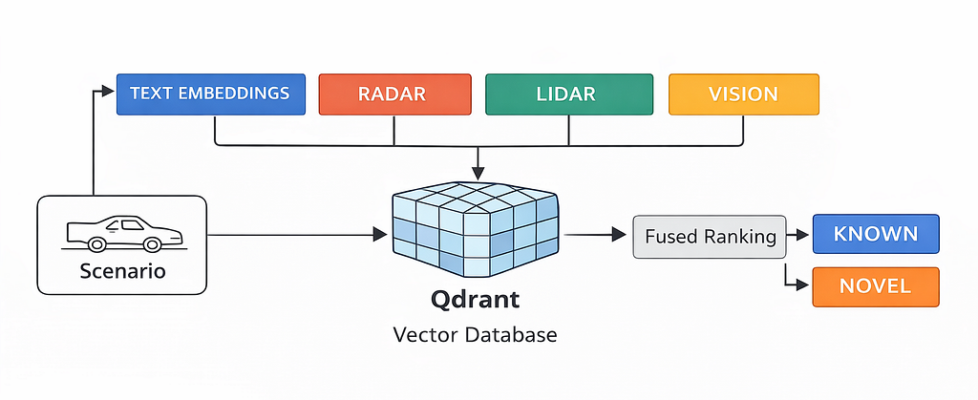
That pushed me to build qdrant-av-edgecase-memory: a small “recall engine” where each driving scenario is stored as a single point, but with four separate sensor memories — vision, lidar, radar, and text — plus payload filters for real driving context like weather and time-of-day.
The goal was simple:
When the car sees something, it should be able to ask — within milliseconds —
“Have I seen something like this before, in similar conditions?”
I remember staring at my terminal as I thought over this question.
But the truth was simpler — my pipeline had no concept of recall, only storage.
That’s when I decided to treat scenarios like memories, not logs.

What exactly is an edge case (and why AV teams suffer from edge-case amnesia)
In real systems, most edge cases are rare combinations.
- A normal road — until it’s rain + dusk + worn lane markings
- A normal pedestrian — until it’s low light + glare + moving shadow
- A normal cut-in — until it’s high speed + short gap + wet road
And the annoying part: each sensor sees a different edge.
- Camera sees texture, lighting, semantics
- LiDAR sees geometry
- Radar sees motion signatures you won’t “see” in RGB
- Notes/logs capture the human summary of what actually happened
So if you store only frames, you lose the physical structure. If you store only LiDAR, you lose semantics. If you store only text, you lose reality.
Most teams end up doing one of these:
- One big embedding that tries to represent everything (and ends up representing nothing well), or
- Separate indexes that don’t talk to each other.
Edge-case amnesia is what happens when you have data, but no proper recall. My approach was: make each scenario a memory unit, and store one embedding per modality in the same Qdrant point so retrieval is multi-modal by design.
Hard truth: if your recall doesn’t work, your safety loop is basically luck.
Why I chose Qdrant’s named vectors instead of stuffing everything into one embedding
The tempting solution looks clean:
“Just concatenate all signals, compress into one embedding, store in a vector DB.”
In AV, that becomes a black box very fast.
- You can’t explain why something was retrieved
- You can’t tune sensor importance per scenario
- You can’t add/remove a modality without breaking everything
- Debugging recall becomes painful and slow
That’s why I leaned into Qdrant’s named vectors. In my repo, the storage model is explicit: one scenario point stores one vector per modality:
- vision: CLIP image embedding (openai/clip-vit-base-patch32)
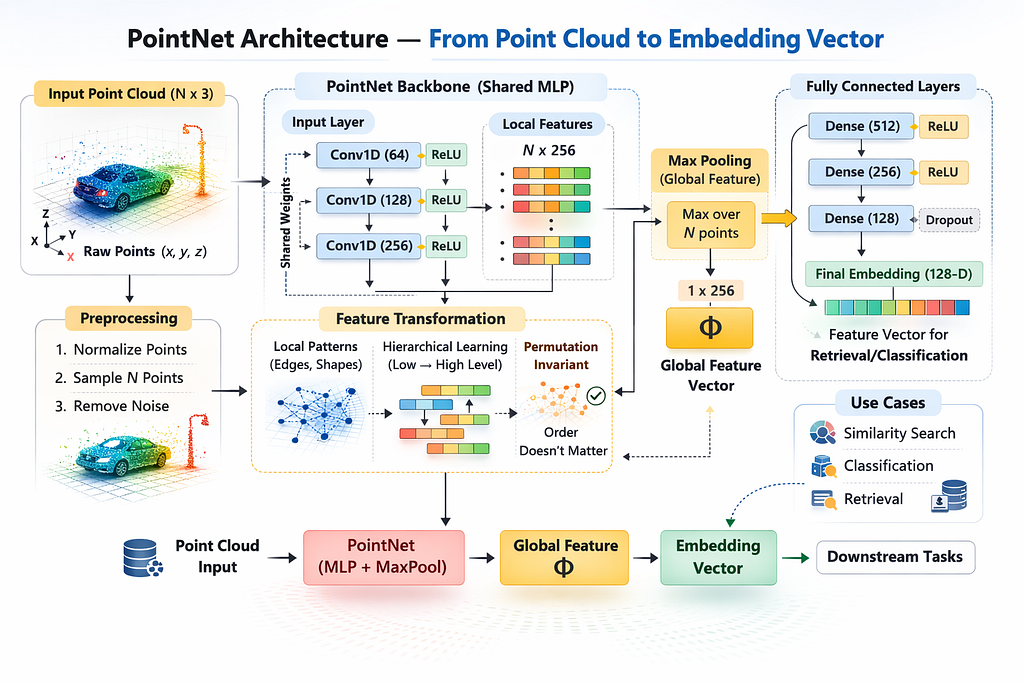
- lidar: PointNet backbone embedding (checkpoint from nanopiero/pointnet_igloos)
- radar: radar TorchScript embedding (VyDat/Radar_Signal-Classification)
- text: SentenceTransformer (sentence-transformers/all-MiniLM-L6-v2)
I’m not forcing radar into the same representational space as image texture. Each sensor keeps its own language, and I fuse results later.
Even dimensions are fixed upfront (because this is where real projects silently break):
- vision_dim=512
- lidar_dim=1024
- radar_dim=64
- text_dim=384
This matches how teams work in real life: camera folks tune camera, LiDAR folks tune LiDAR, safety folks read incident notes. Named vectors let me retrieve per modality, apply filters like “night + rain,” and then do weighted fusion — without pretending one embedding can capture everything.
And it stays practical: the repo runs locally with dockerized Qdrant and scripts that do the full loop — create collection, ingest scenarios, query by example, query by text — so you can reproduce the recall behavior end-to-end, not just read about it.
The collection design: vision, lidar, radar, text as separate named vectors
Once I committed to the idea of “one scenario = one point”, the next question was very practical: what exactly do I store so retrieval stays fast and actually useful? Because if you store the wrong thing, you’ll still be stuck doing manual digging through logs, just with a vector DB sitting in the middle.
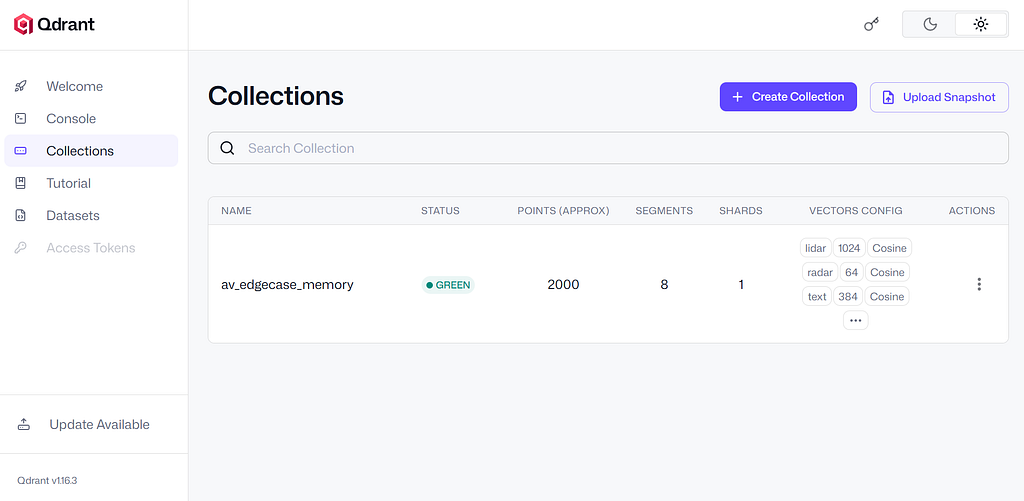
In my repo, the collection is built around a simple backbone: four named vectors per point, each representing a different sensor “view” of the same driving event. Qdrant makes this clean with named vectors, so I don’t need separate collections or weird hacks. One scenario point has four embeddings, and that’s it. This keeps the memory unit consistent and easy to reason about later.
The four vectors are:
- vision → 512-d CLIP embedding
This is the “what does the scene look like” memory. Lighting, texture, semantics, objects — camera is where most perception cues live. CLIP embeddings are a good practical choice because they give a stable semantic representation without needing a heavy custom model just to prove the pipeline. - lidar → 1024-d point cloud embedding
This captures the geometry of the scene — where obstacles are, how the space is shaped, what’s occluded, how objects are positioned in 3D. LiDAR is extremely important because it stays reliable in conditions where camera semantics get weaker (low light, shadows, glare). So it deserves its own representational space. - radar → 64-d radar signature embedding
Radar is underrated in casual AV discussions, but it’s powerful for motion cues and certain detection scenarios. I keep it separate because radar “similarity” is its own thing — it’s not about texture or point geometry, it’s about returns and motion patterns. Also the dimension is smaller here (64), which is fine because radar embeddings are usually compact. - text → 384-d incident/notes embedding
This is the “human memory” layer: labels, short notes, incident descriptions. In real systems, a lot of investigation starts with a sentence: “near miss cut-in at dusk”, “slippery road rain”, “pedestrian low light”. Text isn’t a replacement for sensor similarity, but it’s a very strong entry point for search and triage.
Each vector has its own dimension and cosine distance, so Qdrant enforces the schema up front. That’s important because in real projects things break quietly when vector sizes mismatch or a model changes and nobody updates the pipeline. Here, the collection acts like a contract: vision must be 512, LiDAR must be 1024, radar must be 64, text must be 384. If something is wrong, it fails early instead of giving garbage search results later.
The biggest reason I like this design is independence.
I can search each modality on its own:
- If I have a camera frame embedding, I query only vision.
- If I have a LiDAR sweep embedding, I query only lidar.
- If I have an incident note, I query text.
And I’m not forced to “convert” everything into one big embedding just to search.
Then, when I do need a final decision, I fuse results in a controlled way. That’s the key part. Instead of praying that one-vector embedding captured radar + LiDAR + camera + text, I keep modalities separate and combine them at the ranking step with weights. That makes retrieval more explainable too — when a match looks wrong, I can inspect whether it matched because of vision similarity, LiDAR geometry, radar signal, or the note text.
So the collection design is simple on paper, but it’s the core idea that makes the whole system feel like a real recall engine instead of a toy demo.
Payload filters that matter in real driving: weather, time-of-day, location bucket
Vector similarity alone is not enough in AV. If you don’t filter by context, you’ll retrieve stuff that is “visually similar” but totally different in driving risk. A clean highway frame in daylight might look close to a highway frame at dusk, but safety-wise they’re not even in the same category. Same with rain vs clear weather — the road looks similar, but traction and braking distance are a different game.
So I kept the payload fields simple but realistic — the kind of metadata that actually shows up in incident triage and safety reviews:
- weather
- time_of_day
- road_type
- location_bucket
- ts (timestamp range)
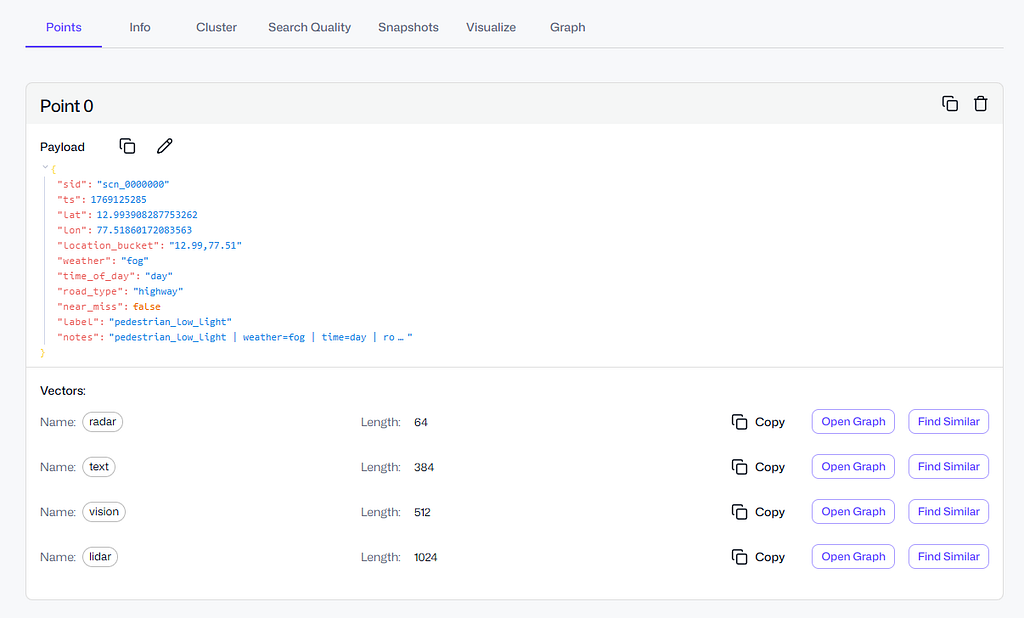
I didn’t add these just to make the JSON look rich. These fields change what “similar” means.
Weather is obvious: rain, fog, snow, overcast. Slippery-road incidents are heavily weather-linked. A “near-miss cut-in” on dry asphalt is one thing. The same behavior on wet roads is a different risk level.
Time of day is the silent killer. Night, dawn, dusk… perception quality changes. Headlight glare, shadows, poor contrast — all those weird pedestrian cases start showing up here. If I’m investigating a low-light pedestrian scenario, I don’t want top results from bright daytime even if the geometry matches.
Road type matters because behavior patterns change by road context. Highway cut-ins, city intersections, residential streets — they produce totally different edge-case families. Intersection edge cases are often about occlusion and timing. Highway ones are about speed + gap + motion.
Location bucket is my “cheap geo filter.” Not full GPS precision, but enough to cluster environments. The same kind of scenario repeats within similar environments — same city layout, similar lane markings, similar signage style. It helps avoid pulling matches from a totally different road culture or infrastructure style. It’s not perfect, but it’s practical.
And then there’s the one field people underestimate: timestamp (ts).
In AV, old data can mislead you. Roads change, sensor calibration changes, model versions change, even driving patterns change seasonally. So queries like:
- “Give me slippery-road cases in rain”
- “Show pedestrian low-light at night”
- “Find near-miss cut-in on highway”
- “Only from the last 12 months”
…are not “nice-to-have.” They’re how teams actually debug and mine training data without wasting time on irrelevant history.
One more thing I did: I created payload indexes for these fields. Without indexing, filtering can become a slow afterthought, especially as you scale from a few thousand points to hundreds of thousands or millions. With indexes, “vector + filter” stays fast and predictable. It’s a small detail, but it’s the difference between a demo and something you can actually keep using.
Weighted fusion ranking: how I combined scores without making the system lie
Multi-modal retrieval sounds fancy, but in practice it fails for one simple reason: scores from different modalities don’t mean the same thing.
A radar embedding score and a vision embedding score aren’t comparable out of the box. If you just average them, you’re basically mixing apples and pressure readings. And if you concatenate everything into one vector, you lose the ability to understand why a scenario matched.
So, in this project, I kept the fusion logic explicit and boring (boring is good in safety-ish systems):
- Search each modality separately
I queried Qdrant once per vector field: vision, lidar, radar, text. Each gave me a ranked list of candidate scenario IDs with similarity scores. In code, it’s the search_modality() + search_fused() flow. The important part is: each modality could retrieve “its own kind of similarity” without being forced into a single embedding space. - Normalize per-modality scores before combining
This is the part most people skip, and then their fusion numbers look impressive but mean nothing. In my fusion step, I normalized scores within each modality (based on the top score in that list). The idea was simple: within vision results, the best vision match was treated as “1.0-ish for vision,” same for lidar, same for radar, same for text.
It’s not perfect science, but it stops one modality from dominating just because its score range is naturally higher. Otherwise you’ll end up with “radar always wins” or “vision always wins” without even realizing it.
3. Apply weights (because sensors aren’t equal for every decision)
Then I applied a weight per modality. For example, if you’re doing scenario recall for a cut-in event at dusk, vision and radar might be more important than text notes. For a training-data mining query like “slippery road rain dusk,” text + metadata might play a bigger role. The weights are configurable through the SearchWeights object.
This keeps the system honest. If the fused score is high, you can still go back and see which modality contributed. If you get a weird retrieval, you can debug it instead of staring at a single mysterious score.
The first time I fused scores, everything looked “perfect.”
All scores were basically 1.0 and I felt like a genius for 3 minutes.
Then I realised I had just normalised my way into fake confidence.
4. Fuse into one final ranking
After normalization + weighting, I summed up the contributions for each scenario ID and produced one ranked list. This is what you saw in the output:
🏁 Top fused results:

It’s not trying to be a research paper. It’s trying to be predictable: you can tune weights, you can tune top-k per modality, and you can still explain the results.
One more thing I like here: this fusion approach works even when you only query with one modality (like text-only). It doesn’t break the system design. The same pipeline runs, just with fewer inputs. That consistency matters when you later plug in real encoders and real sensor feeds.
Quickstart: reproducing the recall engine end-to-end (local, runnable)
I hate “architecture-only” articles where you finish reading and you still can’t run anything. So I set up the repo to be reproducible with a small set of scripts that do the whole loop: create → ingest → query.
Here’s how the flow maps to the codebase:
1) Start Qdrant locally (Docker)
The repo uses docker-compose.yml to spin up Qdrant. Once it’s up, you’ve got a persistent Qdrant instance with storage volume. This makes testing easy because you can destroy and recreate collections without reinstalling anything.
2) Create the collection with named vectors
Run:
scripts/01_create_collection.py
This script creates a collection (default name: av_edgecase_memory) with the four named vectors and the correct dimensions. It also sets up the payload indexing so filtering doesn’t become slow later. This is the part where the schema becomes real: vector sizes are enforced up front, so you don’t accidentally ingest mismatched embeddings and only discover it after 2,000 points.
3) Ingest scenarios (synthetic, but structured like real AV events)
Run:
scripts/02_ingest_synthetic.py - count 2000
This generates scenario points with:
- multi-vector embeddings (vision/lidar/radar/text)
- payload fields like weather, time_of_day, road_type, location bucket, timestamp
- labels like near_miss_cut_in, pedestrian_low_light, slippery_road, normal_drive
Yes, it’s synthetic data. But it’s useful synthetic: it exercises the exact retrieval behavior you’d want in production — multi-modal search + filtering + temporal constraints — without needing a giant dataset download.
4) Query by example (the most realistic AV workflow)
When I saw the top results come back with the same label family, I smiled.
It felt like the system finally had memory.
Run:
scripts/03_query_examples.py
This picks one stored scenario and asks: “find me similar scenarios.” This is what AV teams actually do in debugging. You have a clip (or an event), and you want to retrieve similar past situations to understand risk patterns and training gaps.
The output prints the base scenario, then prints top fused results with payload context like weather/time and whether it’s a near-miss.
5) Query by text (because incident notes matter)
Run:
scripts/04_text_query.py - q "pedestrian crossing low light" - time_of_day night
This is the “human operator” workflow: someone types what happened, and the system pulls back relevant scenarios, filtered by context. In real orgs, this is how safety reviews and incident triage often starts: a sentence, not a vector.
And because everything is stored as a single scenario point, the text query still returns you the same objects that can later be replayed with sensor data.
That’s the loop. If you can run those scripts, you basically understand the entire system end-to-end. The rest is just swapping the synthetic encoders with real sensor encoders and deciding how strict your novelty threshold should be.
The full code is available here: https://github.com/krtarunsingh/qdrant-av-edgecase-memory
I kept it runnable locally because if it can’t run on my laptop, it’s not real.
The “real engineering” part: gotchas I hit at 3 AM (so you don’t)
This project looked smooth in my head. In reality, I hit the same kind of sharp edges you always hit when code meets a real system.
Gotcha #1: Qdrant point IDs are not “any string you like”
My first ingestion tried to use IDs like scn_0000717. Qdrant rejected it.
Qdrant point IDs must be unsigned integers or UUIDs. So I switched to integer IDs for the actual point id, and kept the pretty string inside the payload (so I can still print scn_0000717 nicely). This was a small fix, but without it nothing moves.
Gotcha #2: qdrant-client API differences can mess you up
I hit this one hard because it’s confusing if you’re not expecting it.

I initially used client.search(), then discovered my client version didn’t even have that method. After switching to query_points(), I hit another wall: the query shape I used wasn’t accepted. One version wanted NamedVector, another wanted query= with using=…, and passing the wrong keyword like query_vector= just throws assertion errors.
In short: your repo can be correct and still fail if you call the wrong API signature for your installed qdrant-client. I’m on qdrant-client 1.16.2 and the working pattern is the one you already ran successfully: query_points(query=vector, using=”text”) style.
Gotcha #3: score normalization can accidentally “lie”
I’m a big fan of fusion, but score fusion is also where you can fool yourself.
At one point, my text query outputs were all showing 1.0000, which looks like everything is a perfect match. That wasn’t Qdrant being magical — it was my fusion normalization turning the top result into the scale reference, and when only one modality is active, it can flatten the display if you normalize wrong.
Then later, after fixes, I saw every score as 0.3162 (which looks suspiciously constant). That wasn’t Qdrant either. That was my text embedding setup producing very similar similarity scores across near-identical “notes” strings.
The lesson: don’t trust the number blindly. Look at:
- ranking stability
- payload context
- top-1 gap vs top-10
- and how novelty threshold behaves
Otherwise you will tune your system based on a score that looks clean but isn’t meaningful.
Gotcha #4: novelty threshold is not universal
This is important.
A novelty threshold that makes sense for a fused multi-modal query can be totally wrong for a text-only query. Text similarity tends to be noisier, and sensor embeddings behave differently. If you set one global threshold and call it “edge-case detection,” you’ll either trigger mapping too often or miss real novel scenes.
So the right way is: treat novelty detection as a policy.
- it depends on which modalities are active
- it depends on your encoder quality
- and it depends on what the “false alarm” cost is in your pipeline
Gotcha #5: Docker warnings are not always problems
Docker Compose warning about the version being obsolete looks scary, but it’s just a warning from newer Compose versions. Remove it if you want cleaner logs, but it doesn’t block anything. I mention this because lots of devs waste time chasing it like it’s an error.
Honestly, these little issues were a challenge, but I’m glad they happened. Because they’re the same kinds of issues you’ll face when you move from “toy demo” to “usable system.”
Where this goes next (the real AV upgrade path)
Right now the repo proves the architecture: multi-vector memory + payload filters + temporal search + fusion. The next step is swapping “demo inputs” with real sensor signals while keeping the retrieval logic unchanged.
Here’s the clean upgrade path.
Step 1: Replace synthetic scenario generation with real events
Instead of generating labels like near_miss_cut_in, feed in:
- real timestamped scenario clips
- real GPS/pose metadata
- real road context (map tags, speed, lane count, etc.)
Even if you start small — like 10K curated events — you’ll see immediate value because retrieval becomes searchable incident memory.
Step 2: Use real encoders per modality
The repo already treats each modality separately, which makes this part nice.
- Vision: embed frames (or keyframes) using CLIP or a driving-tuned visual encoder
- LiDAR: embed point clouds using a point cloud model (PointNet family is a start; there are stronger ones too)
- Radar: embed radar sweeps/signatures using a learned radar model
- Text: embed incident notes + tags + QA summaries
The big win is you don’t need to make them “compatible” with each other. They remain separate, and fusion does the combining.
Step 3: Add “temporal truth” and drift awareness
In AV, what you saw two years ago might not represent today’s reality:
- sensor calibration changes
- software changes
- city infrastructure changes
- weather seasonality changes
So temporal filtering (“last 12 months”) shouldn’t be a nice-to-have. It’s part of retrieval correctness. Once you use real data, you’ll likely maintain multiple temporal windows:
- short window for online triage
- longer window for training mining
Step 4: Make novelty detection a workflow, not a print statement
Novelty detection becomes powerful when it triggers an action:
- log and save the clip
- label it for review
- push to training queue
- open a safety ticket with retrieved “closest matches”
Basically: retrieval becomes the front-door to your safety loop.
Step 5: Evaluation (the part people skip, but should not)
Once it’s on real data, you’ll want to measure:
- Does it retrieve the right family of events?
- Does it overfit to weather/time filters?
- How stable are results when sensors degrade (rain, glare, fog)?
The simplest evaluation is surprisingly practical:
- Take a curated list of incidents
- Define “expected similar incidents”
- Check recall@k per modality and fused
This is where your project stops being “cool” and starts being trusted.
Conclusion: AV systems don’t need more storage — they need recall
If you build autonomous systems long enough, you realize something:
The hardest part isn’t collecting data. It’s remembering the right data at the right time.
That’s why I built this recall engine. Qdrant isn’t just a “vector DB for RAG.” In AV safety, it can behave like a real memory layer: multi-modal, filterable, time-aware, and fast enough to be used in the loop.
And the personal takeaway for me was simple: once you can retrieve queries like “similar near-miss at dusk in rain” in milliseconds, you stop treating edge cases like random bad luck. You start treating them like searchable, reusable knowledge.
That’s the shift I wanted. And honestly, it feels like the missing piece.
Resources
- Project Repository (Full Runnable Code)
🔗 https://github.com/krtarunsingh/qdrant-av-edgecase-memory
Complete implementation of the 4-sensor recall engine with multi-modal vectors, payload filters, fusion ranking, and runnable scripts. - Qdrant — Open Source Vector Database
🔗 https://qdrant.tech
Official documentation, architecture details, and named vector support used in this project. - Qdrant Python Client (API Reference)
🔗 https://github.com/qdrant/qdrant-client
Used for collection creation, multi-vector storage, filtering, and search queries. - CLIP (Vision Embeddings)
🔗 https://github.com/openai/CLIP
Model used for generating semantic visual embeddings. - PointNet (LiDAR / Point Cloud Backbone)
🔗 https://github.com/charlesq34/pointnet
👉 If you found value here, clap, share, and leave a comment — it helps more devs discover practical guides like this.
If You Like This Kind of Practical Writing
If you’re building your next version — career, skills, mindset, and execution — I’ve written two books that readers have been using as blueprints:
1) Rebuild: Your next version is only one decision away
A guide to reset your life, rebuild discipline, and future-proof your career in the AI era.
Rebuild: Your next version is only one decision away
2) Retrieval Augmentation Generation: Revolutionizing AI’s Future
A practical, structured guide to RAG — architecture, prompts, real-world use cases, and what’s coming next.
Retrieval Augmentation Generation: Revolutionizing AI’s Future
And if you want more AI + Python content like this (articles you can actually apply), you’ll find it on my blog:
AI & Machine Learning – Tech Niche Pro
Bonus resources:
— YouTube ▶️ https://youtu.be/GHy73SBxFLs
— Book ▶️ https://www.amazon.com/dp/B0CKGWZ8JT
Let’s Connect
Email: krtarunsingh@gmail.com
LinkedIn: Tarun Singh
GitHub: github.com/krtarunsingh
Buy Me a Coffee: https://buymeacoffee.com/krtarunsingh
YouTube: @tarunaihacks
More Builds You’ll Love
- The Next AI Boom: What Comes After AI Agents and Agentic AI?
- On-Device AI Is Finally Real — Build a Copilot+ PC App That Runs 100% Offline
- Laptop-Only LLM: Tune Google Gemma 3 in Minutes (Code Inside)
- Build an AI PDF Search Engine in a Weekend (Python, FAISS, RAG — Full Code)
- AI-Powered OCR with Phi-3-Vision-128K: The Future of Document Processing
- Mastering RAG Chunking Techniques for Enhanced Document Processing
I Built a 4-Sensor “Recall Engine” with Qdrant — And It’s the Missing Piece in AV Safety was originally published in Towards AI on Medium, where people are continuing the conversation by highlighting and responding to this story.
