
Structured Prompting for LLMs: From Raw Text to XML

Choose the right structure for your model, task, and security needs.

Here’s the uncomfortable truth: if you’re still tossing long, unstructured sentences at an LLM, you’re leaving quality on the table.
Structure isn’t decoration. It’s a control surface. With a few deliberate choices, you can make your prompts more precise, safer, and more reproducible.
If you actively follow AI, you’ve probably seen this in various forms many times, often with people offering their structured prompting guide if you leave a comment.
In this article, I would like to shed more light on the dark, on how effective structure prompting really is, and what is behind all this noise in the recent news.
I will introduce the different types of structured prompting with examples of how to implement them. Followed by some thoughts and papers about the results in this field.
If this sounds interesting to you and you would like to make your prompt more understandable for humans and machines, keep on reading.
Structured Prompting Types
The question “Does Prompt formatting have any impact on LLM performance?” was already asked by researchers from Microsoft and MIT in their 2024 paper with the same title.
The study examines the performance of various prompt formats, including raw text, Markdown, YAML, and JSON, utilising the latest OpenAI GPT models (GPT-4) at the time of this investigation. [1]
The following subsections introduce these most common structured prompting types and also add XML prompting to the list of useful prompt structures.
Regular readers of this blog will know that I like to start my morning with an AI news roundup by simply asking ChatGPT, rather than spending ages scrolling through social media or news websites.
Below, I’ve used the same prompt to generate a daily summary in four different formats, providing you with an example of each.
Raw Text Prompting
When using raw text prompts, the instructions are usually concatenated and separated by a line break.
Further formatting is done, using double dots (“:”), spaces or tabs.
Role: You are a precise news summarizer.
Goal: Summarize today's latest developments in artificial intelligence [[date]].
Sections: Collect news from today on: Research & Breakthroughs, Industry & Product News, Policy & Ethics, Societal Impact, and Noteworthy Quotes or Commentary.
Requirements: Only include items from today. Write at least three sentences for each news item. Be factual, neutral, and concise. Avoid speculation.Include a short source note at the end of each item in parentheses like (Source: Publisher - YYYY-MM-DD).
Output Format: Return the final answer as a structured Markdown string. Use H1-level formatting for each subcategory name and H2-level formatting for each news item within those subcategories. Place news items under their correct subcategories. If no items are found for a subcategory, include: "No items found for this section today."
As you can see, raw text prompting might not only be harder to “understand” for Large Language models, but also for humans, without any formatting.
Markdown Prompting
A more readable format is markdown prompting, which structures a prompt with basic Markdown formatting.
If you aren’t familiar with Markdown, here are six essentials you need to know:
- Headings: Use #, ##, ### to organise sections (e.g., ## Requirements).
- Emphasis: Use *italic* and **bold** to highlight key points.
- Lists: Use – for bullets and 1. for numbered steps to make instructions scannable.
- Code: Use backticks: `inline` for short terms and triple backticks for blocks:
- Links: Use [label](https://example.com) to attach sources or references.
- Quotes: Use > for callouts or important notes:
## Role
You are a precise news summarizer.

## Goal
Summarize today's latest developments in artificial intelligence.

## Sections
Collect news from today on:
- Research & Breakthroughs
- Industry & Product News
- Policy & Ethics
- Societal Impact
- Noteworthy Quotes or Commentary

## Requirements
- Only include items from today.
- Write at least three sentences for each news item.
- Be factual, neutral, and concise. Avoid speculation.
- Include a short source note at the end of each item in parentheses like (Source: Publisher - YYYY-MM-DD).

## Output Format
- Return the final answer as a structured **Markdown** string.
- Use H1-level formatting for each subcategory name and H2-level formatting for each news item within those subcategories.
- If no items are found for a subcategory, include: "No items found for this section today."
YAML Prompting
YAML prompting is great when you want a human-friendly, structured prompt that’s still easy for models to parse.
It uses indentation and key–value pairs to keep roles, goals, and requirements tidy and skimmable.
If you are not familiar with YAML, here are the three essentials you need for YAML prompting.
- Indentation = structure: Use spaces (not tabs). Indentation defines nesting. Two spaces are common here
- Key–value pairs: key: value for simple fields like Role or Goal.
- Lists: Start items with – under a key (e.g., Sections: → list of strings).
Role: "You are a precise news summarizer."
Goal: "Summarize today's latest developments in artificial intelligence [[date]]."
Sections:
  - "Research & Breakthroughs"
  - "Industry & Product News"
  - "Policy & Ethics"
  - "Societal Impact"
  - "Noteworthy Quotes or Commentary"
Requirements:
  - "Only include items from today"
  - "Write at least three sentences for each news item."
  - "Be factual, neutral, and concise. Avoid speculation."
  - "Include a short source note at the end of each item in parentheses like (Source: Publisher - YYYY-MM-DD)."
Output Format:
  - "Return the final answer as a structured Markdown string."
  - "Use H1-level formatting for each subcategory name and H2-level formatting for each news item within those subcategories."
  - "If no items are found for a subcategory, include: "No items found for this section on today.""
JSON Promping
JSON prompting uses a rigid, machine-validated structure that’s ideal for agent workflows, API calls, and any case where you need unambiguous parsing.
If you are not familiar with JSON prompting, here are the three essentials you need for JSON prompting.
- Objects & arrays: Curly braces {} for objects, square brackets [] for lists.
- Double quotes only: Keys and string values must use “double quotes”.
- No trailing commas: Commas only between items, never after the last item.
{
  "Role": "You are a precise news summarizer.",
  "Goal": "Summarize today's latest developments in artificial intelligence [[date]].",
  "Sections": [
    "Research & Breakthroughs",
    "Industry & Product News",
    "Policy & Ethics",
    "Societal Impact",
    "Noteworthy Quotes or Commentary"
  ],
  "Requirements": [
    "Only include items from today [[date]]",
    "Write at least three sentences for each news item.",
    "Be factual, neutral, and concise. Avoid speculation.",
    "Include a short source note at the end of each item in parentheses like (Source: Publisher - YYYY-MM-DD)."
  ],
  "Output Format": [
    "Return the final answer as a structured Markdown string.",
    "Use H1-level formatting for each subcategory name and H2-level formatting for each news item within those subcategories.",
    "If no items are found for a subcategory, include: "No items found for this section on [[date]].""
  ]
}
XML Prompting
XML (eXtensible Markup Language) is a plain-text, tag-based format for representing structured data as a hierarchical tree that’s both human- and machine-readable.
However, with the advancement of AI, it can be used not only to structure data but also for instruction, such as LLMs.
If you aren’t familiar with XML, here are the essentials:
- Elements & nesting: Wrap content in tags like <tag>…</tag>. Keep the nesting and order consistent
- Attributes for metadata: Use attributes to encode small constraints or flags without cluttering text
- Escaping special characters: Use entities for reserved characters: &, <, >, ", '.
<prompt>
<role>You are a precise news summarizer.</role>
<goal>Summarize today's latest developments in artificial intelligence [[date]].</goal>
<sections>
<section>Research & Breakthroughs</section>
<section>Industry & Product News</section>
<section>Policy & Ethics</section>
<section>Societal Impact</section>
<section>Noteworthy Quotes or Commentary</section>
</sections>
<requirements>
<requirement>Only include items from today [[date]]</requirement>
<requirement>Write at least three sentences for each news item.</requirement>
<requirement>Be factual, neutral, and concise. Avoid speculation.</requirement>
<requirement>Include a short source note at the end of each item in parentheses like (Source: Publisher - YYYY-MM-DD).</requirement>
</requirements>
<outputFormat>
<format>Return the final answer as a structured Markdown string.</format>
<format>Use H1-level formatting for each subcategory name and H2-level formatting for each news item within those subcategories.</format>
<format>If no items are found for a subcategory, include: "No items found for this section on [[date]]."</format>
</outputFormat>
</prompt>
What Structured Prompting Type should I use?
As always in life, the answer depends. There’s no one-size-fits-all structure that works for now and forever for all models.
When the paper “Does Prompt formatting have any impact on LLM performance?” was released, JSON prompting was considered the best prompting structure, followed by YAML, plain text and markdown.
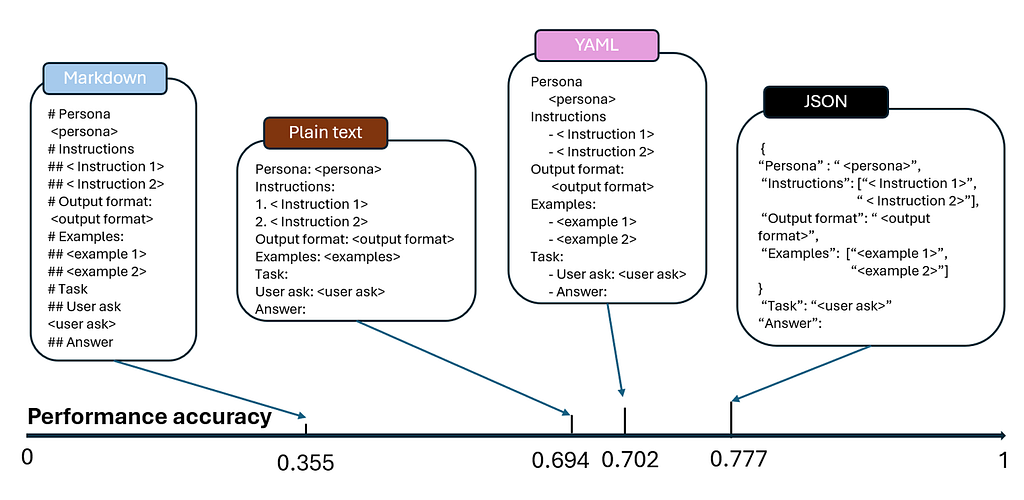
However, currently, most AI model providers, such as Antropic, recommend XML prompting because it is clearer and allows the LLM to parse the input better [2].
Moreover, XML prompting protects from LLM applications being hacked by users.
It’s just putting a “fence” around the user’s text so the model knows what to treat as input, e.g. … <user_input> … </user_input> … [3].
But, this requires removing first all > and < from the user input.
Personal Experience and Thoughts
When I experimented with all the previously introduced prompt types in ChatGPT-5, I didn’t notice any difference in the output.
A similar observation was made by the paper’s researcher, who notes that model size affects a model’s responses to variations in prompt format.
This suggests that the prompt format loses its influence as model size increases.
However, that doesn’t mean we can ignore prompt structuring, nor that this article and the researcher’s work were a waste of time.
As noted in the paper “Small Language Models are the Future of Agentic AI” smaller models are likely to influence the next years of AI because they are more cost-efficient and can be deployed locally, without data leaving your device [4].
Precisely for small model use, structured prompting is tremendously valuable, as highlighted in the paper.
So if anyone insists you must use a specific prompt format, ask which model they are using and what objective the prompt is meant to achieve.
Different models and objectives require different prompting formats.
Rather than declaring that you have to use JSON or XML, I encourage you to try different formats in your daily tasks and share your experience, together with the model and objective you had in mind.
All this said. Let’s start experimenting and stay curious.
Follow & Connect
https://felixpappe.substack.com/
felix-pappe.medium.com/subscribe 🔔
www.linkedin.com/in/felix-pappe 🔗
https://felixpappe.de🌐
Source
[1] Does Prompt Formatting Have Any Impact on LLM Performance?: https://arxiv.org/abs/2411.10541
[2] Use XML tags to structure your prompts: https://docs.anthropic.com/en/docs/build-with-claude/prompt-engineering/use-xml-tags
[3] XML Tagging: https://learnprompting.org/docs/prompt_hacking/defensive_measures/xml_tagging?srsltid=AfmBOooA_ZcdOPqOMPdAx4qpvXzUD_x8hX667bTACyTgFu-C-ur6KV8e
[4] Small Language Models are the Future of Agentic AI:
https://arxiv.org/abs/2506.02153
Structured Prompting for LLMs: From Raw Text to XML was originally published in Towards AI on Medium, where people are continuing the conversation by highlighting and responding to this story.
