Beyond Regex: A Simple Guide to Modern Text Classification in Production

How to combine regex, ML, and LLMs to build production text classifiers that are fast, cheap, and maintainable
By Sravani Lingam

Most teams working with text data do not fail because their models aren’t accurate enough but they fail because their systems are too slow, too expensive, or too complex to maintain in production.
For years, we relied on regular expressions (regex) to classify text. Then machine learning arrived, promising context-aware understanding. LLMs are everywhere these days, and they are good at a lot of things. But here is the reality, teams do not ask which tool is best. They ask how to build something that is fast, cheap, and maintainable in production.
And the answer is surprisingly simple. You don’t pick one approach. You use all three. I’ll walk through four patterns that work in real production systems.
Why one tool isn’t enough
Let’s establish what each approach brings to the table and where it falls short.
Regular expressions (regex)
Regular expressions are patterns of characters that you define to find and match specific text. Think of them as a set of rules that describe what you are looking for. For example, the pattern d{2}/d{2}/d{4} matches any date-like sequence which has two digits, a slash, two more digits, another slash, and four digits.
Strengths:
- Regex is incredibly fast. You write a pattern, it scans through your text, and pulls out everything matching it.
- It’s free to run. No ML models to train, no infrastructure overhead. Write a pattern and deploy.
- It handles anything with a clear structure perfectly. Dates, Phone numbers, Emails, Credit card numbers, Product SKUs etc., Structured data gets found instantly.
- It’s predictable. You always know what it will match. When something breaks, you can see the problem immediately.
Limitations:
- Cannot understand meaning or context.
- Fragile when language varies (typos, abbreviations, different formats break the pattern).
- Requires manual rule-writing for each new pattern you want to match.
Example of the limitation:
- Born on 03/15/1985
- Expires on 03/15/2025
To regex, both are identical: d{2}/d{2}/d{4}. But to a human (or an ML model), they represent fundamentally different concepts, one is a birth date, the other is an expiration date. Regex has no way to know the difference.
Machine Learning (ML)
Machine learning works completely different from regex. You don’t write rules. Instead, you give the system examples you have already labeled. The algorithm looks at those examples, figures out the patterns that separate one category from another, then applies that knowledge to new text.
Here’s a concrete example. You label 500 customer support tickets. Some are complaints. Some are questions. Some are praise. The model studies those tickets, learns the patterns in how people write complaints versus questions. The word choices they use. The tone. How they structure sentences. Then it applies those patterns to new tickets automatically. You’re teaching it from data instead of writing rules.
Strengths:
- It actually understands what the text means. Not just surface patterns. It picks up on tone, nuance, things that are implied but not stated directly.
- You don’t have to anticipate every rule. You just show examples and it learns. This is huge when patterns are complex or subjective. When manual rules would be impossible.
- It handles variations naturally. Typos. Slang. Different ways of saying the same thing. The model learned the underlying concept, so variations don’t break it.
Limitations:
- Training data is expensive and takes time. You need hundreds or thousands of labeled examples upfront before the model is useful.
- Slower than regex. Usually 10 to 100 milliseconds per prediction. Still fast, but noticeable at scale.
- Needs constant attention. Language changes. Your business evolves. The model’s accuracy drifts over time. You need to retrain it periodically.
- Debugging is harder. When something goes wrong, it’s tougher to figure out exactly why. It’s a black box compared to regex.
When to use it: When understanding the actual meaning of text matters more than speed. And you have enough labeled examples to train on.
Large Language Models (LLMs)
Models like GPT, Claude, and Llama are massive neural networks. Trained on billions of words from across the internet. They have learned enormous amounts about language, reasoning, and how the world works.
Unlike ML models that you train on your own data, LLMs come already trained. They can solve completely new problems without any training on the specific task. This is called zero-shot learning. Just write instructions in natural language and it responds.
For example: Classify this customer ticket as a complaint, question, or praise. The LLM often gives a reasonable answer immediately. No labeled examples from you needed.
Strengths:
- They work with little or no training on your specific problem. Zero-shot and few-shot prompting just work surprisingly well.
- They are flexible and powerful for exploration. Perfect for prototyping new ideas, generating labels, handling weird edge cases you haven’t seen before.
- They can reason about complex, ambiguous, open-ended requests. Useful for tasks that are hard to define or that require common sense judgment.
Limitations:
- They are slow. 300 to 700 milliseconds per query, sometimes longer. That’s too slow if you are processing high volume.
- They are expensive at scale. You pay per token. Run them on thousands of tickets and costs add up fast. Cloud-based LLMs like OpenAI get expensive quickly.
- They are less predictable. Models hallucinate. Make up false information. Give inconsistent answers. Less reliable than traditional ML.
- They are black boxes. When something goes wrong, you cannot easily see why the model made that decision. In high-stakes scenarios, it’s hard to guarantee compliance or safety. When mistakes are expensive, LLMs are risky.
When to use them: One-off tasks where you need flexibility more than cost. Prototyping new ideas. Low-volume work where speed and cost do not matter.
The power of combining tools
Here’s the thing: you don’t have to pick one. The best production systems use all three. Each tool handles what it’s good at. And that’s what makes them fast, cheap, and reliable.
Below are four patterns that actually work. Real teams use these. Each pattern solves a different problem: saving money, staying safe, enforcing business rules, or working with limited data.
Pattern 1: Regex first, ML second
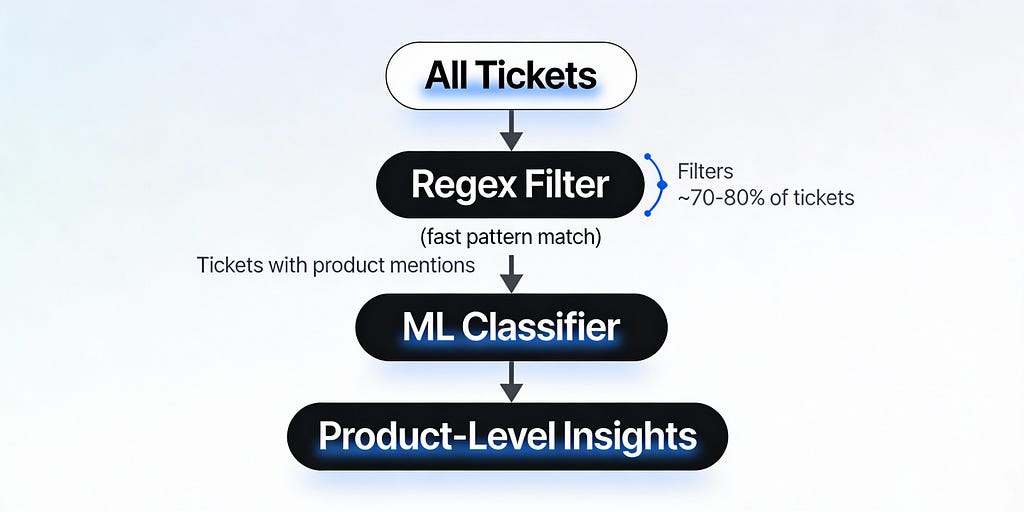
The idea is simple. Use regex as a fast filter. Find the candidates you care about. Then run ML only on those.
When should you use this?
You’re processing huge amounts of text but only some of it matters to you. You’ve got a known list of entities. Product names. SKUs. Plan types. Things with a recognizable structure. And you care about cost and speed.
Example: Telecom company
Your goal is simple too. Which mobile plans get the most complaints? What are customers actually upset about?
Step 1: Regex and a dictionary
Keep a simple list of the product names you care about:
[Plan A, Plan B+, Family Unlimited, Data Max 50GB]
Now scan through your support tickets. Use regex or keyword matching. Pull out any mentions:
- I am on Plan B+ and my roaming never works.
- Our Family Unlimited plan gets throttled after 10GB, why?
This happens in milliseconds. You instantly filter out 80% of tickets that don’t mention any product. Done.
Step 2: ML classifier on the filtered tickets
Now run a lightweight ML model. But only on the tickets that passed the regex filter. The model answers two questions:
- Is this actually a complaint, a question, or praise?
- If it’s a complaint, what category? Billing? Network quality? Support experience?
import re
from sklearn.ensemble import RandomForestClassifier

# Step 1: Regex filter - find tickets mentioning products
product_names = ['Plan A', 'Plan B+', 'Family Unlimited', 'Data Max 50GB']
pattern = '|'.join([re.escape(name) for name in product_names])

filtered_tickets = [
    ticket for ticket in all_tickets
    if re.search(pattern, ticket, re.IGNORECASE)
]
# This filters out ~80% of tickets in milliseconds

# Step 2: Run ML only on the filtered subset
clf = RandomForestClassifier()
clf.fit(X_filtered, y_labels)
predictions = clf.predict(new_filtered_tickets)
What you get:
Real, actionable insights:
- Most complaints about Plan B+ are about roaming problems.
- Most complaints about Family Unlimited are about speed throttling.
Why this works:
Regex does what it’s good at. Fast pattern matching. Instant filtering. No cost.
ML does what it’s good at. Understanding context. Figuring out the sentiment and category.
You cut ML calls by 70 to 80%. Your accuracy barely changes. But costs drop significantly.
That’s the win.
Pattern 2: Rules and ML working together
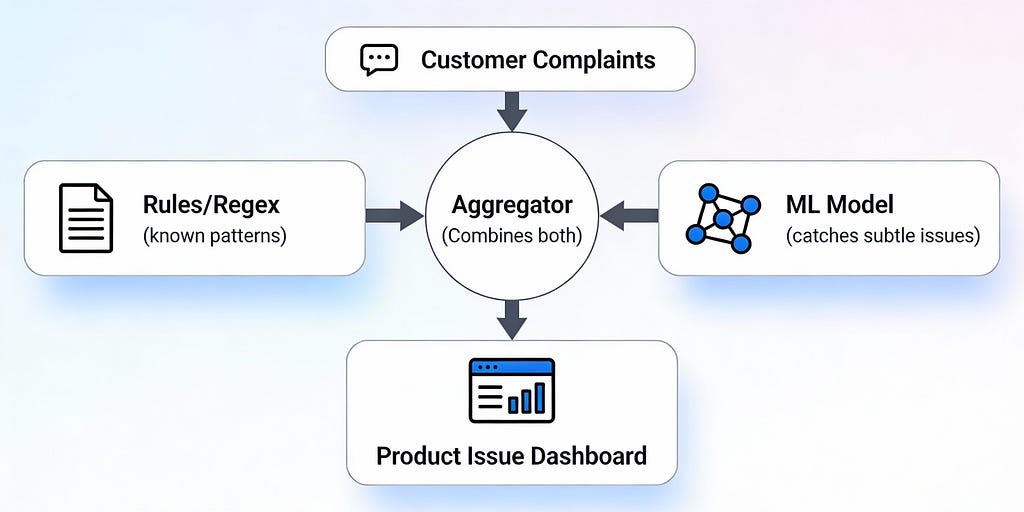
The idea here is different. Don’t pick one. Run them both at the same time. Rules handle the obvious stuff. ML catches the creative stuff. Then you combine what you learn.
When should you use this?
Mistakes are really expensive. Fraud detection. Content moderation. Safety. Compliance. When wrong answers cost money or hurt people.
You also have solid rules for problems you already know about. But you need ML to catch new things, creative ways people describe problems.
Example: Consumer electronics company
Your goal: catch serious defects on a specific phone model. Let’s call it Model X2.
Rules and regex handle the obvious red flags
You know exactly what to look for. When you see these phrases plus “Model X2”, it’s a problem:
- battery swelling → flag as critical
- overheats → flag as critical
- screen cracked on its own → flag as critical
Ticket matches? Escalate immediately. No debate.
ML handles the creative complaints
But people describe problems in different ways. Real examples:
- The Model X2 gets extremely warm when charging and all my apps freeze.
- I left Model X2 in my pocket and now the screen has a weird line through it.
These don’t hit your keyword rules. But an ML model trained on past complaints? It learns that extremely warm when charging is overheating. A weird line is a screen defect.
How they work together
Your system does three things:
Rules trigger? Act immediately. You’re sure it’s a real issue.
Only ML triggers? Check the confidence score. Look at the context. Make a judgment call.
Both trigger? That’s your strongest signal. Escalate right away.
What you actually gain
Rules give you certainty on known, critical issues. Instant escalation. No ML mistakes on things you already know are problems.
ML finds the emerging issues. Catches problems people describe in creative ways. Catches new problems before they become widespread.
Together? You catch far more problems than either approach alone. You don’t miss the obvious stuff. And you catch the subtle stuff too.
That’s the real power.
Pattern 3: ML first, rules after
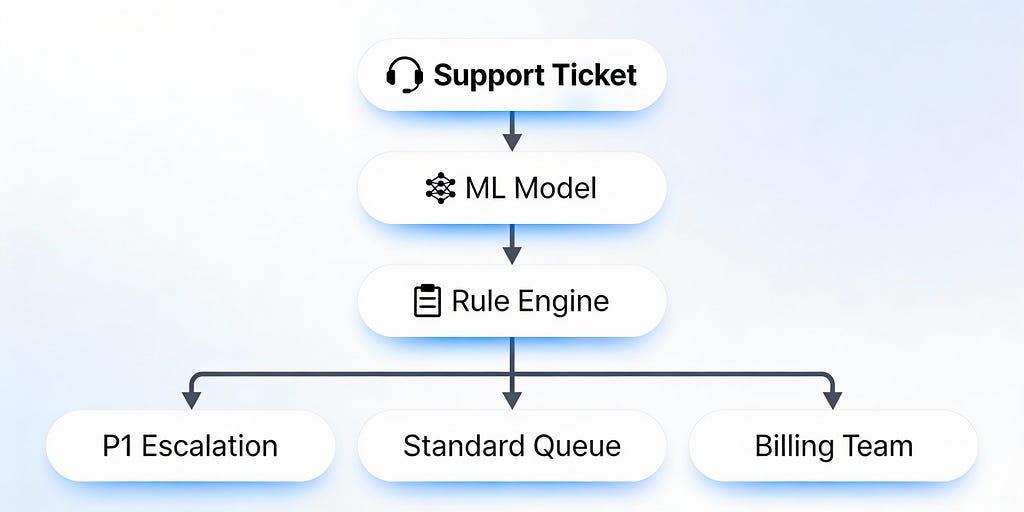
This one flips things. Let ML be flexible. Make predictions. Figure out what’s happening. But then rules take over. Rules make sure business constraints never get broken.
When should you use this?
Different products, different customers, different scenarios need different handling. Different SLAs. Different escalation rules. Different compliance requirements.
You want ML’s flexibility. But you also need hard guarantees. Certain situations must always get handled the right way.
Example: SaaS platform with different service tiers
Your goal: Route support tickets correctly while respecting each plan’s SLA.
Step 1: ML makes the prediction
The model reads the ticket and figures out two things:
What product is this about? Analytics Pro, API Basic, or Dashboard Enterprise?
What’s the actual issue? Downtime, billing problem, or data accuracy issue?
Step 2: Rules take over
Once the ML model outputs its prediction say, Dashboard Enterprise and downtime. The rule engine immediately looks up what to do with that exact combination.
Now your business rules kick in. And they’re simple:
Dashboard Enterprise + downtime? Auto-escalate to an on-call engineer immediately. Tag it P1. It’s critical.
API Basic + downtime? Route it to the standard support queue. Lower priority. They can wait a bit.
Analytics Pro + billing? Send it straight to the billing team. They handle it.
Why this actually works
Here’s the honest thing: ML models make mistakes sometimes. They misclassify tickets. It happens.
But these rules? They guarantee that certain combinations always get the right treatment. An enterprise customer with a downtime issue will always get escalated, no matter what. You never violate your SLA because of an ML mistake.
The rules act as a safety net. ML gives you flexibility. Rules give you control.
Pattern 4: Few-shot learning when you barely have data
This one solves a real problem. You have got a new product. You have got zero historical data. You need a classifier now, not in six months.
Few-shot learning lets you do it. Train a working model with just a handful of examples.
When should you use this?
You just launched a new product or feature. No historical complaints to train on yet.
You are building internal tools. A big labeling project doesn’t make sense for that.
You want to quickly test an idea. Before you invest in full-scale data collection, you need to know if it will work.
Example: B2B fintech startup
You’ve got three new products:
- FX-Trade Pro
- InvoicePay Enterprise
- RiskGuard API
The situation: You launched these recently. You’ve got about 10 to 15 labeled complaints per product. That’s it.
Traditional ML would say come back when you have 500 examples.But you need answers now.
The solution: Few-shot learning with SetFit
SetFit is a framework designed for this exact problem. It fine-tunes sentence transformers using minimal data.
How does it work? SetFit learns to compare pairs of examples and figure out what makes them similar or different. This means it can generalize from just a few labeled complaints, instead of needing thousands.
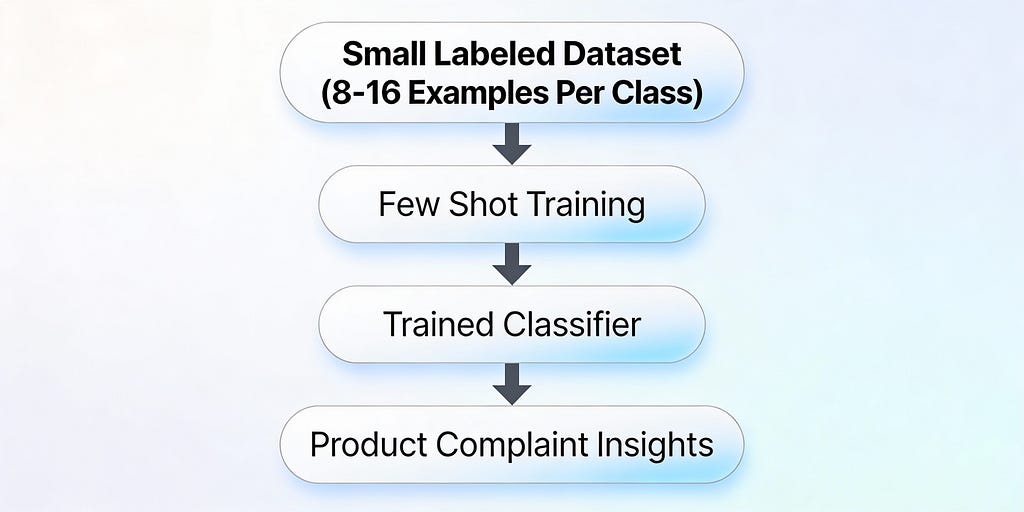
With just 8 to 16 examples per class, it reaches accuracy that normally requires thousands of examples. It’s not magic. It just works better than you’d expect.
Here’s how you do it:
Label a small set of complaints. For each one, you tag:
- Product name
- Issue type (login failure, data mismatch, latency, rate limit exceeded)
That’s it. It takes an hour maybe.
Within minutes, you have a working classifier. It can:
- Recognize product mentions even when people write them different ways (“FX Pro” versus “FX-Trade Pro”).
- Assign issue categories with solid accuracy.
What you learn immediately
Now you can actually see patterns:
- Most complaints about RiskGuard API are about rate limit issues.
- Most complaints about InvoicePay Enterprise are about reconciliation mismatches.
You’ve got insights. You know where to focus. You know what to fix.
Then you improve it
As real complaints come in, you refine the labels. You retrain the model. It gets better over time. You don’t wait. You iterate.
That’s the power of few-shot learning. You start now. You improve continuously.
Key Takeaways:
- You do not have to pick one tool. The best production systems combine regex, ML, and LLMs based on what each does best.
- Pattern 1 (Regex First, ML Second) cuts ML costs by 70–80% by filtering irrelevant data before running expensive models.
- Pattern 2 & 3 show how rules act as a safety net, guaranteeing business constraints even when ML makes mistakes.
- Pattern 4 (Few-Shot Learning) lets you build working classifiers with just 8–16 examples using SetFit which is perfect for new products.
- Speed, cost, and maintainability matter more than accuracy scores. A system your team can deploy and maintain beats a fancy black box.
Why hybrid systems actually win in production
Here’s what matters in the real world: not the fanciest model. Not the biggest neural network. It’s something much simpler.
Fast systems. Cheap systems. Accurate systems. Systems your team can actually understand and maintain without losing their minds.
Teams that consistently ship reliable NLP products care about three things:
Speed
Response time matters. Under 100 milliseconds for interactive apps. Regex does it in milliseconds. Lightweight ML models? Tens of milliseconds. LLMs? Hundreds of milliseconds. At scale, that difference matters.
Cost
A well-designed hybrid system costs tens of dollars a month. Not thousands. Not tens of thousands. Filtering with regex before calling ML? Cuts inference costs by 70 to 80%.
Maintainability
Your rules and pipelines need to make sense to the whole team. Not just the person who built them. Hybrid systems give you that. ML’s power combined with rules’ transparency.
The best text classification system isn’t the one with the highest accuracy score on a test set. It is the one your team can deploy on Monday morning, maintain without needing a PhD, and scale without burning through your budget.
Start with one pattern that fits your biggest pain point. Deploy it. Learn from it. Then add the next piece. You do not have to choose between regex, ML, and LLMs. You just need to know where each one belongs.
Thanks for reading!
Written By Sravani Lingam
If you feel like connecting, I am on LinkedIn
Beyond Regex: A Simple Guide to Modern Text Classification in Production was originally published in Towards AI on Medium, where people are continuing the conversation by highlighting and responding to this story.
