Building AI Agents with Gemini 3 Pro: A Comparison of Google ADK (vs. LangGraph & Agno)

The release of Gemini 3 Pro has shifted the landscape of AI development. With its advanced reasoning capabilities and “agentic” nature, the focus has moved from simple chatbots to autonomous systems that can plan, research, and execute tasks.
However, choosing the right framework to orchestrate these agents is just as critical as the model itself. In this post, we’ll compare Google’s Agent Development Kit (ADK) against popular alternatives like LangGraph and Agno (formerly Phidata), and then dive into a step-by-step tutorial on building your first agent with Google ADK.
Let’s Start Building
For this tutorial, we will use Google ADK because of its synergy with Gemini 3 Pro’s reasoning capabilities. We will build a “Deep Research” agent that can search the web, cite sources, and explain its chain of thought.
Prerequisites
- Python installed.
- Google AI Studio API Key: Get it from Google AI Studio.
- uv: A high-performance Python package manager (recommended for ADK).
Project Initialization
We will use uv to create a clean environment and install the necessary Google libraries.
# Create and navigate to your project folder
mkdir gemini-3-agent
cd gemini-3-agent

# Initialize the project
uv init
# Install the Google ADK and GenAI libraries
uv add google-adk google-genai
Export your API key to your terminal session so the SDK can authenticate with Gemini.
export GOOGLE_API_KEY="your_api_key_here"
Scaffold the Agent using ADK
ADK provides a CLI to generate production-ready boilerplate.
uv run adk create my_search_agent
When prompted, select Gemini 3 Pro (often gemini-3.0-pro-preview) as your model.
Open agent.py. We will strip out the default boilerplate and implement a research-focused agent. Note how ADK allows us to define tools and instructions in a clean, readable Python class structure.
import asyncio
from google.adk.agents.llm_agent import Agent
from google.adk.tools import GoogleSearchTool

# 1. Define the Model
MODEL_NAME = "gemini-3-pro-preview"
# 2. Define the "System Prompt" / Instructions
# We explicitly tell the agent to act as a researcher and cite sources.
INSTRUCTIONS = """
You are a Deep Research Agent powered by Gemini 3 Pro.
Your goal is to provide comprehensive, fact-based answers.
Instructions:
- Use the Google Search tool to find up-to-date information.
- If a query is complex, break it down into multiple search steps.
- Cite your sources implicitly by mentioning where information came from.
- Explain your reasoning process clearly.
"""
async def main():
    # 3. Initialize the Agent
    agent = Agent(
        model=MODEL_NAME,
        name="DeepResearchAgent",
        instruction=INSTRUCTIONS,
        # We inject the search tool directly here
        tools=[GoogleSearchTool()]
    )

    print(f"🚀 Agent initialized with {MODEL_NAME}")

    # In a real app, you would attach this to a runner or API
    # For now, we rely on the ADK Web runner (see next step)
if __name__ == "__main__":
    asyncio.run(main())
Run and Visualize
One of ADK’s strongest features is the built-in web interface for debugging.
uv run adk web
Navigate to http://127.0.0.1:8080.
Try this prompt: “I want to take horse riding lessons in Toronto. Find me the best rated schools and check if they are accessible by public transit.”
Observe the “Events” Tab:
Unlike a standard chat, you will see Gemini 3 Pro’s Thought Signature.
- Reasoning: “I need to find schools first, then cross-reference with transit maps.”
- Tool Call: Queries Google for “Horse riding schools Toronto rating”.
- Tool Call: Queries Google for “public transit to [School Name]”.
- Response: A synthesized answer combining data from multiple searches.
I’ll provide the missing sections for LangGraph and Agno that follow the same structure as the ADK tutorial:
Building with LangGraph
LangGraph excels at creating agents with complex, cyclical workflows where you need explicit control over state transitions.
Project Setup
# Create project directory
mkdir gemini-langchain-agent
cd gemini-langchain-agent
# Install dependencies
pip install langgraph langchain-google-genai tavily-python
Set your API keys:
export GOOGLE_API_KEY="your_google_api_key"
export TAVILY_API_KEY="your_tavily_api_key"
Define the Agent Graph
LangGraph uses a state machine approach where you define nodes (functions) and edges (transitions).
from langgraph.graph import StateGraph, END
from langchain_google_genai import ChatGoogleGenerativeAI
from langchain.tools import TavilySearchResults
from typing import TypedDict, Annotated
import operator
# Define the state structure
class AgentState(TypedDict):
    messages: Annotated[list, operator.add]
    research_complete: bool
# Initialize model and tools
llm = ChatGoogleGenerativeAI(model="gemini-3-pro-preview")
search_tool = TavilySearchResults(max_results=3)
def research_node(state: AgentState):
    """Execute search and reasoning"""
    query = state["messages"][-1]
    results = search_tool.invoke(query)

    response = llm.invoke([
        {"role": "system", "content": "Analyze search results and provide insights"},
        {"role": "user", "content": f"Query: {query}nResults: {results}"}
    ])

    return {
        "messages": [response],
        "research_complete": True
    }
def should_continue(state: AgentState):
    """Decide whether to continue research or end"""
    return "end" if state["research_complete"] else "research"
# Build the graph
workflow = StateGraph(AgentState)
workflow.add_node("research", research_node)
workflow.set_entry_point("research")
workflow.add_conditional_edges("research", should_continue, {
    "research": "research",
    "end": END
})
agent = workflow.compile()
Run the Agent
result = agent.invoke({
    "messages": ["Find horse riding schools in Toronto with good public transit access"],
    "research_complete": False
})
LangGraph’s visualization tools let you see the exact flow through your graph, making it ideal for debugging complex multi-step reasoning chains.
Building with Agno
Agno (formerly Phidata) prioritizes developer velocity with a minimalist, Pythonic API.
Quick Setup
pip install agno google-generativeai duckduckgo-search
Create Your Agent
Agno’s strength is its simplicity — define tools as functions and let the framework handle the rest:
from agno import Agent
from agno.tools.duckduckgo import DuckDuckGoTools
import google.generativeai as genai
# Configure Gemini
genai.configure(api_key="your_api_key")
# Create agent with tools
agent = Agent(
    name="ResearchAgent",
    model=genai.GenerativeModel("gemini-3-pro-preview"),
    tools=[DuckDuckGoTools()],
    instructions="""
    You are a research assistant. Use search to find information,
    then synthesize findings into clear, cited answers.
    """,
    show_tool_calls=True,
    markdown=True
)
# Run it
response = agent.run(
    "Find the best horse riding schools in Toronto and check transit accessibility"
)
print(response)
Multi-Modal Bonus
Agno makes it trivial to work with images and audio:
agent = Agent(
    model=genai.GenerativeModel("gemini-3-pro-preview"),
    tools=[DuckDuckGoTools(), ImageAnalysisTool()],
    multimodal=True
)
# Analyze an image and research related topics
agent.run("Analyze this image and find similar equestrian facilities",
          images=["school_photo.jpg"])
Agno’s playground (agno serve) provides a lightweight UI for testing without writing frontend code.
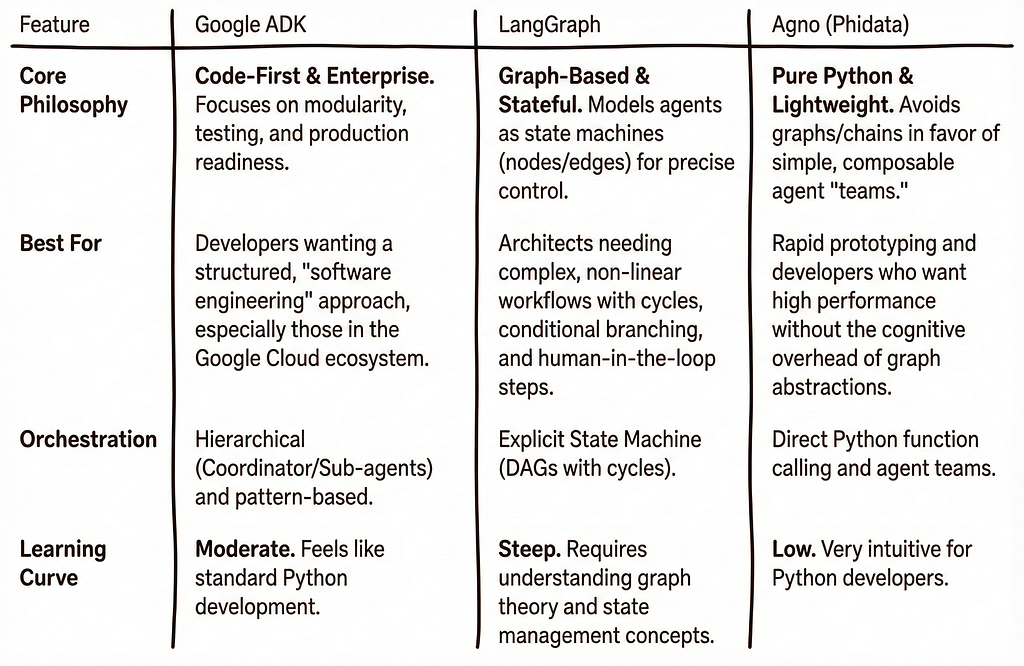
The Verdict: ADK vs. LangGraph vs. Agno
The Verdict: ADK vs. LangGraph vs. Agno
- Start with Google ADK if: You want the path of least resistance to Gemini’s reasoning engine. It is the best tool for rapid prototyping, allowing you to validate your prompts and agent logic within the Google ecosystem immediately.
- Look at LangGraph if: Your prototype reveals a need for complex, cyclical state management that linear code struggles to handle.
- Look at Agno if: You need to integrate multi-modal inputs (video/audio) quickly or prefer a minimalist syntax.
Conclusion: Reliability is the Only Metric That Matters
While tools like LangGraph, Agno, and ADK are excellent accelerators, the specific framework matters far less than the outcome.
Think of Google ADK as the perfect launchpad. It allows you to move from “zero to one” effectively, letting you test Gemini 3 Pro’s capabilities without getting bogged down in boilerplate.
However, moving an agent from a 90% success rate to 98%+ production reliability (compliance) often requires stripping away abstractions. Frameworks are generalized solutions; your specific edge cases may eventually demand bespoke logic.
Don’t be afraid to use ADK to build your MVP, and then pivot to a different framework — or no framework at all (vanilla Python) — if that is what it takes to gain granular control over every token. In the end, your users don’t care which library you imported; they only care that the agent works reliably, every single time.
Building AI Agents with Gemini 3 Pro: A Comparison of Google ADK (vs. LangGraph & Agno) was originally published in Towards AI on Medium, where people are continuing the conversation by highlighting and responding to this story.
