
How to Fine-tune Vision Transformers Using PEFT for Video Classification?

How to Fine-tune Vision Transformers (ViT) for Video Classification with PEFT

Vision Transformers (ViTs) and their variants, such as Timesformer and ViViT, pretrained on video understanding tasks, have set new benchmarks in computer vision. However, their enormous size (hundreds of millions or billions of parameters) makes full fine-tuning incredibly expensive, requiring large amounts of vRAM and training time. Parameter-Efficient Fine-Tuning (PEFT) techniques allow us to adapt these massive models to new tasks by training only a tiny fraction of their parameters.
The idea is to add a randomly initialized classification head on top of a pre-trained encoder and fine-tune the model as a whole on a labeled dataset using PEFT methods for efficient training.
In this article, we’ll walk through a complete, generic pipeline for fine-tuning a Timesformer model for video classification using LoRA (Low-Rank Adaptation) and QLoRA (which adds 4-bit quantization for even greater memory savings). We will utilize PyTorchVideo for loading and processing video data, the peft library for defining LoRA configurations, and Transformers for loading and fine-tuning our vision backbone.
The Core Idea: What is PEFT?
PEFT, or Parameter-Efficient Fine-Tuning, is a set of techniques that adapt large pre-trained models, such as language models (LLMs), for new tasks by training only a small subset of parameters, rather than the entire model.
The PEFT library integrates popular PEFT techniques, such as LoRA, Prefix Tuning, AdaLoRA, Prompt Tuning, Multi-Task Prompt Tuning, and LoHa, with Transformers and Accelerate. This provides easy access to cutting-edge large language models with efficient and scalable fine-tuning.
LoRA
The architecture of the model using LoRA is depicted below, with the left side illustrating LoRA integrated into our Timesformer Model (for simplicity, we have shown a transformer encoder) and the right side detailing the specific structure of LoRA.
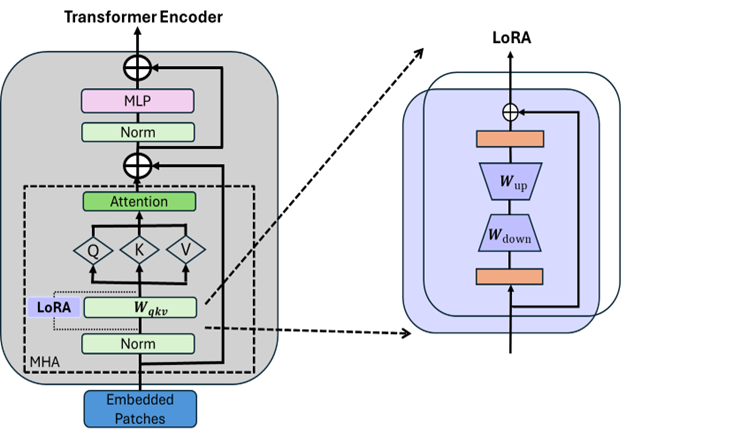
In this tutorial, we inject LoRA in the following layers of our Timesformer Model :
Target Modules : “‘dense’, ‘temporal_dense’, ‘qkv’
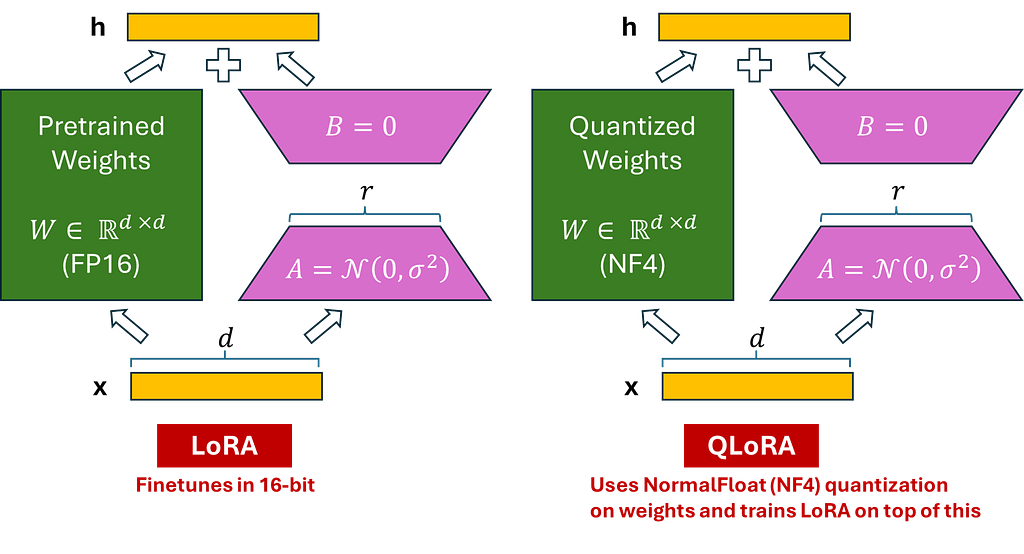
Step-by-Step Guide to Fine-Tuning –
Install the Dependencies
pip install transformers peft bitsandbytes accelerate evaluate scikit-learn
pip install pytorchvideo
Dataset Preparation
For the training dataset transformations, we use a combination of uniform temporal subsampling, pixel normalization, random cropping, and random horizontal flipping. For the validation and evaluation dataset transformations, we maintain the transformation chain unchanged, except for random cropping and horizontal flipping. To learn more about the details of these transformations, refer to the official PyTorch Video documentation.
We will use the image_processor associated with the pre-trained model to obtain the following information:
- Image mean and standard deviation: to normalize the video frame pixels.
- Spatial resolution: to resize the video frames.
import pandas as pd
import torch
import logging
from pathlib import Path
from sklearn.model_selection import train_test_split
from sklearn.preprocessing import LabelEncoder
from pytorchvideo.data.labeled_video_dataset import LabeledVideoDataset
from pytorchvideo.data.clip_sampling import make_clip_sampler
from pytorchvideo.transforms import (
    ApplyTransformToKey, Normalize, RandomShortSideScale, UniformTemporalSubsample
)
from torchvision.transforms import Compose, Lambda, RandomCrop, RandomHorizontalFlip, Resize

logger = logging.getLogger(__name__)

def get_transforms(image_processor, num_frames, train=True):
    mean = image_processor.image_mean
    std = image_processor.image_std
    size = image_processor.size["shortest_edge"]

    if train:
        return Compose([
            ApplyTransformToKey(key="video", transform=Compose([
                UniformTemporalSubsample(num_frames),
                Lambda(lambda x: x / 255.0),
                Normalize(mean=mean, std=std),
                RandomShortSideScale(min_size=256, max_size=320),
                RandomCrop((size, size)),
                RandomHorizontalFlip(p=0.5),
            ])),
        ])
    else:
        return Compose([
            ApplyTransformToKey(key="video", transform=Compose([
                UniformTemporalSubsample(num_frames),
                Lambda(lambda x: x / 255.0),
                Normalize(mean=mean, std=std),
                Resize((size, size)),
            ])),
        ])

def prepare_dataset(csv_path, video_root, label_col, video_col, clip_duration, num_frames, processor):
    """
    Loader that handles N-classes automatically.
    """
    # 1. Load Data
    df = pd.read_csv(csv_path)

    # 2. Encode Labels Dynamically
    le = LabelEncoder()
    df['encoded_label'] = le.fit_transform(df[label_col].astype(str))

    # Create mappings for the Model Config later
    classes = list(le.classes_)
    label2id = {label: int(id) for id, label in enumerate(classes)}
    id2label = {int(id): label for id, label in enumerate(classes)}

    print(f"Found {len(classes)} classes: {classes}")

    # 3. Split Data (Stratified)
    train_df, val_df = train_test_split(df, test_size=0.2, stratify=df['encoded_label'], random_state=42)
    val_df, test_df = train_test_split(val_df, test_size=0.5, stratify=val_df['encoded_label'], random_state=42)

    # 4. Helper to build path list
    def get_labeled_paths(d):
        paths = []
        for _, row in d.iterrows():
            # Resolve path: Root + Filename
            fname = Path(str(row[video_col])).name
            full_path = Path(video_root) / fname

            if full_path.exists():
                paths.append((str(full_path), {"label": int(row['encoded_label'])}))
        return paths

    # 5. Create PyTorchVideo Datasets
    train_ds = LabeledVideoDataset(
        get_labeled_paths(train_df),
        make_clip_sampler("random", clip_duration),
        transform=get_transforms(processor, num_frames, train=True),
        decode_audio=False
    )
    val_ds = LabeledVideoDataset(
        get_labeled_paths(val_df),
        make_clip_sampler("uniform", clip_duration),
        transform=get_transforms(processor, num_frames, train=False),
        decode_audio=False
    )
    test_ds = LabeledVideoDataset(
        get_labeled_paths(test_df),
        make_clip_sampler("uniform", clip_duration),
        transform=get_transforms(processor, num_frames, train=False),
        decode_audio=False
    )

    return train_ds, val_ds, test_ds, label2id, id2label
Model and Training Configuration
class Config:
    # Model Defaults
    MODEL_CHECKPOINT = "facebook/timesformer-base-finetuned-k400"

    # Preprocessing
    NUM_FRAMES = 8
    CLIP_DURATION = 8.0

    # Training
    BATCH_SIZE = 8
    GRAD_ACCUMULATION = 4
    EPOCHS = 10
    LR = 5e-5

    # PEFT Defaults
    LORA_R = 16
    LORA_ALPHA = 32
    LORA_DROPOUT = 0.1
Load Timesformer with PEFT Config (LoRA/QLoRA)
import torch
from transformers import TimesformerForVideoClassification, BitsAndBytesConfig
from peft import LoraConfig, get_peft_model

def find_linear_names(model, use_4bit=False):
    cls = torch.nn.Linear
    if use_4bit:
        import bitsandbytes as bnb
        cls = bnb.nn.Linear4bit

    lora_module_names = set()
    for name, module in model.named_modules():
        if isinstance(module, cls):
            names = name.split('.')
            lora_module_names.add(names[-1])

    if 'classifier' in lora_module_names: lora_module_names.remove('classifier')
    return list(lora_module_names)

def get_model(method, model_ckpt, label2id, id2label, config):
    num_labels = len(label2id)
    print(f"Initializing {method.upper()} model for {num_labels} classes.")

    # 1. QLoRA
    if method == "qlora":
        bnb_config = BitsAndBytesConfig(
            load_in_4bit=True,
            bnb_4bit_use_double_quant=True,
            bnb_4bit_quant_type="nf4",
            bnb_4bit_compute_dtype=torch.bfloat16
        )
        model = TimesformerForVideoClassification.from_pretrained(
            model_ckpt,
            num_labels=num_labels, label2id=label2id, id2label=id2label,
            quantization_config=bnb_config,
            ignore_mismatched_sizes=True
        )
        target_modules = find_linear_names(model, use_4bit=True)

        peft_config = LoraConfig(
            r=config.LORA_R, lora_alpha=config.LORA_ALPHA,
            target_modules=target_modules, lora_dropout=config.LORA_DROPOUT,
            bias="none", modules_to_save=["classifier"]
        )
        model = get_peft_model(model, peft_config)

    # 2. LoRA / DoRA
    elif method in ["lora", "dora"]:
        model = TimesformerForVideoClassification.from_pretrained(
            model_ckpt,
            num_labels=num_labels, label2id=label2id, id2label=id2label,
            ignore_mismatched_sizes=True
        )
        target_modules = find_linear_names(model)
        peft_config = LoraConfig(
            r=config.LORA_R, lora_alpha=config.LORA_ALPHA,
            target_modules=target_modules, lora_dropout=config.LORA_DROPOUT,
            bias="none", modules_to_save=["classifier"],
            use_dora=(method == "dora")
        )
        model = get_peft_model(model, peft_config)

    # 3. Full Fine-Tuning
    else:
        model = TimesformerForVideoClassification.from_pretrained(
            model_ckpt,
            num_labels=num_labels, label2id=label2id, id2label=id2label,
            ignore_mismatched_sizes=True
        )
    return model
Train the Model Using HuggingFace Trainer
We will leverage Trainer from Transformers for training the model. To instantiate a Trainer, we will need to define the training configuration and an evaluation metric. The most important is the TrainingArguments class, which has all the attributes to configure the training. It needs an output folder name to save the model’s checkpoints.
Most of the training arguments are relatively self-explanatory, but one that is particularly important here is remove_unused_columns=False. This one will drop any features not used by the model’s call function. By default, it is True because it is usually ideal to drop unused feature columns, making it easier to unpack inputs into the model’s call function. Nevertheless, in our case, we need the unused features (‘video’ in particular) in order to create pixel_values (which is an important key our model expects in its inputs).
import argparse
import os
import torch
import numpy as np
import evaluate
from transformers import AutoImageProcessor, TrainingArguments, Trainer, EarlyStoppingCallback
from config import Config
from src.dataset import prepare_dataset
from src.model import get_model

class CustomTrainer(Trainer):
    def prediction_step(self, model, inputs, prediction_loss_only, ignore_keys=None):
        model.eval()
        inputs = self._prepare_inputs(inputs)
        with torch.no_grad():
            outputs = model(**inputs)
            loss = outputs.loss
            logits = outputs.logits
        return (loss, logits, inputs.get("labels"))

def compute_metrics(eval_pred):
    metric_acc = evaluate.load("accuracy")
    preds = np.argmax(eval_pred.predictions, axis=-1)
    return {
        "accuracy": metric_acc.compute(predictions=preds, references=eval_pred.label_ids)["accuracy"],
    }

def collate_fn(examples):
    pixel_values = torch.stack([ex["video"].permute(1, 0, 2, 3) for ex in examples])
    labels = torch.tensor([ex["label"] for ex in examples])
    return {"pixel_values": pixel_values, "labels": labels}

def main():
    parser = argparse.ArgumentParser(description="Video Classifier")
    parser.add_argument("--csv_path", type=str, required=True)
    parser.add_argument("--video_root", type=str, required=True)
    parser.add_argument("--label_col", type=str, required=True, help="Column name for labels")
    parser.add_argument("--video_col", type=str, default="videoPath", help="Column name for filenames")
    parser.add_argument("--method", type=str, default="lora", choices=["lora", "qlora", "dora", "full"])
    parser.add_argument("--output_dir", type=str, default="./output")
    args = parser.parse_args()

    # 1. Processor
    processor = AutoImageProcessor.from_pretrained(Config.MODEL_CHECKPOINT)

    # 2. Data Preparation
    print(f"Analyzing {args.csv_path} for labels in column '{args.label_col}'...")
    train_ds, val_ds, test_ds, label2id, id2label = prepare_dataset(
        args.csv_path, args.video_root, args.label_col, args.video_col,
        Config.CLIP_DURATION, Config.NUM_FRAMES, processor
    )
    print(f"Data Loaded: Train={len(train_ds)}, Val={len(val_ds)}, Classes={len(label2id)}")

    # 3. Model
    model = get_model(args.method, Config.MODEL_CHECKPOINT, label2id, id2label, Config)

    # 4. Configure Trainer
    training_args = TrainingArguments(
        output_dir=args.output_dir,
        remove_unused_columns=False,
        eval_strategy="epoch",
        save_strategy="epoch",
        learning_rate=Config.LR,
        per_device_train_batch_size=Config.BATCH_SIZE,
        per_device_eval_batch_size=Config.BATCH_SIZE,
        gradient_accumulation_steps=Config.GRAD_ACCUMULATION,
        warmup_ratio=0.1,
        logging_steps=10,
        load_best_model_at_end=True,
        metric_for_best_model="accuracy",
        num_train_epochs=Config.EPOCHS,
        report_to="wandb",
    )

    trainer = CustomTrainer(
        model=model, args=training_args, train_dataset=train_ds, eval_dataset=val_ds,
        data_collator=collate_fn, compute_metrics=compute_metrics,
        callbacks=[EarlyStoppingCallback(early_stopping_patience=5)]
    )

    print("Starting Training...")
    trainer.train()
    trainer.save_model(os.path.join(args.output_dir, "best_model"))
    print(trainer.evaluate(test_ds))

if __name__ == "__main__":
    main()
References:
- https://github.com/huggingface/peft
- https://pytorchvideo.org/
- https://huggingface.co/docs/transformers/index
- https://huggingface.co/blog/fine-tune-vit
- https://huggingface.co/docs/transformers/tasks/video_classification
- https://huggingface.co/docs/transformers/en/model_doc/timesformer
How to Fine-tune Vision Transformers Using PEFT for Video Classification? was originally published in Towards AI on Medium, where people are continuing the conversation by highlighting and responding to this story.
