
Building an Embedding-Based Surface Defect Detection System for Factories Using Qdrant

When I started this project, I was not trying to build a perfect AI model. I was trying to solve a practical factory problem.
Factories collect thousands of defect images every month — scratches, surface corrosion, cracks, welding marks, and many more. These images are usually stored in folders, maybe labeled once, and then never used again.
I kept thinking:
What if a factory engineer could upload a new defect image and instantly see similar past defects, how serious they were, and what repair steps worked earlier?
That thought led me to this project.

Why This Problem Matters in Real Factories
Most industrial computer vision systems focus on classification:
- Is it a defect or not?
- Which class does it belong to?
But real factory questions are different:
- Have we seen something similar before?
- Was it severe or minor?
- Which shift produced this issue?
- What repair action fixed it last time?
To answer these questions, similarity search is much more useful than plain classification.
That is where image embeddings + vector databases become powerful.
Why I Chose Qdrant
While exploring vector databases, I chose Qdrant for a few simple reasons:
- It is built specifically for vector search, not an add-on feature
- It supports metadata filtering (very important for factories)
- It runs fully offline, which suits industrial environments
- It is open-source and production-ready
Qdrant’s documentation was also very practical and easy to follow:
- 👉https://qdrant.tech/
- 👉https://qdrant.tech/documentation/
- 👉https://qdrant.tech/articles/vector-search/
I didn’t feel like I was fighting the tool — it felt designed for exactly this kind of problem.
Dataset Choice (International and Realistic)
For this project, I used the NEU Surface Defect Dataset (NEU-DET).
Download the dataset through this link:
📈https://www.kaggle.com/datasets/kaustubhdikshit/neu-surface-defect-database
It is an international steel surface defect dataset with six real defect types:
- Crazing
- Inclusion
- Patches
- Pitted Surface
- Rolled-in Scale
- Scratches
I liked this dataset because:
- It represents real industrial defects
- Images are consistent and well organized
- It includes train and validation splits, which makes testing realistic
Final Folder Structure (Actual Project)
This is the exact folder structure used in the project:
FACTORY_DEFECT_DETECTION/
│
├── datasets/                         # Industrial defect image datasets
│   └── NEU-DET/                      # NEU Surface Defect Dataset (International)
│       ├── train/                   # Historical defect images (used for embeddings)
│       │   └── images/
│       │       ├── crazing/          # Crazing defect images
│       │       ├── inclusion/        # Inclusion defect images
│       │       ├── patches/          # Patches defect images
│       │       ├── pitted_surface/   # Pitted surface defect images
│       │       ├── rolled-in-scale/  # Rolled-in scale defect images
│       │       └── scratches/        # Scratches defect images
│       │
│       └── validation/              # Unseen defect images (for testing & search)
│           └── images/
│               ├── crazing/
│               ├── inclusion/
│               ├── patches/
│               ├── pitted_surface/
│               ├── rolled-in-scale/
│               └── scratches/
│
├── factory_env/                      # Python virtual environment (local)
│
├── qdrant_data/                      # Local Qdrant vector database storage
│
├── src/                              # Core project source code
│   ├── generate_embeddings_orb.py    # Converts defect images into ORB embeddings
│   ├── store_orb_in_qdrant.py         # Stores embeddings + metadata into Qdrant
│   ├── search_defect_orb.py           # Searches similar defects using vector search
│   ├── sop_rules.py                   # Maps defect types to repair SOPs
│   └── test_dataset.py                # Utility script to validate dataset paths
│
├── orb_embeddings.json               # Saved ORB embeddings (intermediate output)
├── requirements.txt                  # Python dependencies
└── README.md                         # Project documentation
I kept the structure simple so that anyone can understand and run it easily.
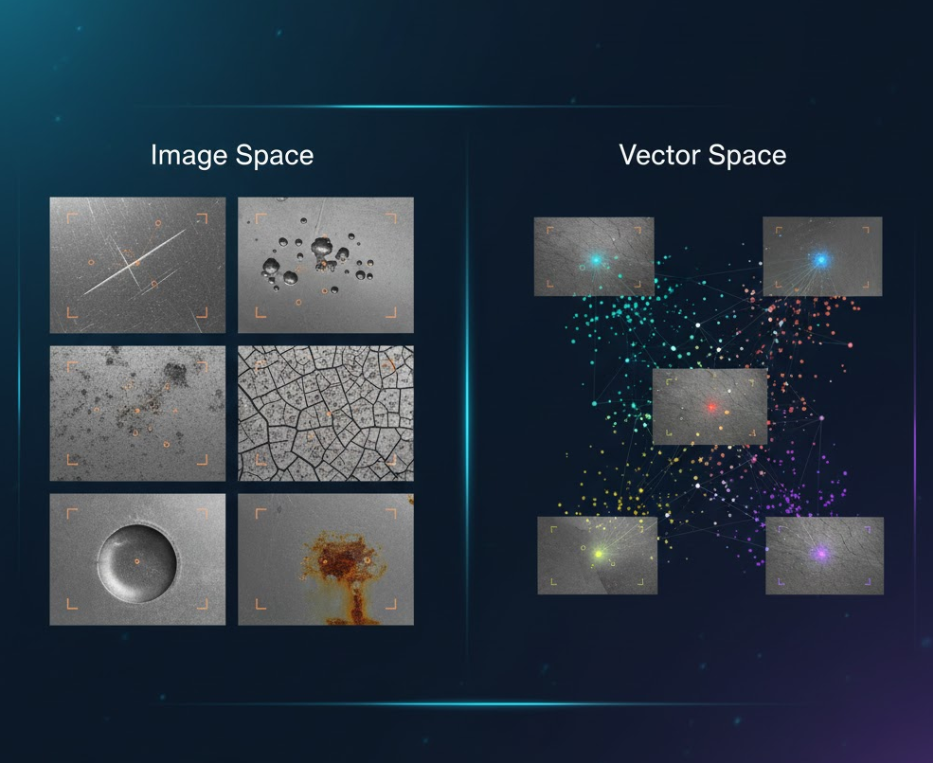
High-Level System Flow
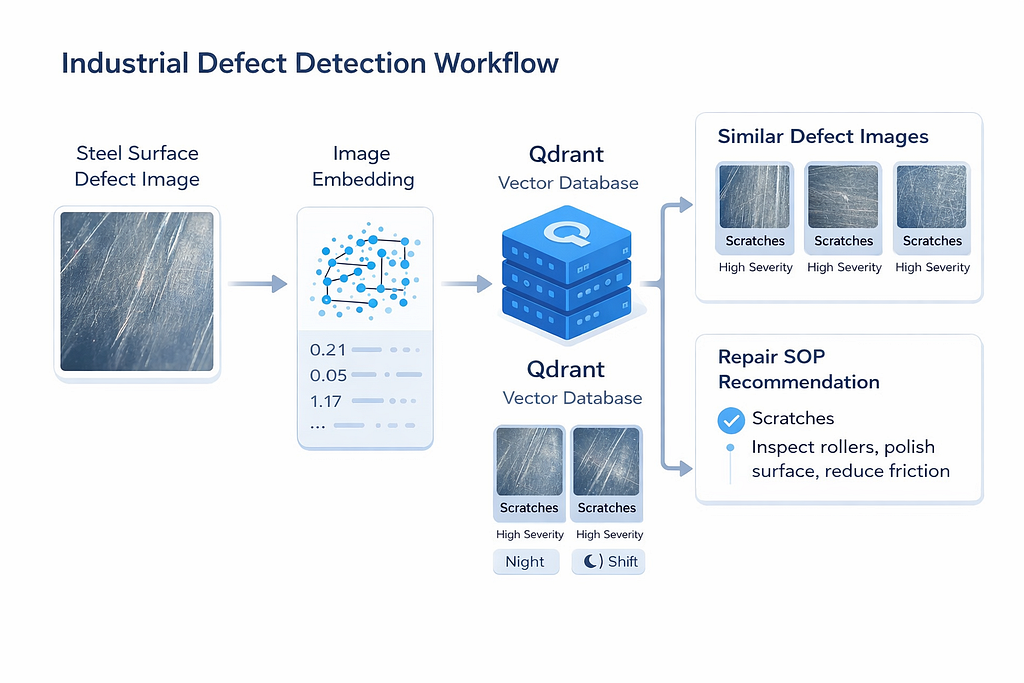
The system is designed to act as a visual experience memory for factory defect inspection, where past defect images are reused to guide future decisions.
- Historical defect images collected during production are first processed offline.
These images represent different surface issues such as scratches, pitted areas, or scale marks that have already occurred in the factory. - Each training image is converted into a compact image embedding.
Instead of storing raw pixels, the embedding captures important visual patterns like texture, edges, and surface irregularities that define a defect. - All generated embeddings are stored in Qdrant, along with useful metadata.
This metadata includes defect type, severity level, production shift, and the original image path, allowing both visual and contextual search. - Qdrant acts as a central knowledge base that holds the visual history of factory defects.
Over time, this database grows and becomes more informative as more defect images are added. - When a new defect image appears on the production line, it is treated as a query image.
The image goes through the same embedding process to ensure a fair and consistent comparison with stored defects. - The system performs a vector similarity search in Qdrant to find visually similar past defects.
This allows the system to recognize similarity even when defects are not exactly identical in shape or size. - Metadata filtering can be applied during search to narrow down results.
For example, engineers can focus only on high-severity defects or defects that occurred during a specific shift. - For each similar defect found, the system retrieves detailed contextual information.
This includes defect type, severity, shift information, and image paths for verification. - Based on the detected defect type, the system links results to predefined repair SOPs.
These SOPs provide practical guidance on what corrective actions should be taken next. - The final output combines visual similarity results with actionable repair recommendations.
This helps engineers move quickly from detection to decision-making.
Overall, this flow ensures that defect images are not treated as isolated cases, but as part of a continuously growing visual knowledge system that improves factory response and consistency over time.
In short, the system works like this:
- Training images are converted into image embeddings
- Embeddings are stored in Qdrant with metadata
- A new defect image is given as input
- The system finds visually similar past defects
- It returns:
- defect type
- severity
- shift
- image paths
- recommended repair SOP

🔹Step 1: Generating Image Embeddings (ORB)
To avoid paid APIs and heavy models, I used ORB (OpenCV).
ORB works well for surface textures like scratches and corrosion and is fast enough for local use.
import cv2
import numpy as np
DATASET_PATH = "dataset path"
EMBEDDINGS = []
orb = cv2.ORB_create(nfeatures=500)
def image_to_embedding(image_path):
    img = cv2.imread(image_path, cv2.IMREAD_GRAYSCALE)
    if img is None:
        return None

    keypoints, descriptors = orb.detectAndCompute(img, None)
    if descriptors is None:
        return np.zeros(32)

    # Convert variable descriptors → fixed-size vector
    return descriptors.mean(axis=0)

for defect_type in os.listdir(DATASET_PATH):
    defect_folder = os.path.join(DATASET_PATH, defect_type)
    if not os.path.isdir(defect_folder):
        continue

    for img_name in os.listdir(defect_folder):
        img_path = os.path.join(defect_folder, img_name)
        emb = image_to_embedding(img_path)

        if emb is not None:
            EMBEDDINGS.append({
                "vector": emb.tolist(),
                "defect_type": defect_type,
                "image_path": img_path
            })

print("Total embeddings:", len(EMBEDDINGS))
print("Embedding size:", len(EMBEDDINGS[0]["vector"]))
Each image becomes a 32-dimensional vector, which is perfect for similarity search.
🔹Step 2: Storing Defects in Qdrant
(This process may take some time — up to 10 minutes on certain systems.)
All training embeddings are stored in Qdrant, along with metadata such as:
- defect type
- severity
- production shift
- image path
from qdrant_client import QdrantClient
from qdrant_client.models import VectorParams, Distance
client = QdrantClient(path="qdrant_data")
client.recreate_collection(
    collection_name="factory_defects_orb",
    vectors_config=VectorParams(
        size=32,
        distance=Distance.COSINE
    )
)
This metadata becomes very powerful later, because it allows filtering search results based on real factory conditions.
This is where Qdrant becomes the memory of the factory.
🔹Step 3: Searching Similar Defects
When a new defect image (from the validation set) is provided, the system searches for similar defects:
- It is converted into an embedding
- Qdrant searches for similar vectors
- The most similar past defects are returned
qdrant-client==1.6.3 (other versions will fail)
results = client.search(
    collection_name="factory_defects_orb",
    query_vector=query_vector,
    limit=5
)
Qdrant also allows filtering:
severity = "high"
shift = "night"
This enables questions like:
Show me high-severity defects from the night shift that look like this.
🔹Step 4: Repair SOP Recommendation
Similarity alone is not enough in factories.
So I added a simple SOP mapping layer:
SOP_MAP = {
    "scratches": "Inspect rollers, polish surface, reduce friction",
    "crazing": "Reduce thermal stress and control cooling rate",
    "pitted_surface": "Check corrosion exposure and clean surface",
    "patches": "Inspect material flow and recalibrate machine",
    "inclusion": "Check raw material purity",
    "rolled-in-scale": "Improve descaling before rolling"
}Now the system gives actionable guidance, not just results.
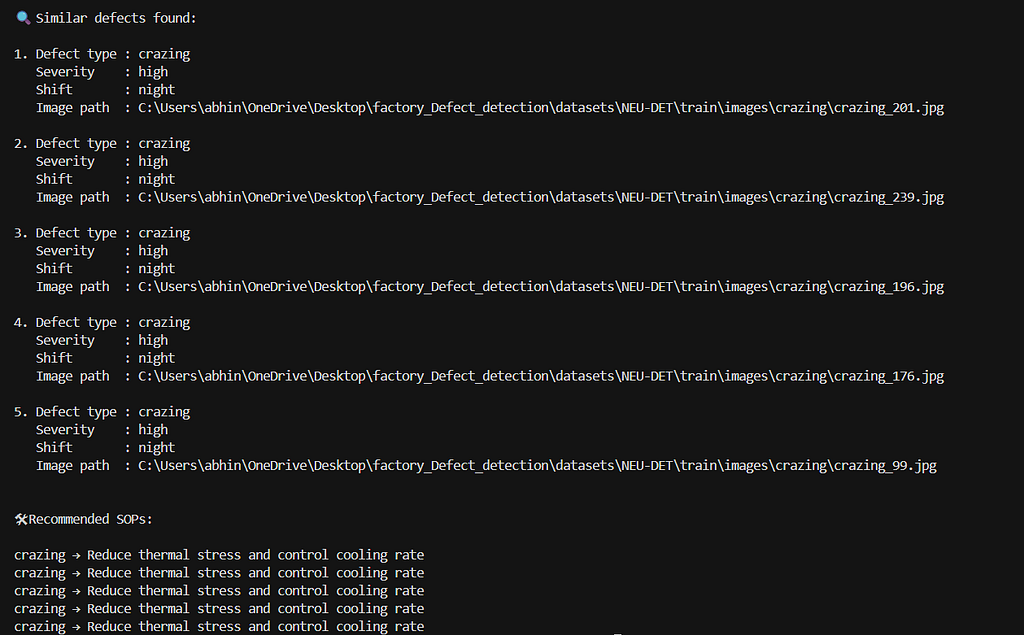
Example Output
When a new defect image is queried, the system retrieves visually similar past defects from Qdrant along with metadata and repair recommendations.
Why This Approach Works Well
Compared to traditional defect classification:
- It reuses historical knowledge
- It works even when labels are imperfect
- It scales naturally as more images are added
- It supports filtering and reasoning
Qdrant makes this possible without complex infrastructure.
Project Links
GitHub Repository: 👉 https://github.com/AbhinayaPinreddy/Industrial_defect_detection-using-ORB-and-QDRANT
Future Improvements
Some ideas for future work:
- Enhance the current ORB-based pipeline by upgrading to CLIP/ViT embeddings for better defect representation.
- Add severity prediction and defect trend analysis using existing stored embeddings.
- Integrate LLMs for auto-SOP generation and build a simple dashboard for factory teams.
References
- Qdrant Official Website — https://qdrant.tech/
- Qdrant Documentation — https://qdrant.tech/documentation/
- Qdrant Vector Search Guide — https://qdrant.tech/articles/vector-search/
- NEU Surface Defect Dataset (NEU-DET)
🔗 Let’s Connect & Collaborate!
I’m passionate about sharing knowledge and building amazing AI solutions. Let’s connect:
- 🐙 GitHub: Link — Check out my latest projects and code repositories
- 💼 LinkedIn: Link — Connect for professional discussions and industry insights
- 📧 Email: [Pinreddy Abhinaya] — Reach out directly for inquiries or collaboration
Building an Embedding-Based Surface Defect Detection System for Factories Using Qdrant was originally published in Towards AI on Medium, where people are continuing the conversation by highlighting and responding to this story.
