Guide to Hugging Face AutoModelFor** Classes and Tokenizers

Understanding SentenceTransformer Vs AutoTokenizer + AutoModel
A tokenizer such as AutoTokenizer simply converts the words into tokens ( A numerical representation of text) however this alone doesnt produce sentence embeddings
Sentencetransformer() does both tokenization and embedding computations automatically it also applies pooling(typically mean pooling) to hidden states resulting a final sentence embedding that can be directly used for various NLP tasks
from sentence_transformers import SentenceTransformer

model = SentenceTransformer("sentence-transformers/all-MiniLM-L6-v2")

sentences = ["I love machine learning", "I am expert in AI"]
embeddings = model.encode(sentences)

print(embeddings.shape)  # (2, 384) dim
However if we want to do fine tuning we need to understand the usage of AutoTokenizer+AutoModel()
Hugging Face’s Transformers library has become the standard toolkit for modern NLP, vision, speech, and multimodal AI. One of its most powerful features is the Auto API — especially the AutoModelFor** classes and tokenizers — which let you load state-of-the-art models with minimal boilerplate.
In this article, we’ll walk through:
- What AutoModelFor** classes are
- All major AutoModelFor* variants and what they’re used for
- Tokenizers and how they fit into the workflow
- Practical examples and real-world use cases
Why the “Auto” API Exists
Before the Auto API, you had to know exactly which model class to load:
from transformers import BertForSequenceClassification
This tightly couples your code to a specific architecture (BERT, RoBERTa, etc.).
The Auto API solves this by:
- Automatically detecting the architecture from the model checkpoint
- Loading the correct configuration, tokenizer, and model class
- Making your code architecture-agnostic
from transformers import AutoModelForSequenceClassification
model = AutoModelForSequenceClassification.from_pretrained("bert-base-uncased")
we will look for AutoModel APIs for each use cases in NLP, Vision and Audio
AutoModelsFor** in NLP
In NLP, different tasks require different output heads:
- Classification → logits
- Token labeling → per-token predictions
- Generation → autoregressive decoding
- QA → span prediction
The AutoModelFor** API ensures:
- The correct head is attached
- The model configuration is respected
- You don’t hardcode architecture-specific logic
This allows you to switch between BERT, RoBERTa, DeBERTa, GPT, T5, and more without rewriting code.
The Role of Tokenizers
Before any model can process text, it must be converted into numbers. That’s the tokenizer’s job.
AutoTokenizer
from transformers import AutoTokenizer
tokenizer = AutoTokenizer.from_pretrained("bert-base-uncased")
What it does:
- Splits text into tokens (subwords or characters)
- Maps tokens to integer IDs
- Handles padding, truncation, attention masks, and special tokens
Used in:
- NLP (text, QA, summarization, translation)
- Multimodal models (text + image/audio)
- Training and inference pipelines
What AutoTokenizer Handles
- Subword tokenization (WordPiece, BPE, Unigram)
- Input IDs
- Attention masks
- Token type IDs (for sentence pairs)
- Padding & truncation
- Special tokens ([CLS], [SEP], <s>, etc.)
### Usage Pattern
inputs = tokenizer(
    "Transformers are amazing",
    padding=True,
    truncation=True,
    return_tensors="pt"
)
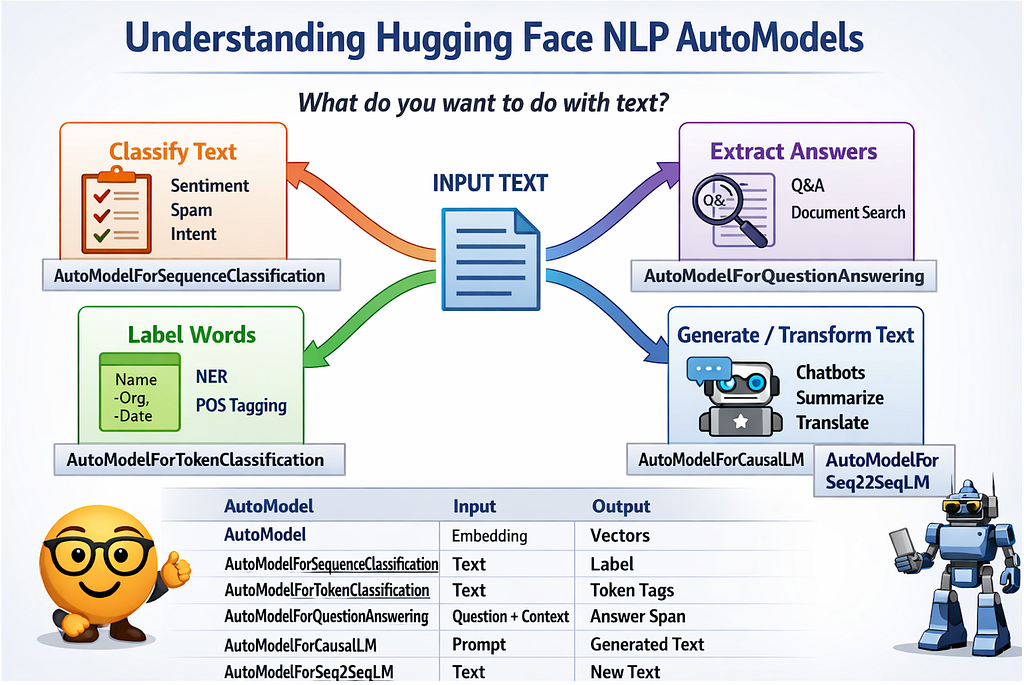
Core AutoModelFor** Classes (NLP)
- AutoModel
Purpose: Base model without a task-specific head.
AutoModel loads the base transformer without any task-specific head.
from transformers import AutoModel
model = AutoModel.from_pretrained("bert-base-uncased")
Outputs
- Hidden states for each token
- Pooled output (if available)
When to Use It
- Feature extraction
- Sentence embeddings
- Custom heads
- Research experiments
Example Use Case
Building a semantic search engine where you compute embeddings and store them in a vector database.
outputs = model(**inputs)
embeddings = outputs.last_hidden_state.mean(dim=1)
2. AutoModelForSequenceClassification
Purpose: Classify an entire sequence into one or more categories. It is a pretrained model for classification + a classification head on top. Given a piece of text it can predict the label
from transformers import AutoModelForSequenceClassification
Internals
- Uses [CLS] token (or equivalent)
- Adds a linear classification head
- Supports multi-class & multi-label setups
Typical Tasks
- Sentiment analysis
- Topic classification
- Toxicity detection
- Intent recognition
- Spam Detection
Example Use Case
Customer reviews
“This product is amazing!” → Positive
“Worst experience ever.” → Negative
Step1: Import the model
from transformers import (
    AutoTokenizer,
    AutoModelForSequenceClassification,
    Trainer,
    TrainingArguments
)
from datasets import Dataset
import torch
Step2: Load Pretrained Model and Tokenizer
model_name = "bert-base-uncased"

tokenizer = AutoTokenizer.from_pretrained(model_name)
model = AutoModelForSequenceClassification.from_pretrained(
    model_name,
    num_labels=2
)
Step3: Prepare your dataset
data = {
    "text": [
        "I love this product",
        "This is terrible",
        "Amazing experience",
        "Worst purchase ever"
    ],
    "label": [1, 0, 1, 0]
}

dataset = Dataset.from_dict(data)
Step4: Tokenize the Data
def tokenize_function(example):
    return tokenizer(
        example["text"],
        padding="max_length",
        truncation=True,
        max_length=128
    )

tokenized_dataset = dataset.map(tokenize_function)
Step5: Set Training Arguments
training_args = TrainingArguments(
    output_dir="./results",
    evaluation_strategy="no",
    learning_rate=2e-5,
    per_device_train_batch_size=8,
    num_train_epochs=3,
    weight_decay=0.01,
    logging_steps=10
)
usually we fine tune for 2–5 epochs not hundreds
Step6: Fine Tuning
trainer = Trainer(
    model=model,
    args=training_args,
    train_dataset=tokenized_dataset
)

trainer.train()
Step7: Save the model
model.save_pretrained("./sentiment-model")
tokenizer.save_pretrained("./sentiment-model")
Step8: Run Inference:
text = "I really enjoyed this movie"

inputs = tokenizer(text, return_tensors="pt")
with torch.no_grad():
    outputs = model(**inputs)

logits = outputs.logits
prediction = torch.argmax(logits, dim=1).item()
if prediction == 1:
    print("Positive sentiment")
else:
    print("Negative sentiment")
2. AutoModelForTokenClassification
If AutoModelForSequenceClassification answers:

“What is this text about?”

Then AutoModelForTokenClassification answers:

“What does each word in this text represent?”
This model is used when labels belong to tokens, not the entire sentence.
AutoModelForTokenClassification pretrained language model (BERT, RoBERTa, etc.) with a token-level classification head.
Each token gets its own prediction.
Key Difference from Sequence Classification
| Sequence Classification         | Token Classification                    |
| ------------------------------- | --------------------------------------- |
| One label per sentence          | One label per token                     |
| Uses `[CLS]` token              | Uses all token embeddings               |
| Output shape: `(batch, labels)` | Output shape: `(batch, tokens, labels)` |
Most Common Tasks
- Named Entity Recognition (NER)
- Part-of-Speech tagging (POS)
- Slot filling (chatbots)
- Medical & legal entity extraction
Real-World Examples
- Extract names, dates, locations from contracts
- Parse resumes into structured fields
- Identify medical terms in clinical notes
Example: Input Sentence
John works at Google in California
Desired Output:
| Token      | Label  |
| ---------- | ------ |
| John       | PERSON |
| works      | O      |
| at         | O      |
| Google     | ORG    |
| in         | O      |
| California | LOC    |
fine-tuning pipeline is the same as sequence classification
(Tokenizer → Dataset → Trainer → Train → Save → Inference)
3. AutoModelForQuestionAnswering
AutoModelForQuestionAnswering is used when you want the model to find an answer inside a given document.
This is very different from:
- classification (choosing a label)
- generation (writing new text)
Here, the model extracts an answer span from existing text.
It is a pretrained language model with a span-prediction head on top
from transformers import AutoModelForQuestionAnswering
Instead of predicting labels or tokens, it predicts:
- where the answer starts
- where the answer ends
The Core Idea (Simple Explanation)
You always give the model two things:
- A question
- A context (document / paragraph)
The model answers by pointing to a part of the context.
Fine-Tuning: What Stays the Same
🔁 Fine-tuning steps are the same as before:
- Load pretrained model
- Prepare dataset
- Tokenize
- Use Trainer
- Train and save
👉 Refer back to AutoModelForSequenceClassification steps.
Training Labels Are Not Classes
Instead of labels like positive / negative, you provide:
- start_position
- end_position
Example of Training Sample:
{
  "question": "When were Transformers introduced?",
  "context": "Transformers were introduced in 2017 by Vaswani et al.",
  "start_position": 31,
  "end_position": 35
}
Training Labels Are Not Classes

Instead of labels like positive / negative, you provide:

start_position

end_position
During training, the model learns:
- How to map questions to answer spans
- How to ignore irrelevant text
- How to pick the most confident answer window
 #### Load the Model
from transformers import AutoTokenizer, AutoModelForQuestionAnswering

model_name = "bert-base-uncased"

tokenizer = AutoTokenizer.from_pretrained(model_name)
model = AutoModelForQuestionAnswering.from_pretrained(model_name)
Example Training Data
train_data = {
    "question": [
        "When were Transformers introduced?"
    ],
    "context": [
        "Transformers were introduced in 2017 by Vaswani et al."
    ],
    "answers": [
        {"text": ["2017"], "answer_start": [31]}
    ]
}
from datasets import Dataset

dataset = Dataset.from_dict(train_data)

def preprocess(example):
    inputs = tokenizer(
        example["question"],
        example["context"],
        truncation=True,
        padding="max_length",
        max_length=128
    )

    start = example["answers"]["answer_start"][0]
    end = start + len(example["answers"]["text"][0])

    inputs["start_positions"] = inputs.char_to_token(1, start)
    inputs["end_positions"] = inputs.char_to_token(1, end - 1)

    return inputs

tokenized_dataset = dataset.map(preprocess)
Fine Tuning
from transformers import Trainer, TrainingArguments

training_args = TrainingArguments(
    output_dir="./qa_model",
    per_device_train_batch_size=2,
    num_train_epochs=2,
    logging_steps=10
)

trainer = Trainer(
    model=model,
    args=training_args,
    train_dataset=tokenized_dataset
)

trainer.train()
Inference
import torch

tokenizer = AutoTokenizer.from_pretrained("./qa_model")
model = AutoModelForQuestionAnswering.from_pretrained("./qa_model")

question = "Who introduced Transformers?"
context = "Transformers were introduced in 2017 by Vaswani et al."

inputs = tokenizer(question, context, return_tensors="pt")

with torch.no_grad():
    outputs = model(**inputs)

start = torch.argmax(outputs.start_logits)
end = torch.argmax(outputs.end_logits)

answer_ids = inputs["input_ids"][0][start:end+1]
answer = tokenizer.decode(answer_ids)

print(answer)

### Output
Vaswani et al.
4. AutoModelForCausalLM
Fine-Tuning & Inference Explained (Text Generation)
AutoModelForCausalLM is the class you use when you want a model to generate text.
If AutoModelForQuestionAnswering:
finds answers in text
Then AutoModelForCausalLM:
writes new text
This is the backbone behind chatbots, assistants, code generators, and story writers.
AutoModelForCausalLM is a pretrained autoregressive language model that predicts the next token given previous tokens
The model learns:
“Given everything so far, what word comes next?”
Use AutoModelForCausalLM if you want:
- Free-form text generation
- Conversational chatbots
- Code completion
- Creative writing
- Instruction-following systems
Input prompt
User: Explain transformers in simple words.
Assistant:Transformers are models that understand text by paying attention to words...
How Fine-Tuning Works (High Level)
- Load pretrained model
- Prepare dataset
- Tokenize
- Trainer → Train → Save
👉 Refer to earlier fine-tuning steps.
Example Training Data
Prompt: What is NLP?
Answer: NLP is a field of AI that focuses on language.
### Load Model
from transformers import AutoTokenizer, AutoModelForCausalLM

model_name = "gpt2"

tokenizer = AutoTokenizer.from_pretrained(model_name)
tokenizer.pad_token = tokenizer.eos_token

model = AutoModelForCausalLM.from_pretrained(model_name)

### Example of Training Data
from datasets import Dataset

data = {
    "text": [
        "User: What is AI?nAssistant: AI is the simulation of human intelligence.",
        "User: What is NLP?nAssistant: NLP helps machines understand language."
    ]
}

dataset = Dataset.from_dict(data)

### Tokenize
def tokenize(example):
    tokens = tokenizer(
        example["text"],
        truncation=True,
        padding="max_length",
        max_length=128
    )
    tokens["labels"] = tokens["input_ids"].copy()
    return tokens

tokenized_dataset = dataset.map(tokenize)
### fine Tuning
from transformers import Trainer, TrainingArguments

training_args = TrainingArguments(
    output_dir="./causal_lm",
    per_device_train_batch_size=2,
    num_train_epochs=2,
    logging_steps=10
)

trainer = Trainer(
    model=model,
    args=training_args,
    train_dataset=tokenized_dataset
)

trainer.train()

### Generate Text
prompt = "User: Explain machine learningnAssistant:"

inputs = tokenizer(prompt, return_tensors="pt")

with torch.no_grad():
    outputs = model.generate(
        **inputs,
        max_new_tokens=50,
        do_sample=True,
        temperature=0.7
    )

print(tokenizer.decode(outputs[0], skip_special_tokens=True))
5. AutoModelForSeq2SeqLM
AutoModelForSeq2SeqLM is used when both your input and output are text, but the output is different from the input.
If AutoModelForCausalLM:
continues text
Then AutoModelForSeq2SeqLM:
transforms text
AutoModelForSeq2SeqLM It is a pretrained encoder–decoder model designed for text-to-text generation.
Popular Models
- T5 — text-to-text framework
- BART — summarization & generation
- mBART — multilingual translation
- Pegasus — abstractive summarization
Core Idea
“Read the input text → understand it → generate a new text.
The model:
- Encodes the input text
- Decodes a new output sequence using attention
Use AutoModelForSeq2SeqLM if your task is:
- Summarization
- Translation
- Paraphrasing
- Question generation
- Grammar correction
Use Case
 ### Input
A long news article...
### output
A short summary of the article.
Example of a Training data
Input:  "Summarize: Transformers revolutionized NLP..."
Target: "Transformers changed NLP."
Fine tuning pipeline
from transformers import AutoTokenizer, AutoModelForSeq2SeqLM

model_name = "facebook/bart-large-cnn"

tokenizer = AutoTokenizer.from_pretrained(model_name)
model = AutoModelForSeq2SeqLM.from_pretrained(model_name)

### example dataset
from datasets import Dataset

data = {
    "input_text": [
        "Transformers revolutionized NLP by enabling attention mechanisms..."
    ],
    "target_text": [
        "Transformers changed NLP using attention."
    ]
}

dataset = Dataset.from_dict(data)

### Tokenizer
def preprocess(example):
    model_inputs = tokenizer(
        example["input_text"],
        truncation=True,
        padding="max_length",
        max_length=128
    )

    with tokenizer.as_target_tokenizer():
        labels = tokenizer(
            example["target_text"],
            truncation=True,
            padding="max_length",
            max_length=64
        )

    model_inputs["labels"] = labels["input_ids"]
    return model_inputs

tokenized_dataset = dataset.map(preprocess)

### Fine tuning
from transformers import Trainer, TrainingArguments

training_args = TrainingArguments(
    output_dir="./seq2seq_model",
    per_device_train_batch_size=2,
    num_train_epochs=2,
    logging_steps=10
)

trainer = Trainer(
    model=model,
    args=training_args,
    train_dataset=tokenized_dataset
)

trainer.train()

### inference
import torch

tokenizer = AutoTokenizer.from_pretrained("./seq2seq_model")
model = AutoModelForSeq2SeqLM.from_pretrained("./seq2seq_model")
### Generate Text
text = "Transformers revolutionized NLP by enabling attention mechanisms."

inputs = tokenizer(text, return_tensors="pt")

with torch.no_grad():
    outputs = model.generate(
        **inputs,
        max_new_tokens=40
    )

print(tokenizer.decode(outputs[0], skip_special_tokens=True))
NLP AutoModels Comparison Table
| AutoModel Class                        | Input              | Output         | What It Does                    | Typical Use Cases                       |
| -------------------------------------- | ------------------ | -------------- | ------------------------------- | --------------------------------------- |
| **AutoModel**                          | Text               | Embeddings     | Returns hidden states only      | Semantic search, similarity, clustering |
| **AutoModelForSequenceClassification** | Text               | Label(s)       | One label per sentence          | Sentiment, spam, intent detection       |
| **AutoModelForTokenClassification**    | Text               | Token labels   | One label per word              | NER, POS tagging, entity extraction     |
| **AutoModelForQuestionAnswering**      | Question + Context | Text span      | Extracts answer from context    | Document QA, search, legal analysis     |
| **AutoModelForMaskedLM**               | Text with `[MASK]` | Missing token  | Predicts masked words           | Pretraining, fill-in-the-blank          |
| **AutoModelForCausalLM**               | Prompt             | Generated text | Continues text autoregressively | Chatbots, code gen, writing             |
| **AutoModelForSeq2SeqLM**              | Text               | New text       | Transforms text                 | Summarization, translation              |
Real world use case mapping
| Real Problem                           | Correct AutoModel                  |
| -------------------------------------- | ---------------------------------- |
| “Is this review positive or negative?” | AutoModelForSequenceClassification |
| “Extract names & locations from text”  | AutoModelForTokenClassification    |
| “Answer questions from a PDF”          | AutoModelForQuestionAnswering      |
| “Build a chatbot”                      | AutoModelForCausalLM               |
| “Summarize this article”               | AutoModelForSeq2SeqLM              |
| “Find similar documents”               | AutoModel                          |
Other AutoModel Reads
a. AutoModelForPreTraining : AutoModelForPreTraining loads a model exactly as it was pretrained, with all pretraining heads included.
Use AutoModelForPreTraining if:
- You are continuing pretraining
- You are doing research
- You want access to all pretraining losses
- You are training on domain-specific corpora (legal, medical)
Why Most Users Don’t Need It
For most applications:
- Fine-tuning uses task-specific models
- Pretraining heads are unnecessary
- Training is expensive
AutoConfig:
AutoConfig loads only the model configuration, not weights.
What’s Inside a Config?
- Number of layers
- Hidden size
- Attention heads
- Dropout
- Vocabulary size
- Architecture type
It is used to inspect the model or Create Models from ScratchUseful for research and experimentation.
config = AutoConfig.from_pretrained("bert-base-uncased")
print(config.hidden_size)

### Modify the Architecture
config.num_hidden_layers = 6
model = AutoModel.from_config(config)
You might have seen and wondering what is TfAutoModel its nothing but model trained specific to tensor flow library it returns tensorflow ‘tf’ instead of pytorch ‘pt’
What Are TfAutoModel Classes?
What Does “Tf” Mean?
Tf = TensorFlow
Hugging Face supports both:
- PyTorch (AutoModel)
from transformers import AutoModel
model = AutoModel.from_pretrained("bert-base-uncased")
- TensorFlow / Keras (TFAutoModel)
from transformers import TFAutoModel
model = TFAutoModel.from_pretrained("bert-base-uncased")
so every PyTorch AutoModel has a TensorFlow equivalent:
| PyTorch                            | TensorFlow                           |
| ---------------------------------- | ------------------------------------ |
| AutoModel                          | TFAutoModel                          |
| AutoModelForSequenceClassification | TFAutoModelForSequenceClassification |
| AutoModelForTokenClassification    | TFAutoModelForTokenClassification    |
| AutoModelForQuestionAnswering      | TFAutoModelForQuestionAnswering      |
| AutoModelForCausalLM               | TFAutoModelForCausalLM               |
| AutoModelForSeq2SeqLM              | TFAutoModelForSeq2SeqLM              |
We will continue Vision and Audio AutoModels details and fine tuning in next article
Guide to Hugging Face AutoModelFor** Classes and Tokenizers was originally published in Towards AI on Medium, where people are continuing the conversation by highlighting and responding to this story.
