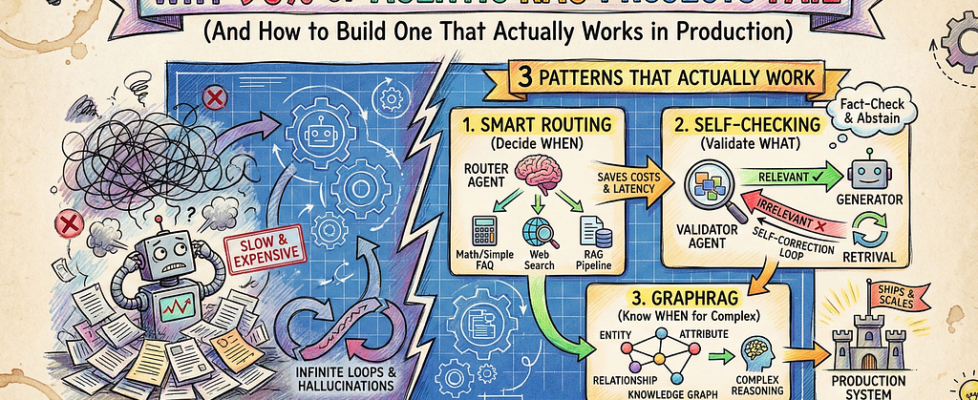
Why 90% of Agentic RAG Projects Fail (And How to Build One That Actually Works in Production)

Author(s): Divy Yadav Originally published on Towards AI. Photo by Gemini Most enterprise AI pilots fail. McKinsey’s research found only 10–20% of AI proofs-of-concept scale beyond pilots. Why? Teams treat production systems like demos. I’ve seen companies spend six months building agentic RAG systems that work beautifully in notebooks, then deploy to production and discover queries cost dollars, take 8 seconds to respond, and loop infinitely on untested edge cases. The problem? Complexity kills projects. Every agent multiplies failure modes. Simple RAG makes 2–3 LLM calls per query. Add routing, validation, and fallbacks, and you’re at 10–15 calls. Without caching and monitoring, costs explode. Here’s what breaks in production: Your router misroutes 40% of queries. Your retrieval fetches irrelevant documents that pollute the context. Your validator approves hallucinations. And you have no observability to debug any of it because you focused on features, not instrumentation. The companies that succeed? They design for failure first, then add intelligence. What Agentic RAG Actually Is Strip away the hype. Agentic RAG means your system makes decisions before retrieving data. Instead of blindly fetching any matching document, it asks: Do I actually need to search? Which documents matter? In what order should I check them? Here’s the difference: Photo by Gemini Real example: A compliance chatbot for financial services. Traditional RAG retrieves documents for “What’s the interest rate?” and returns outdated policy PDFs mixed with current rates. Agentic RAG routes simple rate queries directly to a database, retrieves policies only for complex regulatory questions, and cross-checks answers against multiple sources before responding. The result: measurably better accuracy and fewer hallucinations compared to blind retrieval. The key insight: Intelligence isn’t about more agents. It’s about smarter decisions at each step. THREE PATTERNS THAT ACTUALLY WORK Photo by Gemini Pattern 1: Smart Routing (Decide WHEN to Retrieve) Not every question needs document retrieval. “What’s 2+2?” doesn’t require searching your vector database. Smart routing reduces unnecessary retrieval calls. Research from Adaline Labs on production RAG deployments showed that intelligent query classification can cut costs by 30–45% and reduce latency by 25–40% by routing simple queries directly to appropriate handlers instead of triggering expensive retrieval pipelines. Here’s a simple router: def route_query(query: str) -> str: if matches_math_pattern(query): return “calculator” if needs_current_data(query): return “web_search” if is_simple_faq(query): return “direct_llm” return “rag_pipeline” Production reality: Start with heuristics (regex for dates, calculations, greetings), then add an LLM classifier for ambiguous cases. Don’t route everything through an LLM; that adds latency and cost for queries you can handle with rules. The tradeoff: A classification call costs around $0.0001. Five blind retrieval calls with embeddings and vector search cost roughly $0.001. That’s 10x savings per routed query. Pattern 2: Self-Checking (Validate WHAT You Retrieve) Your retrieval returned five chunks. Are they actually relevant? Does your answer use them correctly? Self-RAG adds reflection: The model checks if retrieved documents help, then validates if its answer is supported by sources. CRAG (Corrective RAG) scores chunks before generation and triggers a web search if the retrieval quality is low. When to use each: Self-RAG: When factuality matters more than speed (legal, medical, compliance) CRAG: When retrieval often fails, and you need fallback strategies Here’s Self-RAG in LangGraph: def validate_retrieval(state): docs = state[“documents”] query = state[“query”] score = llm.invoke(f”Are these docs relevant to ‘{query}’? YES/NO”) return “generate” if score == “YES” else “web_search” Real impact: According to the original Self-RAG paper (Asai et al., 2023), the approach significantly reduces hallucinations in question-answering tasks by adding validation steps, though this adds 2–3 seconds of latency. Use it when correctness beats speed. Pattern 3: GraphRAG for Complex Queries (Know WHEN to Use Graph) Vector RAG fails on questions like “Which companies in our portfolio have both declining revenue and increasing operational costs?” That’s a multi-hop query requiring entity relationships. Vector similarity won’t find it because the answer isn’t in a single chunk. It requires connecting facts across documents. GraphRAG builds a knowledge graph from your documents: entities, relationships, and attributes. Then it answers queries by traversing the graph. Microsoft’s GraphRAG research (2024) demonstrated significant accuracy improvements on complex enterprise queries. In their evaluation on multi-hop reasoning tasks, graph-based retrieval achieved 86% comprehensiveness compared to 57% for traditional vector RAG. However, these gains come with tradeoffs: graph construction takes 2–5x longer than vector indexing, and queries show roughly 2–3x higher latency than simple vector search. Expanded Decision Matrix: Photo by Gemini When GraphRAG wins: Schema-heavy queries (databases, org charts, financial statements), multi-entity questions (competitive analysis, research synthesis), questions requiring “why” not just “what” (root cause analysis). When it’s overkill: Single-document questions, straightforward fact lookup, user-facing chatbots where sub-second latency matters. Start with vector RAG. Add GraphRAG only after you identify query patterns where vectors fail. Don’t build graphs preemptively; most systems don’t need them. The Hidden Precision Layer: Reranking Here’s a problem nobody talks about: Your vector search returns 20 chunks. The answer is in chunk #17, but your LLM only reads chunks #1–5 because of lead bias. Vector search is fuzzy. It finds semantic similarity, not correctness. You need a reranker to sort chunks by exact relevance. The process: Retrieve 20 chunks from vector DB (fast, cheap) Rerank with a cross-encoder like Cohere or BGE (slower, precise) Send only the top 3 high-signal chunks to the LLM This cuts context pollution significantly and improves answer quality without changing your retrieval setup. Libraries like LangChain support rerankers out of the box: from langchain.retrievers import ContextualCompressionRetrieverfrom langchain.retrievers.document_compressors import CohereRerankreranker = CohereRerank(top_n=3)compressed_retriever = ContextualCompressionRetriever( base_retriever=vector_store.as_retriever(search_kwargs={“k”: 20}), base_compressor=reranker) Cost tradeoff: Reranking 20 chunks costs about $0.002 per query. But it prevents sending irrelevant context to your LLM, which saves tokens and improves accuracy. Where Teams Go Wrong Photo by Gemini Failure 1: No Metrics Before Building Teams build agentic systems without knowing what success looks like. Then they can’t tell if their routing logic improves anything or makes it worse. Define metrics first: What’s acceptable latency? What accuracy do you need? What’s your cost budget per query? If you can’t answer these, you’re […]
