
Introducing aiclient-llm: One Python Client for All Your LLMs

Introducing Aiclient-LLM: One Python Client for All Your LLMs
The unified, minimal, and production-ready Python SDK for OpenAI, Anthropic, Google Gemini, xAI, and local LLMs — with built-in agents, resilience, and observability.
Have you ever found yourself juggling multiple SDKs just to use different LLM providers? Writing separate code for OpenAI’s client, Anthropic’s SDK, Google’s API, and then trying to make them work together? If you’ve built production AI applications, you know the pain: different response formats, inconsistent error handling, and endless boilerplate.
Today, I’m excited to announce the public release of aiclient-llm — a Python library that solves this problem elegantly. One client. All providers. Production-ready out of the box.
pip install aiclient-llm
The Problem We’re Solving
Modern AI development requires flexibility. You might want:
- GPT-4o for general reasoning
- Claude for nuanced conversations
- Gemini for its massive context window
- Grok for real-time information
- Ollama for local development and privacy
But each provider has its own:
- SDK with unique method signatures
- Response format and data structures
- Error types and handling patterns
- Authentication mechanisms
- Streaming implementations
The result? Your codebase becomes a tangled mess of provider-specific code, adapter patterns, and conditional logic. Testing becomes a nightmare. Switching providers requires rewrites.
aiclient-llm changes this.
What is aiclient-llm?
aiclient-llm is a minimal, unified Python client that provides:
- One consistent API across OpenAI, Anthropic, Google Gemini, xAI (Grok), and Ollama
- Built-in agent framework with tool use and the Model Context Protocol (MCP)
- Production resilience with circuit breakers, rate limiters, and automatic retries
- Full observability including cost tracking, logging, and OpenTelemetry integration
- First-class testing support with mock providers for deterministic unit tests
All in a clean, Pythonic interface that takes minutes to learn.
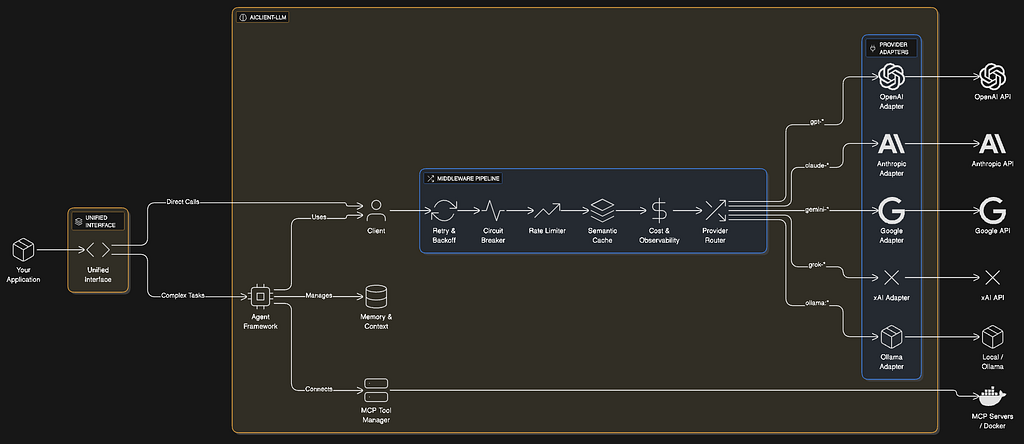
Architecture at a Glance
Quick Start: It Really Is This Simple
Here’s the entire setup to use multiple LLM providers:
from aiclient import Client

# Initialize once with all your API keys
client = Client(
    openai_api_key="sk-...",
    anthropic_api_key="sk-ant-...",
    google_api_key="...",
    xai_api_key="..."
)

# Call OpenAI
response = client.chat("gpt-4o").generate("Explain quantum computing")
print(response.text)

# Call Claude - same interface
response = client.chat("claude-3-5-sonnet-latest").generate("Write a haiku about Python")
print(response.text)

# Call Gemini - still the same
response = client.chat("gemini-2.0-flash").generate("Summarize this article...")
print(response.text)

# Call local Ollama - no code changes
response = client.chat("ollama:llama3").generate("Hello, local LLM!")
print(response.text)
That’s it. No adapter classes. No response translation. No provider-specific code.
The library intelligently routes requests based on model names (gpt- → OpenAI, claude- → Anthropic, gemini- → Google) or explicit prefixes like ollama:mistral.
Streaming That Just Works
Real-time streaming is first-class:
for chunk in client.chat("gpt-4o").stream("Write a poem about coding"):
    print(chunk.text, end="", flush=True)
Works identically across all providers. The chunk format is standardised, so your UI code doesn’t care where the tokens come from.
Multimodal Made Easy
Vision models? Send images from files, URLs, or base64 — the library handles encoding:
from aiclient import UserMessage, Text, Image

message = UserMessage(content=[
    Text(text="What's in this image?"),
    Image(path="./photo.png")  # Auto-encoded to base64
])

response = client.chat("gpt-4o").generate([message])
print(response.text)
Works with OpenAI Vision, Claude’s vision capabilities, and Gemini’s multimodal features.
Structured Outputs: Get JSON You Can Trust
Need guaranteed JSON responses? Use Pydantic models:
from pydantic import BaseModel
from aiclient import Client

class Character(BaseModel):
    name: str
    class_type: str
    level: int
    items: list[str]

client = Client()

# OpenAI's native strict mode
character = client.chat("gpt-4o").generate(
    "Generate a level 5 wizard named Merlin with a staff and hat.",
    response_model=Character,
    strict=True  # Uses OpenAI's native JSON mode
)

print(character.name)  # "Merlin"
print(character.items)  # ["staff", "hat"]
For providers without native JSON mode, the library intelligently falls back to prompt-based extraction.
Build Agents in Minutes
The built-in Agent class provides a complete ReAct loop for tool-using agents:
from aiclient import Client, Agent

def get_weather(location: str) -> str:
    """Get the current weather for a location."""
    return f"Sunny, 22°C in {location}"

def search_web(query: str) -> str:
    """Search the web for information."""
    return f"Top result for '{query}': ..."

client = Client()
agent = Agent(
    model=client.chat("gpt-4o"),
    tools=[get_weather, search_web],
    max_steps=10
)

result = agent.run("What's the weather in Paris and find me some good restaurants there?")
print(result)
The agent automatically:
- Converts your functions to tool schemas
- Executes the ReAct loop (reason → act → observe)
- Handles tool calls and responses
- Maintains conversation memory
Model Context Protocol (MCP): 16,000+ External Tools
Connect to the exploding ecosystem of MCP servers to give your agents superpowers:
from aiclient import Client, Agent

agent = Agent(
    model=client.chat("gpt-4o"),
    mcp_servers={
        "filesystem": {
            "command": "npx",
            "args": ["-y", "@modelcontextprotocol/server-filesystem", "./workspace"]
        },
        "github": {
            "command": "npx",
            "args": ["-y", "@modelcontextprotocol/server-github"]
        }
    }
)

async with agent:
    result = await agent.run_async(
        "List all Python files in the project and create a GitHub issue for any TODOs"
    )
Your agent can now read files, interact with GitHub, query databases, and more — using the rapidly growing MCP ecosystem.
Production Resilience Built-In
Real production systems need resilience. aiclient-llm provides it out of the box:
Automatic Retries with Exponential Backoff
client = Client(
    max_retries=3,
    retry_delay=1.0  # Seconds, with exponential backoff
)
Circuit Breakers
Prevent cascade failures when a provider is down:
from aiclient import CircuitBreaker

cb = CircuitBreaker(
    failure_threshold=5,  # Open after 5 failures
    recovery_timeout=60.0  # Try again after 60 seconds
)
client.add_middleware(cb)
Rate Limiters
Respect API rate limits automatically:
from aiclient import RateLimiter

rl = RateLimiter(requests_per_minute=60)
client.add_middleware(rl)
Fallback Chains
Automatically fall back to alternative providers:
from aiclient import FallbackChain

fallback = FallbackChain(client, [
    "gpt-4o",           # Try OpenAI first
    "claude-3-opus",    # Then Anthropic
    "gemini-1.5-pro"    # Then Google
])

response = fallback.generate("Important query that must succeed")
Load Balancing
Distribute requests across multiple models:
from aiclient import LoadBalancer

lb = LoadBalancer(client, ["gpt-4o", "gpt-4o-mini", "claude-3-5-sonnet"])
response = lb.generate("Hello!")  # Round-robin across models
Observability: Know What’s Happening
Cost Tracking
Track your LLM spending in real-time:
from aiclient import CostTrackingMiddleware

cost_tracker = CostTrackingMiddleware()
client.add_middleware(cost_tracker)
# After making requests...
print(f"Total cost: ${cost_tracker.total_cost_usd:.4f}")
print(f"Input tokens: {cost_tracker.total_input_tokens}")
print(f"Output tokens: {cost_tracker.total_output_tokens}")
Includes up-to-date pricing for all major models.
Logging with Key Redaction
from aiclient import LoggingMiddleware

logger = LoggingMiddleware(
    log_prompts=True,
    log_responses=True,
    redact_keys=True  # Auto-redacts API keys from logs
)
client.add_middleware(logger)
OpenTelemetry Integration
For production observability:
from aiclient import OpenTelemetryMiddleware

otel = OpenTelemetryMiddleware(service_name="my-ai-app")
client.add_middleware(otel)
Automatically creates spans with model, tokens, and error attributes.
Memory Management
Maintain conversation context with built-in memory:
from aiclient import ConversationMemory, SlidingWindowMemory

# Simple memory - stores all messages
memory = ConversationMemory()

# Or sliding window - keeps last N messages (preserves system prompts)
memory = SlidingWindowMemory(max_messages=20)

agent = Agent(
    model=client.chat("gpt-4o"),
    memory=memory
)
Memory is serializable for persistence:
# Save
state = memory.save()

# Load
memory.load(state)
Semantic Caching
Save money and latency with embedding-based response caching:
from aiclient import SemanticCacheMiddleware

class MyEmbedder:
    def embed(self, text: str) -> list[float]:
        # Use any embedding model
        return client.embed(text, "text-embedding-3-small")

cache = SemanticCacheMiddleware(
    embedder=MyEmbedder(),
    threshold=0.9  # Cosine similarity threshold
)

client.add_middleware(cache)
Similar queries hit the cache instead of making API calls.
Embeddings: First-Class Support
Generate embeddings with a unified interface:
# Single text
vector = await client.embed(
    "Hello world",
    model="text-embedding-3-small"
)

# Batch
vectors = await client.embed_batch(
    ["Hello", "World", "!"],
    model="text-embedding-3-small"
)
Works with OpenAI, Google (text-embedding-004), and xAI embeddings.
Testing: Mock Providers for Reliable Tests
Write deterministic unit tests without hitting APIs:
from aiclient import MockProvider, MockTransport

def test_my_ai_feature():
    # Create mock provider
    provider = MockProvider()
    provider.add_response("Expected AI response")
    provider.add_response("Second response")

    # Use in tests
    response = provider.parse_response({})
    assert response.text == "Expected AI response"

    # Verify requests
    assert len(provider.requests) == 1
Test your business logic, not API connectivity.
Batch Processing
Process thousands of requests efficiently:
questions = [
    "What is Python?",
    "What is JavaScript?",
    "What is Rust?",
    # ... hundreds more
]

async def process_question(q):
    return await client.chat("gpt-4o-mini").generate_async(q)

# Process with controlled concurrency
results = await client.batch(
    questions,
    process_question,
    concurrency=10  # Max 10 parallel requests
)
Type-Safe Error Handling
Catch specific errors for proper handling:
from aiclient import (
    AIClientError,
    AuthenticationError,
    RateLimitError,
    NetworkError,
    ProviderError
)

try:
    response = client.chat("gpt-4o").generate("Hello")
except AuthenticationError:
    print("Check your API key")
except RateLimitError:
    print("Too many requests - backing off")
except NetworkError:
    print("Connection failed")
except ProviderError:
    print("Provider returned an error")
except AIClientError:
    print("Something went wrong")
Why Choose aiclient-llm?
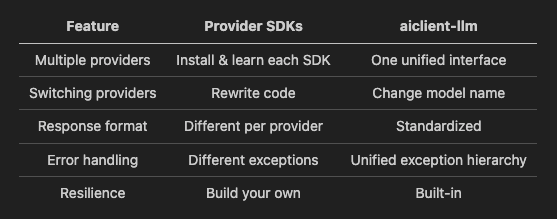
vs. Provider SDKs (openai, anthropic, google-generativeai)
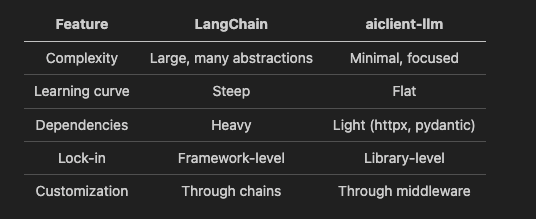
vs. LangChain
vs. LiteLLM
Both solve the unified interface problem. aiclient-llm differentiates with:
- Built-in agent framework
- MCP protocol support
- Comprehensive middleware system
- Semantic caching
- First-class testing utilities
Getting Started Today
# Basic installation
pip install aiclient-llm

# With MCP support
pip install aiclient-llm[mcp]
Set your API keys via environment variables:
export OPENAI_API_KEY="sk-..."
export ANTHROPIC_API_KEY="sk-ant-..."
export GEMINI_API_KEY="..."
export XAI_API_KEY="..."
Then start building:
from aiclient import Client

client = Client()
response = client.chat("gpt-4o").generate("Hello, world!")
print(response.text)
What’s Next?
This is just the beginning. On the roadmap:
- Extended provider support (AWS Bedrock, Azure OpenAI)
- Enhanced caching backends (Redis, PostgreSQL)
- Prompt templating with Jinja2
- Evaluation framework for testing prompt quality
- Multi-agent orchestration patterns
Join the Community
aiclient-llm is open source under the Apache 2.0 license.
- GitHub: github.com/rarenicks/aiclient
- PyPI: pypi.org/project/aiclient-llm
- Documentation: Full docs on GitHub
Star the repo, try it out, and let us know what you think. Contributions welcome!
Summary
Building AI applications shouldn’t mean wrestling with multiple SDKs. aiclient-llm gives you:
- Unified API — One interface for OpenAI, Anthropic, Google, xAI, and local LLMs
- Agents — Built-in ReAct loop with MCP support for 16K+ tools
- Resilience — Circuit breakers, rate limiters, retries, and fallbacks
- Observability — Cost tracking, logging, and OpenTelemetry
- Testing — Mock providers for deterministic unit tests
- Simplicity — Learn once, use everywhere
pip install aiclient-llm
Build AI applications the way they should be built — simple, resilient, and provider-agnostic.
Have questions or feedback? Open an issue on GitHub or reach out on LinkedIn. Happy building!
Introducing aiclient-llm: One Python Client for All Your LLMs was originally published in Towards AI on Medium, where people are continuing the conversation by highlighting and responding to this story.
